
WS-1410T - Calculator CANON - Free user manual and instructions
Find the device manual for free WS-1410T CANON in PDF.


| Product Type | Desktop Calculator |
| Model | WS-1410T |
| Brand | Canon |
| Display Digits | 14 |
| Display Type | LCD |
| Dimensions (W x D x H) | Approx. 165 x 105 x 30 mm |
| Weight | Approx. 180 g (including battery) |
| Power Source | Solar cell with backup battery (LR54) |
| Basic Operations | Addition, subtraction, multiplication, division |
| Percentage Calculation | Yes |
| Square Root | Yes |
| Memory Functions | M+, M-, MR, MC |
| Auto Power Off | Yes (approx. 7 minutes of inactivity) |
| Key Type | Plastic keys with tactile feedback |
| Operating Temperature | 0°C to 40°C (32°F to 104°F) |
| Cleaning Instructions | Wipe with a soft, dry cloth; avoid liquids and solvents |
| Battery Replacement | Use one LR54 battery (if backup needed) |
| Safety Precautions | Keep away from water, direct sunlight, and extreme temperatures |
| Repairability | Non-user-serviceable; contact professional for service |
| Warranty | Refer to manufacturer's warranty |
Frequently Asked Questions - WS-1410T CANON
User questions about WS-1410T CANON
0 question about this device. Answer the ones you know or ask your own.
Ask a new question about this device
Download the instructions for your Calculator in PDF format for free! Find your manual WS-1410T - CANON and take your electronic device back in hand. On this page are published all the documents necessary for the use of your device. WS-1410T by CANON.
USER MANUAL WS-1410T CANON
| CALCULATION | OPERATION | DISPLAY |
| ▼Mixed140 35+22-1272×8+3-8-7×98-3-686×5x3.3+/12.76(2-4)3x8.1-15.2 | ||
| ▼Constant2+3.54+8-71-2-12=2-02×3.62x4-86-3-29-3-0 | 2+3 541+2 522+3 593+5 3+2 72+4 3+3 9+1 | (5.00)(7.00)(-1.00)(6.00)(8.00)(2.00)(3.00) |
| ▼Power, Fraction3+41110+3.2102×41-0.1 | 3 +3 (1+1)(5 +3)2 +3 (4) | (81.00)(6.20)(6.10) |
| ▼Square Root5 = 1/330580/568- 1/330580/5688- 1/330580/568877 | 3 (W5-1610T)(W5-1610T)(W5-1610T) | (1.230530/568)(1.2305680/5688)(1.73205060/56877) |
| ▼Add Mode14.90-0.35 $1.45-13.90 | 1480 +35 +45 | (13.00) |
| ▼Floating Calculation8+3x3.7+9-19.86899068819.8689906889619.8689906889688 | 8 +3 5 79 8 (WS-1210T)(WS-1410T)(WS-1610T) | (19.006990688)(19.8999999999999)(19.86899068999999) |
| ▼Reciprocal Calculation17=0.14285/14285/142 | 7 +3 | (0.143) |
| ▼Percentage1200 x 1441200 x 1801200+130x50%/1.4101200-130x50%/480 | 1200 1215 1200 301200 30 | (144.00)(189.00)(1240.00) |
| ▼Reverse10=0-2X 10=0.5 | 10+5 70 | (0.50) |
| ▼ Memory30x=12-150x=2x=30=18-1=203162 | 30x=4050x=92500x=8(Focal Memory)Clear Memory) | (3)(N=12.30)(N=30.30)(N=18)(N=203.00)(N=182)(N=182) |
| ▼ Grand total30x=1,28920x=3,009+25x=5,7504,655+230x=8,29513,175 | 30x=4050x=9250x=82500x=8(Focal Grand 30f Memory) | (3)(GT(3)(GT(3)(GT(3)(GT(3)(GT) |
| ▼ Mark-updownMark upCost 2,000Profit=20% of selling priceSelling price =9 (2.500)Profit = ? (500) | 2000x20Nil | (2500.00)(500.00) |
| Mark downSelling price2,400Profit=20%Cost = ? (2,000)Profit = ? (400) | 2400x20Nil | (2000.00)(400.00) |
| ▼ TAX CalculationSet Tax RateRate:5%Add the Tax AmountPrice:2,000 without taxSelling Price with tax = ? (182.00)Tax = ? (100)Deduct the Tax AmountSelling Price 3.100 with taxPrice without tax = ? (53,000)Tax = ? (510)Recall Tax Rate | 5 (Wt) | (1)(TAX)(5)(TAX)-2(100.30)(TAX)(100.00) |
| ▼ Overflow123456/830012x/85000-874074065304680000(WS+14107)(WIS+14107)(WIS+16107) | 3160Wt | (2000.30)(TAX)(153.00)(TAX) |
| 0:0=0(-error) | 5x0=0 | (3) |
POWER SUPPLY
This calculator comes with a dual power source, solar cell and lithium battery.
Generally, under normal room lighting, the calculator is powered by a built-in solar
cell. When the light level drops below a certain point, it will automatically switch to
battery power. No lithium battery is long lighting, however the memory will disperse on
usage. When the battery is enhanced, you can still use the solar cell to power the
calculator.
(Notes: Do not attempt to change the battery by yourself. Have a Canon Service
Center change the battery for you.)
■ Execution capture of maintenance, Apr, 10:15:36 discharge may cause the display
to malfunction or the contents of the memory to be lost or altered. Should this occur,
press the @ key and restern your calculation from the beginning. After reacsetting,
be sure to sell the tax rate again.
DECIMAL POINT SELECTOR SWITCH
Used for degrading the decimal point position (+4 3 2 0 F) for calculated
#11111
+ (Add-Mode). Addition and subtraction functions are performed with an
automatic 2 digit decmal. It is complementary for currency calculations.
F (Floating Decimal Point) : All effective numbers up to 1/2 digit
(RWS-12/07), 14 digits (WS-14/17) and 15 digits (WS-16/17) are displayed.
ROUNDING SWITCH
Used for round-up [±] round-off [0], or round-down [±] to the
pre-selected decimal digits in the result.
TAX FUNCTION
Used Store the Tax Rate: Click the tax rate figure, then press [and] to
move.
Test Rate: Press: Press, ### to recall the current tax rate.Add Tax Key: Used for adding the tax amount to the display figure.Deduct Tax Key: Used for deducing the tax amount from the displayed figure. OVERFLOW FUNCTION In the following cases, * will be shown on the display. The keyboard is electronically and, further operation is impossible. Press [±] to clear the format. 1) The key exp. result of primary system sequences 12 digits (WS-12/07), 14 digits (WS-14/07) and 15 digits (WS-16/17) to the left of the decimal point. 2) Dividing by: SPECIFICATION Power Source: Please refer to the product hardware. Automatic power off turn-on. Useable Temperature: 0°C to 40°C (32°F to 104°F) Dimensions: 138mm (L1: 150mm(W): x 38mm(W): 14 mm (x 140°) (U x 28/32°, W): x 140° (A) Weight: 226g (8.4 oz). [Subject to change without notice] DEUTSCH |
AFRONDINGSSCHAKELAAR
For a certain number of variables, it is a result.
KNAPP FÖR PLACERING AV DECIMAL KOMMA
Dimension: Turmm (L): 3.150mm (L) x 3.55mm (P) Page 238p
(2) 2.50g
(3) Figure 8. With Np based with µp ,
EAAHNIKA
ΠΑΡΟΧΗ ΕΝΕΡΓΕΙΑΣ
in Gas Flux, Tone EUROPA N.V
Karneg 29-61, P. D. B 1185 DG Amtsvean, Netherlands
COMMUNICATION &
CAN DEUTSCHLAND
Cancopark Fichtenheim A10, 47007 Krebs d. Century CHRON HLK LTD
Woodruck, Helzole, Survey 7012 BDF, England
CANON ITALIA S.p.A.
9.8 PARSO, 20/07 GENT LEMON AMERICA, INC. CANCH LATIN AMERICA, INC.
700 Waterford Way, Suite 413 Miami FL20126, U.S.A.
CANON INDIA, PVT. LIMITED Drd Floor, Tower A & B, Cyber Green, IR.F. Phase III, Gamers-123067, Hanana, India
CANON MARKETING (MALAYSIA) SON BHD
Stock D. Pemirius Square, Suajama Resort, Section U2 40156 Shin Alam, Geongor Daris Ehwan, Malaysia CASH MARKETING (PHILIPPINES), INC.
Marina Plaza Building, 2153 One Oak Road Avenue, Main City, Philippines
CANON SINGAPORE PTE LTD 1. 2017 First Quarter 2018
CANCH MARKETING (THAILAND) CO., LTD
5.10th Poor, Bangkok City Tower, 179-24 48 South Garden Road, Thangshansai, Satran Bangkok 18/20, Thailand
189- The Motropole Tower, TO Mabu's Drive, Harington, Kusakota
CANON AUSTRALIA PTY, LTD.
CANON DANMARK, AS
KmalHogaram Ve 12850 Sabeng 11. 70-15 62 03 Fa
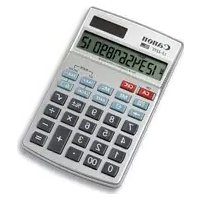


Brand : CANON
Model : WS-1410T
Category : Calculator