
SF 120 - Sports Watch Trevi - Free user manual and instructions
Find the device manual for free SF 120 Trevi in PDF.


| Product Type | Sports Watch |
| Brand | Trevi |
| Model | SF 120 |
| Display Type | Digital LCD |
| Dimensions | Approx. 45 mm diameter, 12 mm thickness |
| Weight | Approx. 50 g |
| Power Source | CR2032 coin cell battery |
| Water Resistance | 3 ATM (splash resistant) |
| Main Functions | Time, date, chronograph, alarm, backlight, stopwatch |
| Band Material | Silicone or resin |
| Battery Life | Approx. 2 years |
| Operating Temperature | 0°C to 50°C |
| Storage Temperature | -10°C to 60°C |
| Cleaning Instructions | Wipe with a soft, dry cloth. Avoid harsh chemicals. |
| Safety Warnings | Keep away from children under 3 years. Do not disassemble. |
| Replacement Parts | Battery, strap |
| Reparability | Battery replacement by qualified technician |
| Manual Format | PDF available for free download |
| Warranty | 1 year (check local terms) |
Frequently Asked Questions - SF 120 Trevi
User questions about SF 120 Trevi
0 question about this device. Answer the ones you know or ask your own.
Ask a new question about this device
Download the instructions for your Sports Watch in PDF format for free! Find your manual SF 120 - Trevi and take your electronic device back in hand. On this page are published all the documents necessary for the use of your device. SF 120 by Trevi.
USER MANUAL SF 120 Trevi
This digital pedometer displays steps taken, distance traveled, calories burned, total exercise time, and 7 days memory storage, among many other useful features.
Please read this manual carefully before using this pedometer. We suggest you keep this manual for future reference.
To keep your health and reduce chronic disease risk, we recommend you to take 10,000 steps a day. For an effective weight loss, the total steps should be between 12,000 and 15,000. If you want to achieve a higher fitness level, you are suggested to take at least 30,000 steps per day.
Water resistance 3 ATM/30M, see classification Water resistance Mark.
CONTENTS
| INTRODUCTION | 25 |
| CONTENTS | 16 |
| BASIC OPERATION OF BUTTONS | 17 |
| OPERATING MODES | 18 |
| SETTING YOUR PEDOMETER | 19-20 |
| CALCULATING STRIDE LENGTH | 21 |
| TIME MODE | 21-22 |
| PEDOMETER MODE | 23 |
| DATA RECALL MODE | 24 |
| STOPWATCH MODE | 25 |
| COUNTDOWN TIMER MODE | 25 |
| ALARM MODE | 26 |
| BATTERY REPLACEMENT | 27 |
| CARE AND MAINTENANCE & CLEARING | 28 |
REMARK:
Press and hold the LIGHT key and RESET key at the same time to turn on the pedometer when in power saving mode.
BASIC OPERATION OF BUTTONS
BUTTONS CONFIGURATION:
S1=MODE
S2=ADJUST/EL
S3=START/STOP
S4=RESET
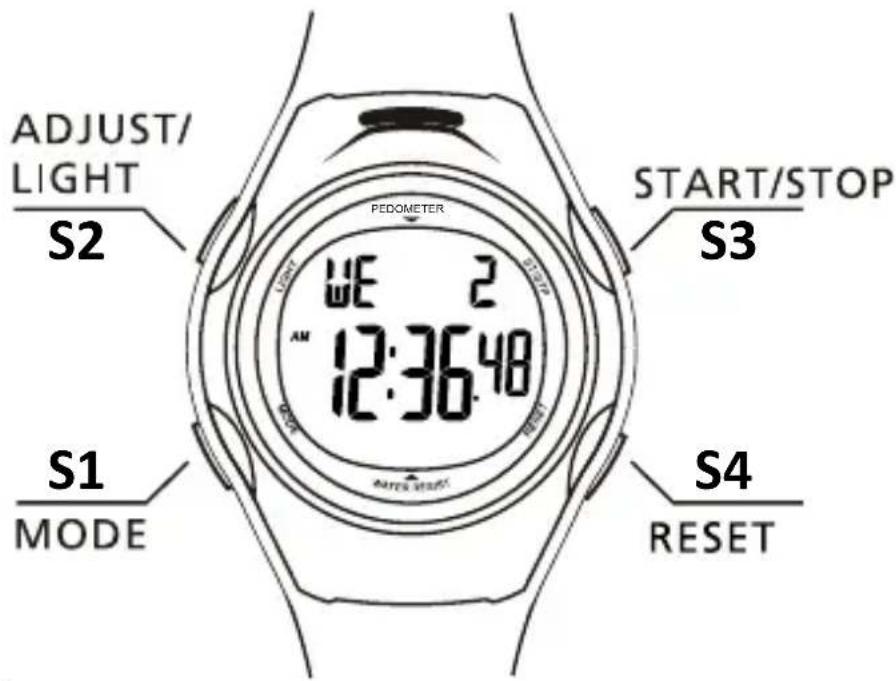

1. MODE BUTTON
Scrolls through various modes of the watch Advances to next variable in setting sequence
2. ADJ/EL BUTTON
Activates light
Enters the setting sequence for each setting mode
3. ST/STP BUTTON
Increases variable in setting sequence
Pauses time in stopwatch and countdown timer modes
4. RESET BUTTON
Decreases variable in setting sequence Toggles key tone
OPERATING MODES
This pedometer has 6 operational modes and are in following sequence
Press MODE key to scroll through modes:
Time mode
-Display date, week, hour, minute, second
Pedometer mode
-Display the number of steps taken, exercise time, calories burned, distance, speed, target icons
Data recall mode
-Display the daily and total data of steps taken, calories burned, distance traveled, exercise time for past 7 days
Stopwatch mode
- 1/100 chronograph
Countdown timer Mode
100 hours total countdown range
Alarm mode
-Optional function for two alarms to go off at the user's expected time
SETTING YOUR PEDOMETER
Time mode Pedometer mode

flowchart
graph TD
    A["AM/PM 12:36:48"] -->|S1| B["Walk 0:26:37"]
    B -->|S1| C["Step 38:98"]
    C --> D["Data recall mode"]
    D --> E["Step 3-2:63:82"]
    E --> F["S1"]
    F --> G["Stopwatch mode"]
    G --> H["ST 172.58"]
    I["Alarm mode"] --> J["ALM - 1 AM 12:00:00"]
    J --> K["S1"]
    K --> L["Countdown Timer Mode"]
    L --> M["TMR 1:00:00"]
    M --> N["S1"]
SETTING YOUR PEDOMETER
-Press Mode key to go into pedometer mode
-Press and hold the ADJ/EL key for 2 seconds to set the info in the following order: Age/Measurement Unit/Weight/Walking Stride/Running Stride/Target Step
-Press ST/STP key to increase the setting value, while press RESET key to decrease; Pressing and holding the button will change the value rapidly.
-When the value is correct, press MODE to move to next. Continue to press MODE and change values as required until the pedometer returns to the age item. Press ADJ/EL key to confirm the setting and go back to pedometer mode.
-There are 10 icons which show the progress of your step to the target steps at the top of LCD screen.
Note: The pedometer will automatically go back to the time mode if there is no input for 20 seconds in the SETUP mode.
CALCULATING STRIDE LENGTH
How to calculate your stride length:
To properly calculate your stride length, measure a predetermined distance in feet.
Correct stride distance is defined as a tip of your foot to another one. To measure the correct average stride distance, divide the total distance of ten steps you walked / run by the number of step (10).
Calculate the stride distance in the following way: You walk 6.2 meters, 6.2m (total distance) / 10 (number of steps) = 0.62m (62cm).
NOTE : Unlike the conventional pedometer, this pedometer using a 3D motion sensor that can detect fine body step movement without mechanical sensor, so no rattle sound will create.
TIME MODE
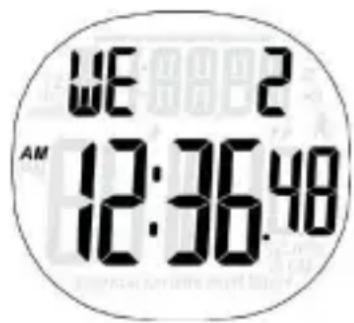
Display instruction:
First Row: display the day of week, day (or month, day)
Second Row: display hour, minute, second
Operation instruction:
- Press MODE key to switch to the next mode
-
Time setting:
Holding ADJ/EL key in time mode, it will enter time setting mode after 2 seconds' flashing of "ADJ; Press MODE key to switch the setting items in the following order: hour, minute, second, year, month, day, 12/24 hour; At one setting items, pressing ST/STP or RESET key to increase/decrease the value, pressing and holding ST/STP or RESET key to increase/decrease the value rapidly.(Note: when the second value is below 30, it will come to zero by pressing ST/STP or RESET key. When the second value is above or equal to 30, it will add 1 on the minute digit by pressing ST/STP or RESET key); then press ADJ/EL key to confirm setting and go back to time display mode. -
Press ST/STP key to switch display: day of the week/month
- Press RESET key to toggle the key tone. It will display the sign “” when the key tone is turned on.
- Press RESET key for 2 seconds to switch between time 1 and time 2. There will be a signal "T2" when the time 2 is selected.
Display instruction:
First Row: display exercise time
Second Row: display steps, calorie, distance, speed, target goal %
The progress of target goal is showed on the top
Operation instruction:
- Press MODE key to switch to next mode
- Personal Info Setting:
Hold ADJ/EL key in the pedometer mode, after
"ADJ" flashing for2 seconds enters setting mode;
Press MODE key to set the info in following order:
age, unit, weight, walking stride, running stride,
hundred thousand digit of target goal, ten
thousands digit of target goal, thousand digit of
target goal, hundred digit of target goal;
At one setting item, press ST/STP or RESET key to
increase/ decrease the value; press and hold ST/STP
or RESET key to increase/decrease the value rapidly.
Press ADJ/EL key to confirm the setting and back to
pedometer mode.

- Press ST/STP key to switch from Step, Calorie, Distance, Speed, Target Goal %
- Hold ST/STP key for 2 seconds to turn on/off pedometer function. When the pedometer is on, the sign “” will be flashing.
- Hold RESET key for 2 seconds to switch from Walking Mode to Running Mode.
DATA RECALL MODE
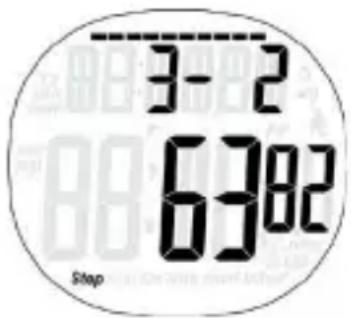
Display instruction:
First Row: display the date of the record Second Row: display the steps, calorie, distance, speed, exercise time, target goal%, progress of target goal( if there is no data, 'DATA--' will be displayed.)
Operation instruction:
- Press MODE key to switch to next mode.
- Press ST/STP key to switch to the record date
- Press RESET key to view the info as below order: steps, calorie, distance, speed, exercise time, target goal %
Press ST/STP key to start or stop the stopwatch. The stopwatch can still running even you turn to other modes.
Press RESET key to reset the stopwatch when counting stops.
COUNTDOWN TIMER MODE
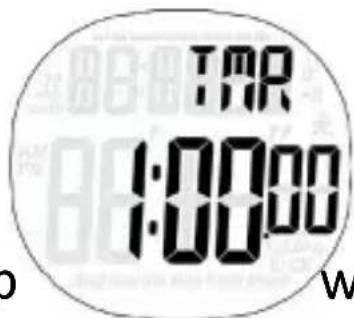
Press ST/STP key to start or stop wn. Press RESET key to reset the timer.
Press and hold ADJ/EL key for 2 seconds to set the timer.
Press ST/STP key to increase the value, while press RESET key to decrease the value.
Pressing and holding the button will change the value rapidly.
Press MODE key to switch from hour digit to minute digit, and press the ADJ/EL key to confirm.

Note: The pedometer will automatically back to Countdown Timer Mode if there is no input for 20 minutes in the setup mode.
ALARM MODE
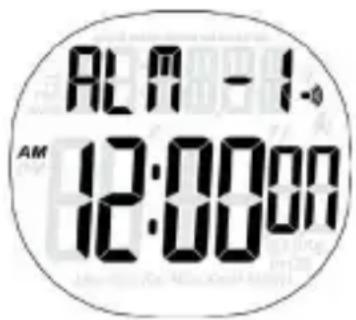
Press RESET key to turn on/off the alarms.
Press and hold ADJ/EL key key for 2 seconds to enter setting.
Press ST/STP key to increase the value, while press RESET key to decrease the value.
Press MODE key to switch from hour digit to minute digit, and press the ADJ/EL key key to confirm.
Note: The pedometer will automatically back to Alarm Mode if there is no input for 20 minutes in the setup mode.
To save power, press the MODE and ST/STP keys at the same time to turn off the watch, and press the ADJ/EL and RESET keys to turn it on.
BATTERY REPLACEMENT
BATTERY REPLACEMENT
WE STRONGLY RECOMMEND TAKING YOUR
PEDOMETER TO A LOCAL JEWELER STORE TO HAVE
BATTERY REPLACED TO AVOID POSSIBILITY OF
PERMANENTLY DAMAGE OF THE PEDOMETER.
-Remove the exhausted battery from the unit, and inset a new one.
Make sure the battery positive (+) side point to the battery compartment cover.
-Replace the cover on the battery compartment

CARE AND MAINTENANCE & CLEARING
CARE AND MAINTENANCE
-Never attempt to disassemble or service your unit, it will void the warranty.
-Do not subject the device to extreme shocks(do not drop on the floor)
-Do not expose the device to strong chemicals such as gasoline, clean solvents, acetone, alcohol, or insect repellents, as they may damage the device's seal, case and finish.
-Store the product in a dry place when you are not using it.
-Leaky batteries can damage the device. Remove the battery when the device will not be used for a long time.
-To avoid accidental strangulation, keep the pedometer out of reach of young children
-The operation environment of the pedometer must be free from shocks, magnetic fields, electrical noise and strong vibration.
-Do not immerse the product in water as this will result in damage to it.
-It could be cleaned with a lightly moistened cloth. Apply mild soap to the area if there are stubborn stains or marks.

Precautions for correct disposal of the product.
The symbol shown on the equipment indicates that waste must be disposed of in “separate collection” and so the product must not be disposed of together with urban waste. The user must take the product to special “separate waste collection centres” provided by local government, or deliver it to the retailer against the purchase of a new product. Separate collection of waste and subsequent treatment, recycling and disposal operations promotes the production of equipment with recycled materials and limits negative effects on the environment and on health caused by improper handling of waste. Illegal disposal of the product leads to the enforcement of administrative penalties.


- CONTENTS
- REMARK:
- BASIC OPERATION OF BUTTONS
- BUTTONS CONFIGURATION:
- MODE BUTTON
- ADJ/EL BUTTON
- ST/STP BUTTON
- RESET BUTTON
- OPERATING MODES
- Time mode
- Pedometer mode
- Data recall mode
- Stopwatch mode
- Countdown timer Mode
- Alarm mode
- SETTING YOUR PEDOMETER
- CALCULATING STRIDE LENGTH
- How to calculate your stride length:
- Display instruction:
- Operation instruction:
- BATTERY REPLACEMENT
- CARE AND MAINTENANCE & CLEARING
- CARE AND MAINTENANCE
- Precautions for correct disposal of the product.
Brand : Trevi
Model : SF 120
Category : Sports Watch