
BPA-41-A - Mp3 player BRIGMTON - Free user manual and instructions
Find the device manual for free BPA-41-A BRIGMTON in PDF.


| Product Type | MP3 Player |
| Brand | Brigmton |
| Model | BPA-41-A |
| Dimensions (approx) | 4.2 x 2.3 x 0.7 cm |
| Weight | 30 g |
| Power Source | Built-in rechargeable lithium battery (200 mAh) |
| Charging | Via USB 2.0 (cable included) |
| Playback Formats | MP3, WMA, WAV |
| Storage Capacity | Internal memory: 8 GB (supports microSD up to 32 GB) |
| Display | 1.8-inch LCD screen with backlight |
| Audio Output | 3.5mm earphone jack; built-in speaker |
| Battery Life | Up to 15 hours of music playback |
| Main Functions | Music playback, voice recording, FM radio, folder navigation |
| Controls | Buttons: Play/Pause, Volume, Next/Prev, Mode, Hold switch |
| Connectivity | USB 2.0 for data transfer and charging |
| Supported OS | Windows, Mac OS, Linux (drag and drop) |
| Accessories Included | Earphones, USB cable, user manual |
| Maintenance | Clean with dry cloth; avoid moisture and extreme temperatures |
| Safety | Do not disassemble; use only provided charger; keep away from children |
| Spare Parts / Reparability | Battery not user-replaceable; contact Brigmton for service |
| General Info | Color: Black; Warranty: 2 years |
Frequently Asked Questions - BPA-41-A BRIGMTON
User questions about BPA-41-A BRIGMTON
0 question about this device. Answer the ones you know or ask your own.
Ask a new question about this device
Download the instructions for your Mp3 player in PDF format for free! Find your manual BPA-41-A - BRIGMTON and take your electronic device back in hand. On this page are published all the documents necessary for the use of your device. BPA-41-A by BRIGMTON.
USER MANUAL BPA-41-A BRIGMTON
natural_image
White rectangular device with a central button and circular top, no visible text or symbolsBPA-41-N-A-R-V
REPRODUCTOR MP3
natural_image
White rectangular electronic device with a circular button and central play button (no text or symbols visible)BPA-41-N-A-R-V
MP3 PLAYER
Operation Manual
KEY INSTRUCTIONS
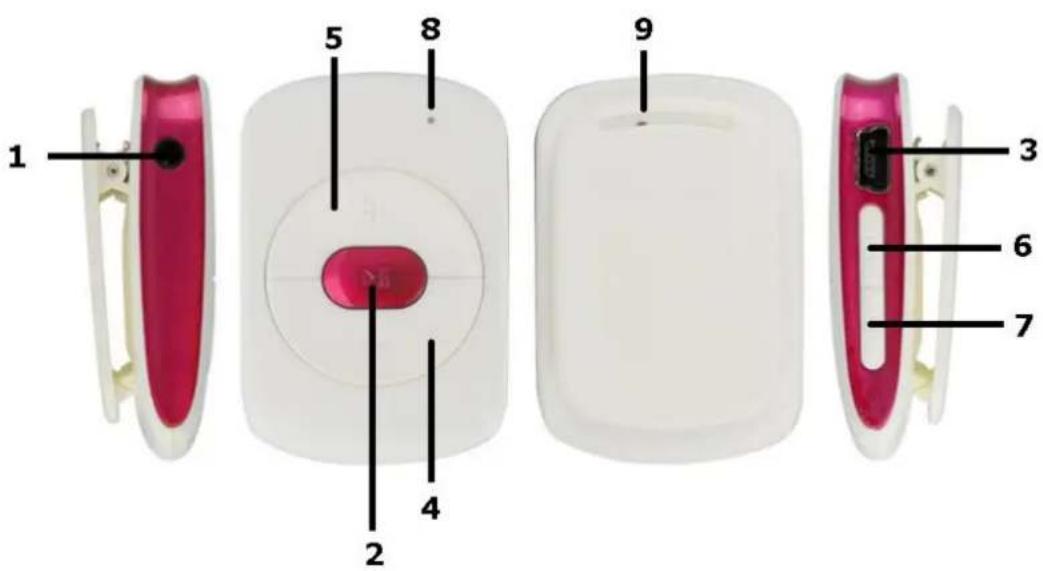
- Earphone Jack
- Power ON/OFF/Play/Pause
- USB Port
- VOL-
- VOL+
- Previous/ Backward
- Next/ Forward
- LED Indicator
- Reset
OPERATION
- Plug in the earphone in the earphone jack
- Press and hold ▶|| to power on / off the device
- Play or pause the songs by pressing ▶ ||
- Press "+ / - " one by one to increase / decrease the volume.
- Play previous song by pressing |◀◀, long press it for backward of the song playing
- Skip to next song by pressing ▶▶|, long press it for forward of the song playing
- You can use the clip on the rear side of the product to attach the player
"Features can change without notice"
Imported: I.R.P., S.L.
DECLARATION OF CONFORMITY
I.R.P., SL declare under our responsibility that the equipment meets the requirements indicated in the following directives:
EMC 2004/108/EC DIRECTIVAS EMC
EN55022:2010
EN61000-3-2:2006+A1:2009+A2:2009
EN61000-3-3:2008
EN55024:2010
Description of apparatus:
BRIGMTON Model BPA-41-N-A-R-V
Music player
Importer: I.R.P., SL
Address: Avenida Santa Clara de Cuba 5, 41007, Sevilla.
Brand : BRIGMTON
Model : BPA-41-A
Category : Mp3 player