
UGT-CR905 - Memory reader Vantec - Free user manual and instructions
Find the device manual for free UGT-CR905 Vantec in PDF.


| Brand | Vantec |
| Model | UGT-CR905 |
| Product Type | Memory Card Reader |
| Compatible Cards | SD, SDHC, SDXC, microSD, microSDHC, microSDXC, MMC, RS-MMC, MS, MS Pro, MS Duo |
| Interface | USB 2.0 (compatible with USB 1.1 and 3.0) |
| Dimensions | Approx. 100 x 50 x 15 mm |
| Weight | Approx. 50 g |
| Power Source | Bus-powered via USB |
| Operating Systems Supported | Windows, macOS, Linux (no driver required) |
| Data Transfer Speed | Up to 480 Mbps (USB 2.0) |
| Plug and Play | Yes |
| LED Indicator | Yes, power/activity LED |
| Maintenance | Keep dry; clean contacts with a soft cloth if needed |
| Safety Precautions | Avoid liquid contact; do not insert bent or damaged cards |
| Warranty | 1-year limited warranty |
Frequently Asked Questions - UGT-CR905 Vantec
User questions about UGT-CR905 Vantec
0 question about this device. Answer the ones you know or ask your own.
Ask a new question about this device
Download the instructions for your Memory reader in PDF format for free! Find your manual UGT-CR905 - Vantec and take your electronic device back in hand. On this page are published all the documents necessary for the use of your device. UGT-CR905 by Vantec.
USER MANUAL UGT-CR905 Vantec
Feature:
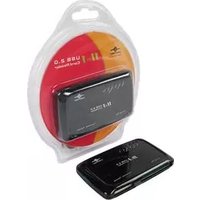
- Read/Write to 58 Types of Memory Cards
• Built-In USB 2.0 Port
• Hi-Speed USB 2.0 Transfer Rate Up to 480 Mbps
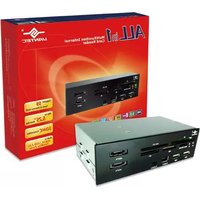
- Fits in Any Standard 3.5" or 5.25" Drive Bay
• Simultaneously Transfer Data Between Memory Cards
• Power and Activity LED Indicator
Package Contents:
• 3.5" Internal Card Reader x 1
- 5.25" Mounting Bracket x 1
- Driver CD x 1
• Installation Screws x 1
System Requirements:
Intel Pentium II 350 MHz-compatible or Mac G3 processor & greater
Microsoft Windows 2000/XP/Vista or Mac OS 8.6 & greater
For USB 2.0 speeds, the system must support USB 2.0 specifications.
CD Rom drive (if drivers are needed)
Specification:
Model: UGT-CR905
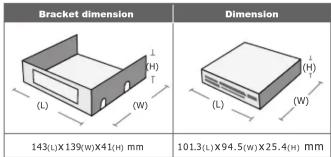
Dimension: 101.3x25.4x94.5mm
(Bracket dimension :143x41x139mm )
Interface: USB 2.0
Memory Cards Support:
CF-Type I, CF-Type II, CF-Ultra II, Micro Drive, CF-Pro, CF-Pro II, CF-Extreme, CF-Extreme III, CF-PSP II, CF-Super, CF-Ultra X
MS, MS-Magic Gate, MS-PRO Magic Gate, HS-MS-PRO Magic Gate, MS-DUO, MS-DUO Magic Gate, MS-PRO Duo, HS-MS-PRO Duo, MS-PRO Duo-PSP, MS-PRO Duo-Gaming, *M2
* SD, SDHC, SD-Pro, SD-Pleomax, SD-Pro C, SD-Ultra, SD-Ultra II, *SD-Ultra II Plus, SD-Extreme III, SD-Ultra X, SD-Turbo, SD-Super, SD-Max, *Mini SD, *Mini SD-Pro, *Mini SD-Pleomax,MMC, MMC-Pleomax, MMC Pro, HS-MMC,MMC Plus, MMC-Plus Turbo, *RS MMC, RS MMC-Pleomax, RS MMC-Speed, RS MMC-Max, MMC Mobile, MMC Mobile-ProC, MMC Mobile-Pocketnet. *T-Flash, *Micro SD. *MMC Micro
• XD, XD (M), XD (H), Smart Media.
*card adapter required
5.25" Drive Bay Installation:
- Open Case

4. Install into any open 5.25" drive bay and secure with screws
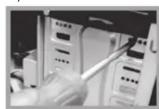
2. Slide the card reader into the 5.25" mounting bracket

5. Connect the USB cable from card reader to motherboard
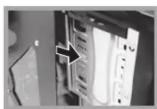
Align the screws holes with mounting bracket and secure with screws

6. The card reader is now ready for use

3.5" Drive Bay Installation:
- Open case

4. Connect the USB cable from card reader to motherboard

2. Install the card reader into an open 3.5" drive bay

5. The card reader in now ready for use
3. Align the screws holes and secure with screws

Installation (USB Cable):


Vantec Thermal Technologies
WWW.VANTECUSA.COM
43951 Boscell Rd. Fremont, CA 94538

Brand : Vantec
Model : UGT-CR905
Category : Memory reader