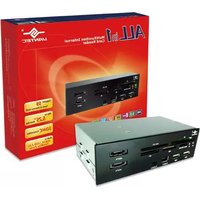
All-in-1 Multifunction Internal Card Reader - Memory reader Vantec - Free user manual and instructions
Find the device manual for free All-in-1 Multifunction Internal Card Reader Vantec in PDF.


| Product Type | Internal Multi-Function Card Reader |
| Brand | Vantec |
| Model | UGT-CR955-BK |
| Form Factor | 5.25" Drive Bay |
| Supported Memory Cards | 59 types including SD, MS, CF, MMC, MD, Micro SD, XD, SM |
| Ports | 2x eSATA, 2x USB 2.0, 1x FireWire 400 |
| Transfer Rate (eSATA) | Up to 3 Gbps |
| Transfer Rate (USB 2.0) | Up to 480 Mbps |
| Transfer Rate (FireWire 400) | Up to 400 Mbps |
| Dimensions (L x W x H) | 145 x 79 x 43 mm |
| Material | Aluminum & Plastic |
| System Requirements (Windows) | Intel Pentium II 350 MHz, Windows 2000/XP/Vista, USB/eSATA/FireWire port |
| System Requirements (Mac) | G3 processor, Mac OS 9.2 or greater, USB/eSATA/FireWire port |
| Plug & Play | Yes |
| Hot Swapping | Yes (USB and FireWire) |
| Package Contents | Card reader, installation screws, user manual |
| Warranty | 1 year limited warranty |
Frequently Asked Questions - All-in-1 Multifunction Internal Card Reader Vantec
User questions about All-in-1 Multifunction Internal Card Reader Vantec
0 question about this device. Answer the ones you know or ask your own.
Ask a new question about this device
Download the instructions for your Memory reader in PDF format for free! Find your manual All-in-1 Multifunction Internal Card Reader - Vantec and take your electronic device back in hand. On this page are published all the documents necessary for the use of your device. All-in-1 Multifunction Internal Card Reader by Vantec.
USER MANUAL All-in-1 Multifunction Internal Card Reader Vantec
Multifunction Internal Card Reader
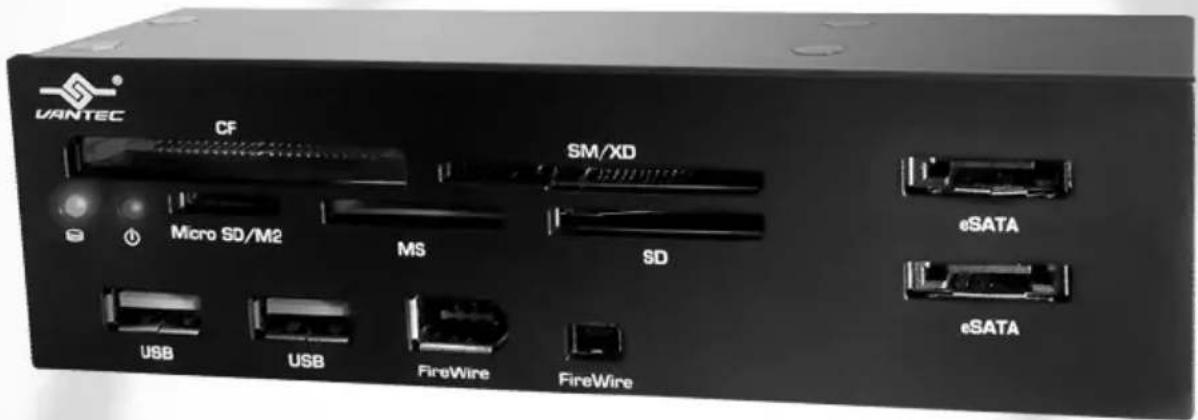
Support 59
Types of Memory Cards
Fits In
5.25" Drive Bay
SDHC
Compatible
Built-in
eSATA / USB 2.0/
FireWire Ports
Package Contents :
All in 1 Multifunction Internal Card Reader
① All in 1 Multifunction Internal Card Reader
② Installation Screws
③ User's Manual

Table of Contents :
- Introduction 02
- Features/Specifications....03
- System Requirements/Parts Layout ....04
- Installation 05
- FAQ/Warranty....07
- Contact 08
1. Introduction :
From digital cameras to PDAs, data storage is a crucial piece to all these devices. Unfortunately, with so many different types of memory cards, accessing them can quickly turn your computer into a mess of wires and adapters. The Vantec All-in-1 Multifunction Internal Card Reader brings you a convenient and compact way to share and exchange files stored in your flash memory cards from one simple panel. In addition, with the extra eSATA, USB 2.0, and FireWire ports which support plug & play and hot swapping, the multifunction panel brings more ports to the front of your computer allowing easier access and transfer of data. The Vantec All-in-1 Multifunction Internal Card Reader is your best choice for an internal card reader solution.

2. Features / Specifications :
All in 1 Multifunction Internal Card Reader
Features:
- Read/Write to 59 Types of Memory Cards
- No Adapter Required for Micro SD (T-flash)
• Fits in Any Standard 5.25" Drive Bay - Simultaneously Transfer Data Between Memory Cards
- Two eSATA / Two USB2.0 / FireWire Ports
- Transfer Rates Up to 3Gbps W/ eSATA
- Transfer Rates Up to 480Mbps W/ USB 2.0
- Transfer Rates Up to 400Mbps W/ FireWire 400
• Plug & Play and Hot Swapping
Specifications :
• Model: UGT-CR955-BK
- Ports: eSATA / USB 2.0 / FireWire 400
- Transfer Rate: Up to 3 Gbps (eSATA)
Up to 480 Mbps (USB 2.0)
Up to 400 Mbps (FireWire 400)
• Dimension: 145 x 79 x 43 (L x W x H) mm
• Material: Aluminum & Plastic
• Memory Cards Support :
*card adapter required.
| SD | SD / SDHC / MINI SD / HS MINI SD / EXTREME SD / EXTREME III SD / ULTRA SD / ULTRA II SD / ULTRA II SD PLUS / SD-ULTRA-X / ULTRA SPEED SD / SD PRO / SD ELITE PRO / HS SD |
| MS | MS / MS PRO / MS DUO / MS PRO DUO / MS MG PRO / MS MG / MS MG DUO / MS MG PRO DUO / EXTREME MS PRO / MS SELECT/ EXTREME III MS PRO / ULTRA II MS PRO / HS MS MG PRO / HS MS MG PRO DUO / HS MS PRO / HS MS PRO DUO / MS ROM |
| CF | CF I / CF II / CF 3.0 / EXTREME III CF / EXTREME CF / ULTRA II CF / HS CF / XS-XS CF / CF ELITE PRO / CF PRO / CF PRO II |
| MMC | MMC / MMC 4.0 / HS MMC / HS RS MMC / RS MMC / RS MMC 4.0 / MMC Mobile / MMC Plus / MMC micro* |
| MD | IBM MD / HITACHI MD / MAGIC STOR MD |
| Micro SD | Micro SD / T-Flash / M2 |
| XD | XD |
| SM | SM |
3. System Requirements / Parts Layout :

Intel Pentium II 350 MHz-compatible Microsoft Windows 2000/XP/Vista
- USB port, eSATA port, FireWire 400 (1394a) port
- For USB 2.0 speeds, the system must support USB 2.0 specifications
- For FireWire speeds, the system must support FireWire specifications
- For SATA speeds, the system must support SATA specifications

Mac G3 processor & greater
Mac OS 9.2 & greater
- USB port, eSATA port, FireWire 400 (1394a) port
- For USB 2.0 speeds, the system must support USB 2.0 specifications
- For FireWire speeds, the system must support FireWire specifications
- For SATA speeds, the system must support SATA specifications
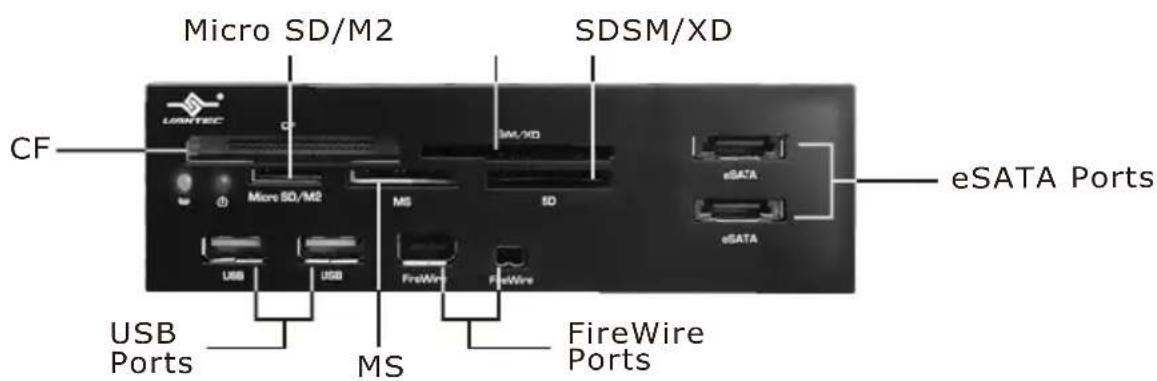
Parts Layout:
All in 1 Multifunction Internal Card Reader
4. Installation :
All in 1 Multifunction Internal Card Reader
(5-1) Please remove the side panels of the case to gain access to the chassis. Once inside, remove the 5.25" front panel where you wish to place the card reader. (Figure 5-A)
(5-2) Insert the UGT-955-BK into the 5.25" bay as shown in the figure. (Figure 5-B)
(5-3) Tighten the screws of both sides. (Figure 5-C)
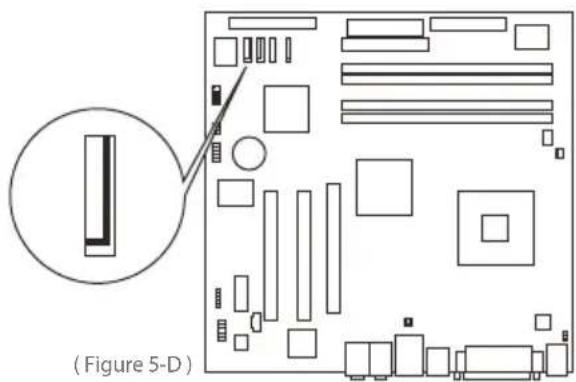
(5-4) Plug two SATA cables(Red) into the SATA ports on the motherboard. (Figure 5-D)


natural_image
Diagram of a server rack with open storage compartments and directional arrows indicating file orientation (no text or symbols)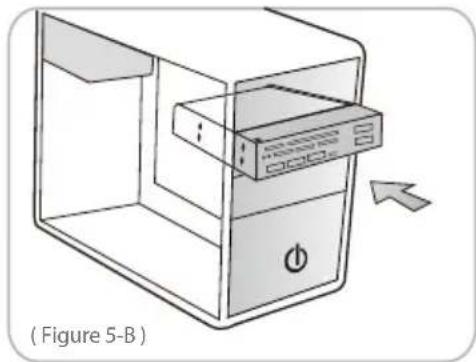
natural_image
Diagram of a device with an open lid and power button, labeled (Figure 5-B), showing no text or symbols beyond the label.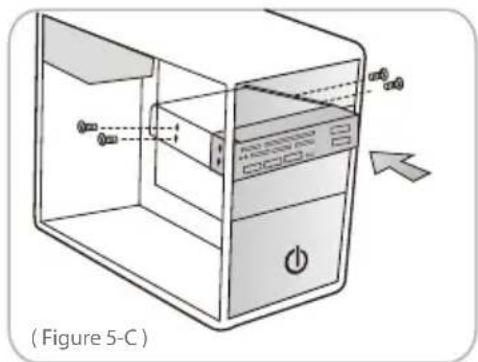
Installation :
(5-5) Plug the two USB cables from the device to the USB ports on the motherboard (Please consult the user's manual from the motherboard for the location of the USB ports)
(Figure5-E)


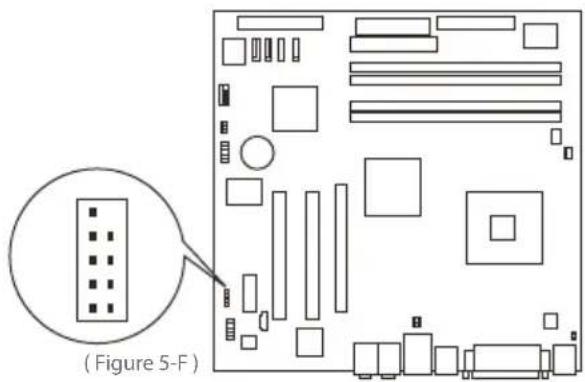
(5-6) Plug one 1394 cable to the 1394 port on the motherboard.(Please consult the user's manual from the motherboard for the location of the port)
(Figure 5-F)

(5-7) Lastly, put the side panels back on the case and secure with the screws.
(Figure 5-G)

natural_image
Diagram of a server rack with directional arrows indicating file movement (no text or symbols)
CAUTION :
The USB cable is similar to the 1394 cable, please check the plug carefully and consult the user's manual from your motherboard. If the USB cable or 1394 cable is plugged on the wrong position, it can cause damage to the motherboard and to any connected devices.
5. FAQ / Warranty :
1.
Q: Why is the power indicator not illuminating?
A: Please check the connection from the USB cable.
2.
Q: Why is the eSATA port not working?
A: (1) Please check the connection of the SATA cable to your motherboard.
(2) Some motherboards cannot support hot-swapping using SATA. Please confirm with your motherboard manufacturer or your PC supplier for compatibility.

WARNING :
The All in 1 Multifunction Internal Card Reader comes with a 1 year limited warranty (90 day parts). If your unit should become defective within that time frame, please go to http://www.vantecusa.com for information on how to receive warranty exchange or repair. Cosmetic defects and missing parts are not covered under this warranty. Please check the contents of the unit to make sure you received all parts. Also, check for any cosmetic flaws. If any parts are missing or if there are cosmetic defects, please contact the retailer from which you purchased the unit immediately and ask for a replacement.
6. / Contact :
Contact
Vantec Thermal Technologies
43951 Boscell Rd.
Fremont, CA 94538
tel: 510-668-0368
fax: 510-668-0367
website: www.vantecusa.com
Copyright © 2009 Vantec Thermal Technologies. All Right Reserved.
All Registered Trademarks Belong To Their Respective Companies.


- Multifunction Internal Card Reader
- Package Contents :
- All in 1 Multifunction Internal Card Reader
- Table of Contents :
- Introduction :
- Features / Specifications :
- Features:
- Specifications :
- System Requirements / Parts Layout :
- Parts Layout:
- Installation :
- Installation :
- CAUTION :
- FAQ / Warranty :
- 1.
- 2.
- WARNING :
- / Contact :
- Contact
- Vantec Thermal Technologies
Brand : Vantec
Model : All-in-1 Multifunction Internal Card Reader
Category : Memory reader