
31031 - Webcam TRUST - Free user manual and instructions
Find the device manual for free 31031 TRUST in PDF.


Pick your language and provide your email: we'll send you a specifically translated version.
| Product Type | Webcam |
| Brand | Trust |
| Model | 31031 |
| Dimensions (approx.) | 10 x 5 x 5 cm |
| Weight | 120 g |
| Power Source | USB 2.0 (bus-powered) |
| Resolution | 1280 x 720 pixels (720p HD) |
| Frame Rate | Up to 30 fps |
| Lens | Fixed focus, f/2.4 |
| Field of View | 60 degrees |
| Microphone | Built-in omnidirectional |
| Connection | USB-A cable, 1.5 m |
| Mounting | Clip for monitor or tripod mount |
| Compatibility | Windows, macOS, Chrome OS, Linux (UVC) |
| Software | Driverless, works with most video apps |
| Care and Cleaning | Wipe with soft dry cloth; avoid liquids |
| Safety | Use in dry environment; keep away from water |
| Spare Parts / Repairability | Not user-serviceable; contact support |
| General Info | Plug and play, no driver installation needed |
Frequently Asked Questions - 31031 TRUST
How do I set up the Trust 31031 webcam?
Simply plug the webcam into a USB port on your computer. It is plug-and-play and should be recognized automatically. No additional drivers are required.
What should I do if the webcam is not detected?
Try a different USB port. Ensure the cable is fully inserted. Restart your computer. If still not working, check if the device appears in your operating system's Device Manager (Windows) or System Information (macOS).
Does the webcam work with Windows, macOS, and Linux?
Yes, the Trust 31031 is compatible with Windows, macOS, Chrome OS, and Linux (UVC compliant). It works out of the box with most video conferencing apps like Zoom, Skype, and Teams.
What is the maximum video resolution?
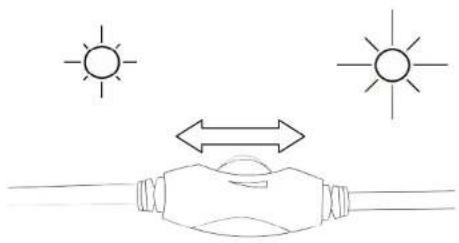
The webcam supports up to 1280 x 720 pixels (720p HD) at 30 frames per second. For best quality, ensure good lighting.
How do I clean the webcam lens?
Use a soft, lint-free cloth to gently wipe the lens. Do not apply any liquids directly. Avoid using abrasive materials that could scratch the lens.
Can I mount the webcam on a tripod?
Yes, the webcam has a standard tripod mount at the base. You can also use the built-in clip to attach it to a monitor or laptop screen.
The built-in microphone is not working. What can I do?
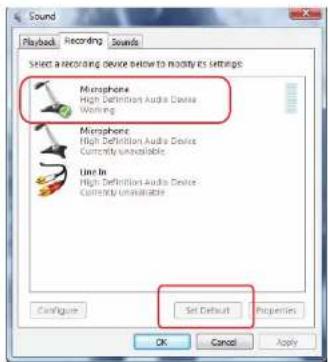
Check your computer's sound settings to ensure the webcam microphone is selected as the input device. Also, verify that the microphone is not muted. If using Windows, go to Settings > System > Sound > Input.
Is the webcam compatible with Xbox or PlayStation?
The Trust 31031 is designed primarily for PC and Mac. It may not work with gaming consoles without special adapters, but it's not officially supported.
What is the field of view of the camera?
The webcam has a 60-degree field of view, suitable for single-person video calls or small group settings. Position yourself centrally for the best framing.
How do I obtain spare parts or repair the webcam?
The webcam is not designed for user repair. If you experience hardware issues, contact Trust support. Check the warranty terms on the product packaging or Trust's website.
User questions about 31031 TRUST
0 question about this device. Answer the ones you know or ask your own.
Ask a new question about this device
No questions yet. Be the first to ask one.
Download the instructions for your Webcam in PDF format for free! Find your manual 31031 - TRUST and take your electronic device back in hand. On this page are published all the documents necessary for the use of your device. 31031 by TRUST.
USER MANUAL 31031 TRUST
natural_image
Black and white photo of a standard office webcam (no visible text or symbols)quick installation guide
31031webcam pro
1


natural_image
Simple line drawing of a mechanical device with a curved arrow indicating rotation or change (no text or symbols)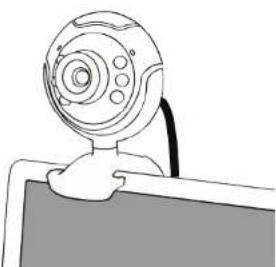
natural_image
Line drawing of a computer monitor with a spherical device on top (no text or symbols)2


3


4

natural_image
Line drawing of a webcam with circular motion arrows, showing internal movement and a 3D layout of furniture (no text or symbols)5
natural_image
Simple line drawing of a hand holding a device with sunlight symbols above (no text or labels)


Manual assistant
Powered by Anthropic
Waiting for your message
Product information
Brand : TRUST
Model : 31031
Category : Webcam