
Zyno - Webcam TRUST - Free user manual and instructions
Find the device manual for free Zyno TRUST in PDF.


Pick your language and provide your email: we'll send you a specifically translated version.
| Product Type | Webcam |
| Brand | Trust |
| Model | Zyno |
| Color | Black |
| Connectivity | USB 2.0 |
| Wireless | No (cable connection via USB) |
| Power Source | USB powered from computer |
| Dimensions (approx.) | 7.5 x 5.0 x 4.0 cm |
| Weight | 100 g |
| Video Resolution | 1280 x 720 pixels (HD ready) |
| Frame Rate | Up to 30 fps |
| Built-in Microphone | Yes |
| Auto-Focus | Yes (fixed focus typical) |
| Mounting | Clip-on for monitor or stand on desk |
| Compatible Operating Systems | Windows, macOS, Chrome OS |
| Included Accessories | Quick installation guide, CD with drivers |
| Cleaning Instructions | Wipe with a soft, dry cloth |
| Safety Precautions | Do not expose to liquids; keep away from moisture |
| Spare Parts Availability | Not available; device is non-repairable |
| General Information | Plug and play installation; no additional power adapter needed |
Frequently Asked Questions - Zyno TRUST
How do I install the Trust Zyno webcam?
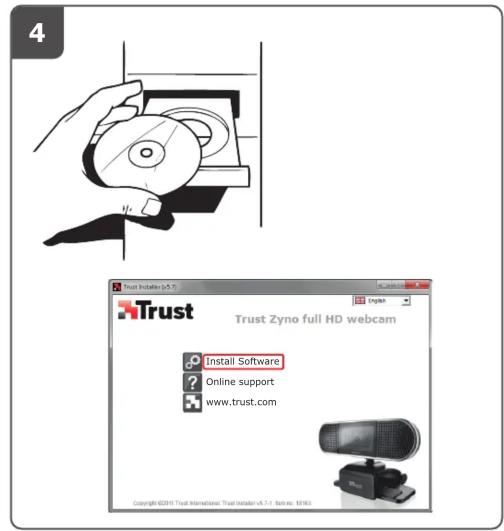
Connect the webcam to an available USB port on your computer. The device should be automatically detected. If drivers are required, insert the included CD and follow the on-screen instructions. For systems without a CD drive, download drivers from the Trust website.
Is the Trust Zyno compatible with Mac?
Yes, the webcam is compatible with macOS. It works as a plug-and-play device without additional drivers. You can use it with video conferencing applications like Zoom, Skype, or FaceTime.
What is the maximum video resolution?
The Trust Zyno webcam supports a maximum video resolution of 1280 x 720 pixels (HD ready) at up to 30 frames per second. For lower resolutions, check your software settings.
Does the webcam have a built-in microphone?
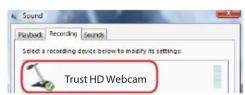
Yes, the webcam integrates a microphone for audio capture. Ensure your operating system audio settings select the webcam as the input device for best results.
How can I mount the webcam?
The webcam has a clip that can be attached to the top of a monitor or laptop screen. Alternatively, it can stand on a flat surface using its base.
Why is my webcam not being detected?
First, try a different USB port. Check if the USB cable is firmly connected. On Windows, open Device Manager and look for imaging devices. On Mac, check System Information under USB. If issues persist, reinstall drivers from the CD or Trust website.
Can I use the webcam on Linux?
The webcam is compatible with many Linux distributions using standard UVC drivers. It may require manual configuration. Check community forums for specific distribution instructions.
How do I clean the webcam lens?
Use a soft, lint-free cloth slightly dampened with water or a lens cleaning solution. Gently wipe the lens in a circular motion. Avoid using abrasive materials or harsh chemicals.
Does the webcam have a privacy shutter?
No, the Trust Zyno does not include a built-in privacy shutter. You can cover the lens with a sticker or external cover when not in use.
What is the warranty period for the Trust Zyno webcam?
Trust typically offers a 2-year warranty. Check your purchase confirmation or contact Trust support for exact terms. Keep the receipt for proof of purchase.
User questions about Zyno TRUST
0 question about this device. Answer the ones you know or ask your own.
Ask a new question about this device
No questions yet. Be the first to ask one.
Download the instructions for your Webcam in PDF format for free! Find your manual Zyno - TRUST and take your electronic device back in hand. On this page are published all the documents necessary for the use of your device. Zyno by TRUST.
USER MANUAL Zyno TRUST
natural_image
Exterior view of a black YouTob device on a stand (no visible text or symbols)Quick Installation Guide
Webcam
18163

flowchart
graph TD
    A["USB"] --> B["Laptop"]
    C["USB"] --> D["Computer"]


Windows 7 / Windows Vista


©


2

natural_image
Simple line drawing of a robotic arm with a curved arrow indicating motion (no text or symbols)
natural_image
Line drawing of a webcam on a flat surface (no text or symbols)3


Windows Live
Messenger






Manual assistant
Powered by Anthropic
Waiting for your message
Product information
Brand : TRUST
Model : Zyno
Category : Webcam