TRUST 18350 Ceptor HD - Webcam

18350 Ceptor HD - Webcam TRUST - Free user manual and instructions

Find the device manual for free 18350 Ceptor HD TRUST in PDF.

📄 2 pages English EN Download 💬 AI Question 10 questions ⚙️ Specs
Notice TRUST 18350 Ceptor HD - page 1
Pick your language and provide your email: we'll send you a specifically translated version.
Product Type Webcam
Model 18350 Ceptor HD
Brand Trust
Resolution HD (1280 x 720 pixels)
Frame Rate 30 fps
Connection Type USB 2.0
Built-in Microphone Yes
Field of View 60 degrees
Focus Type Fixed focus
Compatible Operating Systems Windows, macOS, Chrome OS
Dimensions (W x H x D) 100 mm x 40 mm x 40 mm
Weight 100 g
Power Supply USB powered (5V, 500mA)
Cable Length 1.5 m
Mounting Clip-on or tripod mount
LED Indicator Yes (when active)
Maintenance Clean lens with a soft, dry cloth. Avoid liquids.
Safety Do not expose to water or extreme temperatures.
Spare Parts & Repairability Not available; device is non-serviceable.
Certifications CE, FCC

Frequently Asked Questions - 18350 Ceptor HD TRUST

How do I install the Trust 18350 Ceptor HD webcam?
Plug the webcam into a USB port on your computer. It will automatically install drivers. For optimal performance, download the latest drivers from the Trust website.
Is the webcam compatible with Windows 10?
Yes, the Trust Ceptor HD webcam is compatible with Windows 10, Windows 8.1, Windows 7, macOS X 10.7 or higher, and Chrome OS.
Does the webcam have a built-in microphone?
Yes, the webcam includes a built-in microphone for audio capture during video calls.
How do I clean the webcam lens?
Use a soft, lint-free cloth to gently wipe the lens. Avoid using any liquids or harsh chemicals as they may damage the lens.
Can I use the webcam with third-party software like Zoom or Skype?
Absolutely. The webcam works with most video conferencing applications including Zoom, Skype, Microsoft Teams, and Google Meet.
What is the resolution of the Trust Ceptor HD webcam?
The webcam captures video in HD resolution (1280 x 720 pixels) at 30 frames per second.
How do I mount the webcam on my monitor?
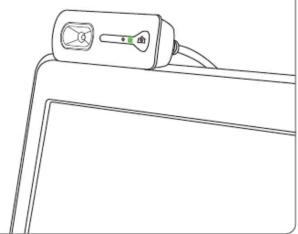
The webcam has a flexible clip that can be attached to the top of your monitor or laptop screen. It also has a standard tripod mount.
Why is the webcam not working?
Ensure the USB connection is secure. Try a different USB port. Check that the webcam is selected as the default camera in your software settings. Restart your computer if necessary.
Is there a warranty for this product?
Trust offers a 2-year warranty for this webcam. Keep your purchase receipt for warranty claims.
Can I replace the cable if it's damaged?
No, the cable is integrated and cannot be replaced. If damaged, the entire webcam must be replaced.

User questions about 18350 Ceptor HD TRUST

0 question about this device. Answer the ones you know or ask your own.

Ask a new question about this device

The email remains private: it is only used to notify you if someone responds to your question.

No questions yet. Be the first to ask one.

Download the instructions for your Webcam in PDF format for free! Find your manual 18350 Ceptor HD - TRUST and take your electronic device back in hand. On this page are published all the documents necessary for the use of your device. 18350 Ceptor HD by TRUST.

USER MANUAL 18350 Ceptor HD TRUST

natural_image Black PiTrust smartphone with adjustable screen and stand (no visible text or symbols)

Quick Installation Guide
CEPTOR HD Video Webcam

1
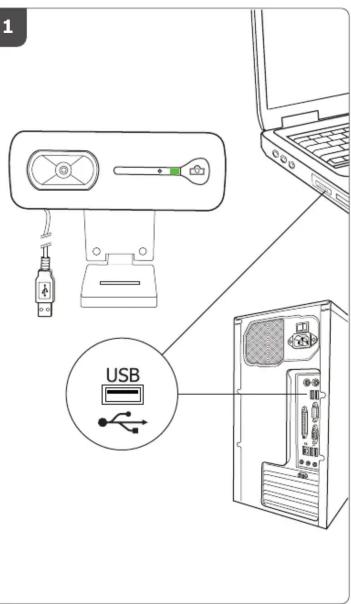
USB

2
A

TRUST 18350 Ceptor HD - 2

B
TRUST 18350 Ceptor HD - 3

C
TRUST 18350 Ceptor HD - 4

natural_image Line drawing of a device with a handle and cable, no text or symbols present

3
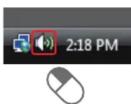
Windows 7 / Vista
A
TRUST 18350 Ceptor HD - 5

B
TRUST 18350 Ceptor HD - 6

C
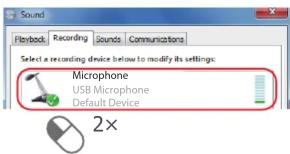
Sound Playback Recording Sounds Communications Select a recording device below to modify its settings: Microphone USB Microphone Default Device 2×

D
TRUST 18350 Ceptor HD - 8

4

Windows XP

A
TRUST 18350 Ceptor HD - 4 - 1

TRUST 18350 Ceptor HD - 4 - 2

B
TRUST 18350 Ceptor HD - 4 - 3

C
TRUST 18350 Ceptor HD - 4 - 4

D
TRUST 18350 Ceptor HD - 4 - 5

E
Recording Control Columns: Aero CD Player Balance Volume Microphone Volume Volume Volume Select Advanced Select Select SoundMAX HD Audio

5

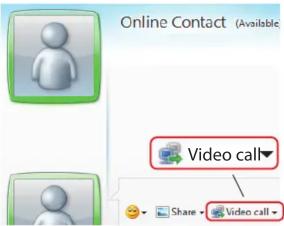
Online Contact (Available) Video call Share - Video call

6

www.trust.com/18350/drivers

Frequently asked questions

www.trust.com/18350/faq

© 2012-01-16 Trust International B.V. All rights reserved.

Table of contents Click a title to access it
Manual assistant
Powered by Anthropic
Waiting for your message
Product information

Brand : TRUST

Model : 18350 Ceptor HD

Category : Webcam