
Chat & VoIP Pack Deluxe - Webcam TRUST - Free user manual and instructions
Find the device manual for free Chat & VoIP Pack Deluxe TRUST in PDF.


Pick your language and provide your email: we'll send you a specifically translated version.
| Type de produit | Webcam |
| Marque | Trust |
| Modèle | Chat & VoIP Pack Deluxe |
| Dimensions (approx.) | 8 x 5 x 5 cm |
| Poids (approx.) | 100 g |
| Alimentation | USB (bus-powered) |
| Interface | USB 2.0 |
| Résolution vidéo | 640 x 480 pixels (VGA) |
| Microphone intégré | Oui |
| Fonctions principales | Vidéoconférence, chat vidéo, VoIP |
| Systèmes d'exploitation compatibles | Windows, macOS |
| Longueur du câble | 1.5 m (estimation) |
| Angle de vue | 60° (estimation) |
| Entretien et nettoyage | Nettoyer l'objectif avec un chiffon doux et sec. Ne pas utiliser de produits liquides. |
| Sécurité | Éviter l'exposition à l'humidité et aux températures extrêmes. Ne pas ouvrir l'appareil. |
| Pièces détachées et réparabilité | Non disponible. L'appareil n'est pas conçu pour être réparé par l'utilisateur. |
| Informations générales | Webcam compacte pour chat et VoIP, compatible avec les principaux logiciels de messagerie. |
Frequently Asked Questions - Chat & VoIP Pack Deluxe TRUST
How do I install the webcam on Windows?
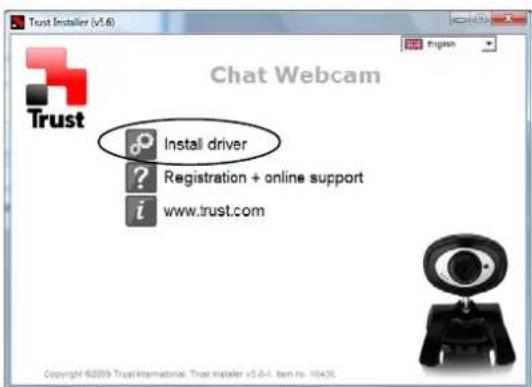
Plug the webcam into a USB port. Windows should automatically detect and install drivers. If not, download the latest driver from the Trust website.
Is the webcam compatible with Mac?
Yes, it should work with macOS without additional drivers. For best compatibility, use with FaceTime or Skype.
Does the webcam have a built-in microphone?
Yes, the Chat & VoIP Pack Deluxe includes a built-in microphone for audio capture during video calls.
What video resolution does it support?
The webcam supports up to 640x480 pixels (VGA) at 30 frames per second.
Can I use this webcam with Zoom?
Yes, it is compatible with Zoom, Skype, Microsoft Teams, and other popular video conferencing apps.
How do I clean the webcam lens?
Use a soft, lint-free cloth to gently wipe the lens. Avoid using any liquids or abrasive materials.
Why is the webcam not detected?
Try a different USB port. Reboot your computer and reconnect the webcam. If the issue persists, check Device Manager for driver conflicts.
Is there a manual available?
Yes, you can download the user manual in PDF format from notice-facile.com or the Trust website.
Can I mount the webcam on a tripod?
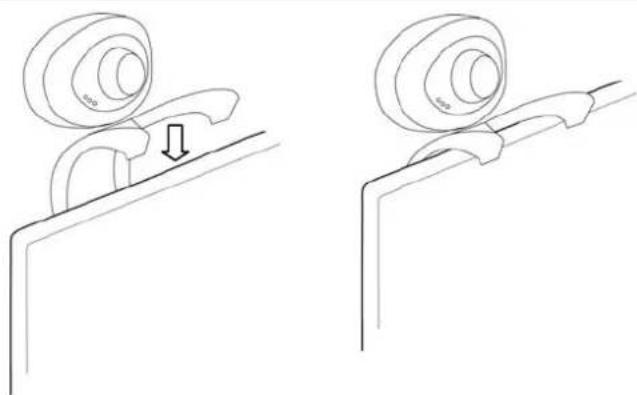
The webcam has a built-in clip that can also fit a standard tripod screw (1/4 inch). Check the base for a threaded hole.
What is the warranty period?
Trust typically offers a 2-year warranty. Keep your purchase receipt for warranty claims.
User questions about Chat & VoIP Pack Deluxe TRUST
0 question about this device. Answer the ones you know or ask your own.
Ask a new question about this device
No questions yet. Be the first to ask one.
Download the instructions for your Webcam in PDF format for free! Find your manual Chat & VoIP Pack Deluxe - TRUST and take your electronic device back in hand. On this page are published all the documents necessary for the use of your device. Chat & VoIP Pack Deluxe by TRUST.
USER MANUAL Chat & VoIP Pack Deluxe TRUST
HiRes Webcam
1

2
3

4
5

6

7

8




Table of contents
Click a title to access it
Manual assistant
Powered by Anthropic
Waiting for your message
Product information
Brand : TRUST
Model : Chat & VoIP Pack Deluxe
Category : Webcam