
PG-9085 - SLR camera IPEGA - Free user manual and instructions
Find the device manual for free PG-9085 IPEGA in PDF.


| Brand | IPEGA |
| Model | PG-9085 |
| Product Type | SLR Camera |
| Dimensions | 130 x 90 x 60 mm |
| Weight | 500 g (with battery) |
| Power Source | Rechargeable Lithium-Ion Battery (1200 mAh) |
| Sensor Type | CMOS |
| Effective Resolution | 20 Megapixels |
| Lens Mount | Interchangeable (compatible with major brands) |
| Display | 3.0-inch LCD (approx. 920k dots) |
| Storage Medium | SD/SDHC/SDXC memory card |
| Connectivity | USB 2.0, HDMI mini, Wi-Fi (built-in) |
| Video Recording | Full HD 1080p at 30 fps |
| Shutter Speed | 30 - 1/4000 sec, Bulb |
| ISO Sensitivity | 100 - 12800 (expandable to 25600) |
| Focus Modes | Autofocus (phase-detection) and Manual |
| Flash | Built-in pop-up flash |
| Image Stabilization | Sensor shift (5-axis) |
| File Formats | JPEG, RAW |
| White Balance | Auto, Preset (daylight, shade, etc.), Custom |
| Self-Timer | 2s or 10s delay |
| Operating Temperature | 0 °C to 40 °C |
| Recommended Cleaning | Use a soft, dry cloth for exterior; sensor cleaning kit for sensor |
| Warranty | 1 year limited warranty |
Frequently Asked Questions - PG-9085 IPEGA
User questions about PG-9085 IPEGA
0 question about this device. Answer the ones you know or ask your own.
Ask a new question about this device
Download the instructions for your SLR camera in PDF format for free! Find your manual PG-9085 - IPEGA and take your electronic device back in hand. On this page are published all the documents necessary for the use of your device. PG-9085 by IPEGA.
USER MANUAL PG-9085 IPEGA
English Version

Scan me or search PEGA HK from youtube to see more online video tutorial

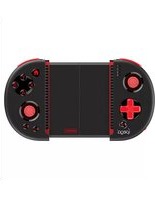
Red ELF Bluetooth Controller
User Manual (PG-9085)
Applicable instructions
-
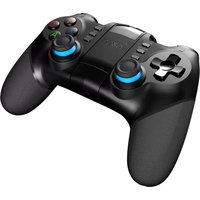
Thanks for purchasing IPega developed Red Ef Rechargeable Mini Bluetooth Game Controller:
-
This Gamepad support playing games on Nintendo Switch, Bluetooth enable Android tablet/ smart phone/ TV box/ smart TV/ VR, IOS mobile phone/ tablet and Win7/ Win8/ Win10 PC without any drivers.
-
Easy operate with a mode select switch
-
Include a protective carry case for conveniently use it while on traveling.
- Include a Silicon Stand for phone, tablets and Nintendo Switch
- The product with power indicate LEDs shows the battery level of the game controller.
* Due to the official game platform software upgrades or source code changes and other not resist factors caused some of the game can not be played or connected with our Gamepad, iPega company has no responsibility, iPega reserve the right of final interpretation for this,
Introduction for key functions

Electrical Parameters
- Working voltage: DC3.7V
- Working current: 20 mA
- Consecutive Usage Hours: 10H
-
Sleep mode current: <35uA
-
Charging voltage/current: DC5V/500mA
- Battery capacity: 380mAh
- Bluetooth transmission distance: ±8M
- Standby time: up to 30 days once fully charged
Charge/ Sleep/ Wake up/Battery detection function of Gamepad
- Charging indicator will sit on during charging and will turn off after fully charged.
-
Sleep/Wake up function: Gamepad will enter into sleeping mode if not in use for 5 minutes, an press ipega button for wake up and reconnect automatically.
-
Charging LED flashing quickly for low battery remind.
- Battery detect function: After successful Bluetooth connected, the LED by the side of the controller will it continuously for 5 seconds and remind: LED1 lit red means battery is 10%-25% LED1, LED2 lit red means battery is 25%-50%; LED1,LED2, LED3 lit red means battery is 50%-75%. LED1, LED2, LED3, LED4 lit red means battery is 75%-100%.

Working Mode instruction
| Android system | Nintendo Switch | ||
| Mode Switch location | HD Mode (GammaField) [IMAGE] | Mouse Mode | Switch Mode [IMAGE] |
| Power on(Press button for2 seconds) | Image | Under HD mode generatesand then "Hpage" buttonsshift to Mouse Mode | Image |
| Indicator | Android | Android | Android |
| Remark | Under HD Mode, press Y+Image shift to Mouse ModeUnder Mouse Mode, press X+Image shift to HD Mode | ||
| IOS system | Windows system | ||
| Mode Switch location | iCode Mode | X_Keyboard Mode | HD Mode |
| Power on(Press buttons for2 seconds) | Iqega | Iqega | Iqega |
| Indicator | IOS | IOS | Android |
| Remark | Default Englishkeyboard input | support onnon-jointmask devices | Need purchase aUSB Bluetooth Adapter |
Android Game Center

Scan to download Android Game Center Android system users only
Usage of Android Devices
*Majority of the games in Android system supports HID mode. (When using it in a PC, the usage methods are the same with Android). Those games that are downloaded from related mobile phone game centers or emulators are also supported.
- Pull the mode switch to 20 location(Pic 1)
- Press "pega" for 2 seconds, Android mode indicator flash quickly. (Pic 2)
- Open the Bluetooth function on Android device, click searching (Pic 3)
- Find and select "PG-9085" for Bluetooth pairing (Pic 3)
- Android mode indicator turn on after Bluetooth connected (Pic 4)
-
Enter the game (You can directly play the games which downloads from the Android game center or emulators).
-
Or you can also download the Gamepad enabled games from Google Playstore. Below are the recommend games for reference: Implosion / Dead Trigger / Dead Effect / CS Portable / The dungeon hunter 4 glory palace / Shadowgun: Dead Zone / SoulCraft-Action RPG etc.

Usage of Nintendo Switch Mode:
-
Pull mode switch to location
-
Press "pega" for 2 seconds, Switch Mode indicator flash quickly
-
Enter Switch main interface, then enter key input interface as shown on below pictures.
4.Switch Mode indicator turn on when Bluetooth successful paired.
-
Press "SELECT" button as */
-
Press "START" button as "+
-
Short Press "pega" button is screenshot on Switch Console.
-
Press "pega" button 1 second returns to home page. Press "pega" button 3 seconds to power off.
Tips: This game controller DO NOT support vibration and cryo functions.

Usage of iOS iCase mode
Support iOS non jail-breaking devices. Could play games which download from Apple APP Store. Searching "iCade" from APP Store will come out vast of iCade games for playing.
- Set keyboard input in English Pic1
- Pull the swift button to position Pic2
-
Press and hold ipega button for 2 second then release two buttons until the iOS LED flash quickly.Pic3
-
Open the Bluetooth on iOS device, click searching. Find and select "PG-9085" for Bluetooth pairing.Pic4
- iOS indicator turn on after successful Bluetooth connected.Pic5


Below tested iCode game list for reference
Akane the Kunoch Life-Hannenko Temple Run-Imangi Studios,LLC Rush city-Acotekrota Iron Frost-YOMEN,Inc. Recess Rot-Deceased Pixel LLC Super Mega Worm Lite - Deceased Pixel LLC Emarid Mine - Lee Bird Guns r/Bottles - Ivanovich Games Danskaku Unlimited 2 file - Bullet Hell Shump cub - Andrew Brinkhaus Alien Annihilation-Free retro - space shooter Hell Apps
Bullet Hall Infinite - Nicolas Bevillard Retro Dust-Classic Arcade - Asteranda Va RI Productions Invaders J-Werewolf LTE - Daniel Novais Recess Rot Lite - Deceased Pixel LLC Space Inversion FREE - merlyn Iser Vector Star Brawl - Jorge Arroyo The Invaders - RI Productions Towerman - Tomek Szczepanski Bunny Leap - John Carlyle
Wired connect to PC by USB Data Cable
*Connect game controller and PC by the USB data cable, indicator turn on while connected means game controller entered into X-INPUT mode. The game controller support most of classic large games on PC under this mode.
Such as: 1. Need for Speed, 2. Shadow Gun, 3. Street Fighter 5 4. Modern combat 5 5. Dead Trigger
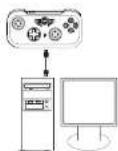
Wireless conned to PC by Bluetooth
* If your PC don't have Bluetooth function, then you required to purchase a Bluetooth Dongle for Bluetooth connection (Suggest Bluetooth 3.0+ version), Windows 10 PC required Bluetooth 4.0 Dongle.
1 Pull the mode switch to 751 location at power off stalge, Press "pega" button 2 seconds to power on;
-
Insert the Bluetooth Dongle into the USB interface on PC device. The driver will be installed by Windows system automatically;
-
After the driver is installed successfully, the symbol of the Bluetooth device will be displayed in the lower right corner of the computer.
-
Move the mouse to the Bluetooth symbol, click the right mouse button, and select "Add device"
-
After selecting "Add device", the device model number (PG-9085) will be speared, click PG-9085 for Bluetooth pairing.
-
Click "next", and select "Do not use the code to match", it will be automatically added after confirmed, then remind the Bluetooth was connected! After connected, the indicator light is always on.
-
It will be D_INPUT mode after Bluetooth connected successfully and can support the games running in simulator way.
Notes
- Please do not store this product in wet or high-temperature areas.
- Don't knap, beat, drum, pierce, or try to decompose this product, to avoid unnecessary damage to the product.
- The product has built-in batteries, and please don't discard them together with the garbages.
- Don't charge the controller in a place near the fire or other heat source.
- Non professional personnel should not disassemble the product, otherwise it will not be covered in the after-sales warranty service.
Accessories List
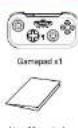
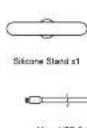

Patent NO.: ZL 201730518732.4

- Applicable instructions
- Introduction for key functions
- Electrical Parameters
- Charge/ Sleep/ Wake up/Battery detection function of Gamepad
- Working Mode instruction
- Android Game Center
- Usage of Android Devices
- Usage of Nintendo Switch Mode:
- Usage of iOS iCase mode
- Below tested iCode game list for reference
- Wired connect to PC by USB Data Cable
- Wireless conned to PC by Bluetooth
- Notes
- Accessories List
Brand : IPEGA
Model : PG-9085
Category : SLR camera