
S760-SILVER - Camera SAMSUNG - Free user manual and instructions
Find the device manual for free S760-SILVER SAMSUNG in PDF.



| Product type | Compact digital camera |
| Brand | Samsung |
| Model | S760 |
| Sensor | 1/2.5" CCD, 7.2 effective megapixels |
| Optical zoom | 3x (35mm equivalent: 38-114 mm) |
| Digital zoom | Up to 5x (depending on image size) |
| LCD screen | 2.4" TFT color, 230,000 dots |
| Focus | TTL auto focus with face detection |
| Shutter speed | 1/2000 sec |
| Flash modes | Auto, red-eye reduction, slow sync, off |
| Power supply | 2 AA alkaline batteries or rechargeable SNB-2512 (Ni-MH) battery |
| Dimensions (W x H x D) | 93 x 62 x 26.5 mm |
| Weight | Approx. 123 g (without batteries or card) |
| Internal memory | 11 MB |
| External storage | SD/SDHC/MMC (up to 4 GB guaranteed) |
| File formats | Image: JPEG, Video: AVI (MJPEG), Audio: WAV |
| Connectivity | USB 2.0, video output NTSC/PAL |
| Operating temperature | 0 to 40°C |
| Operating humidity | 5 to 85% |
| Included software | Samsung Master, Adobe Reader |
Frequently Asked Questions - S760-SILVER SAMSUNG
User questions about S760-SILVER SAMSUNG
0 question about this device. Answer the ones you know or ask your own.
Ask a new question about this device
Download the instructions for your Camera in PDF format for free! Find your manual S760-SILVER - SAMSUNG and take your electronic device back in hand. On this page are published all the documents necessary for the use of your device. S760-SILVER by SAMSUNG.
USER MANUAL S760-SILVER SAMSUNG
Thank you for buying a Samsung Camera.
This manual has basic instructions for quick and easy picture taking.
For more information, refer to the user manual included in the supplied CD-Rom.
※ This manual is based on model S860.
Getting to know your camera
- Microsoft, Windows and Windows logo are registered trademarks of Microsoft Corporation incorporated in the United States and/or other countries
- All brand and product names appearing in this manual are registered trademarks of their respective companies.
- The contents and illustrations of this manual are subject to change without prior notice for upgrading the camera functions. Refer to the user manual included on the Software CD for more information.
- PDF documents of user manual are included in the Software CD-ROM supplied with this camera. Search the PDF files with Windows explorer. Before opening the PDF files, you must install the Adobe Reader included in the Software CD-ROM.
Contents
Getting to know your camera 1
Identification of features / Contents of camera 4
Battery life & Number of shots (Recording time) 5
LCD monitor indicator 6
Mode dial 7
Taking a picture 8
Playing back / Deleting images 9
Downloading images 10
Specifications 11
FCC notice
■ NOTE :
This equipment has been tested and found to comply with the limits for a Class B digital device, pursuant to part 15 of the FCC Rules.
These limits are designed to provide reasonable protection against harmful interference in a residential installation.
This equipment generates, uses and can radiate radio frequency energy and, if not installed and used in accordance with the instructions, may cause harmful interference to radio communications.
However, there is no guarantee that interference will not occur in a particular installation. If this equipment does cause harmful interference to radio or television reception, which can be determined by turning the equipment off and on, the user is encouraged to try to correct the interference by one or more of the following measures:
- Reorient or relocate the receiving antenna.
- Increase the distance between the equipment and receiver.
- Connect the equipment to an outlet on a circuit different from that to which the receiver is connected.
- Consult the dealer or an experienced radio/TV technician for help.
CAUTION:
Changes or modifications not expressly approved by the manufacturer responsible for compliance could void the user's authority to operate the equipment.
Declaration of Conformity
Responsible Party: Samsung Opto-Electronics America, INC.
Address: 40 Seaview Dr. Secaucus, NJ 07094
Telephone No.: 201-902-0347
This device complies with Part 15 of the FCC Rules. Operation is subject to the following two conditions: (1) This device may not cause harmful interference, and (2) this device must accept any interference received, including interference that may cause undesired operation.
Getting to know your camera
DANGER
DANGER indicates an imminently hazardous situation which, if not avoided, will result in death or serious injury.

Do not attempt to modify this camera in any way. To do so may result in fire, injury, electric shock or severe damage to you or your camera. Internal inspection, maintenance and repairs should only be carried out by your dealer or Samsung Camera Service centre.

Should any form of liquid or a foreign object enter the camera, do not use it. Switch off the camera, and then disconnect the power source. You must contact your dealer or Samsung Camera Service centre. Do not continue to use the camera as this may cause a fire or electric shock.

Please do not use this product in close proximity to flammable or explosive gases, as this could increase the risk of explosion.

Do not insert or drop metallic or inflammable foreign objects into the camera through access points e.g. the memory card slot and battery chamber. This may cause a fire or electric shock.

Do not operate this camera with wet hands. This could pose a risk of electric shock.
WARNING
WARNING indicates a potentially hazardous situation which, if not avoided, could result in death or serious injury.

Do not use the flash in close proximity to people or animals. Positioning the flash too close to your subject's eyes may cause eyesight damage.

For safety reasons keep this product and accessories out of reach of children or animals to prevent accidents e.g.:
- Swallowing battery or small camera accessories. If an accident should occur, please consult a doctor immediately.
- There is the possibility of injury from the camera's moving parts.

Battery and camera may become hot during prolonged use and it may result in camera malfunction. Should this be the case, allow the camera to sit idle for a few minutes to allow it time to cool.

Do not leave this camera in places subject to extremely high temperatures, such as a sealed vehicle, direct sunlight or other places of extreme variances in temperature. Exposure to extreme temperatures may adversely affect the camera's internal components and could cause a fire.

When in use, do not cover the camera or Charger. This may cause heat to build up and distort the camera body or cause a fire. Always use the camera and its accessories in a well-ventilated area.
Getting to know your camera
CAUTION
CAUTION indicates a potentially hazardous situation which, if not avoided, may result in a minor or moderate injury.

Remove the battery when not planning to use the camera for a long period of time.
Otherwise the battery may leak corrosive electrolyte and permanently damage the camera's components.

Leaking, overheating, or damaged battery could result in fire or injury.
- Use battery with the correct specification for the camera.
- Do not short circuit, heat or dispose of battery in fire.
- Do not insert the battery with the polarities reversed.

Do not fire the flash while it is in contact with hands or objects. Do not touch the flash after using it continuously. It may cause burns.

Take care not to touch the lens or lens cover to avoid taking an unclear image and possibly causing camera malfunction.

Using an AC adapter that doesn't match with the camera specification may cause camera malfunction. We recommend supplied battery or exclusive rechargeable battery.
※ Available AC adapter :
Voltage: 3.3V, Ampere: 2.0A, Diameter: 2.35 - After turning on the camera, Check whether the battery type and the camera setting set on the [Settings]
[Battery Type] menu are same.

Credit cards may be demagnetized if left near a camera case. Avoid leaving magnetic strip cards near the case.

Do not insert the memory card the wrong way round.

Be sure to format the memory card if you are using a newly purchased memory for the first time, if it contains data that the camera cannot recognise, or if it contains images captured with a different camera.

Before an important event or going on a trip, you should check the camera condition. Samsung cannot be held responsible for camera malfunctions.
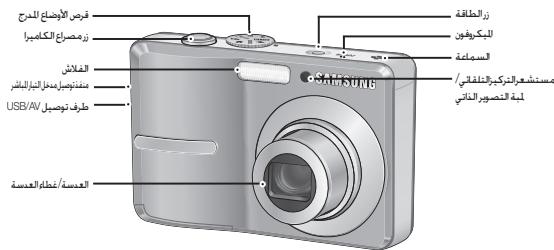
Identification of features / Contents of camera
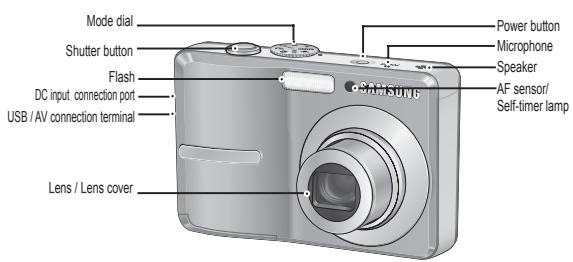
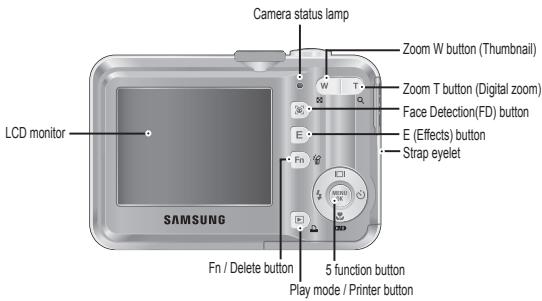
Included items Camera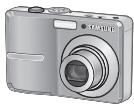
AA Alkaline Batteries
USB Cable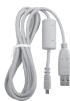
Camera strap
User manual, Product warranty
Software CD
Optional items SD/SDHC memory card / MMC
Rechargeable Battery (SNB-2512)
Charger (SBC-N2)
AV Cable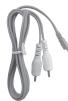
AC Cord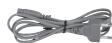
Camera case
Please check that you have the correct contents before using this product. The contents can vary depending on the sales region. To buy the optional equipment, contact your nearest Samsung dealer or Samsung service centre.
Battery life & Number of shots (Recording time)
We recommend batteries for a digital camera (Within a year from the date of manufacture). The batteries are listed below.
- Non rechargeable batteries : 2 X AA Alkaline (High Capacity)
- Rechargeable batteries (Optional) : SNB-2512 (Ni-MH)
SNB-2512 rechargeable battery Specification
| Model | SNB-2512 |
| Type | Ni-MH |
| Capacity | 2500mAh |
| Voltage | 1.2V x 2 |
| Charging time | Approximately 300 Minutes (Use for SBC-N2) |
※ Included battery may vary depending on sales region.
- When using a 256MB MMC memory, the specified shooting capacity will be as follows. These figures are approximate as image capacities can be affected by variables such as subject matter and memory card type.
-S860
| Recorded image size | Super Fine | Fine | Normal | 30FPS | 15FPS | |
| Still image | 6 | About 58 | About 83 | About 118 | - | - |
| 7 | About 64 | About 132 | About 186 | - | - | |
| 8 | About 76 | About 151 | About 195 | - | - | |
| 9 | About 91 | About 179 | About 252 | - | - | |
| 10 | About 140 | About 269 | About 372 | - | - | |
| 11 | About 459 | About 600 | About 744 | - | - | |
| *Movie clip | 20 | - | - | - | About 2'3" | About 4'7" |
| 21 | - | - | - | About 7'44" | About 13'24" | |
-S760
| Recorded image size | Super Fine | Fine | Normal | 30FPS | 15FPS | |
| Still image | 7 | About 65 | About 130 | About 190 | - | - |
| 8 | About 74 | About 147 | About 205 | - | - | |
| 9 | About 88 | About 173 | About 248 | - | - | |
| 10 | About 88 | About 173 | About 248 | - | - | |
| 11 | About 140 | About 274 | About 372 | - | - | |
| 12 | About 538 | About 710 | About 744 | - | - | |
| *Movie clip | 340 | - | - | - | About 2'3" | About 4'7" |
| 320 | - | - | - | About 7'44" | About 13'24" | |
The zoom button doesn't use during the movie recording. The recording times can be changed by the zoom operation.
Refer to the user manual included on the Software CD for more information.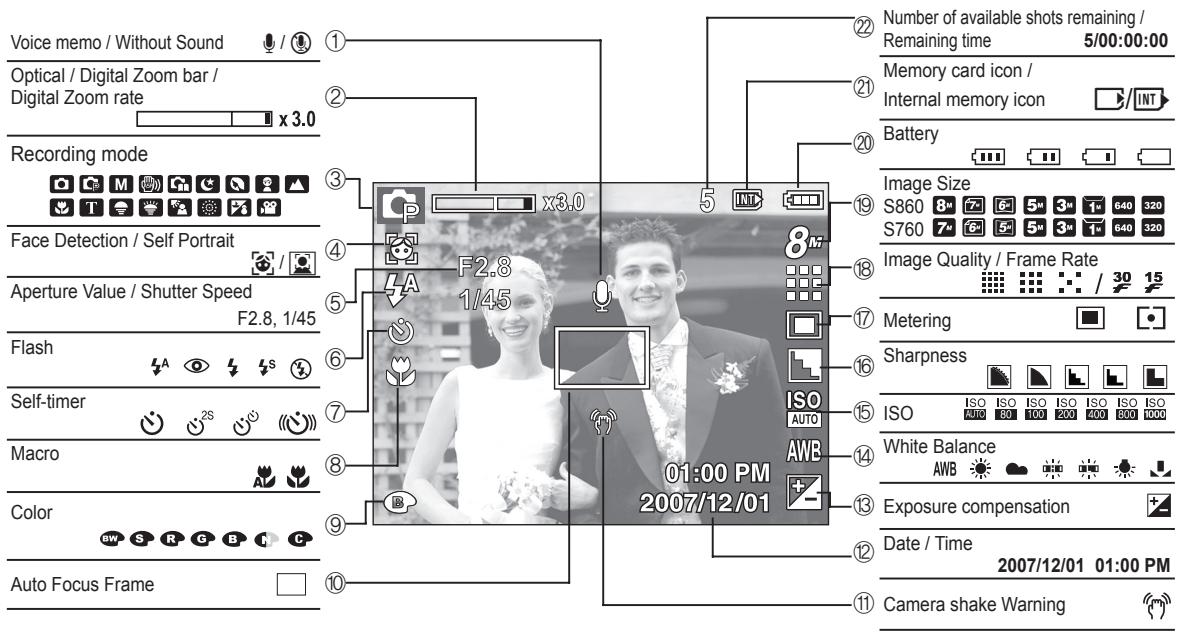
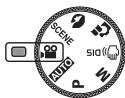
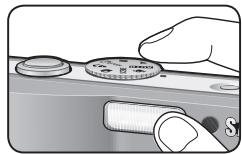
You can select a desired camera mode by using the Mode dial on the top of the camera.

AUTO
Selects this mode for quick and easy picture taking with minimal user interaction.

PHOTO HELP GUIDE
Helps the user to learn the correct picture taking method. This includes solutions for potential problems that may occur, and enables the user to practice shooting.
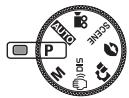
PROGRAM
Selecting the program mode will configure the camera with optimal settings. You can still manually configure all functions except the aperture value and shutter speed.
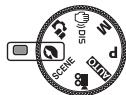
PORTRAIT
Use this menu to take a picture of a person.

MANUAL
You can manually configure all functions with the aperture value and shutter speed.
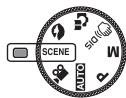
SCENE
Use the menu to easily configure optimal settings for a variety of shooting situations.

DIS
This mode will reduce the effect of camera shake and help you get a well-exposed image in dim conditions.
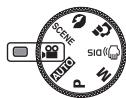
MOVIE CLIP
A movie clip can be recorded for as long as the available recording time.
Taking a picture
How to take a picture
- Turn on the camera and select a camera mode by rotating the mode dial.
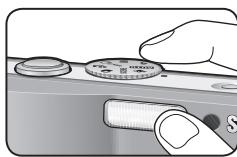
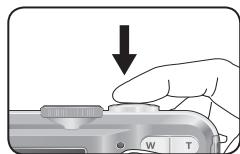
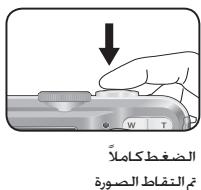
- Take a picture.
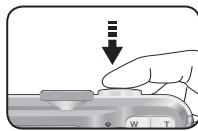
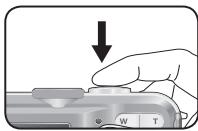
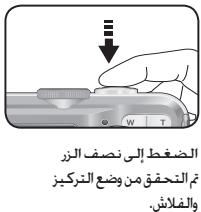
Pressing halfway down Focus and Flash status are checked.
Pressing fully Image is taken
- Hold the camera as shown
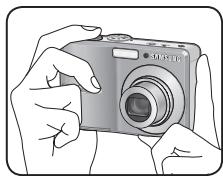
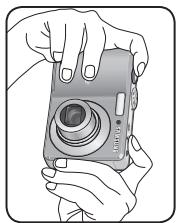
- Confirm the composition
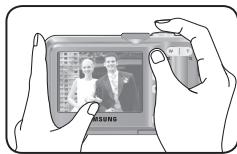
How to record a movie
Rotate the Mode dial and select ( ).
- Confirm the composition
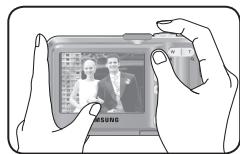
- Start the recording: Press the Shutter button to start recording, and press the Shutter button again to stop recording.
Playing back / Deleting images
Playing back the images
- The last image stored on the memory is displayed.
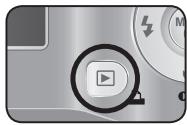
Press the play button (回).
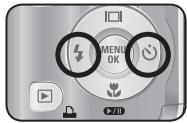
Select an image that you want to play back by pressing the Left/Right button
※Manner mode: Pressing the play mode button for more than 3 seconds changes the buzzer and start-up sound setting to OFF, even though you may have set these to ON.
- Deleting images
- This deletes images stored on the memory card.
- Select an image that you want to delete by pressing the Left / Right button and press the DELETE ( 合 ) button.
[Single Image]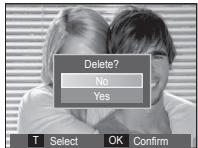
[Thumbnail Image]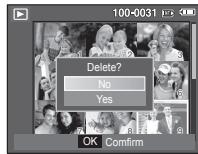
- To add images to delete, press the T button.
- Left / Right button : Selects images
- T button : Checks for deletion
- OK button : deletes the selected images.
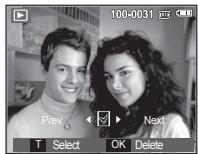
- Select the submenu values by pressing the Up / Down button and then press the OK button.
- If [No] is selected : cancels "Delete Image".
- If [Yes] is selected : deletes the selected images.
Downloading images
| For Windows | For Macintosh |
| PC with processor better than Pentium 450MHz(Pentium 800MHz recommended) | Power Mac G3 or later |
| Windows 98SE / 2000 / ME / XP/Vista | Mac OS 9.2 ~ 10.4 |
| Minimum 128MB RAM(Over 512MB recommended)200MB of available hard disk space (Over 1GB recommend) | Minimum 64MB RAM(Over 256MB recommended)110MB of available hard-disk space |
| USB port | USB port |
| CD-ROM drive | CD-ROM drive |
| 1024x768 pixels, 16bit colordisplay compatible monitor(24bit color display recommended)MicroSoft DirectX 9.0C |
PC connection mode
- Install the supplied Software.
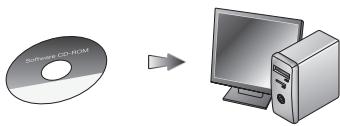
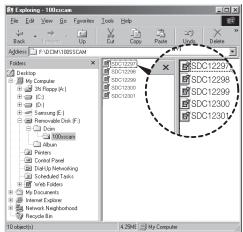
- Download the images
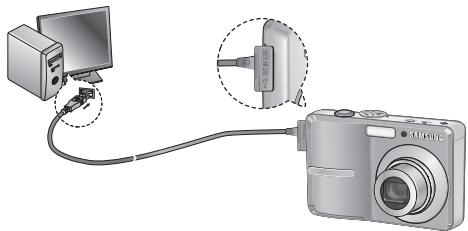
- Connect the camera and Computer with supplied USB cable and download the image on your computer to save them.
Specifications
Image Sensor -Type:1/2.5"CCD
- Effective Pixel : S860 : Approx. 8.1 Mega-pixel
S760:Approx.7.2 Mega-pixel
- Total Pixel : S860 : Approx. 8.3 Mega-pixel
S760 : Approx. 7.2 Mega-pixel
Lens - Focal Length : SHD Lens f = 6.3 ~ 18.9mm
(35mm film equivalent : 38 ~ 114mm)
-F No.: F2.8(W) ~ F5.2(T)
- Digital Zoom : - Still Image mode :1.0X ~ 3.0X
- Playmode: 1.0X~12.8X
(depends on image size)
LCD Monitor - 2.4" color TFT LCD (230,000 dots)
Focusing - Type: TTL auto focus (Multi AF, Center AF, Face Detection AF) - Range
| Normal | Macro | Auto Macro | |
| Wide | 80cm ~ Infinity | 10cm ~ 80cm | 10cm ~ Infinity |
| Tele | 50cm ~ 80cm | 50cm ~ Infinity |
Shutter - Speed 1~1/2,000 sec.
Manual/Night: 8-1/2,000 sec., Firework: 4 sec.)
Exposure - Control: Program AE
- Metering: Multi, Spot, Face Detection AE - Compensation: ±2EV (1/3EV steps) - ISO: Auto, 80, 100, 200, 400, 800, 1000
Flash - Modes: Auto, Auto & Red-eye reduction, Fill-in flash, Slow sync, Flash off
- Range: Wide: 0.3m ~ 4.0m, Tele: 0.5m ~ 2.1m
- Recharging Time: Approx. 5.5 sec
Sharpness - Soft+, Soft, Normal, Vivid, Vivid+
Color Effect - Normal, B&W, Sepia, Red, Green, Blue, Negative, Custom Color
White Balance - Auto, Daylight, Cloudy, Fluorescent_H, Fluorescent_L, Tungsten, Custom
Voice Recording - Voice Recording (max. 10 hours)
- Voice Memo in Still Image (max. 10 sec.)
Date Imprinting - Date, Date & Time, Off (user selectable)
Shooting - Still Image
-Mode : Auto, Program, Manual, DIS,
Photo Help Guide, Portrait, Scene
- Scene : Night, Children, Landscape,
Close-up, Text, Sunset, Dawn,
Backlight, Firework, Beach & Snow
-Self-timer : 10 sec., 2 sec., Double,
Motion Timer
Specifications
- Movie Clip
-With Audio (recording time : memory capacity dependent) ·Size:640x480,320x240 -Frame rate : 30 fps, 15 fps -3X Optical Zoom and Mute in Zooming - Movie Editing (Embedded): Pause during recording, Still Image Capture
Storage
- Media Internal memory : About 11MB flash memory -External Memory (Optional): MMC card (Up to 1GB guaranteed) SD card (Up to 2GB guaranteed) SDHC card (Up to 4GB guaranteed)
- File Format - Still Image: JPEG (DCF), EXIF 2.2, DPOF 1.1, PictBridge 1.0; Movie Clip: AVI (MJPEG); Audio: WAV
- Image Size
·S860
- Capacity (256 MB Size)
·S860
| 8M | 7° | 6° | 5M | 3M | 1° | |
| Super Fine | About 58 | About 64 | About 76 | About 91 | About 140 | About 459 |
| Fine | About 83 | About 132 | About 151 | About 179 | About 269 | About 600 |
| Normal | About 118 | About 186 | About 195 | About 252 | About 372 | About 744 |
·S760
| 7m | 6m | 5m | 5m | 3m | 1m | |
| Super Fine | About 65 | About 74 | About 88 | About 88 | About 140 | About 538 |
| Fine | About 130 | About 147 | About 173 | About 173 | About 274 | About 710 |
| Normal | About 190 | About 205 | About 248 | About 248 | About 372 | About 744 |
These figures are measured under Samsung standard conditions and may vary depending on shooting conditions and camera settings.
"E" Button
- Effect: Color
- Editing: Resize, Rotate, Color
Image Play
- Type: Single image, Thumbnails, Multi Slide Show, Movie Clip
Interface
- Digital output connector: USB 2.0
- Audio: Mono
- Video output: NTSC, PAL (user selectable)
- DC Adapter: 3.3V
Power Source - Primary Battery: 2 X AA Alkaline
- Rechargeable battery (Optional):
SNB-2512B KIT (2xAA Ni-MH Battery & Charger)
※ Included battery may vary depending on sale region.
Dimensions (WxHxD) - 93 X 62 X 26.5mm
(excluding protrusions)
Weight - Approx. 123g (without batteries and card)
Operating Temperature - 0~40°C
Operating Humidity - 5~85%
Software - Samsung Master, Adobe Reader
※ Specifications are subject to change without prior notice. ※ All trademarks are the property of their respective owners.
Correct Disposal of This Product

Correct Disposal of This Product (Waste Electrical & Electronic Equipment)
(Applicable in the European Union and other European countries with separate collection systems) This marking shown on the product or its literature indicates that it should not be disposed with other household waste.
wastes at the end of its working life. To prevent possible harm to the environment or human health from uncontrolled waste disposal, please separate this from other types of wastes and recycle it responsibly to promote the sustainable re-use of material resources. Household users should contact either the retailer where they purchased this product, or their local government office, for details of where and how they can take this item for environmentally safe recycling. Business users should contact their supplier and check the terms and conditions of the purchase contract. This product should not be mixed with other commercial wastes for disposal.

Samsung Techwin cares for the environment at all product manufacturing stages to preserve the environment, and is taking a number of steps to provide customers with more environment-friendly products. The Eco mark represents Samsung Techwin's will to create environment-friendly products, and indicates that the product satisfies the EU RoHS Directive.
Table of Contents
Discover your camera 1
Rechargeable battery (SNB-2512)
Charger (SBC-N2)
AV cable
Power cable
Case
S760: Approximately 7.2 megapixels
Lens - Focal length:
SHD lens f = 6.3 18.9mm
Multi, Center-weighted, Spot AF
P. MULTI, M. AU P. CENTREE, AF
(Manual / Night: 8 1 / 2,000 second,
Artifice: 4 seconds)
| 8th | 7th | 6th | 5th | 3rd | 1st | |
| Çok iley | Yaklabyk 58 | Yaklabyk 64 | Yaklabyk 76 | Yaklabyk 91 | Yaklabyk 140 | Yaklabyk 459 |
| İyi | Yaklabyk 83 | Yaklabyk 132 | Yaklabyk 151 | Yaklabyk 179 | Yaklabyk 269 | Yaklabyk 600 |
| Normal | Yaklabyk 118 | Yaklabyk 186 | Yaklabyk 195 | Yaklabyk 252 | Yaklabyk 372 | Yaklabyk 744 |
| 7° | 6° | 5° | 5° | 3° | 1° | |
| Çok lıy | Yaklabyk 65 | Yaklabyk 74 | Yaklabyk 88 | Yaklabyk 88 | Yaklabyk 140 | Yaklabyk 538 |
| Iyi | Yaklabyk 130 | Yaklabyk 147 | Yaklabyk 173 | Yaklabyk 173 | Yaklabyk 274 | Yaklabyk 710 |
| Normal | Yaklabyk 190 | Yaklabyk 205 | Yaklabyk 248 | Yaklabyk 248 | Yaklabyk 372 | Yaklabyk 744 |
Indicator monitor LCD 6
Mode button 7
Taking pictures 8
Playback / Deleting images 9
Downloading images 10
Specifications 11
1


A


SINB-2512
SD/SDHC/MMC
a.1234567890
a2s3g0000000000000000000000000000000000000000000000000
.
( \ Jk - k\ : k z) ,Jk = k
aaslll bll l aew 256 pnn MMCCsSla hpaanw n ic aill acgic wae yaae aeew aee eae eae eae eae ee eae eae eae eae eae eae eae eae eae eae eae eae eae eae eae eae eae eae eae eae eae eae eae eae eae eae eae eae eae eae eae eae eae eae eae eae eae eae eae eae eae eae eae eae eae eae eae eae eae eae eee
| 15 FPS | 30 FPS | gale | zaii | L'2234567890 | JHJHJHJHJHJHJHJHJHJHJHJHJHJHJHJHJHJHJHJHJHJHJHJHJHJHJHJHJHJHJHJHJHJHJHJHJHJHJHJHJHJHJHJHJHJHJHJHJHJHJ H |
| - | - | L'2234567890 | L'2234567890 | ||
| - | - | L'2234567890 | L'2234567890 | ||
| - | - | L'2234567890 | L'2234567890 | ||
| - | - | L'2234567890 | L'223456789 | ||
| - | - | L'2234567890 | L'223456789 | ||
| L'2234567890 | L'2234567890 | - | - | - | - |
| L'2234567890 | L'2234567890 | - | - | - | - |
| L'2234567890 | L'2234567890 | - | - | - | - |
S760-
| 15 FPS | 30 FPS | gale | a#e | L#j#e | J#e J#e J#e J#e J#e J#e J#e J#e J#e J#e J#e J#e J#e J#e J#e J#e J#e J#e J#e J#e J#e J#e J#e J#e J#e J#e J#e J#e J#e J#e J#e J#e J#e J#e J##e J#e J#e J#e J#e J#e J#e J#e J#e J#e J#e J#e J#e J#e J#e J#e J#e J#e J#e J#e J#e J#e J#e J#e J#e J#e J#e J#e J#e J#e J#e J#e J#e J#o | 7 | |
| - | - | L#j#e190 | L#j#e130 | L#j#e65 | |||
| - | - | L#j#e205 | L#j#e147 | L#j#e74 | |||
| - | - | L#j#e248 | L#j#e173 | L#j#e88 | |||
| - | - | L#j#e248 | L#j#e173 | L#j#e88 | |||
| - | - | L#j#e372 | L#j#e274 | L#j#e140 | |||
| - | - | L#j#e744 | L#j#e710 | L#j#e538 | |||
| L#j#e4'07" | L#j#e2'03" | - | - | - | 640 | ||
| L#j#e13'24" | L#j#e7'44" | - | - | - | 320 |
1 1 1 1 1 1 1 1 1 1 1 1 1 1 1 1 1 1 1 1 1
(2011年全国春季)
LJbJbIaIgJbJyLLaIe
(aaiea)AAjnglaJIyIJIyIJIy
SNB-2512 (Ni-MH): (a)
SNB-2512 1
pssuilll ac,swg|yolSll anie aoe goglogyolSll albgalSs 1. yolSllg

Lg 10
Jc Jg 1c ccluag jolSj jolai jilai gll i joi

yjgolal
8.8.1.2.11.4
a231 c0g0.2g0.2 10: jlll l
CCD1/2.5:gJl- gJl
Lj:JusL8.1 Approx.:S860:JusL
LJ7.2 Approx.: S760
L8.3 Approx.:S860:JUSSI
L7.2 Approx.: S760
(114~38;35aJg≤)18.9~6.3=SHD aWc:gjllJg-
F5.2(T) F2.8(W):
:
3.0X~1.0X:
(a.11 12.8X\~1.0X:
(a,b,c:230,000) aTFT2.4aL - aL
1aLaljSjLaiqJyJIySjTILg
( a > b) ( 1 ≤ i < 1) ∴ i s
| yIaIaLySlo | yIaSlo | yIdc | |
| \( \dot{a}\dot{a}g\dot{a}\dot{y}\dot{a}\dot{L}\dot{o}\dot{J}\dot{a}\dot{n},\dot{p}\dot{a}\dot{w}\dot{1}\dot{0} \) | \( \dot{p}\dot{a}\dot{a}80\dot{J}\dot{a}\dot{n},\dot{p}\dot{a}\dot{w}\dot{1}\dot{0} \) | \( \dot{a}\dot{a}g\dot{a}\dot{y}\dot{a}\dot{L}\dot{o}\dot{J}\dot{a}\dot{n},\dot{p}\dot{a}\dot{w}\dot{0} \) | \( g\dot{a}\dot{a}g \) |
| \( \dot{a}\dot{a}g\dot{a}\dot{y}\dot{a}\dot{L}\dot{o}\dot{J}\dot{a}\dot{n},\dot{p}\dot{a}\dot{w}\dot{5}0 \) | \( \dot{p}\dot{a}\dot{a}80\dot{J}\dot{a}\dot{n},\dot{p}\dot{a}\dot{w}\dot{5}0 \) | \( \dot{p}\dot{a}\dot{a} \) |
2,000/1~1a
| 1w | 3M | 5M | 5M | 6M | 7M | |
| L2x:538 | L2y:140 | L2z:88 | L2y:88 | L2z:74 | L2y:65 | L2x:66 |
| L2x:710 | L2y:274 | L2z:173 | L2y:173 | L2z:147 | L2y:130 | L2x:130 |
| L2x:744 | L2y:372 | L2z:248 | L2y:248 | L2z:205 | L2y:190 | L2x:190 |
gaiill gbi 1c gii iag eouolal aawll all lla 1p2l aie wz,※ 1.
-
“E”
jgljg jgljg jgljg jgljg
aegbao. 1yrc aai ayd sag: gill - gull
USB2.0:
4a ≥ 19
gol
(panillabwgljll JJI)NTSC.PAL:g
Jg3.3:22211Jg
(g) SNB-2512BKIT: JSSLSSLSSLSSLSSLSSLSSLSSLSSLSS
(2xAA Ni-MH aL
gaiiaioiistiyiaiaiallaibaiiaix※
AR-12
(SliJaeW: JuaJIJIa)
240x320, 480x640:
a1111111111111111111111111111111111111111111
pssllsglal 105g aaleaaiy
aIiIgOJbIJI JIeJIJI 10
:1jLwgl- jz
11 11
∴ 2(1,2) = 1
(LLa1 1 aL) MMC aIb:
all
PictBridge 1.0, DPOF 1.1, EXIF 2.2, A(DCF), JPEG:
AVI (MJPEG):
WAV:
S860-
| 1- | 3M | 5M | 6M | 7M | 8M |
| X1024 | X2048 | X2592 | X3264 | X3264 | X3264 |
| 768 | 1536 | 1944 | 1836 | 2176 | 2448 |
S760-
| 1 | 3M | 5M | 5M | 6M | 7M |
| X1024 | X2048 | X2592 | X3072 | X3072 | X3072 |
| 768 | 1536 | 1944 | 1728 | 2048 | 2304 |
92.65 × 62 × 93 (W × H × D)
40-
85~5-
Adobe Reader, Samsung Master -
(20
Therefore, the area of triangle ACD is 1/2 * AQ * CD = 1/2 * 2t * 5.
J 15
Therefore, a1 = 2/3, a2 = -4/3, b1 = 5/6, b2 = -3/5.
.
Samsung Techwin
100
1
1
Samsung Techwin Ecoolc
.EU RoHSol


RoHS compliant

4∠
nnaaannnnnnaaannn
#
1 1 4 5 6 7 8 9 10 11
Microsoft, Windows 11
#
aannnnnnaanennnnnnnnnnnnnnnnnnnnnnnnnnnnnnnnnnnnnnnnnnnnnnnnnnnnnnnnnnnnnnnnnnnnnnnnnnnnnnnnnnnnnnnnnnnnnnnnnnnnnnnnnnnnnnnn

wnnnnnaaannnnnnae nnnnnae nnnnne nnnnne nnnnne nnnnne nnnnne nnnnne nnnnne nnnnne nnnnne nnnnne nnnnne nnnnne nnnnne nnnnne nnnnne nnnnne nnnnne nnnnne nnnnne nnnnne nnnnne nnnnne nnnnne nnnnne nnnnne nnnnnee nnnnne nnnnne nnnnne nnnnne nnnnne nnnnne nnnnne nnnnne nnnnne nnnnne nnnnne nnnnne nnnnne nnnnne nnnnne nnnnne nnnnne nnnnne nnnnne nnnnne nnnnne nnnnne nnnnne nnnnne nnnnae


LCD - 2.4" TFT LCD (230,000
| Wide | 80mm.~50mm | 10mm.~80mm. | 10mm.~50mm |
| Tele | 50mm.~80mm. | 50mm.~50mm |
-1/1200 (5571/n7n:8~1/2,0004
nunuua -nunnuu:luuueAA 1- nnuu:nuu,nuuue,AEnuuuruuu uuuu 1- nnuuauuu: ±2EV (1/3EV) ISO: 80, 100, 200, 400, 800, 1000
waw -nua: nuiu, uuiuuaaanaanua, uuuWai, Slow sync, - 5%0: Wide: 0.311. ~4.011., Tele: 0.511. ~2.111. -155555555555555
nunna-1nnn+,nnnana,nnnnn,nnnnn,nnnnn iwwnn -nna, nna-n, nnaa, nna, nna, nna, na muaa a 1
nunnnna -nnnnnn (10 10 - 1nnnnnnaaennnnnnae (gaa 10 nnn)
mwnwun -nun,wnan,la (
-
·:nua:,iun,ssu,DIS,y n: nannu, iin, wnu, zua Ina, vwnu, wnuan, nnnu, uinlan, annuw, wnu& :10 2
yaaanw
-
The CE Mark is a Directive conformity mark of the European Community (EC)
6806-4695


- GETTING TO KNOW YOUR CAMERA
- CONTENTS
- FCC NOTICE
- NOTE
- CAUTION
- DECLARATION OF CONFORMITY
- DANGER
- WARNING
- IDENTIFICATION OF FEATURES / CONTENTS OF CAMERA
- BATTERY LIFE & NUMBER OF SHOTS (RECORDING TIME)
- AUTO
- PHOTO HELP GUIDE
- PROGRAM
- PORTRAIT
- MANUAL
- SCENE
- DIS
- MOVIE CLIP
- TAKING A PICTURE
- HOW TO TAKE A PICTURE
- PLAYING BACK / DELETING IMAGES
- PLAYING BACK THE IMAGES
- DELETING IMAGES
- DOWNLOADING IMAGES
- PC CONNECTION MODE
- SPECIFICATIONS
- CORRECT DISPOSAL OF THIS PRODUCT
- TABLE OF CONTENTS
- DISCOVER YOUR CAMERA
- ( \ JK - K\ : K Z) ,JK = K
- NNAAANNNNNNAAANNN
- YAAANW
Brand : SAMSUNG
Model : S760-SILVER
Category : Camera