
ARC 241G - PC Case Azza - Free user manual and instructions
Find the device manual for free ARC 241G Azza in PDF.


Pick your language and provide your email: we'll send you a specifically translated version.
| Type | PC Case |
| Brand | Azza |
| Model | ARC 241G |
| Form Factor | Mid Tower |
| Motherboard Support | ATX, Micro-ATX, Mini-ITX |
| Dimensions (H x W x D) | 465 x 210 x 440 mm |
| Weight | Approx. 6.5 kg |
| Material | Steel, Tempered Glass |
| Side Panel | Tempered Glass |
| Expansion Slots | 7 |
| Drive Bays | 2x 3.5", 2x 2.5" |
| Cooling Support (Front) | 3x 120mm or 2x 140mm |
| Cooling Support (Top) | 2x 120mm or 2x 140mm |
| Cooling Support (Rear) | 1x 120mm |
| Radiator Support | Front: 240mm/280mm, Top: 240mm, Rear: 120mm |
| PSU Support | Bottom mount, ATX |
| Maximum GPU Length | 350 mm |
| Maximum CPU Cooler Height | 160 mm |
| Front I/O | 2x USB 3.0, Audio, MIC |
| Dust Filters | Top, Bottom, Front |
| Warranty | 1 year |
Frequently Asked Questions - ARC 241G Azza
What is the form factor of the Azza ARC 241G PC case?
The Azza ARC 241G is a Mid Tower case.
What motherboard sizes are supported?
It supports ATX, Micro-ATX, and Mini-ITX motherboards.
Does the case come with pre-installed fans?
No, fans are not pre-installed. You can install up to 3x 120mm or 2x 140mm in the front, 2x 120/140mm on top, and 1x 120mm at the rear.
What is the maximum GPU length supported?
The maximum GPU length is 350 mm.
Can I install a liquid cooler?
Yes, you can install a 240mm or 280mm radiator in the front, 240mm on top, and 120mm at the rear.
How many drive bays does the case have?
It has 2x 3.5-inch and 2x 2.5-inch drive bays (internal).
Is the side panel tempered glass?
Yes, the left side panel is tempered glass.
What ports are available on the front I/O?
The front I/O includes 2x USB 3.0, an audio jack, and a microphone jack.
What is the maximum CPU cooler height?
The maximum CPU cooler height is 160 mm.
Does the case have dust filters?
Yes, it includes dust filters on the top, bottom, and front.
User questions about ARC 241G Azza
0 question about this device. Answer the ones you know or ask your own.
Ask a new question about this device
No questions yet. Be the first to ask one.
Download the instructions for your PC Case in PDF format for free! Find your manual ARC 241G - Azza and take your electronic device back in hand. On this page are published all the documents necessary for the use of your device. ARC 241G by Azza.
USER MANUAL ARC 241G Azza
| AZZA245 FINISH ONE MISSION | Installation Instructions | Specifications |
| K7XT | 1. Specifications2. Chassis Parts3. Control Panel Functions4. 3.5"/2.5" HDD Installation5. Cooling System Installation6. Digital RGB Fan Installation | ModelModel NameARC 241Model NumberCSA2-241/CSA2-241DSpecificationsTypeATX Mid TowerColorBlack(ularity/Black(Interior)Sides Panel Window: CSAZ-241)Transparent Acrylic with rubber mountsSide Panel Window: CSAZ-241GTempereD Glass with rubber mountsMix CFU cooler / HeightUp to 155mmMix Video Card LengthUp to 340mm long video cardPower SupplyNot IncludedMotherboard CompatibilityATX Micro ATXExpansionExternal 0.5" Drive Bays8Internal 2.5" Drive BaysUp to 3Internal 3.5" Drive BaysUp to 3Expansion Side7Top Ports1xUSB1.0, 1xUSB2.5, HD AudioPhysical SpecificationsDimensions (HxVxD):490x197x427mm / 18.9x7.8x16.8 inchesWeight: CSAZ-2413.8x8x4.8lbsWeight: CSAZ-241G4.8x10.8lbsFeaturesDigital RGB Light EffectsDigital RGB light on the frontLeft Side PanelTransparent acrylic for CSAZ-241, tempered glass for CSAZ-241GHigh- quality transparent side window allows for clear visuals to inner components.Available Fan Ports:2x120mm parts on the Top3x120mm or 2x140mm parts in the Front(1x120mm built in automatic lighting mode digital RGB Fan included)1x120mm Fan port in the RearDust FiltersRemovable (Magneti) dualproof net on the top and dualproof PVCNet on the bottom of sharesWater CoolingSupports radiators up to 240mm as frontIsolated ChamberPower supply is based inside its own isolated chamber, preventing its head from affecting other componentsEasy Installation coolerA pre-out hole for easy installation of CPU cooler, eliminating the need to remove the motherboard |
| USER MANUALwww.rscnit.com | ||
| AZZA245 FINISH ONE MISSION | Chassis Parts | Control Panel Functions POWERUSB3.0(Blue)RESETUSB2.0(Black)HDD LEDMicPOWER LEDAudio POWERUSB3.0(Blue)RESETUSB2.0(Black)HDD LEDMicPOWER LEDAudio |
| 1Front bezel | ||
| 2Acrylic cover | ||
| 3Case feet x4 | ||
| 4Dust filter | ||
| 5Transparent acrylic side panel for CSAZ-241 | ||
| 6Tempered glass side panel for CSAZ-241G | ||
| 7PCI slot cover | ||
| 8PVC dust filter with magnetRight side panel |
| 1 | Front bezel |
| 2 | Acrylic cover |
| 3 | Case feet x4 |
| 4 | Dust filter |
| 5 | Transparent acrylic side panel for CSAZ-241 |
| Tempered glass side panel for CSAZ-241G | |
| 6 | PCI slot cover |
| 7 | PVC dust filter with magnet |
| 8 | Right side panel |
| POWER | USB3.0(Blue) | ||
| RESET | USB2.0(Black) | ||
| HDD LED | Mic | ||
| POWER LED | Audio |
| 3.5"72.5"HDD Installation | Cooling System Installation | Cooling System Installation | |||
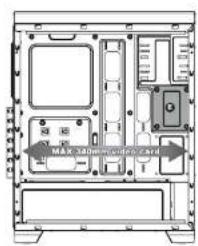 | •Supports up to 340mm long video cards.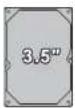 or or  •Supports 3.5" HDD X3(○○○)•Supports 2.5" Devices X3(○○○) •Supports 3.5" HDD X3(○○○)•Supports 2.5" Devices X3(○○○) | Fro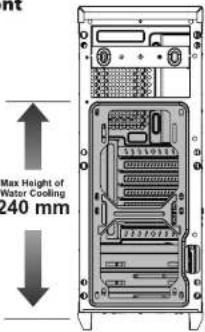  |  or [120mm x2] or [120mm x2]  | Rear 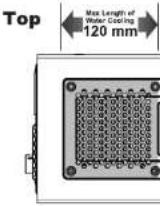 |  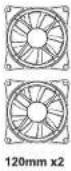 |
| Digital RGB Fan installation | |||||
Connect to power molex connectoran of MB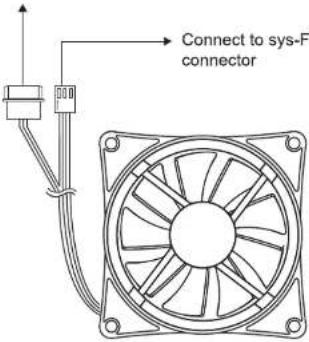 Connect to a molex connector, or a 3-pin connector. Connect to a molex connector, or a 3-pin connector. | |||||
Front

Manual assistant
Powered by Anthropic
Waiting for your message
Product information
Brand : Azza
Model : ARC 241G
Category : PC Case