
Pyramid 240 - PC Case Azza - Free user manual and instructions
Find the device manual for free Pyramid 240 Azza in PDF.


| Product Type | All-in-One Liquid CPU Cooler |
| Model | Pyramid 240 |
| Fan Dimensions | 120 x 120 x 25 mm |
| Fan Speed | 500-2000 RPM ± 10% |
| Fan Bearing Type | Hydro Bearing |
| Fan Rated Voltage | DC 12.2 V |
| Fan Rated Current | 0.28 A |
| Fan Power Consumption | 3.36 W |
| Fan Airflow | 57.5 CFM |
| Fan Noise Level | 34 dB(A) |
| Radiator Dimensions | 284 x 121 x 35 mm |
| Radiator Material | Aluminum |
| Water Block Dimensions | 75 x 85 x 76.5 mm |
| Pump Type | Radiator built-in pump |
| Pump Rated Voltage | DC 12 V |
| Pump Rated Current | 0.38 A |
| Pump Power Consumption | 4.5 W |
| Pump Speed | 4000 RPM ± 10% |
| Pump Noise Level | < 25 dB(A) |
| Tube Length | 400 mm |
| Socket Compatibility (Intel) | LGA115X, LGA1366, LGA1200, LGA1700, LGA1851 |
| Socket Compatibility (AMD) | AM5, AM4, AM3+/AM3, AM2+/AM2, FM2+/FM2, FM1 |
| RGB Connector | 5V ADD-HEADER (Female to Male) |
| Warranty | Refer to manufacturer |
Frequently Asked Questions - Pyramid 240 Azza
User questions about Pyramid 240 Azza
0 question about this device. Answer the ones you know or ask your own.
Ask a new question about this device
Download the instructions for your PC Case in PDF format for free! Find your manual Pyramid 240 - Azza and take your electronic device back in hand. On this page are published all the documents necessary for the use of your device. Pyramid 240 by Azza.
USER MANUAL Pyramid 240 Azza
| Model Name | Pyramid 240 | |
| Model No. | LCAZ-240Y-ARCB | |
| Fan | Dimensions | 120 x 120 x 25mm |
| Speed | 500x100-2000x10% RPM | |
| Searing Type | Hydro Bearing | |
| Rating voltage(Fan) | DC 12.2V | |
| Rating current(Fan) | 0.28A | |
| Power consumption(Fan) | 3.36W | |
| Rating voltage(Lights) | DC 5.0V | |
| Rating current(Lights) | 0.36A(Max) | |
| Power consumption(Lights) | 1.8W | |
| Airflow | 57.5CFM | |
| Air Pressure | 1.8mm/120 | |
| Noise | 34 dB (A) | |
| Lifegain | 20000 hours at 25°C | |
| ARCB Connector | SM2.54-3Pin(Female) to SM2.54-3Pin(Male) | |
| Power Connector | 2510.4Pin(female) to 2510.4Pin(Male) | |
| Radiator | Dimensions | 284x121x35.0mm |
| Material | Aluminum silty | |
| Water Block | Dimensions | 75.0x85.0x76.5mm |
| ARGS Connector | 5V ADD-HEADER(Final) to ADD-HEADER(Male) | |
| Rating voltage(ights) | DC 5.0V | |
| Rating current(Lights) | 0.72A(Max) | |
| Power consumption(Lights) | 3.5W | |
| Pump | Pump Type | Radiator built-in pump |
| Connector | 2510-3Fm | |
| Bearing type | Zirconia ceramic bearings | |
| Rating voltage | DC 12.0V | |
| Rating current | 0.38A | |
| Power consumption | 4.5kW | |
| Speed | 4000x10% RPM | |
| Water Pressure | 1.5 m+20 | |
| Flow Rate | 96 L/h | |
| Motor Type | 3-Phases brushless DC motor | |
| Lifespan | 50000s | |
| Noise | <25dB(A) | |
| Tube | Dimensions | 400mm |
| Material | EPDM-Rayon mesh | |
| Socket Compatibility | Intel Socket | LGA115X,LGA136X,GA1200X,GA1700X,GA1851 |
| AMD Socket | AMU/AMU/AMS+AMU/AMU+AMU/FM2+FM2/FM1 |
| Model Name | Pyramid 360 | |
| Model No. | LCA2-360Y-ARCB | |
| Fan | Dimensions | 120 x 120 x 25mm |
| Speed | 500x100-2000x10% RPM | |
| Searing Type | Hydro Bearing | |
| Rating voltage(Fan) | DC 12.0V | |
| Rating current(Fan) | 0.28A | |
| Power consumption(Fan) | 3.3kW | |
| Rating voltage(Lights) | DC 5.0V | |
| Rating current(Lights) | 0.36A(Max) | |
| Power consumption(Lights) | 1.6W | |
| Airflow | 57.5CFM | |
| Air Pressure | 1.8mm/20 | |
| Noise | 34 dB (A) | |
| Lifespan | 20000 hours at 25°C | |
| ARCB Connector | SM2.54-3Pin(Female) to SM2.54-3Pin(Male) | |
| Power Connector | 2510-4Pin(Female) to 2510-4Pin(Male) | |
| Radiator | Dimensions | 404x121x35.0mm |
| Material | Aluminum dilly | |
| Water Block | Dimensions | 70.2x85.0x76.5mm |
| ARGS Connector | 5V ADD-HEADER(Female) to ADD-HEADER(Male) | |
| Rating voltage(Lights) | DC 5.0V | |
| Rating current(Lights) | 0.724(Max) | |
| Power consumption(Lights) | 3.6W | |
| Pump | Pump Type | Radiator butt+ pump |
| Connector | 2510.3Pin | |
| Bearing type | Zirconia ceramic bearings | |
| Rating voltage | DC 12.0V | |
| Rating current | 0.38A | |
| Power consumption | 4.58W | |
| Speed | 4000±10% RPM | |
| Water Pressure | 1.5 mH2O | |
| Flow Rate | 96 L/h | |
| Motor Type | 3-Phases bruntless DC motor | |
| Linespan | 5000Hz | |
| Noise | <25dB(A) | |
| Tube | Dimensions | 400mm |
| Material | EPDM+Rayon mesh | |
| Socket Compatibility | Intel Socket | LGA115X/LGA1366L/GA1209/LGA1700L/GA1851 |
| AMD Socket | AM5/AM4/AM5+AM5/AM2+AM2/FM2+FM2/FM1 |
INSTALL CONTENTS

PREPARATION

Intel LGA1851 / LGA1700 / 115X / LGA1200 / LGA1366
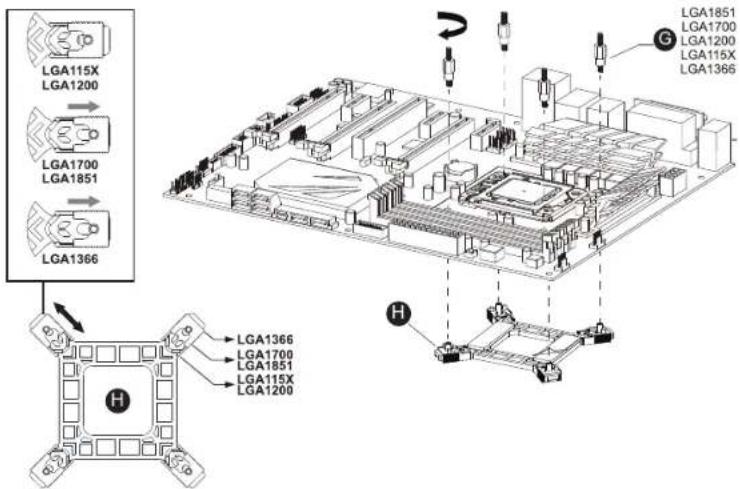
AMD AM5/AM4/AM3+/AM3/AM2+/AM2/FM2+/FM2/FM1
Please remove the original bracket of AMD first

natural_image
Isometric diagram of a computer motherboard with two train cars and a central monitor (no text or labels)
INSTALLATION
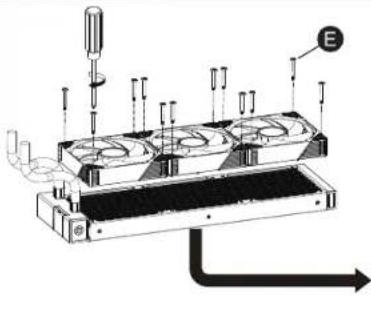
natural_image
Technical diagram of a mechanical device with multiple ports and piping (no text or symbols)
natural_image
Technical line drawing of a mechanical device with labeled component 'F' (no text or symbols beyond label)
Notice :
Please remove the protect tape
before installing

natural_image
Pure technical diagram of an electronic circuit board with no visible text or symbolsAMD AM5/AM4/AM3+/AM3/AM2+/AM2/FM2+/FM2/FM1
The suggestion of the screw sequence

natural_image
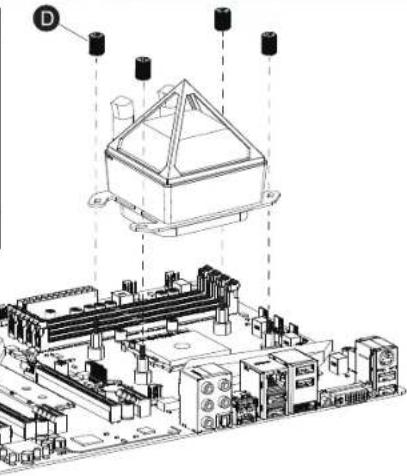
Technical line drawing of an electronic device with a top view and internal components, no visible text or symbolsIntel LGA1851 / LGA1700 / 115X / LGA1200 / LGA1366
The suggestion of the screw sequence

D

natural_image
Technical line drawing of a mechanical component with mounting holes and structural supports (no text or symbols)
natural_image
Isometric technical line drawing of a computer motherboard layout (no text or labels)ARGB Motherboard Connection

[Non-Text]
1. Please connect the ARGB port to the ARGB controller.
2. The power port of water-coding head must be connected to AIO PUMP port.
otherwise it will seriously affect the performance.
3. If there is not AIO PUMP port plug into the system fan port and set the port fan mode to PWM mode,

natural_image
Isometric line drawing of a computer motherboard with cooling fans and heatsink (no text or labels)The pump hose faces the PCIe slot for better performance.

Brand : Azza
Model : Pyramid 240
Category : PC Case