
S518J - Tablet PHILIPS - Free user manual and instructions
Find the device manual for free S518J PHILIPS in PDF.
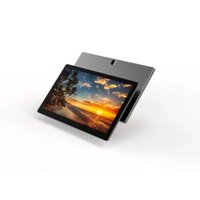


| Product Type | Tablet |
| Brand | Philips |
| Model | S518J |
| Display | Touchscreen |
| Rear Camera | Yes (with flash) |
| Flash | Yes |
| Port | USB Type-C |
| Reset Button | Yes (reset hole) |
| Power Button | Yes |
| Speaker | Yes |
| Operating System | Android (assumed) |
| Connectivity | Wi-Fi (typical), Bluetooth (assumed) |
| Safety Information | Included in manual; read before use |
| Environmental Protection Use Period | 30 years |
| Hazardous Substances | Complies with Chinese regulations |
| Guarantee | Valid in China; customer service: 400 955 6666 |
| Manufacturer | TPV Audio and Visual Technology (Shenzhen) Co., Ltd. |
| Document Version | 10 (2023-12-05) |
Frequently Asked Questions - S518J PHILIPS
User questions about S518J PHILIPS
0 question about this device. Answer the ones you know or ask your own.
Ask a new question about this device
Download the instructions for your Tablet in PDF format for free! Find your manual S518J - PHILIPS and take your electronic device back in hand. On this page are published all the documents necessary for the use of your device. S518J by PHILIPS.
USER MANUAL S518J PHILIPS
Welcome, Important Notice
www.philips.com/support
Product Features
Copyright © 2021 TPV Audio and Visual Technology (Shenzhen) Co., Ltd TPV Audio and Visual Technology (Shenzhen) Co., Ltd reserves the rights to modify specifications without notice. Pictures without contractual values. Philips and the Philips Shield Emblem are registered trademarks of Koninklijke Philips N.V. and are used under license. This product has been manufactured by and is sold under the responsibility of TPV Audio and Visual Technology (Shenzhen) Co., Ltd or one of its affiliates, and TPV Audio and Visual Technology (Shenzhen) Co., Ltd is the warrantor in relation to this product. Document version 1.0, 2021-12-03
Your Device
Device Includes Reset

Main Unit Preview

Names and Contents of Hazardous Substances in the Product
Names and Contents of Hazardous Substances
The table is compiled according to 30,11,304.
Q: Indicates that this hazardous substance contained in all of the homogeneous materials for this part is below the limit requirement in GB/T 26572.
X: Indicates that this hazardous substance contained in at least one of the homogeneous materials used for this part is above the limit requirement in GB/T 26572.

Environmental Protection Use Period
Environmental Protection Use Period
This logo refers to the period (10 years) during which the hazardous substances in electronic and electrical products will not leak or mutate so that the use of these [substances] will not result in any severe environmental pollution, any bodily injury or damage to any assets.
Service
Service
Service
GUARANTEE
This guarantee card is valid in China.
This guarantee card should be retained by
the user.
This guarantee card is valid in China. Please retain this card for future reference.

Date of Purchase:
Note:
Product service hotline: 400 800 7890
Model No:
Model: ____
Serial No:
Serial number: ...
Product Place:
Place of Origin
Shop name and address:
Purchasing store name and address
Tel.No/Post Code:
Telephone/Postal Code
Customer Service Hotline: 400 955 5666


Brand : PHILIPS
Model : S518J
Category : Tablet