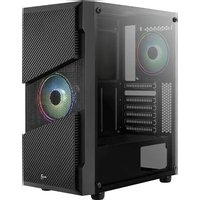
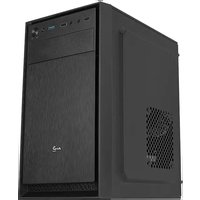
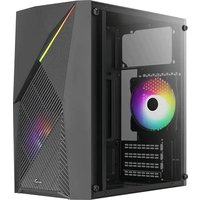
AeroCool CS-103 - Computer Case

CS-103 - Computer Case AeroCool - Free user manual and instructions

Find the device manual for free CS-103 AeroCool in PDF.

📄 2 pages English EN Download 💬 AI Question 10 questions ⚙️ Specs
Notice AeroCool CS-103 - page 1
Pick your language and provide your email: we'll send you a specifically translated version.
Product Type Computer Case
Brand AeroCool
Model CS-103
Form Factor Mid Tower
Motherboard Support ATX, Micro ATX, Mini ITX
Drive Bays 2 x 3.5 inch internal, 2 x 2.5 inch internal
Expansion Slots 7
Front I/O Ports USB 3.0 x 2, USB 2.0 x 2, Audio x 1
Cooling Support (Front) 2 x 120mm or 2 x 140mm fans (optional)
Cooling Support (Rear) 1 x 120mm fan (pre-installed)
Power Supply Type Bottom mounted, ATX
Maximum GPU Length 360 mm
Maximum CPU Cooler Height 155 mm
Dimensions (L x W x H) 440 x 190 x 430 mm
Weight 4.2 kg
Material SECC Steel, Plastic front panel
Color Black
Side Panel Tempered glass (left side) or steel (depending on version)
Cable Management Yes, with rubber grommets
Dust Filters Front and bottom removable
Cleaning Instructions Use a soft dry cloth; avoid water and harsh chemicals. Clean dust filters regularly.
Safety Warnings Keep away from liquids and heat sources. Ensure proper grounding.
Spare Parts Availability Contact AeroCool support or authorized retailers for replacement fans, screws, etc.
General Information Designed for gaming and high-performance builds. Supports water cooling radiators up to 240mm front.

Frequently Asked Questions - CS-103 AeroCool

How do I install the motherboard in the CS-103 case?
First, remove the side panel. Then, place the I/O shield into the case backplate. Align the motherboard with the standoffs and secure it with screws. Make sure the motherboard's ports align with the I/O shield.
What is the maximum GPU length supported by the CS-103?
The CS-103 supports graphics cards up to 360 mm in length. Measure your GPU before installation to ensure it fits.
Can I install a liquid cooling radiator in the front?
Yes, the front supports up to a 240 mm radiator. Remove the drive cage if necessary to accommodate thicker radiators.
How do I clean the dust filters?
Remove the front panel and bottom dust filters. Rinse them under lukewarm water, let them dry completely, then reattach. Do not use soap or abrasive cleaners.
What power supply form factor fits the CS-103?
The case accepts standard ATX power supplies. Install it in the bottom compartment with the fan facing downwards for optimal airflow.
How many fans are included with the case?
The CS-103 usually comes with one 120mm rear fan pre-installed. Additional fans can be purchased separately for the front and top.
Does the CS-103 have a tempered glass side panel?
Some versions of the CS-103 feature a tempered glass side panel to showcase your components. Check the product specifications to confirm.
What hard drive sizes are supported?
The case has 2 x 3.5 inch drive bays (compatible with 2.5 inch) and 2 x 2.5 inch dedicated SSD mounts.
How do I remove the front panel for cleaning?
Gently pull from the bottom corners of the front panel to release the clips. The panel can then be fully detached. Be careful not to break the plastic clips.
Is the CS-103 suitable for a beginner builder?
Yes, the case offers cable management grommets and tool-free drive bays, making it user-friendly for first-time builders. The manual provides step-by-step instructions.

User questions about CS-103 AeroCool

0 question about this device. Answer the ones you know or ask your own.

Ask a new question about this device

The email remains private: it is only used to notify you if someone responds to your question.

No questions yet. Be the first to ask one.

Download the instructions for your Computer Case in PDF format for free! Find your manual CS-103 - AeroCool and take your electronic device back in hand. On this page are published all the documents necessary for the use of your device. CS-103 by AeroCool.

USER MANUAL CS-103 AeroCool

natural_image Line drawing of a desktop computer tower case with ventilation slots and control panel (no text or symbols)

User's Manual
Manual del usuario
Bedienungsanleitung
Manuel d'utilisation
Manuale dell'utente
Podręcznik użytkownika
Руководство пользователя
Manual de utilizador
使用說明書/使用说明书
ユーザーズマニュアル
Нускаулары
Talimatlar

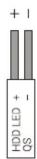
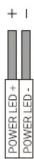
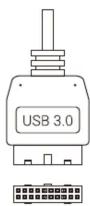
Front I/O Panel Cable Connection

Front Panel Connector

(Please refer to the motherboard's manual for further instructions).

AeroCool CS-103 - 1

AeroCool CS-103 - 2

AeroCool CS-103 - 3

AeroCool CS-103 - 4

AeroCool CS-103 - 5

Note : Specifications may vary depending on your region. Contact your local retailer for more information.

AeroCool CS-103 - 6

AeroCool CS-103 - 7

AeroCool CS-103 - 8

AeroCool CS-103 - 9

AeroCool CS-103 - 10

AeroCool CS-103 - 11

Accessory Bag Contents

AeroCool CS-103 - 12

AeroCool CS-103 - 13
SSD Screw
ODD Screw
MB Screw

AeroCool CS-103 - 14

AeroCool CS-103 - 15
HDD Screw

AeroCool CS-103 - 16

AeroCool CS-103 - 17
PSU Screw
PCI Screw

AeroCool CS-103 - 18

AeroCool CS-103 - 19
MB Standoff

How to install Guide

(1) Install Motherboard
AeroCool CS-103 - 20

natural_image Technical line drawing of a computer tower internal structure showing CPU socket, drive bays, and fan (no text or labels)

AeroCool CS-103 - 21
Install Motherboard

AeroCool CS-103 - 22
Install PSU

natural_image Technical line drawing of a computer tower internal structure showing fan, drive, and chassis components (no text or labels)

AeroCool CS-103 - 23
Install add-on Card

AeroCool CS-103 - 24
Inserte la tarjeta add-on

How to install Guide

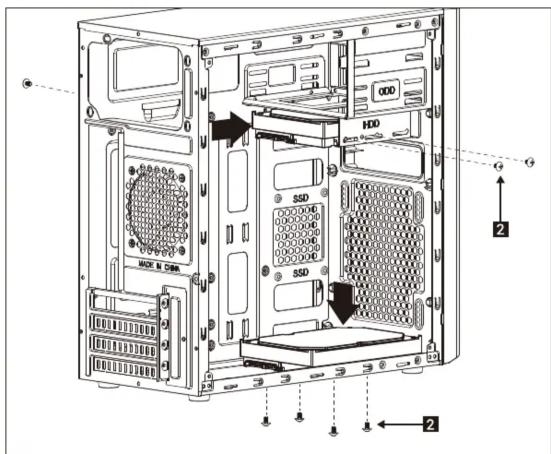
(4) Install 3.5" HDD x 2
HDD SSD SSD MDD, N. OEM 2 2

(5) Install 2.5" SSD x 2
Technical diagram of a computer tower case with labeled storage areas including HDD, SSD, and ventilation slots

AeroCool CS-103 - 27

Install 3.5" HDD

AeroCool CS-103 - 28

natural_image Diagram of a computer tower with an attached drive load, showing internal components and no text or symbols.

(7a) Install Front Fans
AeroCool CS-103 - 29

natural_image Diagram of a computer tower with an attached drive load, showing internal components and wiring (no text or symbols)

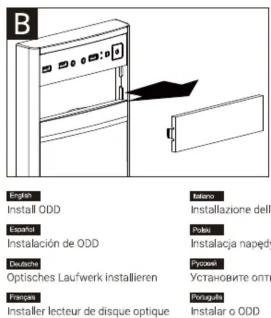
B English Install ODD Italiano Instalazione dell Especial Poles Instalacja naped Deutsche Optisches Laufwerk installieren Prudaje Установите otti Fianzas Portugues Installer lecteur de disque optique Instalar o ODD

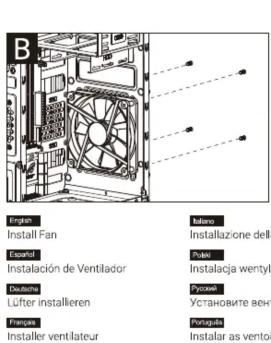
B English Install Fan Esquart Instalación de Ventilador Deutsche Lüfter installeren Franças Installer ventilateur Italano Instalazione dell' Polei Instalacja wentyl Pyruise Установите ven- Portugal Instalar as vento

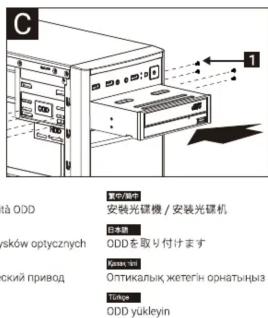
C 1 à ODD 安裝光碟機 / 安裝光碟機 日本語 ODDを取り付けます PSAKI, PS Оптикалык жетепін орнатыныз Tidape ODD yükleyin

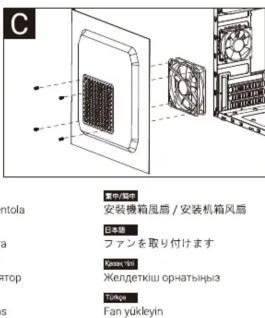
(7b) Install Side Fans
AeroCool CS-103 - 33

natural_image Line drawing of a front view of a kitchen appliance with buttons and a door (no text or symbols)

USB3.0 USB2.0 HD Audio & Mic. USB2.0 Reset Power Note : Specifications may vary depending on your region. Contact your local retailer for more information.

Manual assistant
Powered by Anthropic
Waiting for your message
Product information

Brand : AeroCool

Model : CS-103

Category : Computer Case