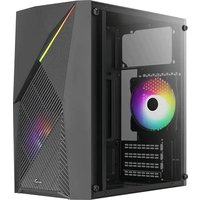
Raider Mini - Computer Case AeroCool - Free user manual and instructions
Find the device manual for free Raider Mini AeroCool in PDF.


| Product Type | Mini Tower Computer Case |
| Brand | AeroCool |
| Model | Raider Mini |
| Motherboard Support | Mini-ITX, Micro-ATX |
| Dimensions (L x H x W) | 400 mm x 400 mm x 200 mm |
| Weight | 4.5 kg |
| Material | Steel, Plastic, Tempered Glass (side panel) |
| Color Options | Black, White |
| Drive Bays | 2x 3.5" HDD, 2x 2.5" SSD |
| Expansion Slots | 4 |
| Maximum GPU Length | 330 mm |
| Maximum CPU Cooler Height | 155 mm |
| Power Supply Support | Standard ATX PSU, bottom mounted |
| Front Panel Ports | 2x USB 3.0, 1x Audio/Mic |
| Fan Support (Front) | 2x 120mm or 2x 140mm |
| Fan Support (Rear) | 1x 120mm |
| Fan Support (Top) | 2x 120mm |
| Radiator Support (Front) | 240mm or 280mm |
| Radiator Support (Rear) | 120mm |
| Included Fans | 1x 120mm rear fan |
| Dust Filters | Bottom (PSU), Front |
| Cable Management | Space behind motherboard tray |
| Cleaning Instructions | Wipe exterior with dry cloth; clean dust filters with vacuum or soft brush |
| Safety Note | Disconnect power before cleaning or modifying components |
Frequently Asked Questions - Raider Mini AeroCool
User questions about Raider Mini AeroCool
0 question about this device. Answer the ones you know or ask your own.
Ask a new question about this device
Download the instructions for your Computer Case in PDF format for free! Find your manual Raider Mini - AeroCool and take your electronic device back in hand. On this page are published all the documents necessary for the use of your device. Raider Mini by AeroCool.
USER MANUAL Raider Mini AeroCool
natural_image
Simple line drawing of a 3D rectangular block with a folded corner, no text or symbols present.Aero Cool
Front I/O Cable Connection
Front I/O Connectors (Please refer to the motherboard's manual for further instructions).
Note : Specifications may vary depending on your region. Contact your local retailer for more information.

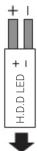
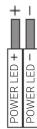


: : : : : : : : : :
M/B F-PANEL


Accessory Bag Contents

x 18 | SSD Screw MB Screw

x 6 | PSU Screw PCI Screw

MB Standoffx 3

x 4 | HDD Screw

x 3 | 3.5" HDD Thumb Screw

x 2 | 3.5" HDD Special Screw
How to Install Guide
(1) Install Motherboard (2) Install PSU

natural_image
Technical line drawing of a computer tower internal structure showing internal components and mounting points (no text or labels)
Install Motherboard


Install PSU

natural_image
Technical line drawing of a mechanical assembly or machine with no visible text or symbols
Install add-on Card

Inserte la tarjeta add-on

natural_image
Diagram of a server rack with ventilation grilles and a directional arrow indicating rotation (no text or symbols)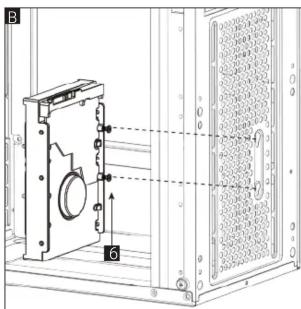
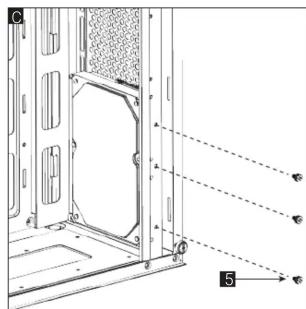
How to Install Guide
(4b) Install 3.5" HDD x 1
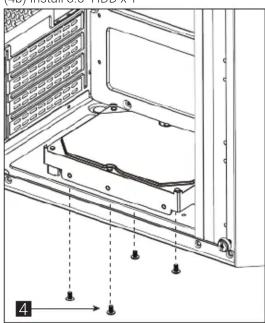
natural_image
Technical line drawing of a server rack with mounting holes and internal components (no text or symbols)
Install 3.5" HDD

natural_image
Technical diagram of a server rack with mounting holes and ventilation slots (no text or symbols)
Install 2.5" SSD Установите 2.5" жесткий диск

(6b) Install Rear Fan

natural_image
Technical line drawing of a computer tower fan assembly (no text or symbols)


Lüfter installieren

(7a) Install Front Radiator

re вентиляторInstall Fan

(7b) Install Rear Radiator
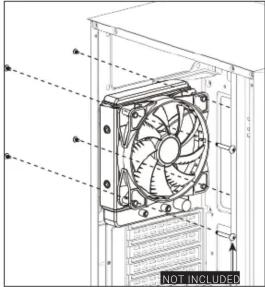
natural_image
Technical line drawing of a computer fan assembly with no visible text or symbols
Install the radiator

Instalar radiador

Lüfter einbauen

Specifications may vary depending on your region.
Contact your local retailer for more information.
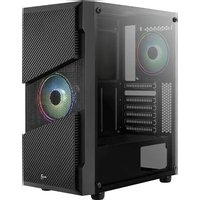
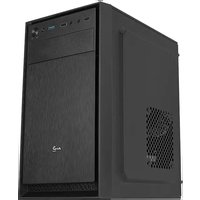


Brand : AeroCool
Model : Raider Mini
Category : Computer Case