
Talon - Computer Case AeroCool - Free user manual and instructions
Find the device manual for free Talon AeroCool in PDF.


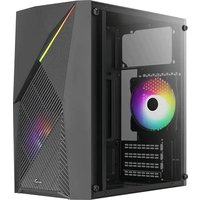
| Type | Mid Tower Computer Case |
| Dimensions (H x W x D) | 450 x 200 x 400 mm |
| Weight | 5.5 kg |
| Motherboard Support | ATX, Micro-ATX, Mini-ITX |
| Power Supply Support | ATX PS2 (bottom mount) |
| Expansion Slots | 7 |
| Drive Bays | 2x 3.5" internal, 2x 2.5" internal |
| Cooling Support - Front | 2x 120mm or 3x 120mm fans (not included) |
| Cooling Support - Top | 2x 120mm fans (not included) |
| Cooling Support - Rear | 1x 120mm fan (not included) |
| I/O Ports | USB 3.0 x2, USB 2.0 x2, Audio In/Out |
| Side Panel | Tempered Glass |
| Materials | SPCC Steel, Tempered Glass, ABS |
| Max GPU Length | 350 mm |
| Max CPU Cooler Height | 160 mm |
| Cleaning and Maintenance | Use a soft, dry cloth to wipe exterior; remove dust from filters regularly; avoid using liquids. |
| Safety Precautions | Ensure the case is placed on a stable surface; keep away from moisture; handle with care to avoid glass breakage. |
| Spare Parts and Repairability | Replacement side panels, fans, and I/O panels are available from the manufacturer or authorized resellers. |
Frequently Asked Questions - Talon AeroCool
User questions about Talon AeroCool
0 question about this device. Answer the ones you know or ask your own.
Ask a new question about this device
Download the instructions for your Computer Case in PDF format for free! Find your manual Talon - AeroCool and take your electronic device back in hand. On this page are published all the documents necessary for the use of your device. Talon by AeroCool.
USER MANUAL Talon AeroCool
Save Money. Build Better.
User Manual Manual del usuario Bedienungsanleitung Manuel d'utilisation
natural_image
Technical line drawing of a 3D rectangular box with cutouts and a side panel (no text or symbols)Aero Cool
aerocool.io
Front I/O Cable Connection
Front I/O Connectors (Please refer to the motherboard's manual for further instructions).
Note : Specifications may vary depending on your region. Contact your local retailer for more information.


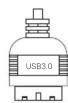


Accessory Bag Contents

x 18 SSD Screw MB Screw

x 6 | PSU Screw PCI Screw

MB Standoffx 3

x 4 | HDD Screw

x 3 | 3.5" HDD Thumb Screw

x 2 | 3.5" HDD Special Screw
How to Install Guide
(1) Install Motherboard (2) Install PSU
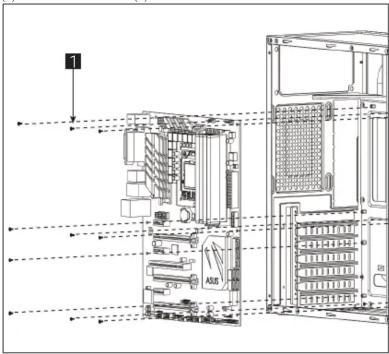
English Install Motherboard
English Install PSU
natural_image
Diagram of a server rack with an arrow pointing to the internal structure (no text or symbols present)English Install add-on Card
natural_image
Technical line drawing of a server rack unit with ventilation grilles and ventilation ducts (no text or labels)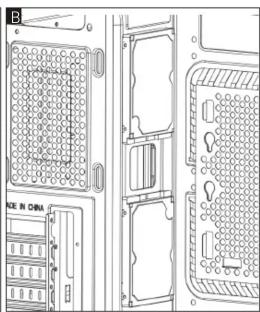
natural_image
Technical line drawing of a server rack with mounting holes and ventilation slots (no text or symbols)English Русский Install 2.5" SSD Установите 2.5" жесткий диск
How to Install Guide
(5a) Install 3.5" HDD x 1 (5b) Install 3.5" HDD x 1

English
Install 3.5" HDD
Español
natural_image
Technical line drawing of a mechanical assembly with mounting holes and structural supports (no text or symbols)Русский
(6a) Install Front Fans (6b) Install Rear Fan
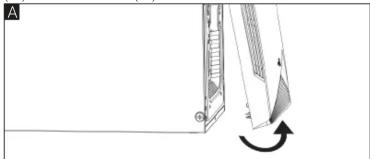
natural_image
Diagram showing a mechanical assembly with an arrow indicating rotational motion (no text or symbols)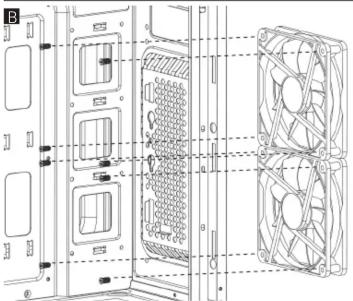
natural_image
Technical line drawing of a multi-chamber HVAC unit with fan array (no text or symbols)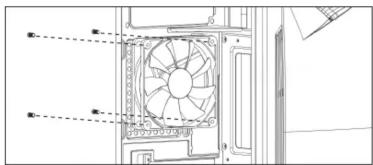
English
Español
Deutsche
Lüfter installieren
Français

Brand : AeroCool
Model : Talon
Category : Computer Case