
AN-SP167 - Loudspeaker Aconatic - Free user manual and instructions
Find the device manual for free AN-SP167 Aconatic in PDF.


| Product Type | Portable Bluetooth Speaker |
| Brand | Aconatic |
| Model | AN-SP167 |
| Dimensions (W x H x D) | Approx. 16 x 6 x 6 cm |
| Weight | Approx. 300 g |
| Power Output | 5 W RMS |
| Frequency Response | 100 Hz - 20 kHz |
| Driver Size | 2 x 52 mm full-range |
| Connectivity | Bluetooth 5.0, AUX 3.5 mm, MicroSD card slot |
| Battery | Built-in rechargeable Li-ion 1200 mAh |
| Battery Life | Up to 6 hours of playback |
| Charging Time | Approx. 2 hours via Micro USB |
| Water Resistance | IPX5 (splash-proof) |
| Controls | Power, Volume +/-, Play/Pause, Next/Previous, Pairing, Answer/End Call |
| Additional Features | Built-in microphone for hands-free calling, TWS pairing |
| Included Accessories | Micro USB charging cable, AUX cable, User manual |
| Compatible Devices | Smartphones, tablets, laptops, and other Bluetooth-enabled devices |
| Material | Plastic and fabric cover |
| Color | Black (standard) |
Frequently Asked Questions - AN-SP167 Aconatic
User questions about AN-SP167 Aconatic
0 question about this device. Answer the ones you know or ask your own.
Ask a new question about this device
Download the instructions for your Loudspeaker in PDF format for free! Find your manual AN-SP167 - Aconatic and take your electronic device back in hand. On this page are published all the documents necessary for the use of your device. AN-SP167 by Aconatic.
USER MANUAL AN-SP167 Aconatic
คุ้มือการใช้งาน
User Manual
Thanks for your preference. We hope you enjoy the experience!
Safety Instruction
- Don't put this product under high temperature wet environment and it will be worse when it is in the rain or crash strongly.
• To reduce the risk of electronic shock or fire, do not remove the cabinet cover, to contact professionals for maintenance. - Contact a certified professionals for a proper diagnosis and repair when occurrence of malfunction, do not attempt to repair the unit by your own.
• If plastic, metal, or wood fragments fall into the appliance or any type of liquid is dropped on the appliance, unplug it from the outlet and take it to an authorized service center, the appliance should be evaluated by a qualified technician.
FEATURES:
- Classic dynamic design
- Clear dynamic sound effect
- Versatile Input Options to support wide range devices
- Bluetooth V5.3 technology support wide range Bluetooth devices
• Built-in rechargeable lead-acid battery
• Built-in rechargeable battery - With recording function
- With colorful LED light
- With TWS function
- With karaoke function
- With Karaoke priority function
- With remote control
SPECIFICATION:
Output power: 100W
Speaker: 10 Inch*2+Tweeter 2**1
Frequency Range: 50Hz-20KHz
S/N rate: >75dB
Bluetooth version: 5.3
Bluetooth range: up to 10m
Function: USB, TF, Wired Microphone Input*2, Wireless microphone Input, AUX in, Guitar in, Recording, Bluetooth, TWS Function, Karaoke function, Karaoke priority, LED Light
Lead-acid battery: 12V 7500mAh
Power supply: AC 220-240V
Dimensions: 844*340*361mm
Packing content:
• Dual 10" Bluetooth party speaker
- Wireless microphone*2
- Power cable
- Aux cable
- Remote control
- User manual
- Warranty card
INSTRUCTION FOR CONTROL PANEL
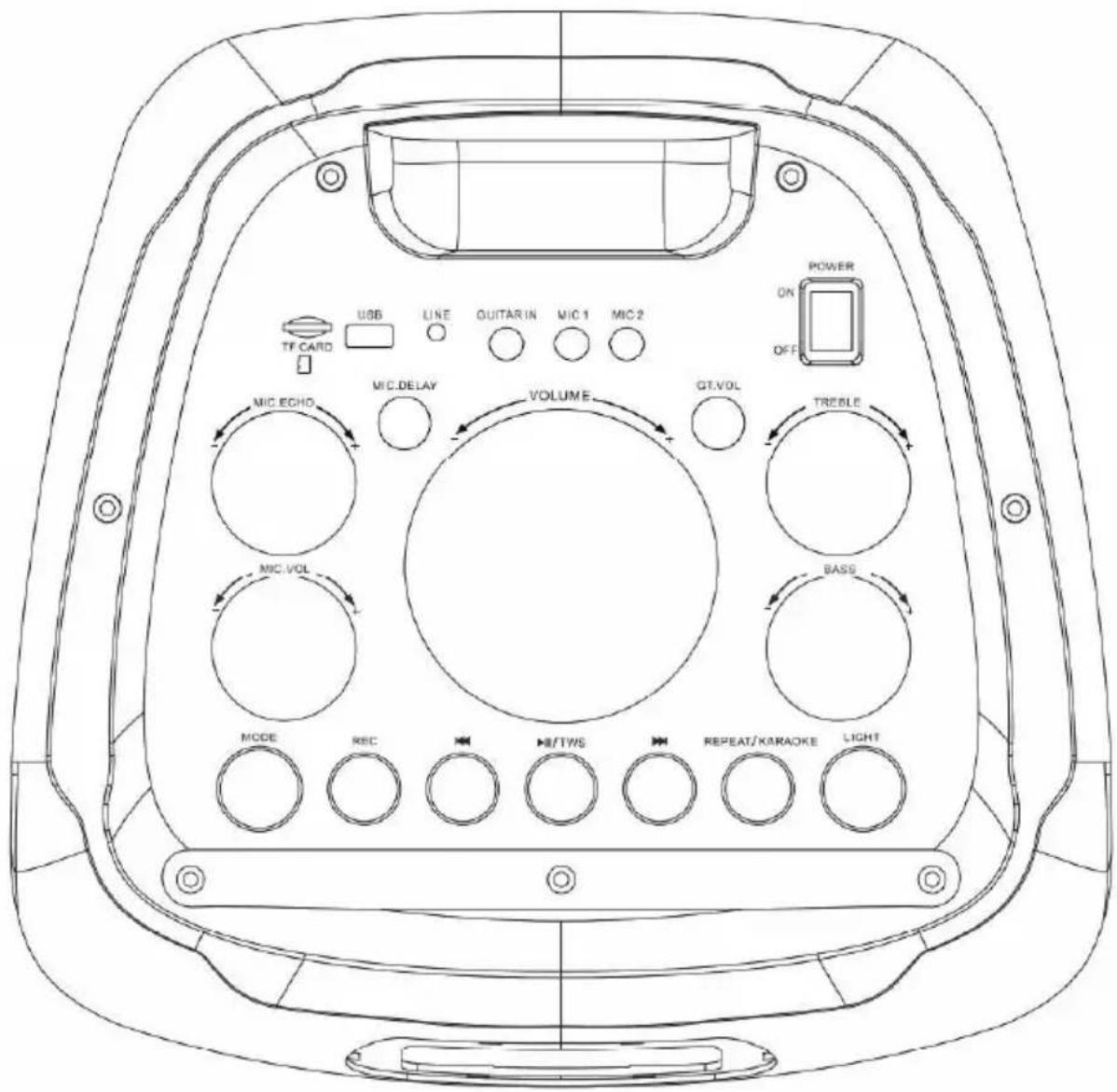
- TF card input
- USB input
- Line input
- Guitar input
- MIC input 1
- MIC input 2
- Power button
- MIC. ECHO
- MIC VOL
- Master volume
- Treble control
-
Bass control
-
MIC DELAY
- GT.VOL
- MODE button/ Karaoke Priority function
- Recording button
- Previous track
- Play/pause/TWS
- Next track
- Repeat button/ Karaoke function
INSTRUCTION FOR REMOTE CONTROL

| Button | Function |
| Light | RGB Light |
| BASS | Bass adjustment |
| Treble | Treble adjustment |
| Vol+ | Volume turning up |
| Vol- | Volume turning down |
| USB and BT Previous track | |
| Pause/Play/TWS | |
| USB and BT Next track | |
| EQ | Sound effects |
| MIC VOL | Microphone volume adjustment |
| ECHO/REVB adjustment | |
| BT | Shifting into BT ModeHold to disconnect |
| REP | USB Playback Repeat/Microphone function |
| Mode | Mode/Microphone priority function |
BLUETOOTH CONNECTION:
- Short Press the MODE button on the control panel or remote control until the BT display on the LED display.
- The ✝ on the LED display will flash to indicate that the speaker is in Bluetooth pairing mode. Ensure that the device you wish to connect is also in pairing mode and search for AN-SP167 in its device list.
- The ⚠ on the LED display will stop flashing and remain constant when the two devices paired. (The speaker will now automatically re-pair with this device whenever it is within range and has Bluetooth turned on). The speaker will automatically play the music by the music player which operated during Bluetooth paired in the first time.
TWS FUNCTION:
- Power on two identical speakers you want to pair and both turn to Bluetooth mode, long press ▶ button to pair each other. Then, search these paired speakers in your device's Bluetooth list and connect with them.
AUX IN:
- Connect a compatible device by a 3.5mm - 3.5mm stereo jack cable.
- Select AUX mode by short pressing the MODE button on the speaker control panel or remote control. Ensure the connected device is producing audio signal, then adjust the volume of speaker by Volume Knob or connected device.
- All music playing related function can be controlled by external connected device under AUX mode.
BATTERY CHARGING:
- Power off the speaker before battery charging, the charging indicator in red color during charging period and turn to blue color when fully charged.
- The speaker working time vary from the different working condition, such as music volume, LED light mode, etc.
- The built-in rechargeable battery is not replaceable. Do not trash it to the fire or liquid to avoid safety risk and environmental pollution.
RECORDING FUNCTION:
- Power on the speaker and put flash memory or TF card into the slots, microphone voice and the music under Bluetooth mode are recordable when you press REC button on control panel, press REC button again to stop the recording.
USB media AND TF CARD MUSIC PLAYING:
- Power on the speaker and insert USB or TF card, the speaker will automatically play the compatible music.
- To select previous or next music by pressing ▶ or ▶ buttons, to volume up and down by turning the VOLUME knob on control panel, to play or pause the music by pressing the ▶II/TWS button
- The speaker will disconnect the Bluetooth connection to automatically play the music from flash memory or TF card under Bluetooth mode, you can back to Bluetooth mode by short pressing MODE button on control panel.
Connecting an electric guitar:
- The unit also has an additional guitar jack which can be used for attaching an electric guitar.
Microphone operation:
• Power on the speaker and power on the wireless microphone.
Karaoke function:
- Power on the speaker. Long press the REPEAT/KARAOKE button, Karaoke function will be on. It will cut the voice out.
- Power on the speaker. Long press the Mode button, Karaoke priority function will be on. It will cut the music out.
LED light effects:
- The unit also has built-in multi-colored LED lights which light up the speaker drivers.
- Long press to turn the light On/Off, short press to switch the light mode (intervals for a second)
NOTE
These will only work if the speaker is powered on.
- SAFETY INSTRUCTION
- FEATURES
- SPECIFICATION
- PACKING CONTENT
- INSTRUCTION FOR CONTROL PANEL
- INSTRUCTION FOR REMOTE CONTROL
- BLUETOOTH CONNECTION
- TWS FUNCTION
- AUX IN
- BATTERY CHARGING
- RECORDING FUNCTION
- USB MEDIA AND TF CARD MUSIC PLAYING
- CONNECTING AN ELECTRIC GUITAR
- MICROPHONE OPERATION
- KARAOKE FUNCTION
- LED LIGHT EFFECTS
- NOTE
Brand : Aconatic
Model : AN-SP167
Category : Loudspeaker