
LX8 - Professional audio equipment Radial Engineering - Free user manual and instructions
Find the device manual for free LX8 Radial Engineering in PDF.


| Product Type | Eight-Channel Balanced Line Splitter |
| Channels | 8 |
| Input Connectors | Front panel XLR female (x8), Rear panel DB-25 (TASCAM pinout), Rear panel Euroblock socket (12-pin, terminals sold separately) |
| Output Connectors | Direct output (DB-25 & Euroblock), Auxiliary output with ground lift (DB-25 & Euroblock), Isolated output (Euroblock) – all paralleled |
| Isolation Transformer | Jensen™ bridging transformer on each channel for isolated output |
| Ground Lift Switch | Front panel switch per channel for auxiliary output; internal chassis ground lift switch (all channels) |
| Frequency Response | Not specified; designed for line-level audio, typical 20Hz-20kHz |
| Distortion (THD) | Not specified; transformer isolated output minimizes distortion |
| RF Filtering | RF network filter on input ground paths |
| Chassis Construction | 14-gauge steel, welded corners, baked enamel finish |
| Dimensions (approx) | 1RU height, 19" wide, depth approx. 6.75 inches (172 mm) |
| Weight (approx) | 6.5 lb (2.95 kg) |
| Power Supply | None (passive device) |
| Warranty | 3 years transferable limited warranty |
| Application | Sound reinforcement, recording, broadcast, multi-zone audio systems |
Frequently Asked Questions - LX8 Radial Engineering
User questions about LX8 Radial Engineering
0 question about this device. Answer the ones you know or ask your own.
Ask a new question about this device
Download the instructions for your Professional audio equipment in PDF format for free! Find your manual LX8 - Radial Engineering and take your electronic device back in hand. On this page are published all the documents necessary for the use of your device. LX8 by Radial Engineering.
USER MANUAL LX8 Radial Engineering
Eight Channel • Transformer Isolated • Line Splitter
LX8 User Guide
Eight Channel • Transformer Isolated • Line Splitter
Table of Contents Page
LX8 Introduction ....1
Signal Flow 2
Features ....3
Connecting the LX8 4
Applications 5
Internal Chassis Ground Lift 5
Warranty Back
INTRODUCTION
Congratulations on your purchase of a the Radial LX8 line splitter. We recommend that you take a few minutes to read through this manual in order to familiarize yourself with the many innovative features that are built in.
Should you have questions or applications not covered in this manual, we invite you to log onto the Radial web site at www.radialeng.com to check the FAQ section for the latest updates. Of course, you can also send us an email at support@radialeng.com.
LX8 DESIGN CONCEPT
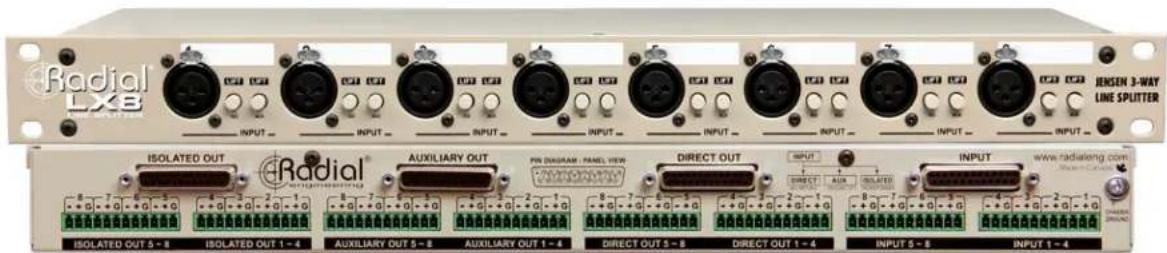
The Radial LX8 is an eight channel, balanced line splitter in a compact 1RU package that divides the signals three ways; to a direct output; a direct output with ground lift; and an isolated output. A high performance Jensen™ bridging transformer is used on the isolated output to eliminate hum and buzz caused by ground loops.
Splitting line level signals is a straight forward concept. It's most common in sound reinforcement when a single set of outputs needs to be fed to two separate destinations simultaneously. When done improperly, splitting a signal can dull frequency response, lower the output and worst of all, cause ground loops that produce buzz and hum. To avoid these pitfalls, sound reinforcement companies have been building custom "splitter-snakes" for many years.
The LX8 is an off-the-shelf splitter for the rest of us allowing virtually anyone to design and assemble a splitter-snake with plug-n-play simplicity and professional audio quality without the need for custom metal work or complex soldering.

SIGNAL FLOW
Take a moment to follow the signal path through the block diagram below.

flowchart
graph TD
    A["Inputs 1-8 DB-25"] --> B["①"]
    C["Front Panel XLR x 8"] --> B
    D["Inputs 1-8 Euroblock"] --> B
    B --> E["Direct Output and Return Path for 48V"]
    B --> F["Auxiliary Output with Ground Lift"]
    B --> G["Transformer Isolated Output"]
    E --> H["DB-25 Euro Block"]
    F --> I["DB-25 Euro Block"]
    G --> J["Euro Block"]
    H --> K["Isolation Transformer"]
    I --> K
    J --> K
① Parallel Inputs
For flexibility, the LX8 has three paralleled inputs.
• Female XLR connectors on the front panel
• 25 pin D-SUB (DB-25) on the rear panel
- Euroblocks screw terminals on the rear panel (Set of eight Euroblocks terminals sold separately, Order # R800 8050).
② Direct Output
The DIRECT output is the primary "straight through" output. It is paralleled to DB-25 and Euroblocks terminals for flexibility.
③ Auxiliary Direct Output with Ground Lift
The AUXILLARY outputs uses eight front panel switches to lift the ground. This output may be patched to another audio system that may or may not be transformer isolated itself. The DIRECT WITH GROUND LIFT output is paralleled to DB-25 and Euroblocks terminals.
④ Isolated Output
The ISOLATED outputs uses eight precision Jensen audio isolation transformers to decouple the signals from the DI-RECT outputs. This output may be patched to a separate audio system without creating ground loops. The ISOLATED output is paralleled to DB-25 and Euroblocks terminals.
Transformer
After the PAD the signal is fed to the isolation transformer where the mic signal is decoupled to eliminate noise from ground loops. For the most flexibility when designing technical ground systems, each transformer features an internal switch allowing the signal ground to connect around the transformer.
RF Filter (not shown in the diagram)
The three paralleled inputs employ a RF network filter on their ground paths to prevent unused inputs from acting like antennas when the ground is lifted. Any radio frequencies picked up by an open pin will be shunted to ground.
FEATURES

- Locking XLR Inputs - Front panel female XLR jacks allow easy connection of individual signals. Rugged, glass-reinforced nylon construction for reliable connections.
- Front Panel Lift Switch - Disconnects the ground path at the auxiliary and isolated outputs. Using the front panel ground lift can eliminate ground loop noise between equipment connected to the LX8 outputs.
- Easy ID Label Zones - For dry-erase markers or wax pencil identification. Handy when using several LX8 at a time.
- Military Grade PCB - The dual layer circuit board is manufactured with plated through holes and secured with 8 standoffs.
- Transformers - Each transformer is mounted directly on the PCB in close proximity to the input for the shortest possible signal path.
- Heavy-duty Switches - Front panel switches are metal encased and rated at 20,000 operations.
- Internal Chassis Ground Lift - Input connectors are 100% isolated from the chassis, but an internal switch is provided to connect signal ground (pin-1) to the chassis without modifying the LX8. By default, this switch is factory set to "lifted" allowing the chassis to "float" ungrounded and should remain this way unless a specific grounding scheme requires the signal ground to be tied to the chassis.
-
14-Gauge Chassis - Made extra tough with heavy gauge steel and welded corners to provide excellent shielding and durability. Finished in baked enamel.
-
Isolated Output - This output is transformer isolated to block noise caused by ground loops and is wired in parallel to DB-25 and Euroblocks terminals.
- Auxiliary Output - This is a direct output wired in parallel with the DIRECT output. The signal grounds may be disconnected using the front panel LIFT switch. This output is wired parallel to the DB-25 and Euroblock terminals.
- DB-25 Pin-out Diagram - The pin-out for the female DB-25 connector is diagramed on the rear panel. All DB-25 connectors follow the Tascam standard for eight channel analog signal interface.
- Direct Output - This output passes signal through the LX8 and is wired parallel to the DB-25 and Euroblocksterminals.
- Euroblock Sockets - These panel sockets receive 12-pin Euroblock screw terminals. Each Euroblock connects four channels with bare wire termination and facilitate custom options like interfacing a connector panel or multi-pin disconnect. Euroblock screw terminals are optional and must be ordered separately. (Radial order # R800 8050)
- Rear Inputs - The rear panel DB-25 and Euroblock inputs connect all eight channels and are wired parallel to the front XLR connectors.
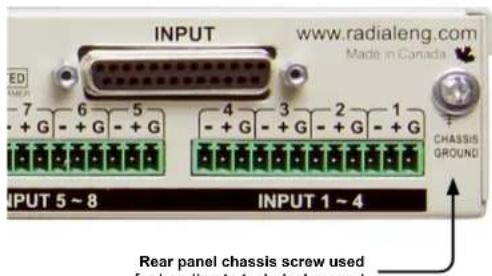
- Chassis Ground - Ground screw connection point used in conjunction with the internal chassis lift switch to bond the LX8 to earth.
CONNECTING THE LX8
LX8 Inputs
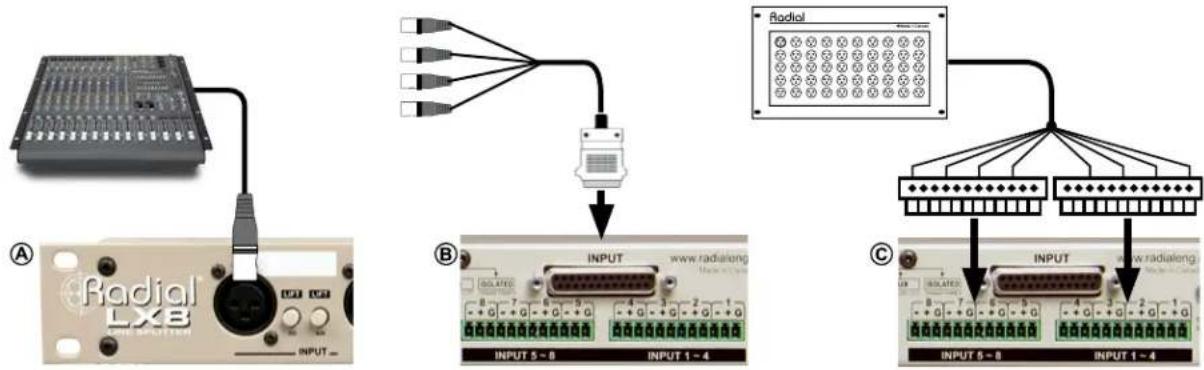
You can connect to the LX8 using the front panel XLR inputs, or the rear panel DB-25 and Euroblock terminals. Which input you choose to use will depend where the LX8 is located and what you are connecting to it. For instance, individual channels may be connected directly via the front panel XLRs A, or a multi-channel snake may be used to connect to the DB-25 inputs B. Finally, a wall-mounted panel of XLRs may be connected to the Euroblock inputs with a multi-channel snake cable C
Connecting the DB-25 I/O
The DB-25 connectors on the rear panel use the TASCAM pin-out standard for analog audio. Connecting the LX8 to devices equipped with DB-25 connectors like recording interfaces is simply a matter of using compatible DB-25 audio cables. Radial balanced DB-25 cables are a perfect match for the LX8 and can be ordered in standard or custom lengths.
The pin-out diagram is silk-screened on the rear panel for reference and represents the panel-mount female pin-out. To make your own interface DB-25 cables follow the pin-outs below for male and female connectors.
Female DB-25 Pin-out (Panel View) Male DB-25 Pin-out (Cable View)

Connecting the Euroblock Terminals
Euroblock, or European style terminal blocks, also called Phoenix blocks, are removable screw terminal connectors. The Euroblock connector requires no soldering to terminate. Instead, the wire is stripped, inserted into slots in the connector and locked into place with a standard screwdriver. The connector then mates with the socket. Pin termination for the Euroblock terminals are clearly marked on the rear panel.
Referring to the pins on an XLR connector:
- Connect pin-1 (GROUND) to the G terminal.
- Connect pin-2 (HOT) to the + terminal.
- Connect pin-3 (COLD) to the - terminal.

Using the LX8 to split line levels on stage
Recording live using high quality preamps delivers the best results. Connect your preamps to the LX8 and split the signal to the recorder and the PA using the isolation to eliminate hum & buzz caused by ground loops.
Using the LX8 to feed two different audio systems
Running audio around various environments such as large venues, multi-function rooms or broadcast facilities can often lead to noise polluting the audio system. The LX8 eliminates noise problems due to ground loops.

flowchart
graph TD
    A["Microcontroller 1"] --> B["Switch"]
    C["Microcontroller 2"] --> B
    D["Microcontroller 3"] --> B
    E["Microcontroller 4"] --> B
    F["Microcontroller 5"] --> B
    G["Microcontroller 6"] --> B
    H["Microcontroller 7"] --> B
    I["Microcontroller 8"] --> B
    J["Microcontroller 9"] --> B
    K["Microcontroller 10"] --> B
    L["Microcontroller 11"] --> B
    M["Microcontroller 12"] --> B
    N["Microcontroller 13"] --> B
    O["Microcontroller 14"] --> B
    P["Microcontroller 15"] --> B
    Q["Microcontroller 16"] --> B
    R["Microcontroller 17"] --> B
    S["Microcontroller 18"] --> B
    T["Microcontroller 19"] --> B
    U["Microcontroller 20"] --> B
    V["Microcontroller 21"] --> B
    W["Microcontroller 22"] --> B
    X["Microcontroller 23"] --> B
    Y["Microcontroller 24"] --> B
    Z["Microcontroller 25"] --> B
    AA["Microcontroller 26"] --> B
    AB["Microcontroller 27"] --> B
    AC["Microcontroller 28"] --> B
    AD["Microcontroller 29"] --> B
    AE["Microcontroller 30"] --> B
    AF["Microcontroller 31"] --> B
    AG["Microcontroller 32"] --> B
    AH["Microcontroller 33"] --> B
    AI["Microcontroller 34"] --> B
    AJ["Microcontroller 35"] --> B
    AK["Microcontroller 36"] --> B
    AL["Microcontroller 37"] --> B
    AM["Microcontroller 38"] --> B
    AN["Microcontroller 39"] --> B
    AO["Microcontroller 40"] --> B
    AP["Microcontroller 41"] --> B
    AQ["Microcontroller 42"] --> B
    AR["Microcontroller 43"] --> B
    AS["Microcontroller 44"] --> B
    AT["Microcontroller 45"] --> B
    AU["Microcontroller 46"] --> B
    AV["Microcontroller 47"] --> B
    AW["Microcontroller 48"] --> B
    AX["Microcontroller 49"] --> B
    AY["Switch"] --> AZ["Switch"]
    BA["Switch"] --> BB["Switch"]
    BC["Switch"] --> BD["Switch"]
    BE["Switch"] --> BF["Switch"]
    BG["Switch"] --> BH["Switch"]
    BI["Switch"] --> BJ["Switch"]
    BK["Switch"] --> BL["Switch"]
    BM["Switch"] --> BN["Switch"]
    BO["Switch"] --> BP["Switch"]
    BP["Switch"] --> BQ["Switch"]
    BR["Switch"] --> BS["Switch"]
    BT["Switch"] --> BU["Switch"]
    BV["Switch"] --> BW["Switch"]
    BX["Switch"] --> BY["Switch"]
    BZ["Switch"] --> CA["Switch"]
    CB["Switch"] --> CC["Switch"]
    CD["Switch"] --> CE["Switch"]
    CF["Switch"] --> CG["Switch"]
    DH["Switch"] --> DI["Switch"]
    DJ["Switch"] --> DE["Switch"]
    DF["Switch"] --> DG["Switch"]
    DHX["Switch"] --> DY["Switch"]
    DY["X/S/DCs/Hz"] --> DC["Y/A"]
    DYX["X/A/B/D/W/Hz"] --> DC["Y/A/B/D/W/Hz"]

flowchart
graph TD
    A["Central Server"] --> B["Control Panel"]
    B --> C["1 Speaker"]
    B --> D["2 Speaker"]
    B --> E["3 Speaker"]
    B --> F["4 Speaker"]
    B --> G["5 Speaker"]
    B --> H["6 Speaker"]
    style A fill:#f9f,stroke:#333
    style B fill:#ccf,stroke:#333
    style C fill:#cfc,stroke:#333
    style D fill:#fcc,stroke:#333
    style E fill:#cff,stroke:#333
    style F fill:#ffc,stroke:#333
    style G fill:#cfc,stroke:#333
    style H fill:#fcc,stroke:#333
The Radial LX8 features an internal grounding option that will be of interest to system engineers when integrating the LX8 into complex audio-visual systems.
Internal Chassis Ground Lift - All Channels
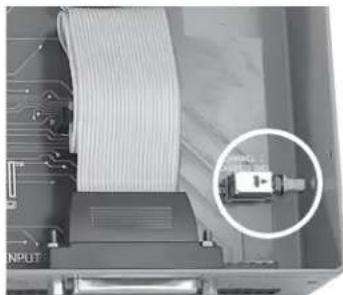
All connectors are 100% isolated from the steel chassis allowing chassis and signal ground to be kept separate. However, a single internal switch is provided to connect the pin-1 cable shields to the chassis without modifying the LX8. By default, this switch is factory set to open or "lifted" allowing the chassis to "float" ungrounded.
Should a specific grounding scheme require the cable shields to be bonded to the chassis simply set this switch to closed (pushed in position). The switch may be accessed through a small hole in the side of the steel chassis or by removing the top cover. The chassis ground switch does not effect the isolation provided by the transformer at the ISOLATED output.
On the rear panel a ground screw provides a convenient point to bond the chassis. Use a heavy gauge solid copper wire to bond the LX8 chassis to your technical ground.
natural_image
Close-up of a computer interface showing a cable being inserted into a device, with a magnified inset highlighting a component (no visible text or symbols)Access the internal chassis ground lift switch through a small hole in the side of the chassis.
RADIAL ENGINEERING LTD. 3 YEAR TRANSFERABLE WARRANTY
RADIAL ENGINEERING LTD. ("Radial") warrants this product to be free from defects in material and workmanship and will remedy any such defects free of charge according to the terms of this warranty. Radial will repair or replace (at its option) any defective component(s) of this product (excluding finish and wear and tear on components under normal use) for a period of three (3) years from the original date of purchase. In the event that a particular product is no longer available, Radial reserves the right to replace the product with a similar product of equal or greater value. To make a request or claim under this limited warranty, the product must be returned prepaid in the original shipping container (or equivalent) to Radial or to an authorized Radial repair center and you must assume the risk of loss or damage. A copy of the original invoice showing date of purchase and the dealer name must accompany any request for work to be performed under this limited warranty. This limited warranty shall not apply if the product has been damaged due to abuse, misuse, misapplication, accident or as a result of service or modification by any other than an authorized Radial repair center.
THERE ARE NO EXPRESSED WARRANTIES OTHER THAN THOSE ON THE FACE HEREOF AND DESCRIBED ABOVE. NO WARRANTIES WHETHER EXPRESSED OR IMPLIED, INCLUDING BUT NOT LIMITED TO, ANY IMPLIED WARRANTIES OF MERCHANTABILITY OR FITNESS FOR A PARTICULAR PURPOSE SHALL EXTEND BEYOND THE RESPECTIVE WARRANTY PERIOD DESCRIBED ABOVE OF THREE YEARS. RADIAL SHALL NOT BE RESPONSIBLE OR LIABLE FOR ANY SPECIAL, INCIDENTAL OR CONSEQUENTIAL DAMAGES OR LOSS ARISING FROM THE USE OF THIS PRODUCT. THIS WARRANTY GIVES YOU SPECIFIC LEGAL RIGHTS, AND YOU MAY ALSO HAVE OTHER RIGHTS, WHICH MAY VARY DEPENDING ON WHERE YOU LIVE AND WHERE THE PRODUCT WAS PURCHASED.



- Eight Channel • Transformer Isolated • Line Splitter
- LX8 User Guide
- Table of Contents Page
- INTRODUCTION
- LX8 DESIGN CONCEPT
- SIGNAL FLOW
- ① Parallel Inputs
- ② Direct Output
- ③ Auxiliary Direct Output with Ground Lift
- ④ Isolated Output
- Transformer
- RF Filter (not shown in the diagram)
- CONNECTING THE LX8
- LX8 Inputs
- Connecting the DB-25 I/O
- Connecting the Euroblock Terminals
- Using the LX8 to split line levels on stage
- Using the LX8 to feed two different audio systems
- Internal Chassis Ground Lift - All Channels
- RADIAL ENGINEERING LTD. 3 YEAR TRANSFERABLE WARRANTY
Brand : Radial Engineering
Model : LX8
Category : Professional audio equipment