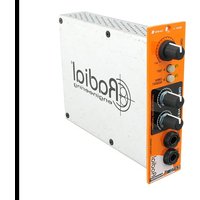
EXTC 500 - Professional audio equipment Radial Engineering - Free user manual and instructions
Find the device manual for free EXTC 500 Radial Engineering in PDF.


| Product Type | 500 Series Reamp Module |
| Circuit Type | Solid state with transformer coupled effects loop |
| Power Requirement | 60 mA, +/-16 VDC |
| Frequency Response (Dry) | 10 Hz ~ 21 kHz (0 dBu, -3 dBu) |
| Frequency Response (Wet) | 10 Hz ~ 21 kHz (0 dBu, -3 dBu) |
| Dynamic Range (Dry) | 94 dB |
| Dynamic Range (Wet) | >99 dB |
| Gain (Dry) | +5 dB |
| Gain (Wet) | +27 dB |
| Signal to Noise Ratio (Dry) | 94 dB |
| Signal to Noise Ratio (Wet) | >99 dB |
| Total Harmonic Distortion (Dry) | <0.0006% @ 0 dBu output |
| Total Harmonic Distortion (Wet) | <0.0012% @ 0 dBu output |
| Maximum Input Level (Dry) | +26 dBu |
| Maximum Input Level (Wet) | +20 dBu |
| Input Connectors | XLR (rear), 1/4" (front send/receive) |
| Output Connectors | XLR (rear), 1/4" (front send/receive) |
| Front Panel Controls | Blend, 180° Polarity Reverse, Omniport Insert, Send Level, Receive Level |
| Effects Loop | Transformer isolated send and receive jacks (front panel), second loop via Omniport (Workhorse) |
| Warranty | 3-year transferable limited warranty |
| Operating Conditions | Dry locations only, 5°C to 40°C |
| Dimensions (approx.) | 1.5" x 5.25" x 8" (single slot 500 series) |
| Weight (approx.) | 0.5 kg |
Frequently Asked Questions - EXTC 500 Radial Engineering
User questions about EXTC 500 Radial Engineering
0 question about this device. Answer the ones you know or ask your own.
Ask a new question about this device
Download the instructions for your Professional audio equipment in PDF format for free! Find your manual EXTC 500 - Radial Engineering and take your electronic device back in hand. On this page are published all the documents necessary for the use of your device. EXTC 500 by Radial Engineering.
USER MANUAL EXTC 500 Radial Engineering
Table of Contents Page
Feature Set .... 1
Overview 2
Getting Started 3
Specifications 4
Block Diagram....5
Warranty......Back cover
Congratulations and thank you for purchasing the Radial EXTC 500 Reamp® module. The EXTC is a unique 500 series interface designed to allow you to introduce guitar pedals and effects into the recording world with relative ease while keeping the signal quiet. With the EXTC in your rig you are now set to add wah to a Hammond, tube distortion to a vocal track or an envelope filter to the snare drum. The EXTC is all about creativity and making sure your recording stands above the rest.
This manual describes installing and operating your EXTC in the Radial Workhorse or other 500 series module power racks. To take full advantage of the unique features that have been incorporated into the EXTC, please read through this guide before using it. This user guide will give you a broader sense of the module's capabilities. If you have questions that are not covered in this manual, please visit the FAQ section on our website. This is where we post answers to questions from users. If you cannot find the answer to your question please feel free to send an email to info@radialeng.com and we will do our very best to respond as quickly as possible.
The Radial EXTC 500 module opens creative options to your recording world.

WARNING NOTICE TO USER!
Although preventative safety measures have been designed into Radial 500 series products we strictly advise against hot-swapping modules or plugging and unplugging them when the Workhorse or other 500 series rack is powered on. Hot swapping can cause connection sparks at the card-edge connector that could send damaging transients to other equipment. This also greatly reduces the life span of the contacts. Damage due to hot swapping is not covered under warranty. There are no user serviceable parts inside.
FEATURE SET
- BLEND - Lets you adjust the wet-dry mix between the original unprocessed signal and the EXTC's effects loop.
- 180° POLARITY REVERSE - Lets you adjust the polarity of the wet signal path and bring it into phase with the dry signal when they are being mixed together.
- OMNI INSERT (with Workhorse) - Turns on the Workhorse TRS Omniport insert jack. This is used to add a second unbalanced effects insert path, wired in series after the front-panel loop.
- SEND LEVEL - Used to adjust the output level going to the pedals and optimize signal-to-noise for best performance.
- RECEIVE LEVEL - Used to set the effects loop return path level and further optimize signal-to-noise.
- 14 " SEND and RECV - Separate send and receive jacks used to connect guitar pedals to the EXTC. Front panel mounted to make connections easy for use on the desktop and transformer isolated to eliminate hum and buzz caused by ground loops.
- OMNIPORT (with Workhorse) - TRS insert jack lets you connect effects to a second unbalanced effects insert path, wired in series after the front-panel insert loop.

OVERVIEW
The Radial EXTC is a professional audio interface that takes a balanced line level signal and converts it to a guitar-level effects loop and then re-converts it back to a balanced line level for processing. In other words, you send in a balanced signal from your recorder, adjust the send level that drives the pedals. Set the return level from the pedals as it comes back and send the resulting sound to your recording system.

flowchart
graph LR
    A["INPUT SET"] --> B["EXTC RETURN"]
    B --> C["PEDAL"]
    C --> D["AL PEDAL"]
    D --> E["Feedback Loop"]
    E --> F["OUTPUT"]
Although simple in principle, the key to the EXTC's performance is how quietly it does the task. This is achieved by employing full sized discrete electronic components, class-A circuitry and transformer isolation to help eliminate the hum and buzz that is common with pedals and guitars. The other cool ‘trick’ inside the EXTC is the blend control. This mixes the original dry signal with the newly introduced effects created by the pedals. Something to think about here is how some effect pedals will reverse the polarity of the signal passing through them. When you mix a dry signal with a wet signal and one is polarity reversed, you will of course end up with cancellation. The diagram below illustrates a setup where one pedal “B” is inverting the polarity creating cancellation where two out-of-phase signals come together.

flowchart
graph TD
    A["INPUT"] --> B["NORMAL PHASE"]
    B --> C["EXT C"]
    C --> D["NORMAL"]
    D --> E["SEND"]
    E --> F["BLEND"]
    F --> G["PHASE CANCELLATION"]
    G --> H["OUTPUT"]
    I["PEDAL - A"] --> J["NORMAL"]
    J --> K["PARANT"]
    K --> L["INVERT"]
    L --> M["RETURN"]
    M --> N["POLARITY REVERSE"]
    N --> O["END"]
    O --> P["TRANSFORM"]
    P --> Q["CHANGE"]
    Q --> R["CHANGE"]
The 180^ polarity reverse switch plays an important role by ensuring both the dry and wet signals are in phase. The next diagram shows how the 180^ switch inverts the signal before it gets to the offending pedal. Pedal “B” gets tricked into re-inverting the signal back to normal phase.

flowchart
graph LR
    INPUT["INPUT"] --> NORMAL_PHASE["NORMAL PHASE"]
    NORMAL_PHASE --> EXTC["EXT C"]
    EXTC --> NORMAL["NORMAL"]
    NORMAL --> POLARITY_180["POLARITY 180°"]
    POLARITY_180 --> INVERT["INVERT"]
    INVERT --> SEND["SEND"]
    SEND --> BLEND["BLEND"]
    BLEND --> OUTPUT["OUTPUT"]
    BLEND --> RETURN["RETURN"]
    RETURN --> NORMAL["NORMAL"]
    NORMAL --> POLARITY_REVERSE["POLARITY REVERSE"]
    POLARITY_REVERSE --> PEDAL_A["PEDAL - A"]
    PEDAL_A --> INVERT1["INVERT"]
    INVERT1 --> PEAR[" "]
    PEAR --> NORMAL2["NORMAL"]
    NORMAL2 --> BLEND
Once you get the EXTC hooked up, you will find it to be loads of fun! All of a sudden, you will be going back into the attic looking for that box of forgotten pedals, dusting them off and plugging them in. Some will sound fantastic, others will sound bad in a good way. Who knows, only those brave enough to enter blindly into these cold waters may live to tell the tale.
GETTING STARTED
Before making any connections, start by turning off your audio system and turning all volume levels down. This helps protect equipment from turn-on transients that could damage loudspeakers and other sensitive equipment. We recommend using a power bar with an on-off switch as this makes it easy to turn on and off the 500 series rack, monitors and so on, using a single switch. Carefully plug the EXTC into your 500 series rack to avoid stress on the card-edge connector. Screw the module in to ensure it does not accidentally get dislodged.
Connections between the EXTC and your pedals are made on the front panel while connections to the recording system are done on the rear panel. Most 500 series racks are equipped with XLR connectors. When you plug the EXTC into your 500 series rack, it will automatically route the input and output to the module. With the Workhorse, this is augmented with 14 " TRS connectors, D-Subs and a signal to feed the Workhorse mixer. It also activates the Omniport which in this instance (with EXTC) turns the Omniport into a second effects loop.
Start by setting up the X-amp panel controls as follows:
- Set the blend control to the wet position (fully-clockwise).
- Make sure the 180^ is off (switch outward) so that everything is in phase.
- Set the Omniport insert switch to off (switch outward).
- Set the send and receive level controls at mid-way (12 o'clock).
Connect the output from your recorder to the XLR input on the rear panel. To connect your pedals, simply plug the 14 " send to your pedal chain and the output of the pedal chain back to the EXTC receive input. We suggest you start with one pedal first before using a complete chain. This will make it easier to trouble shoot when setting up the EXTC in your system.
Turn on the effects and play the desired track. You should be able to monitor the return path in your recording system and hear the effect. Separate send & receive controls make it easy to adjust the levels to suit. Now, try varying the blend control by rotating it counter-clockwise towards the dry setting to hear how the effect mixes in with the original track. If you notice that the signal is ‘thinning out’ when you are adjusting the mix, the wet and dry signals may be out-of-phase with each other, thus causing cancellation. Try depressing the 180° polarity reverse to fix the problem. If all is well, try adding more pedals.
One of the most common applications for the EXTC is using it to add grit to a vocal track. This can easily be done with a distortion or overdrive pedal. You will find that the most realistic effects are created by introducing slight distortion. But you can also have loads of fun creating Nine Inch Nails type of tones by going crazy. There are no rules, only guidelines.
Adding A Second Loop
If you have a Workhorse, you can use the Omniport to add a second effects loop in series after the front panel pedal chain. This is ideally suited for studio effects or to connect to a studio patchbay. The Workhorse TRS jack is wired tip-send, ring-receive following convention. To turn on, depress the OMNI INSERT switch on the front panel.
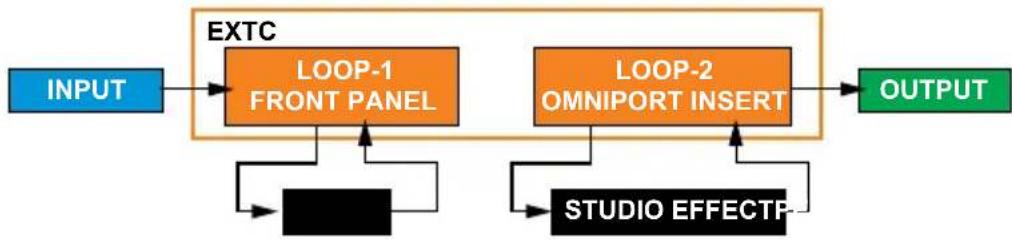
flowchart
graph LR
    A["INPUT"] --> B["EXT C"]
    B --> C["LOOP-1 FRONT PANEL"]
    B --> D["LOOP-2 OMNI PORT INSERT"]
    C --> E["STUDIO EFFECTP"]
    D --> E
    E --> F["OUTPUT"]
RADIAL EXTC SPECIFICATIONS
Circuit type: Solid state with transformer coupled effects loop
Power requirement: 60mA, +/-16VDC
| DRY WET | ||
| Frequency Response: 10Hz | ~ 21kHz 0dBu, -3dBu 10Hz ~ 21kHz 0dBu, -3dBu | |
| Dynamic Range: 94dB >99dB | ||
| Gain +5dB +27dB | ||
| Signal to Noise Ratio: 94dB | >99dB | |
| Intermodulation Distortion: -1 | 17dBu -110dBu | |
| Total harmonic Distortion <0 | 0006% 0dBu output <0.0012% 0dB output | |
| Maximum Input: +26dBu | +20dBu |
| Features | |
| 180° polarity reverse, OmniPort | |
| Input Connectors: | 1/4", XLR |
| Output Connectors: | 1/4", XLR |
| General | |
| Conditions: | For use in dry locations only between 5°C and 40°C |
| Warranty: | Radial 3-year, transferable |
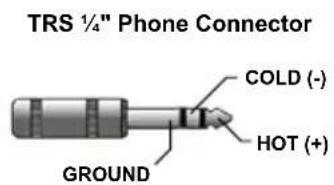
CONNECTOR WIRING


RADAIAL EXTC BLOCK DIAGRAM
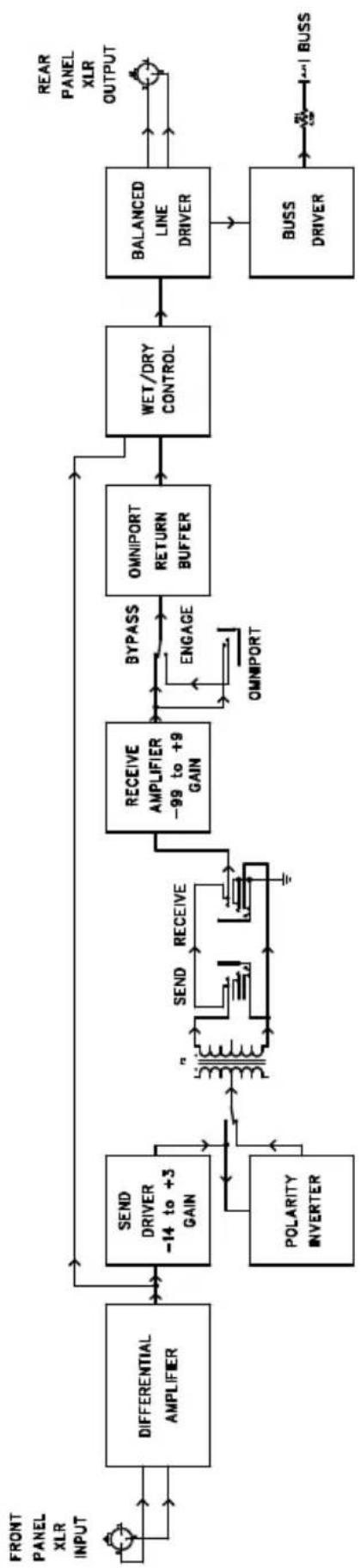
flowchart
graph LR
    A["FRONT PANEL XLR INPUT"] --> B["DIFFERENTIAL AMPLIFIER"]
    B --> C["SEND DRIVER -14 to +3 GAIN"]
    C --> D["Polarity INVERTER"]
    D --> E["OR/QUANTITY SWITCH"]
    E --> F["SEND RECEIVE"]
    F --> G["OR/QUANTITY SWITCH"]
    G --> H["RECEIVE AMPLIFIER -99 to +9 GAIN"]
    H --> I["BYPASS ENGAGE"]
    I --> J["OMNIPORT RETURN BUFFER"]
    J --> K["WET/DRY CONTROL"]
    K --> L["BALANCED LINE DRIVER"]
    L --> M["BUSS DRIVER"]
    M --> N["+1 BUSS"]
    O["REAR PANEL XLR OUTPUT"] --> L
THREE YEAR TRANSFERABLE LIMITED WARRANTY
RADIAL ENGINEERING LTD. ("Radial") warrants this product to be free from defects in material and workmanship and will remedy any such defects free of charge according to the terms of this warranty. Radial will repair or replace (at its option) any defective component(s) of this product (excluding finish and wear and tear on components under normal use) for a period of three (3) years from the original date of purchase. In the event that a particular product is no longer available, Radial reserves the right to replace the product with a similar product of equal or greater value. In the unlikely event that a defect is uncovered, please call 604-942-1001 or email service@radialeng.com to obtain an RA number (Return Authorization number) before the 3 year warranty period expires. The product must be returned prepaid in the original shipping container (or equivalent) to Radial or to an authorized Radial repair center and you must assume the risk of loss or damage. A copy of the original invoice showing date of purchase and the dealer name must accompany any request for work to be performed under this limited and transferable warranty. This warranty shall not apply if the product has been damaged due to abuse, misuse, misapplication, accident or as a result of service or modification by any other than an authorized Radial repair center.
THERE ARE NO EXPRESSED WARRANTIES OTHER THAN THOSE ON THE FACE HEREOF AND DESCRIBED ABOVE. NO WARRANTIES WHETHER EXPRESSED OR IMPLIED, INCLUDING BUT NOT LIMITED TO, ANY IMPLIED WARRANTIES OF MERCHANTABILITY OR FITNESS FOR A PARTICULAR PURPOSE SHALL EXTEND BEYOND THE RESPECTIVE WARRANTY PERIOD DESCRIBED ABOVE OF THREE YEARS. RADIAL SHALL NOT BE RESPONSIBLE OR LIABLE FOR ANY SPECIAL, INCIDENTAL OR CONSEQUENTIAL DAMAGES OR LOSS ARISING FROM THE USE OF THIS PRODUCT. THIS WARRANTY GIVES YOU SPECIFIC LEGAL RIGHTS, AND YOU MAY ALSO HAVE OTHER RIGHTS, WHICH MAY VARY DEPENDING ON WHERE YOU LIVE AND WHERE THE PRODUCT WAS PURCHASED.

This product is intended for professional use only. The user should be familiar and experienced with the 500 series rack and module format.

True to the Music
Radial Engineering Ltd.
1845 Kingsway Ave, Port Coquitlam BC V3C 1S9, Canada
tel: 604-942-1001 • fax: 604-942-1010
email: info@radialeng.com
www.radialeng.com
Reamp®
API, Lunchbox, ProTools and Neve are registered trademarks of their respective owners.
Reamp, Reamper, Reamping and Workhorse are trademarks of Radial Engineering Ltd.
Copyright 2019+ Radial Engineering Ltd. All rights reserved.
Specifications and appearances subject to change without notice.
Radial® EXTC™ 500 Module User Guide November 2019 - Part #: R870 1244 00 / 08-2022 Printed in Canada

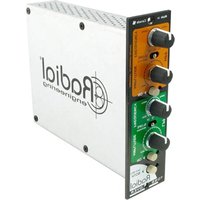


Brand : Radial Engineering
Model : EXTC 500
Category : Professional audio equipment