
MWTT-1 - Remote control Nexa - Free user manual and instructions
Find the device manual for free MWTT-1 Nexa in PDF.


| Type | Remote control |
| Brand | Nexa |
| Model | MWTT-1 |
| Dimensions | 120 x 45 x 25 mm |
| Weight | 80 g |
| Power supply | 2 x AAA batteries (1.5V) |
| Operating frequency | 433 MHz |
| Range | 30 m indoors |
| Indoor/Outdoor use | Indoor only |
| Number of buttons | 4 |
| Functions | On, Off, Dim up, Dim down |
| Compatible devices | Nexa receivers, dimmers, and smart plugs |
| Learning function | Yes, learnable with Nexa devices |
| Housing material | ABS plastic |
| Water resistance | IP20 (no water protection) |
| Operating temperature | 0°C to 40°C |
| Battery life | Approximately 1 year |
| Cleaning and maintenance | Wipe with a dry, soft cloth. Do not use water or cleaning agents. |
| Battery safety | Keep batteries away from children. Recycle used batteries. |
| Repairability | No user-serviceable parts. Contact Nexa support. |
| Certifications | CE, RoHS |
| Warranty | 2 years |
Frequently Asked Questions - MWTT-1 Nexa
User questions about MWTT-1 Nexa
0 question about this device. Answer the ones you know or ask your own.
Ask a new question about this device
Download the instructions for your Remote control in PDF format for free! Find your manual MWTT-1 - Nexa and take your electronic device back in hand. On this page are published all the documents necessary for the use of your device. MWTT-1 by Nexa.
USER MANUAL MWTT-1 Nexa
natural_image
Two white square electronic switches with black dots on one side (no text or symbols visible)MWTT-1 / MWTT-2 VÄGGSÄNDARE
TEKNISK DATA
Batteri 1 x CR2032
Radioprotokoll System Nexa (433,92 MHz)
natural_image
Two white square electronic switches with central vertical lines, no text or symbols visibleMWTT-1 / MWTT-2 WALL TRANSMITTER
TECHNICAL DATA
Battery 1 x CR2032
Radio protocol System Nexa (433.92 MHz)
Range up to 30 m
Timer interval Off, 5s, 1m, 10m, 30m, 60m
Operating temperature 0-45 °C
IP rating IP20 Indoor use
Dimensions (W x H x D) 82 x 82 x 16 mm
A declaration of conformity is available at www.nexa.se
NEXA TRADING AB
support@nexa.se | www.nexa.se
MWTT-1 and MWTT-2 are battery powered System Nexa wall transmitters with built-in switch off timer and function for pushdim with System Nexa dimmer receiver.
They are simple to install on a switch box or on a flat surface with self-adhesive tape or screw. The wall transmitter can control System Nexa ON/OFF- and dimmer receiver.
INSTALLATION
-
Open the battery holder on the wall transmitter.
-
Place the battery in the wall transmitter.
-
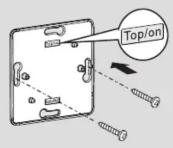
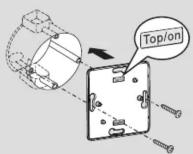
Fit the back unit on the wall (1a) or switch box (1b).
-
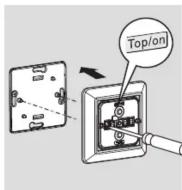
Place wall transmitter with the marking "TOP" upwards in the frame.
-
Screw the wall transmitter on to the back unit.
-
Fit the rocker/rockers on the wall transmitter.
PAIRING
-
Set the receiver to pairing mode – see respective manual
-
Press the upper part (ON) of the selected toggle switch within 6 seconds.
PAIRING CONFIRMATION
The LED indicator on the receiver flashes rapidly. If a light is connected to the receiver, this flashes twice. See also the receiver's manual.
DELETING MEMORY
-
Set the receiver to pairing mode – see respective manual.
-
Press the lower part (OFF) of the selected toggle switch within 6 seconds.
CONFIRMATION DELETION
The LED indicator on the receiver flashes rapidly. If a light is connected to the receiver, this flashes twice. See also the receiver's manual.
SWITCH OFF TIMER
MWTT has built-in switch off timer which automatically sends an "OFF" signal to trained receiver when the set time has been reached.
SETTING SWITCH OFF TIMER
- Press and hold down the toggle switch's upper and lower part for 3 seconds, green LED starts to flash (the number of flashes represents the current timer setting, see table below).
- Press the toggle switch's upper part to increase one step or on the toggle switch's lower part to decrease one step.
- Press and hold down the toggle switch's upper and lower part for 3 seconds to save the setting, LED flashes green rapidly to confirm timer is set.
1 flash Timer not activated
3 flashes 1 minute
4 flashes 10 minutes
5 flashes 30 minutes
6 flashes 60 minutes
Setting mode finishes after 16 seconds if no setting is saved.
CONTROL
ON Press briefly on the toggle switch's upper part to turn on. The dimmer receiver turns on at the most recently set dimmer level OFF Press briefly on the toggle switch's lower part to turn off.
DIM model name that starts with MXXX Dim up: Press and hold down the toggle switch's upper part, release the toggle switch at the required dimmer level. Dim down: Press and hold down the toggle switch's lower part, release the toggle switch at the required dimmer level.
DIM other models Press on the toggle switch's upper part to turn on. Press briefly on the toggle switch again, to start the dimming cycle. Press briefly to stop at required level.
1a231b

SAFETY AND INFORMATION
Indoor range: up to 30m (optimal conditions). The range is strongly dependent on local conditions, such as the presence of metals. For example, the thin metal coating in Low-emissivity (Low-E) glass has a negative impact on the range of radio signals.
There may be restrictions on the use of this device outside the EU. If applicable, check whether this device complies with local directives. Maximum load: Never connect lights or equipment that exceed the maximum load of the receiver, as it can result in defects, a short
Life-support: Never use Nexa products for life-support systems or other applications in which equipment malfunctions can have life-threatening consequences.
Interference: All wireless devices may be subject to interference, which could affect performance. The minimum distance between 2 receivers should be at least 50~cm .
Repairing: Do not attempt to repair this product. There are no user-serviceable parts inside.
Water-resistance: This product is not water-resistant. Keep it dry. Moisture will corrode the inner electronics and can result in a short circuit, defects and shock hazard.
Cleaning: Use a dry cloth to clean this product. Do not use harsh chemicals, cleaning solvents, or strong detergents.
Environment: Do not expose the product to excessive heat or cold, as it can damage or shorten the life of electronic circuit boards.
Nexa cannot be held liable if the product is used for any purpose other than the one for which it is designed, or if there is failure to comply with the instruction.

NORSK
NEXA

natural_image
Two white square electronic switches with central vertical lines, no text or symbols visibleMWTT-1 / MWTT-2 VEGGSENDER
TEKNISKE SPESIFIKASJONER
Batteri 1 x CR2032
Radioprotokoll System Nexa (433,92 MHz)
natural_image
Two white square electronic circuit switches with central vertical lines and circular ends, no text or symbols visible.MWTT-1 / MWTT-2 SEINÄLÄHETIN
TEKNISET TIEDOT
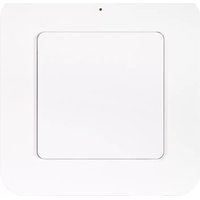

Brand : Nexa
Model : MWTT-1
Category : Remote control