
KSP-303 - Docking Station Vorago - Free user manual and instructions
Find the device manual for free KSP-303 Vorago in PDF.


| Product Type | Docking Station |
| Brand | Vorago |
| Model | KSP-303 |
| Dimensions | 120 x 80 x 30 mm |
| Weight | 150 g |
| Power Input | 5V DC via USB |
| Charging Ports | 1 x USB-C, 1 x USB-A |
| Data Transfer | Supported (USB 2.0) |
| Compatibility | Universal for smartphones and tablets |
| Material | ABS Plastic |
| LED Indicator | Power/Charging status |
| Cable Length | 1 meter |
| Color | Black |
| Care and Cleaning | Wipe with a dry, soft cloth; avoid liquids |
| Safety Features | Overcurrent and short-circuit protection |
| Spare Parts and Repairability | Not available separately; seek professional service |
| General Information | Compact design for desktop use |
Frequently Asked Questions - KSP-303 Vorago
User questions about KSP-303 Vorago
0 question about this device. Answer the ones you know or ask your own.
Ask a new question about this device
Download the instructions for your Docking Station in PDF format for free! Find your manual KSP-303 - Vorago and take your electronic device back in hand. On this page are published all the documents necessary for the use of your device. KSP-303 by Vorago.
USER MANUAL KSP-303 Vorago
CONOCE TU BOCINA
- Light RGB
-
Mode (RT, USB/TE, EM, TWS)
-
Previous song / Vol -
-
Play or pause
-
Next song / Vol +
-
Bass bu
-
OFF/ON
-
OPPJON
-
AUX 3.5
-
Port Micro SD
-
Charging port
-
USB port
-
Microphone slot
广力云智慧零售收银系统


HOW TO USE
01
Turn on the speaker and it will come into the BT mode directly. After pairing the device, now you can play music on it. Press button (4) to Play/Pause. Short press (3) or (5) button to be previous track or next track, long press (3) or (5) button to increase or decrease the Volume.
USB / MICRO SD
Insert the USB (11) or Micro SD card (9) into the slot, KSP-303 will read the MP3 format music automatically. Press button (4) to Play/Pause, press (3) or (4) button to previous track and next track.
FM RADIO
Press (4) to search FM channels automatically. This operation will scan all FM stations and Pre-record them to memory. The scan procedure will take several minutes and cannot be interrupted. Once completed, you can short press (3) or (4) button to move forward or backward. Long press (3) or (4) button to increase or decrease the Volume.
Note: There is no built-in antenna, please using Audio cable as the antenna when FM mode is activated.
RGB LIGHTS
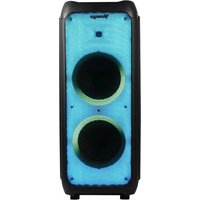
The speaker has different light modes, short press (1) button to switch RGB light mode. The last RGB light mode will be remembered by the unit itself.
ADJUST THE BASS
Short press (6) button will enhance bass effects, it will make bass more obvious.
Tiw
Two same unit speakers, turn on them first, choose one unit and long press its (2) button for several seconds, when you heard the sound of "Ding-tong", that is to say the two units have already paired well. Please ensure before pairing the two units have not connected with other devices.
CHARGING
Plug the USB cable into the speaker's charging port (10) and connect to a power outlet.
The red LED indicator on panel will be lit when the unit is charging.
DATA SHEET
| Input | 5Vcc.1A |
| Input | Micro USB |
| Connector | USB, BT 5.3, TWS, Micro SD, Microphone |
| Reach | 10m |
| RMS Power | 10W |
| Frequency range | 875-108.0Mhz |
| Impedance | 2 Ω |
| Battery | 3.7V, 2400mAh |
| Play time | Up to 4h |
| Size | 270 x 210 x 350 mm |
| Weigh | 2.6 kg |
[Non-Text]
| Year Ended December 31, | ||
| 2018 | 2017 | |
| (in millions) | ||
| Revenues | 1,465 | 1,394 |
| Costs and expenses | (1,088) | (1,038) |
| Net income | 1,465 | 1,394 |
LISH
Limited product warranty
Vorage equipment and / or accessories are covered by a limited warranty for the time indicated in the annexed validity table, counting from the date of acquisition, against any manufacturing and operation defect, provided they have been used under normal conditions of use during the warranty period and for which it was manufactured. Vorage warranty the buyer the absence of anomalies regarding the materials.
| Products | Validity |
| P2, battery, subtilty, audio, actuators, motors, networking and supporting LED Interface | 12 Months |
| * Except in panel (person, designed for which it will only be 12 months) | 36 Month* |
| [...] [+] [+] [+] [+] [+] [+] [+] [+] [+] [+] [+] [+] [+] [+] [+] [+] [+] [+] [+] [+] [+] [+] [+] [+] [+] [+] [+] [+] [+] [+] [+] [+] [+] [+] [+] [+] [+] [+] [+] [+] [+] [+] [+] [+] [+] [+] [+] [+] [+] [+] [+] [+] [+] [+] [+] [+] [+] [+] [+] [+] [+] [+] [+] [+] [+] [+] [+] [+] [+] [+] [+] [+] [+] [+] [+] [+] [+] [+] [+] [+] [+] [+] [+] [+] [+] [+] [+] [+] [+] [+] [+] [+] [+] [+] [+] [+] [+] [+] [+] [+] [+) | 36 Month* |
| [+] [+] [+] [+] [+] [+] [+] [+] [+] [+] [+] [+] [+] [+] [+] [+] [+] [+] [+] [+] [+] [+] [+] [+] [+] [+] [+] [+] [+] [+] [+] [+] [+] [+] [+] [+] [+] [+] [+] [+] [+] [+] [+] [+] [+] [+] [+] [+] [+] [+] | 36 Month* |
sell R in the store when purchasing the product.
| Product: Karaoke speaker | |
| Model: ESP-303 | Dealer stamp |
| Brand: Verappa | |
| Serial number: | |
| Invoice number: | |
| Delivery date: |
The total responsibility of Vorsage will be required to replace the product, including labor and parts, at no cost to the buyer when it is returned to the point of sale, presenting this warranty policy properly completed and stamped by the establishment where it was purchased. The product or copy of the receipt or receipt or invoice, in which cars of the product are sold, will be sold for any purpose of the sale. This warranty will not be granted to Vorsage may use new parts, restored or used in good condition to repair or replace any product, at no additional cost for the consumer. In the case of equipment and / or accessories that can not be repurchased, the warranty will be made from the sale of the product or service, and the warranty covers the transportation expenses of the product derived from its fulfillment, which will be directly attributable to the supplier of the product. In all replacement products, the original warranty period will be renewed. Vorsage is governed by international standards for
How to obtain warranty support
Mentery claims are justified through the point at time, during the first 1st day after the purchase, as long as they meet the requirements, Guarantee claims that can not be processed through the point of sale and any cancers related to the product purchased should be sent with the prepaid guide by Versape in the address at the Vangja headquarters in Francisco Villa No. 2; Cal. San Agustín, CP 456-45, Tijsemula de Zúñiga, Jalisco, Mexico.
Except in situations of force measure or fortuitous event, the repair time in no case will be greater than 30 calendar days from the date of receive of the equipment in Verage.
Exclusion
This warranty is has valid in the following cases: 1) When the product had been used in condition
b) when the product has not been operated in accordance with the
c) When the product has been altered or repaired by unauthorized persons by Village.
Vargo does not offer any other express warranty for this product. To make the warranty of, as well as the availability of parts
As it is made the security value, as well as the acquisition of bonds, companies, and securities and accessories.
To validate a warranty, the following information must be sent to the email:
garantou@tragonis.com
-
Ticket or purchase invoice (digitized)
-
Your address with US, telephone and mail name
Available in the establishment where the product was purchased and / ar in our central offices:
Relunto
In the case of product return, it will only be the place of purchase by the end customers. Subject to the return policy mitigated by the same relief.
(Continued, 2020) is the first part of the first part of the second part.
Vitro
Brand : Vorago
Model : KSP-303
Category : Docking Station