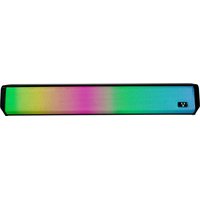
BSP-320 - Docking Station Vorago - Free user manual and instructions
Find the device manual for free BSP-320 Vorago in PDF.


| Product Type | Docking Station |
| Brand | Vorago |
| Model | BSP-320 |
| Power Input | 5V 2A via USB |
| USB Port | USB Type Port |
| Audio Input | Aux 3.5mm |
| Controls | Volume+/Next, Play/Pause, Volume-/Previous, Mode |
| Memory Card Slot | Micro SD |
| Battery Capacity | 3.7V 1200mAh |
| RMS Power | 5W × 2 |
| Frequency Range | 60Hz – 20KHz |
| Sensitivity | ≥75dB |
| Impedance | 4Ω |
| Dimensions | 70 x 443 x 78 mm |
| Weight | 0.755 kg |
| Compatibility | PC, Laptop, Smartphone, Tablets, MP3, MP4 |
| Cleaning | Unplug and wipe with a dry cloth |
| Safety | Do not drop, keep away from moisture and dust |
Frequently Asked Questions - BSP-320 Vorago
User questions about BSP-320 Vorago
0 question about this device. Answer the ones you know or ask your own.
Ask a new question about this device
Download the instructions for your Docking Station in PDF format for free! Find your manual BSP-320 - Vorago and take your electronic device back in hand. On this page are published all the documents necessary for the use of your device. BSP-320 by Vorago.
USER MANUAL BSP-320 Vorago
CONOCE TU DISPOSITIVO
WARNINGS
Don't hit or drop the product.
Don't get it wet.
Don't place heavy objects on it
Keep away from dust and moisture.
Don't expose it to the sun directly.
Unplug and turn of with a dame cloth.
with a damp cloth. Don't alter or modify the horn.
TECHNICAL SPECIFICATION
| Input line | 5V cc 2A |
| Feeding | USB |
| Battery | 3.7V 1200mAh |
| Connector | Aux 3.5mm |
| RMS Power | 5W×2 |
| Frequency range | 60Hz - 20 KHz |
| Sensitivity | ≥75dB |
| Impedance | 4 Ω |
| TDH | 0.2% |
| Compatibility | PC, Laptop, Smartphone, Tablet, Mp3 and Mp4 |
| Size | 70 x 440 x 78 mm |
| Weight | 0.755 Kg |
Limited product warranty
Vorago equipment and / or accessories are covered by a limited warranty for the time indicated in the annexed validity table, csw
from the date of acquisition, against any manufacturing and operation defect, provided they have been used under normal conditions of use.
detect, provided they have been used under normal conditions at use during the warranty period and for which it was manufactured. Vorago
warranty the buyer the absence of anomalies regarding the materials.
Products Validity PC tablets, availability audio keyboards, menus networks and accessories 12 Months
| LCD Monitor* faced in acquisitions, priced for 2010-8 will only be 12 months. | 36 Months* |
| Computer equipment 3 years including Neurobay 2* Coupal computer equipment where the processor is integrated | 36 Months * |
| on the Mollerboard 1 will only be '2 months |
Important warranty policy: Please read and comp
| Seal it in the state when purchasing the product. |
| Model: BSP-320 | Dealer stamp |
| Brands: Ver-age |
| Serial number: |
| Invoice number: |
| Delivery date: |
Responsibilities
The total responsibility of Vorago will be to repair or replace the product, including lobar and parts, at its cost to the buyer when it is returned to the point of sale, presenting this warranty policy properly completed and approved. The product is not intended for any loss or damage, but it is not a copy of the receipt or receipt or invoice, in which data of the product. The date of purchase is specified, to verify the times within the warranty. Vorago may use new parts, restored or used in good condition to repair or replace any product, at its additional cost to the consumer. In the case of the purchase, the price of the product is \$10 per unit, and the price of the product will be generated by a similar product or with superior characteristics. This warranty covers the transportation expenses of the product derived from its fulfillment, which will be directly attributable to the supplier of the products, and that the entire warranty period will be renewed. Vorago is governed by international standards for the manufacture of products.
How to obtain warranty support?
marlavity claims are processed through the joint or side, during the first 12 days after the purchase, as long as they meet the requirements. Guarantee claims that
can not be processed through the point of sale and any concerns related to the product purchased should be sent with the prepaid guide by Verago to the
address of the Vorago headquarters in Francisco Villa No. 3, Col. San Agustín, CP 45845, Tlaiemulca de Zúñiga, Jalisco, Mexico.
Except in situations of twice majeure or fort
case will be greater than 30 calendar days from the date of receive of the equipment in June.
Explanation
EXCLUSIONS This warranty is has valid in the following cases
a) When the product had been used in conditions other than normal. b) When the product has not been operated in accordance with the
for use.
c) When the product has be Vargo.
to make the warranty valid, as well as the acquisition of parts,
consumables and accessories
To validate a warranty, the following information must be sent to the email: gravantias@vprzeplive.com
- 本次股东大会的决议
- Ticket or purchase Invoice (digitized)
-
You address with 65 trainshore and full time
-
Your address with CP, legislature and/or Native.
Available in the establishment where the product was purchased and / or in our central offices.
2017年1月1日
Returns In the 57
In the case of purchase, return is only to the price of purchase by the customer. Subject to the return policies established by the same seller.
Vorago, S.A. de C.V.
Francisco Villa No. 3

Brand : Vorago
Model : BSP-320
Category : Docking Station