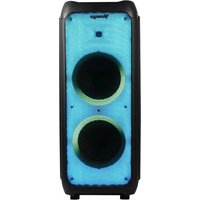
KSP-600 - Docking Station Vorago - Free user manual and instructions
Find the device manual for free KSP-600 Vorago in PDF.


| Product Type | Docking Station |
| Brand | Vorago |
| Model | KSP-600 |
| Dimensions (Approx.) | 20 x 15 x 5 cm |
| Weight | 500 g |
| Power Source | USB-C or AC adapter (5V/2A) |
| Charging Output | Up to 15W per port |
| Number of USB Ports | 4 |
| HDMI Port | 1 (4K@30Hz) |
| Ethernet Port | Gigabit RJ45 |
| Audio Jack | 3.5 mm combo |
| Card Reader | SD/TF card slot |
| Compatible Devices | Laptops, tablets, smartphones (USB-C) |
| Operating Systems | Windows, macOS, Android, iOS |
| LED Indicator | Power on/off status |
| Material | Aluminum alloy + ABS |
| Cleaning Instructions | Wipe with a dry, soft cloth. Do not use liquids. |
| Safety Precautions | Avoid exposure to water, extreme temperatures, and direct sunlight. |
| Spare Parts Availability | Not available as individual parts. Contact Vorago support. |
| Warranty | 1 year limited warranty |
Frequently Asked Questions - KSP-600 Vorago
User questions about KSP-600 Vorago
0 question about this device. Answer the ones you know or ask your own.
Ask a new question about this device
Download the instructions for your Docking Station in PDF format for free! Find your manual KSP-600 - Vorago and take your electronic device back in hand. On this page are published all the documents necessary for the use of your device. KSP-600 by Vorago.
USER MANUAL KSP-600 Vorago
CONOCE TU DISPOSITIVO
1.- Luz LED Encender/Apagar
Gurds, ambos haines an prevocation on made
In a legal case that is not
Pinequ, SA, de C.V. Franshous Ville No. 3 Ma
13) San Agustre, C.P. 46546. Tajornalai de Züringe, Ct
(8)(3) (9)(6) Tel. (31) (44-5555)

KNOW YOUR DEVICE
1.- LED Light On/Off
2.- Turn on / off / restart 3.- Microphone settings:
4.- Time adjustment between source and speaker
Boss +/-. Treble +.
5.- Volume +/-
6.- Scam/Flrs: Play/padla/TWS/FM Automatic station search next/previous music
- Adjust X-Boss +/-
8.- Display screen
9.- 12V DC charging input 10.- Power input 11.- Audio input
12.- USB input
-
- 50 card
-
Guitar Input
- Microshower
12.- Microphone inputs to - central volume 47- T7.- Mode selection
Microphone on/off
18.- Microphone volume +/-.
广力云智慧零售收银系统


REMOTE CONTROL
Turn on / eff
(1) USD/SD/LNG/BT (Audio input)
Prev/FM CH-
Play/pause/IFM tuner
Next/IM DH+
⊕ Repeat
Step
Volume sp
Volume down
⊕ Muice
@ busolizer
(2) Number
[Non-Text]
[Non-Text]
2017-03-04
- Plug your speaker's power cord into a light source.
- You can use its rechargeable battery when the red
at You can see her from England Sunday evening and the light turns green.
-
The battery recharges even when the speaker is in use. (connected with the cable to a light source)
-
You can adjust the music mode within the control
Battery
-
The units takes approximately 8 hours to fully charge
-
If the battery power is low may caused sound
distortion or stop play, pis charging the battery on time.
- To maximize the battery's lifespan, please
charging the battery immediately. When the units not used for prolonged periods of time, the battery
will gradually lose its power. It is recommended to
fully charge the battery at least every 30 days. d. To suggest batteries, please power off once stop
- To saving laundry, please power off once stop using.
LED light
- When the power turn onledlight, it will be on the aut
play status. There have 10 modes for the led lights. 2. Press, the LED LIGHT button, to select the modes
there are 10 different modes can be select. After all
the modes have been pressed, the screen will be black and back to the auto-play status after the Led
light open again.
- Long press the led light switch, the led light will be close.
(1)
Bluetooth connection Change the mode into
twinkles, and speaker will give an alarm. Ensure
you enable the Bluetooth function on your Bluetooth device. Search for Bluetooth connection
until you find device model and pair
TWS connection
Push the MODE Button on bath speakers until
speakers are in Bluetooth Mode. Screen will display the word "BLUE".
itthen both apolives are in Elustanth marks, swits and
When both speakers are in British mode, push and hold the TiWS button for 3 seconds. You will hear a
beep & screen display "bW/btst". Next time you put
both speakers in Bluetooth mode at the same time, speakers will connect automatically.
On your day, a year of previous meeting will be
On your device, turn your Bluetooth settings ON, you will then select the unit and pair. Enjoy TWS
(True Wireless Stereo) sound from your phone via
Budet
TECHNICAL SPECIFICATION
Input line 110-240V 50-60hz 2A
Battery 12VCC, 12A
Amplifier Digital Version
Power Speaker 80W
CONNECTION (Microphone) 10^3 X 2 6.35mm Functions OSV/TWS/EMU/USB/ISO/Bluetooth
LED light Flame&Music spectrum
Accessories Remote control, UHF wireless microphone
Size Weight 35 x 89 x 34 cm 15.75 K
| |
(No text)
Limited product warranty
warranty for the time indicated in the annexed validity table, counting from the state of non-inflation against any manufacturer and assuring
From the case of acquisition, again on early time monitoring and operation deficit, provided they have been used under normal conditions at work during the same period end by which it was manufactured.
Vonogo reversibly the buyer the absence of animales regarding the
(五)
Products Variety
- Nucleotide: cell growth, uptake, endoplasmic activity, hyperactivity and intercellular activity - Enzyme in transcriptionally expressed for cells in mitochondria and 32 nuclei - Complosial vesicularism (in part of the laboratory laboratory) to
- Except computer equipment where the conversion is interpreted 36. Adjustments * use this method to assist only tax 52 months.
important warranty policy Phase road and complete this warranty policy
Job it in the store when purchasing the product.
Product Speaker
Pozem 152.000: Odrém Izamp Eskarvi 904800 Takom 16.000
Invalvia rumban
Cimbrity Bank
The initial preparedness of income will be required as replacing the market.
The total responsibility of Vorsby will be to repart or replace the protocol including below and parts, of no card to the lawyer when it is returned to the print of said permission. This company may not be completed and
point of sale, proceeding the warranty policy properly compared to changed by the establishment where it was purchased. The product is
Scope of the receipt or receipt of invalid, in which data of the product. This date of purchase is specified, to verify the times within the warranty.
No idea may see how part is, described or stated in good condition to repair or replace any product, at no additional cost to the consumer. In the case of environment and /as transparency, feature not be created. For change
or equipment and/or ecosystems that can fall. Be registered, the "Charge will be generated by a similar product or with superior characteristics. This
at maturity covers the long-termation expenses of the product serve from its fulfilment, which will be directly attributable to the supplier of the product, in all end-of-year costs. For additional awards granted will be
property: 17 an replacement procedure; the original material policy will be renewed. Vorago is governed by international standards for the
The following table is provided in the image.
How to collect Maturity support Inventory claims are processed through the point of sale, during the first 15 days
error (the paracentral) (reg. de laq in port) the quaternary to duaternized districtors, not not be prosessed through that point of sale and any concerns related to the product, oubreast, should be sent with the prepaid claim by respace to the
the process of the address of the Voyage headquarters in Infrimestary Ville His. 3; Col. San Agustín, EP 458-49, Téco/Huelo de 20/16a, Jérilco, México.
Except in situations, of hence majeure or 'fattulous' event, the repair time is no
case will be longer equipment in storage.
EXCLÉONIE This comments is successful in the following survey:
a) When the product had been used in conditions b) when the product has not been repeated in
for use: (i) when the product has been altered or retained, by unauthorized persons, by
VORIGO.
to undergo does not offer any other express warranty for this product. To make the warranty valid, as well as the acquisition of parts, components,
consumables meal recommendations I'm confident in community. Even exhaustive information use at time pasti in the next
gaantexaviosyohie.com
1.-Modal and color 2.-Product (lakury) 2.-Zukel at purchase (inventive) (indivoreli)
4.-Your address with OP, telephone and full name
Available in the establishment where the product central offices:
Returns In the past 12 months, 2008 was a return of \5.67 million, which was \3.94 million.
In the Case of product returns, it remains on the past or purchased by the third customers. Subject to the return policies establishment by the same seller .
.

Brand : Vorago
Model : KSP-600
Category : Docking Station