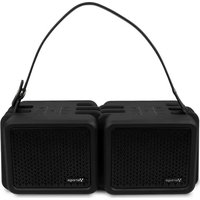
BSP-601 - Docking Station Vorago - Free user manual and instructions
Find the device manual for free BSP-601 Vorago in PDF.


| Product Type | Docking Station |
| Brand | Vorago |
| Model | BSP-601 |
| Dimensions (approx.) | 200 x 80 x 30 mm |
| Weight (approx.) | 300 g |
| Power Supply | USB-C or DC 20V adapter (included) |
| Input Interface | USB-C (male) to connect to laptop |
| Output Ports | 2x USB 3.0, 1x HDMI, 1x Ethernet, 1x 3.5mm audio |
| Supported Video Resolution | Up to 4K @ 30Hz via HDMI |
| Ethernet Speed | Gigabit (10/100/1000 Mbps) |
| Compatible Operating Systems | Windows, macOS, Linux |
| LED Indicators | Power and Ethernet activity LEDs |
| Cleaning Instructions | Wipe with a soft, dry cloth. Do not use liquids or cleaners. |
| Safety Warnings | Keep away from water and extreme temperatures. Do not disassemble. |
| Storage Environment | Temperature: 0-45°C, Humidity: 10-90% |
| Package Contents | Docking station, power adapter, user manual |
Frequently Asked Questions - BSP-601 Vorago
User questions about BSP-601 Vorago
0 question about this device. Answer the ones you know or ask your own.
Ask a new question about this device
Download the instructions for your Docking Station in PDF format for free! Find your manual BSP-601 - Vorago and take your electronic device back in hand. On this page are published all the documents necessary for the use of your device. BSP-601 by Vorago.
USER MANUAL BSP-601 Vorago
natural_image
Close-up of a handbag with visible internal components (no text or symbols)
bar
| Category | Value | | -------- | ----- | | Group 1 | 0.0 | | Group 2 | 0.0 | | Group 3 | 0.0 | | Group 4 | 0.0 | | Group 5 | 0.0 | | Group 6 | 0.0 | | Group 7 | 0.0 | | Group 8 | 0.0 | | Group 9 | 0.0 | | Group 10 | 0.0 | | Group 11 | 0.0 | | Group 12 | 0.0 | | Group 13 | 0.0 | | Group 14 | 0.0 | | Group 15 | 0.0 | | Group 16 | 0.0 | | Group 17 | 0.0 | | Group 18 | 0.0 | | Group 19 | 0.0 | | Group 20 | 0.0 | | Group 21 | 0.0 | | Group 22 | 0.0 | | Group 23 | 0.0 | | Group 24 | 0.0 | | Group 25 | 0.0 | | Group 26 | 0.0 | | Group 27 | 0.0 | | Group 28 | 0.0 | | Group 29 | 0.0 | | Group 30 | 0.0 | | Group 31 | 0.0 | | Group 32 | 0.0 | | Group 33 | 0.0 | | Group 34 | 0.0 | | Group 35 | 0.0 | | Group 36 | 0.0 | | Group 37 | 0.0 | | Group 38 | 0.0 | | Group 39 | 0.0 | | Group 40 | 0.0 | | Group 41 | 0.0 | | Group 42 | 0.0 | | Group 43 | 0.0 | | Group 44 | 0.0 | | Group 45 | 0.0 | | Group 46 | 0.0 | | Group 47 | 0.0 | | Group 48 | 0.0 | | Group 49 | 0.0 | | Group 50 | 0.0 | | Group 51 | 0.0 | | Group 52 | 0.0 | | Group 53 | 0.0 | | Group 54 | 0.0 | | Group 55 | 0.0 | | Group 56 | 0.0 | | Group 57 | 0.0 | | Group 58 | 0.0 | | Group 59 | 0.0 | | Group 60 | 0.0 | | Group 61 | 0.0 | | Group 62 | 0.0 | | Group 63 | 0.0 | | Group 64 | 0.0 | | Group 65 | 0.0 | | Group 66 | 0.0 | | Group 67 | 0.0 | | Group 68 | 0.0 | | Group 69 | 0.0 | | Group 70 | 0.0 | | Group 71 | 0.0 | | Group 72 | 0.0 | | Group 73 | 0.0 | | Group 74 | 0.0 | | Group 75 | 0.0 | | Group 76 | 0.0 | | Group 77 | 0.0 | | Group 78 | 0.0 | | Group 79 | 0.0 | | Group 80 | 0.0 | | Group 81 | 0.0 | | Group 82 | 0.0 | | Group 83 | 0.0 | | Group 84 | 0.0 | | Group 85 | 0.0 | | Group 86 | 0.0 | | Group 87 | 0.0 | | Group 88 | 0.0 | | Group 89 | 0.0 | | Group 90 | 0.0 | | Group 91 | 0.0 | | Group 92 | 0.0 | | Group 93 | 0.0 | | Group 94 | 0.0 | | Group 95 | 0.0 | | Group 96 | 0.0 | | Group 97 | 0.0 | | Group 98 | 0.0 | | Group 99 | 0.0 | | Group1 | - | | Group2 | - | | Group3 | - | | Group4 | - | | Group5 | - | | Group6 | - | | Group7 | - | | Group8 | - | | Group9 | - | | Group1 | - | | Group2 | - | | Group3 | - | | Group4 | - | | Group5 | - | | Group6 | - | | Group7 | - | | Group8 | - | | Group9 | - | | Group1 | - | | Group2 | - | | Group3 | - | | Group4 | - |We invite you to register your product and enjoy the benefits. Register your purchase on our website and participate in promotions at:

www.vorago live.com
Queremos escucharte
(33) 3044 6666
COMUNÍCATE CON NOSOTROS
We want to hear you
+52(33)30446666
CALL US
Siguenos:
Follow us:


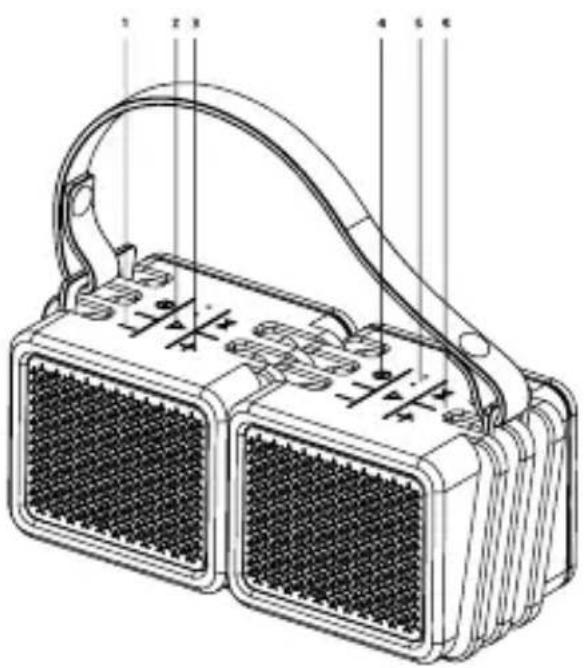
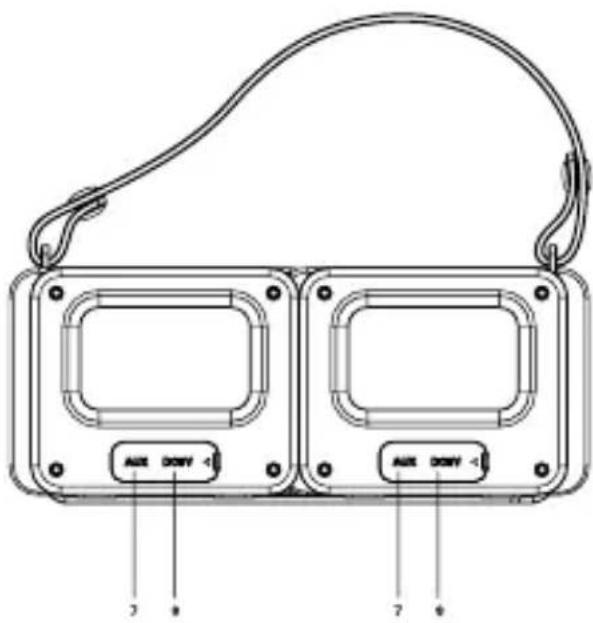
CONOCE TU DISPOSITIVO

| Number Function | |
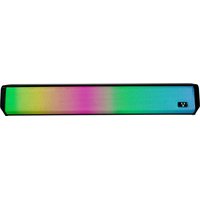
| 1 | Previous track / - Vol button: long press to choose previous song / short press to decrease volume. |
| 2 | Answer or end a call. Press and hold to make the last call. Press and hold to reject the incoming call. |
| 3 | Volume + / Next song. Press and hold to choose the next song / One tap to increase the volume. |
| 4 | On off |
| 5 | LED indicator |
| 6 | TWS button |
| 7 | 3.5 mm |
| 8 | Micro USB charger port |
HOW TO USE
Before you start using the device, you must fully charge it and connect it with a compatible phone or device.
Battery charge
This device has a built-in rechargeable internal battery. Do not attempt to remove the battery from the device, as it may damage the device.
The speaker will emit an intermittent beep and red flash indicator when the battery is low and requires recharging.
Connect your Micro USB charging cable to the charging port of your speaker.
Connect the other end of the USB cable to a charger.
The red indicator light turns on indicating that the device is charging.
The red indicator light goes out when the speaker is properly charged (approximately 1-2 hours).
FUNCIONES
| Function Instruction LED | ||
| Power on | Long press ➊ about 2-3 seconds Blue LED flashes | |
| Power on | Long press ➊ about 2-3 seconds LED off | |
| Pairing | Auto to enter paring mode Blue LED flashes | |
| Successful paring | ower on. Choose Bluetooth BSP-601 to match | Blue LED long on |
| Manual disconnect | Under the Bluetooth connection status, long press the TWS button for 1 second | Blue LED Flashes |
| Receive the call | Short press when incoming call (Under TWS, only the main device have voice) | Blue LED long on |
| Reject the call | Long press ▶ when incoming call Blue LED long on | |
| Hang up the call | Short press ▶ when you are on call Blue LED long on | |
| TWS Connection | When Bluetooth is unconnected, press and hold TWS button on any of the speaker for 1 second to enter TWS mode | LED blue and green alternate flashes |
| TWS Successful Connection | TWS automaticall connected successfully | LED on master flashes blue,slave speaker LED turns to liquid blue |
| TWS speakers connect with mobile phone | After the master and slave speaker successfully connected, simply use your mobile phone searching Bluetooth signal and connect with it. | Blue LED long on |
| Mode switch Short press “ ”/➌ | ||
| AUX mode | Auto switch to AUX mode when insert AUX cable | Play: Green LEDMute:Green LED flashes |
| Volume up | Short press volume + / | |
| Volume down | Short press volume - / | |
| Next Song | Long press volume + / | |
| Previous song | Long press volume - / | |
| Pause/Play/Mute | Short press “ ▶ ” / | |
| Battery low | Connect the micro USB charging cable Red LED flashes | |
BT CONNECTION
To turn on the device, press the button for 5 seconds, do not release the button until the blue light turns on and / or red and blue lights flash this indicates that your horn is in pairing mode. Now you can use your mobile phone to connect to the device.
Note: It is only possible to pair it with only 1 device at
a time.
To pair a device other than the originally paired, turn off the BT of the previously paired device and search the new music player for the BSP-601 and follow the previous instructions for use.
- Consult the user manual of your device to activate the BT and put it in detection mode. If the device requests a password enter 0000.
The blue led of the device will turn on. This will indicate that it is connected and running.
- Once linked you can play music directly from your device.
- Maximum distance between devices is 10m without barriers.
ACCESSORY OPERATION
Once your device is synchronized via BT, play your favorite content on your device and press the or button until you reach the desired volume. You can adjust the volume also from your player.
You can change the song with a quick press to the buttons (1) and (3)
Device operation, hands-free functions and volume control on equipment, players, cell phones and tablets are subject to compatibility with the device and its operating system.
TROUBLESHOOTING
If your speaker doesn't work at all:
Make sure they have enough battery to be able to connect properly with your transmitting equipment (smartphone, audio player, laptop, etc.).
Verify that your transmitter device is on and running.
Verify that the BT transmitter is enabled on your speaker and transmitter device.
TECHNICAL SPECIFICATION
| Frequency range 20 Hz - 20 kHz | |
| Sensitivity ≥70dB | |
| Feeding USB | |
| Impedance 4 Ω | |
| Connector Bluetooth Conectivity, Micro USB,3.5 mm | |
| Range / BT Wireless | 10 m |
| RMS power 10W x2 | |
| Battery 2 000 mAh (each) | |
| Weight 350 g (each) | |
| Bluetooth version | 4.2 |
| Input 5 V 700 mA | |
garantias@voragolive.com
Francisco Villa No. 3
Col. San Agustín, C.P. 45645
Francisco Villa No. 3
Col. San Agustín, C.P. 45645
Limited product warranty
Vorago equipment and / or accessories are covered by a limited warranty for the time indicated in the annexed validity table, counting from the date of acquisition, against any manufacturing and operation defect, provided they have been used under normal conditions of use during the warranty period and for which it was manufactured. Vorago guarantees the buyer the absence of anomalies regarding the materials.
| PRODUCTS VALIDITY | |
| PC, tablets, cell phones, audio, keyboards, mouse, networks and accessories | 12 Months |
| LCD Monitor* Except in panel (screen display) for which it will only be 12 months. | 36 Months* |
Guarantee Policy
Important: Please read and complete this warranty policy and seal it in the store when purchasing the product.
| Product:Bluetooth speaker TWS | |
| Model: BSP-601 Dealer stamp | |
| Brand: Vorago | |
| Serial number: | |
| Invoice number: | |
| Delivery date: | |
Responsibilities
The total responsibility of Vorago will be to repair or replace the product, including labor and parts, at no cost to the buyer when it is returned to the point of sale, presenting this guarantee policy duly completed and stamped by the establishment where it was purchased. The product or copy of the receipt or receipt or invoice, in which the specific data of the product object of the sale, in which the date of purchase is specified, to verify the times within the guarantee. vorago may use new parts, restored or used in good condition to repair or replace any product, at no additional cost to the consumer. In the case of equipment and / or accessories that do not have repair, the change will be generated by a similar product or with superior characteristics. this guarantee covers the transportation expenses of the product derived from its fulfillment; which will be directly attributable to the supplier of the product.
In all replacement products, the original warranty period will be renewed. Vorago is governed by international standards for the manufacture of products.
How to obtain warranty support
Guarantee claims are processed through the point of sale, during the first 15 days after the purchase, as long as they meet the requirements. Guarantee claims that can not be processed through the point of sale and any concerns related to the product purchased should be sent with the prepaid guide by Vorago to the address of the Vorago headquarters in Francisco Villa No. 3, Col. San Agustín, CP 45645, Tlajomulco de Zúñiga, Jalisco, Mexico.
Except in situations of force majeure or fortuitous event, the repair time in no case will be greater than 30 calendar days from the date of receipt of the equipment in Vorago.
Exclusions
This guarantee is not valid in the following cases:
a) When the product had been used in conditions other than normal.
b) When the product has not been operated in accordance with the instructions for use that accompany it.
c) When the product has been altered or repaired by unauthorized persons by Vorago.
Vorago does not offer any other express warranty for this product.
To make the guarantee valid, as well as the acquisition of parts, components, consumables and accessories
To validate a guarantee, the following information must be sent to the email:
garantias@voragolive.com
1.- Model and color
2.- Product failure
3.-Ticket or purchase invoice (digitized)
4.-Your address with CP, telephone and full Name.
Available in the establishment where the product was purchased and / or in our central offices:
Vorago, S.A. de C.V. Francisco Villa No. 3 Col. San Agustín, C.P. 45645 Tlajomulco de Zúñiga, Jalisco, México. Tel. 01 (33) 3044 6666
Importador: Vorago, S.A. de C.V. Francisco Villa No. 3 Col. San Agustín, C.P. 45645 Tlajomulco de Zúñiga, Jalisco, México. Tel. 01 (33) 3044 6666

natural_image
Abstract white V-shaped logo on black background (no text or symbols)

- CONOCE TU DISPOSITIVO
- HOW TO USE
- FUNCIONES
- BT CONNECTION
- ACCESSORY OPERATION
- TROUBLESHOOTING
- TECHNICAL SPECIFICATION
- Limited product warranty
- Guarantee Policy
- Responsibilities
- How to obtain warranty support
- Exclusions
- To make the guarantee valid, as well as the acquisition of parts, components, consumables and accessories
Brand : Vorago
Model : BSP-601
Category : Docking Station