
Meet HD - Webcam OBSBOT - Free user manual and instructions
Find the device manual for free Meet HD OBSBOT in PDF.


| Product Type | Webcam |
| Brand | OBSBOT |
| Model | Meet HD |
| Video Resolution | 1080p Full HD (1920x1080) |
| Frame Rate | 30 fps |
| Field of View | 78° |
| Lens Type | Fixed focus, glass lens |
| Microphone | Built-in dual stereo microphone |
| Noise Reduction | Built-in AI noise reduction |
| Light Correction | Auto light correction (low-light boost) |
| Connection | USB Type-C (USB 2.0 compatible) |
| Plug & Play | Yes, no driver required for Windows/macOS |
| Compatibility | Windows, macOS, Android, Linux |
| Dimensions (LxWxH) | 3.74 x 2.44 x 1.38 inches (95 x 62 x 35 mm) |
| Weight | 5.6 oz (159 g) |
| Mounting | Clip-on monitor or tripod mount (1/4" thread) |
| Privacy Cover | Yes, integrated sliding privacy shutter |
| Cable Length | 5 ft (1.5 m) USB cable |
| Power Source | USB powered (5V DC, 0.5A) |
| Operating Temperature | 32°F to 104°F (0°C to 40°C) |
| Storage Temperature | 14°F to 140°F (-10°C to 60°C) |
| Humidity | 20% to 80% non-condensing |
| Repairability | No user-serviceable parts; contact OBSBOT support |
| Warranty | 1 year limited warranty |
Frequently Asked Questions - Meet HD OBSBOT
User questions about Meet HD OBSBOT
0 question about this device. Answer the ones you know or ask your own.
Ask a new question about this device
Download the instructions for your Webcam in PDF format for free! Find your manual Meet HD - OBSBOT and take your electronic device back in hand. On this page are published all the documents necessary for the use of your device. Meet HD by OBSBOT.
USER MANUAL Meet HD OBSBOT
natural_image
Close-up of a black rectangular device with a circular lens and 'OBSBOT' branding on the top (no additional text or symbols visible)OBSBOT | MEET 4K 4K Edition

natural_image
Close-up of a dark gray OBS80T camera with lens and circular head (no visible text or symbols on body)OBSBOT | MEET 1080P Edition
AI-Powered 4K Webcam
OBSBOT Meet 4K Concept
| Seamless video calls experience | ||
| Best Video Quality | 4K Ultra HD | 4k sensor with a 4K lens, present crystal-clear videos. Support up to 4K@30fps and 1080p@60fps video stream, capture smoother video. |
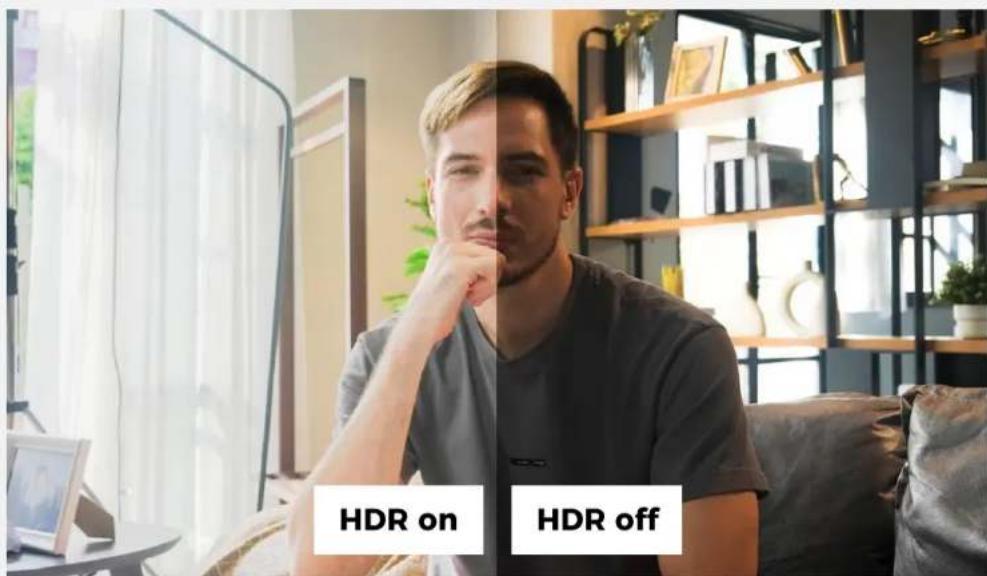
| HDR | Light up the dark part and turn down the over-exposure part, look great in any lights. | |
| Portrait Capture | Simply rotate your OBSBOT Meet device into vertical on the magnetic mount, enjoy your moment in portrait! | |
| Microphone | Outstanding microphone component make your conversation sound clear and natural on OBSBOT Meet series. | |
| AI Auto-Framing | Group Mode | When others join in or leave out the image, the view will synchronously expand or zoom out to cover all the participants properly |
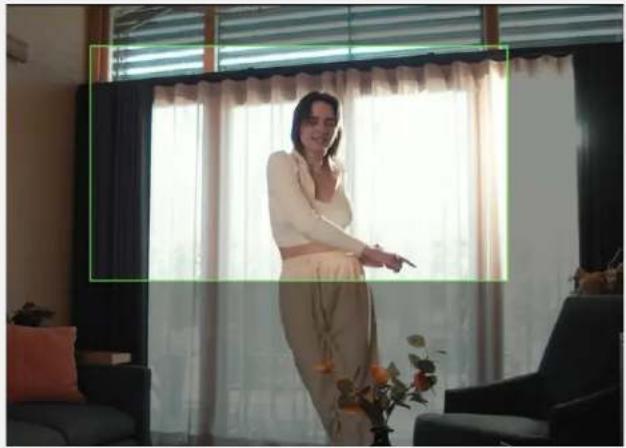
| Single Mode | Single mode in AI Auto-framing features can be divided into landscape closeup, landscape upper body mode and portrait mode. | |
| AI-Power Benefits | AI Auto Focus | Empowered by OBSBOT AI tech. Auto Focus feature on the OBSBOT Meet series will always keep the focus in the middle of the image, urning on the Face Focus function, the device will keep the focus on your face instead |
| AI Auto-Exposure | Use AI algorithm to automatically light up the dark part, after switching the Face AE, the exposure target will change to your face. | |
| Virtual Background | Blurred Background | Powered by the built-in AI chip. OBSBOT Meet can calculate your movement and put the background into the blurred effect. |
| Background Replacement | Upload your favorite pic into the OBSBOT Meet, with only one click, you can entirely immerse yourself in your own video calls area. | |
| Green Screen Background | OBSBOT Meet allows you to capture a real-time chroma key background for you to better customize, no extra equipment required. | |
| Privacy and Convinence | Sleep Mode | Long press the function button for 3 seconds enter Sleep Mode, the video and audio capture will be stopped instantly |
| Cable with a switch | Power off the OBSBOT Meet 4K directly, no need to unplug the power cable anymore | |
| Privacy Cover | An easy, simple but effective way to keep your privacy safe and sound, just put the privacy cover on! | |
| Foldable Magnetic Mount | Stable Magnetic Mount offers you more choices of the position angles of OBSBOT Meet | |
| 1/4" interface | Well compatible with most of the tripods on the market. | |
Iconic Design
The compact & simplify design make the OBSBOT Meet not just a powerful webcam, but also a decoration of your desktop.

natural_image
Close-up of a black OBSBOT camera lens with red circular aperture and ventilation grille (no text or symbols on body)Usage Scenario
The AI Auto-Framing function is a specially designed function for remote group meeting. Accompanied with the Virtual Background features, OBSBOT Meet 4K is the perfect choice for having seamless video calls at home and in the office.


Best Video Quality
Capture every detail with a 12 .8" Sony 4K sensor, OBSBOT Meet 4K present accurate, crystal-clear videos. With the HDR and auto-exposure technology, look professional in any lights.

4K Ultra HD

HDR

Vertical Capture
4K Ultra HD
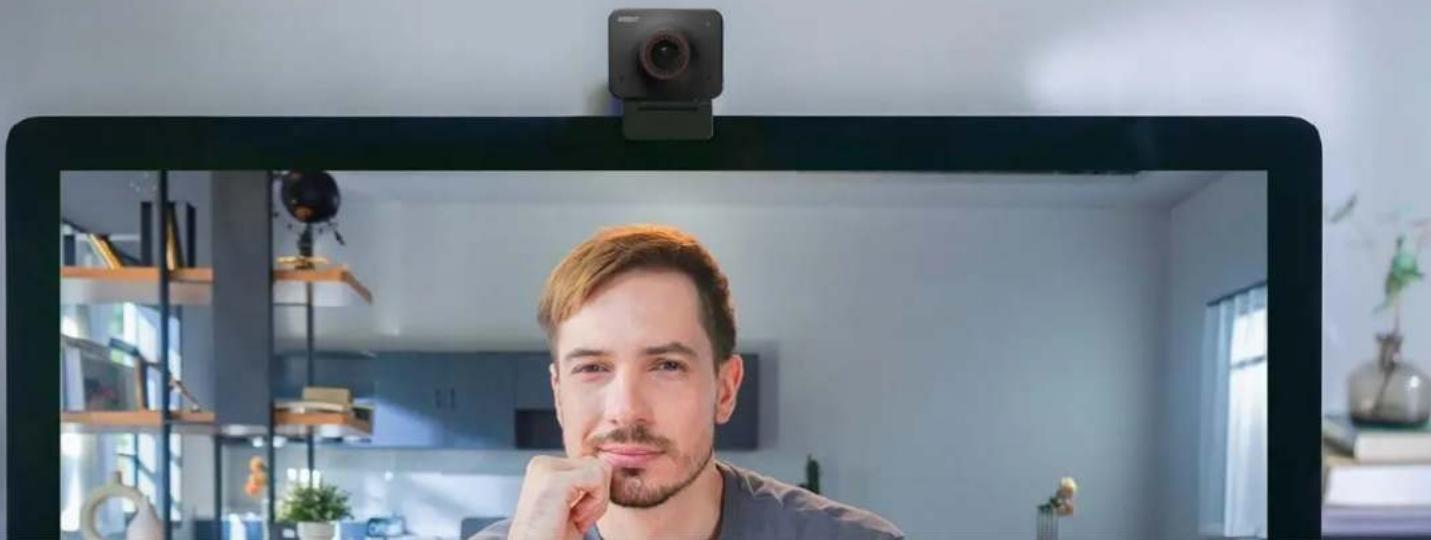
Capture every detail with the 4K lens and deliver crystal-clear video, provide HD video quality even zoom in.
natural_image
Man with beard in front of a digital camera mounted on a wall, in a modern interior (no visible text or symbols)Bigger Sensor
With the 12.8 " Sony Sensor, OBSBOT Tiny 4K capture every detail vividly.
Video Quality
OBSBOT MEET 4K
4K Webcam

Other brand's 4K Webcam

1/2.8" sensor

HDR
Voice Pickup range 3 meters
Voice Pickup range 1.2 meters
Up to 4K@30fps/1080p@60fps
Up to 4K@30fps/1080p@60fps
AI-Powered Features
AI Features process in webcam No Extra App Needed
AI Chip Embedded
Auto Framing
Portrait Mode
No AI Features
No AI Chip
No Auto Framing
Landscape Mode Only
HDR
Look great in any lights, the HDR features provide a professional looks in any bad lightings. No more wasting time in light setting
Portrait Capture
OBSBOT Meet 4K also support portrait view, Enjoy ultra HD 4K video in the 9:16 format.

AI-Powered Benefits
Unlock Inner Power of Your OBSBOT Meet

AI Auto-Framing

Auto-Focus
AI Auto-Framing
Benefits with the ULTRA-wide FOV camera and advanced AI algorithm, the AI Auto-framing feature can be well settled to fit the way you have the extraordinary video call experience, not only for the single person but also the multiple-person situation.
*At Auto-Framing Mode and Virtual background Mode cannot run at the same time
Watch the video clip

natural_image
Two business professionals standing in an office setting, one holding a folder, with a whiteboard and plant visible in the background (no text or symbols on the subjects)AI Auto-Framing
Single mode

natural_image
Interior scene of a modern office with a person holding a mug, no visible text or symbolsLandscape Close-up Mode
AI Auto-framing feature is defaulted in Landscape closeup mode, in which the image will auto track your face and adjust accurately for your actual situation.
natural_image
Woman standing in a room with curtains and a potted flower, no visible text or symbolsUpper Body Mode
Under the Landscape Upper Body mode, the image will change the target from your face to your upper body, offering you a natural ratio to help you do a presentation.
AI Auto-Framing
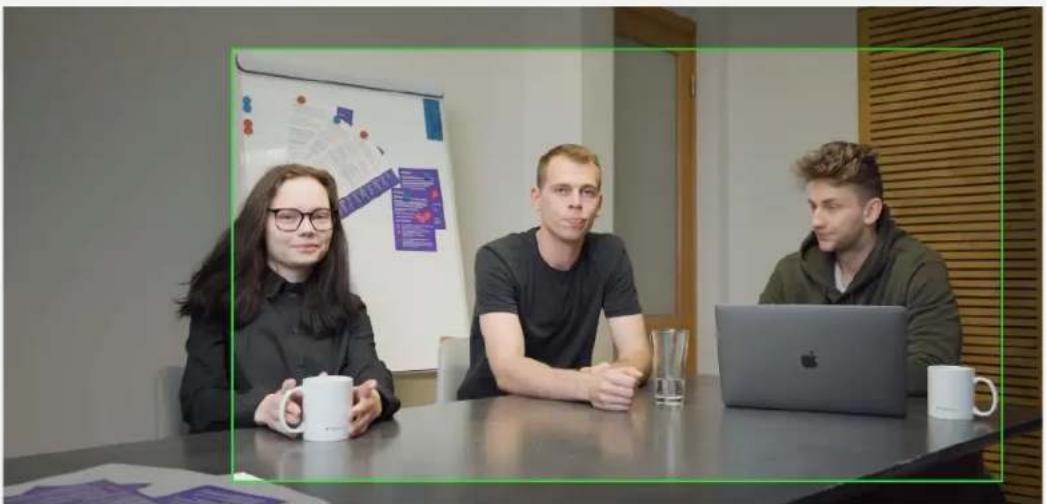
Group mode
natural_image
Three people seated at a conference table with a laptop and mug, in an office setting with a whiteboard and wall art in the background (no visible text or symbols on main subjects)When activating AI Auto-framing Group mode, anyone else who joins in or leaves out the image, the view will synchronously expand or zoom out to cover all the participants properly.
Auto-Focus

natural_image
Person holding a small object with red bounding boxes, no visible text or symbolsEmpowered by OBSBOT AI tech, the Auto Focus feature on the OBSBOT Meet series will always keep the focus in the middle of the image.

natural_image
Portrait of a woman in a white dress with floral hair accessory, seated indoors near a lamp (no visible text or symbols)Turning on the Face Focus function, the device will keep the focus on your face instead and adjust the bokeh and keeping your face distinct and bright.
AI works on OBSBOT device
OBSBOT device
Processed all AI features by OBSBOT Meet itself, no extra App needed.
Video image

flowchart
graph TD
    A["Camera"] --> B["AI"]
    B --> C["Monitor"]

flowchart
graph TD
    A["Video Camera"] --> B["APP"]
    B --> C["GPU"]
    B --> D["CPU"]
    C --> E["APP"]
    D --> E
    E --> F["Monitor with Image"]
Other webcam
Use computer CPU. GPU and extra software to calculate and process AI features.
Video image
Privacy and Convenience
Powerful privacy protection solution and easy-to-go installation

On/Off Switch cable

Sleep Mode

Foldable Magnetic Mount

14 " interface
Cable With A Switch ^[1]
Physical privacy protection is always the best way, no more unplug and replug the cable, just turn the power off with the switch.
![OBSBOT Meet HD - Cable With A Switch ^[1] - 1](/content/2026/05/985031/images/137c559f39238fddbb74ef9bc15f9d2c2c8a526379fd9d846d2d6d6f9dab2b60.jpg)
natural_image
Close-up of a hand holding a black USB cable against a white background (no text or symbols visible)[1]: The Cable is not included in the package.
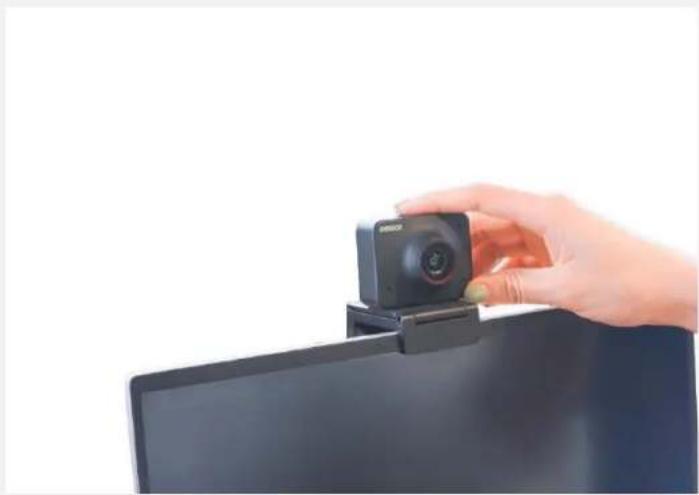
Sleep Mode
natural_image
Hand holding a camera on a laptop screen (no visible text or symbols)Long press the function button for 3 seconds to get OBSBOT Meet into Sleep Mode, the video and audio capture will be stopped in the meanwhile.
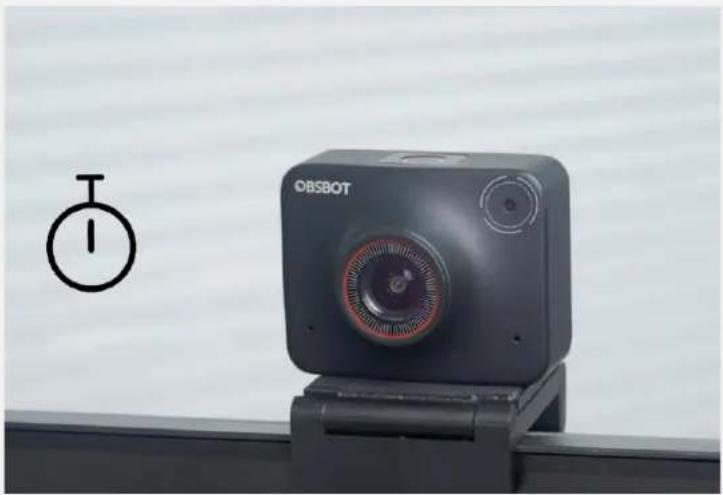
Device Auto Sleep
natural_image
Exterior view of a black OBSBOT camera on a stand, with a circular dial indicator symbol nearby (no text or symbols on the device itself)Or you can make your device's sleep time customizable using "Device Auto Sleep" in OBSBOT MeetCam.
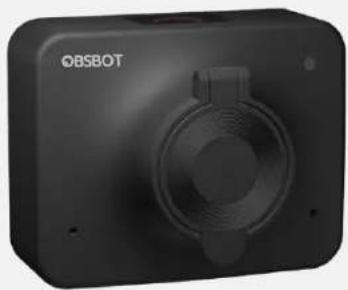
Privacy Shutter
Cover the lens with the privcay shutter, direct physical protection always is the best

natural_image
Black OBSBOT camera with red LED and circular lens (no visible text or symbols)OPEN
natural_image
Exterior view of a black OBSBOT camera module (no visible text or symbols on body)CLOSE

natural_image
3D rendered mechanical component labeled 'Foldable Magnetic Mount' (no other text or symbols visible)Foldable Magnetic Mount
Compact and portable
The foldable magnetic mount not just secures a steady placement to the top of the screen, also provides an adjustable shooting angle.

Universal 14 " interface
OBSBOT Meet features with a universal 14 " interface, compatible with all mainstream tripod.
Virtual Background
Empower Your Video Calls
Blurred Background

Background Replacement

Chroma Key Background
Blurred Background
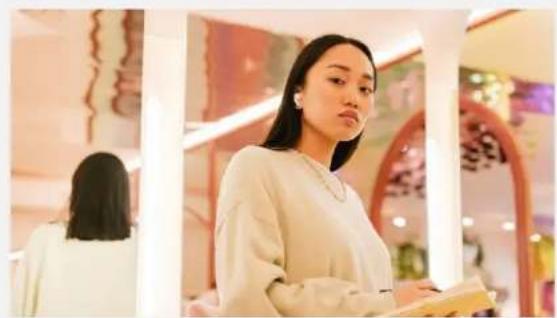
Thanks to the built-in AI chip, OBSBOT Meet can complete the AI Feature itself, just click the button once to get a blurred background. No extra App needed. you can blurred your background in whatever communicating software your using.
natural_image
Woman in a modern interior setting with decorative wall art and a blurred background (no visible text or symbols)
AI Features process inside the camera

natural_image
Portrait of a woman in a light-colored top, standing indoors with blurred background (no visible text or symbols)Background Replacement
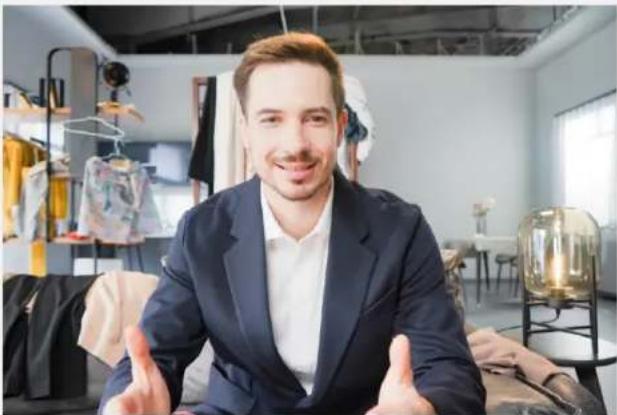
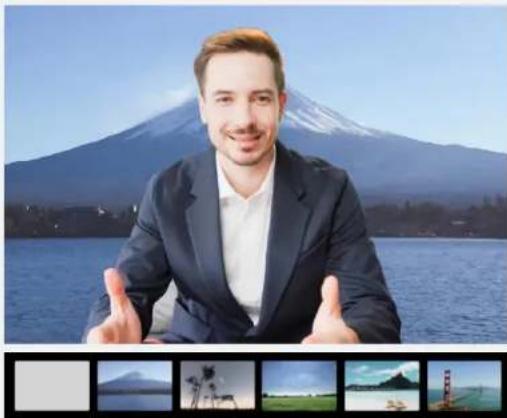
Customize your own background, and just click the button on the OBSBOT Meet, not other Apps needed, get your video calls a whimsical background.
natural_image
Portrait of a man in a suit sitting in a modern interior with clothing racks and hanging garments (no visible text or symbols)Normal
natural_image
Portrait of a man in a suit posing with hands in front of a Mount Fuji lake, with scenic landscape and no visible text or symbols.After background replacement
Green Screen background
Besides the blurred background and background replacement, the OBSBOT Meet allows you to capture a real-time chroma key background which would be easy to reedit, no extra equipment required.

Different options for different needs

natural_image
Black OGBOT camera with red circular lens and black body (no visible text or symbols)OBSBOT MEET 4K
4K Edition
Up to 4K@30fps & 1080P@60fps
Al Auto-framing
Auto-Focus
HDR
Virtual Background
4x Digital Zoom
Sleep Mode

natural_image
Black OBSOT camera with circular lens and control buttons (no visible text or symbols on body)OBSBOT | MEET
1080P Edition
Up to 1080P@60fps
Al Auto-framing
Auto-Focus
HDR
Virtual Background
2x Digital Zoom
Sleep Mode
OBSBOT Meet 4K

Size and Weight
Size (without mount):
56 × 44 × 32mm / 2.2 × 1.73 × 1.26in
Size (with mount)
56×44×53mm/2.2×1.73×2.08in
Weight ( without mount );
72g/2.5401
Weight (with mount):
133g / 4.69oz
Contact Interface
Built-in Audio: Dual omni-directional
microphone
Power Interface: USB Type-C Connection
Data Port: USB Type-C Connection
Max control speed: 120%
Operating Environment
Working Environment Temperature
Camera
Max Video Resolution:
4K@30fps,1080p@60fps/30fps/24/20/15.
MJPEG, H264, YUV
Supported Resolutions: 3840x2160,
1920x1080, 1280x720, 640x360
Supported Frame Rate[1][2][3]:
MOPEG: 3840x2160@[30 24 20 15].
1920×1080@[60 30 24 20 16].
1280x720(0[60 30 24 20 15],
960x540@[60 10 24 20 15],
640×360@[60 10 24 20 15]
YUV: 3840x2160@[1],
1920x1080@[5]
1280×720@[10 5].
96.0x54.0@[15 10 5].
640×360@[20.24 2015 10 5]
H264: 3840x2160@[30 24 20 15],
1920x1080@[60 30 24 20 15].
1280×720@[60 30 24 20 15],
960x540@[60 30 24 20 15].
640×360@[60 30 24 20 15]
Digital Zoom: 4x
Focus Type: AF/MF
HDR: √
Aperture: F2.2
FOV(D): 86°/78°/65°
System Requirements
Windows 7 or later (Windows 8.1 or higher
required for resolutions greater than 1080p)
macOS 10.13 or later
OBSBOT Meet

Size and Weight
Size (without mount):
56×44×12mm/2.2×1.73×1.26in
Size [with mount]
56×44×53mm/2.2×1.73×2.08in
Weight (without mount):
72g/2.54oz
Weight (with mount):
133g / 4.69oz
Contact Interface
Built-in Audio: Dual omni-directional
microphone
Power Interface USB Type-C Connection
Data Port: USB Type-C Connection
Max control speed: 120°/s
Operating Environment
Working Environment Temperature
Camera
Max Video Resolution:
1080p@60fps/30fps/24/20/15, MJPEG,
H264, YUV
Supported Resolutions: 1920x1080,
1280×720, 640×360
Supported Frame Rate[1][2][3]:
MJPEG: 1920x1080(B)[60 30 24 20 15].
1280×720@[60 30 24 20 15].
960x540@1[60 30 24 20 15].
640x360@[60 30 24 20 15]
YLV:1920x1080@[5].
1260×720@[10 5],
960x540(8)[15 10 5],
640x360@[30 24 20 15 10 5]
H264 1920x1080(8)60 30 24 20 15].
1280×720@[69 30 24 20 15].
960x540@[60 30 24 20 15],
640x360@[60 30 24 20 15]
Digital Zoom: 2x
Focus Type: AF/MF
HDR: √
Aperture: F2.2
FOV(D): 66°/78°/65°
System Requirements
Windows 7 or later (Windows 8) or higher
required for resolutions greater than 1080p)
macOS 10.13 or later
- Iconic Design
- Usage Scenario
- Best Video Quality
- 4K Ultra HD
- Bigger Sensor
- HDR
- Portrait Capture
- AI-Powered Benefits
- AI Auto-Framing
- Single mode
- Group mode
- Auto-Focus
- AI works on OBSBOT device
- Privacy and Convenience
- Cable With A Switch [1]
- Sleep Mode
- Device Auto Sleep
- Privacy Shutter
- Foldable Magnetic Mount
- Compact and portable
- Universal 14 " interface
- Virtual Background
- Blurred Background
- Background Replacement
- Green Screen background
- Different options for different needs
- OBSBOT MEET 4K
- OBSBOT | MEET
- Size and Weight
- Contact Interface
- Operating Environment
- Camera
- System Requirements
- OBSBOT Meet
Brand : OBSBOT
Model : Meet HD
Category : Webcam