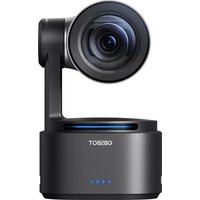
Tail 2 - Surveillance Camera OBSBOT - Free user manual and instructions
Find the device manual for free Tail 2 OBSBOT in PDF.


Pick your language and provide your email: we'll send you a specifically translated version.
| Product Type | Surveillance Camera |
| Brand | OBSBOT |
| Model | Tail 2 |
| Dimensions (LxWxH) | 120 x 120 x 150 mm |
| Weight | 500 g |
| Power Supply | DC 12V, 2A |
| Video Resolution | 4K (3840 x 2160) at 30 fps |
| Pan/Tilt Range | Pan: 360° continuous, Tilt: -20° to 90° |
| AI Features | Auto tracking, gesture control, human detection |
| Night Vision | IR LEDs up to 10m |
| Audio | Two-way audio with built-in mic and speaker |
| Connectivity | Wi-Fi 802.11 b/g/n, 2.4GHz |
| Storage | MicroSD card up to 128GB, cloud storage |
| Mobile App | OBSBOT Capture (iOS/Android) |
| Mounting | Included stand with tripod mount |
| Operating Temperature | 0°C to 40°C |
| Maintenance | Clean lens with soft, dry cloth; avoid liquids |
| Safety | Keep away from water; use only provided adapter |
| Spare Parts | Power adapter, USB cable, mounting bracket |
| Repairability | Contact OBSBOT support for repairs |
Frequently Asked Questions - Tail 2 OBSBOT
How do I set up the OBSBOT Tail 2 camera?
Download the OBSBOT Capture app, connect the camera to power, and follow the in-app instructions to connect via Wi-Fi.
Does the Tail 2 support AI tracking?
Yes, the Tail 2 features auto tracking using AI to follow moving objects or people.
What is the video resolution?
The camera records in 4K at 30 frames per second.
Does it have night vision?
Yes, it has infrared LEDs for night vision up to 10 meters.
Can I use two-way audio?
Yes, the built-in microphone and speaker allow for two-way communication.
How do I connect to Wi-Fi?
Use the OBSBOT Capture app to connect the camera to a 2.4GHz Wi-Fi network.
Is there a way to store recordings locally?
Yes, insert a MicroSD card up to 128GB for local storage.
How do I update the firmware?
Firmware updates are available through the OBSBOT Capture app.
Can I mount the camera on a tripod?
Yes, the camera comes with a stand that has a standard tripod mount.
What should I do if the camera is not tracking properly?
Ensure the subject is within the field of view and the camera is not obstructed. Restart the camera or recalibrate via the app.
User questions about Tail 2 OBSBOT
0 question about this device. Answer the ones you know or ask your own.
Ask a new question about this device
No questions yet. Be the first to ask one.
Download the instructions for your Surveillance Camera in PDF format for free! Find your manual Tail 2 - OBSBOT and take your electronic device back in hand. On this page are published all the documents necessary for the use of your device. Tail 2 by OBSBOT.
USER MANUAL Tail 2 OBSBOT
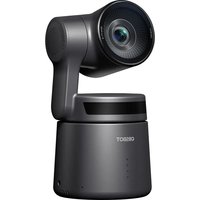

Manual assistant
Powered by Anthropic
Waiting for your message
Product information
Brand : OBSBOT
Model : Tail 2
Category : Surveillance Camera