
PrimeTest 50 - Measurement Seaward - Free user manual and instructions
Find the device manual for free PrimeTest 50 Seaward in PDF.


| Product Type | Portable Appliance Tester (PAT) |
| Dimensions (HxWxD) | Approx. 265 x 115 x 185 mm |
| Weight | Approx. 1.2 kg |
| Power Supply | Mains powered, 230V AC 50/60 Hz |
| Main Functions | Earth bond, insulation, lead testing, RCD testing |
| Display | Backlit LCD with pass/fail indicators |
| Memory | Stores up to 500 test results |
| Communication | USB and Bluetooth for data transfer |
| Safety Rating | CAT II 600V, double insulated |
| Ingress Protection | IP40 |
| Operating Temperature | 0 °C to 40 °C |
| Storage Temperature | -20 °C to 60 °C |
| Standards Compliance | EN 61010, EN 61557 |
| Maintenance | Wipe with dry cloth; avoid solvents |
| Spare Parts & Repairability | Replaceable test leads and fuses; service by qualified personnel |
| General Information | Brand: Seaward, Model: PrimeTest 50 |
Frequently Asked Questions - PrimeTest 50 Seaward
User questions about PrimeTest 50 Seaward
0 question about this device. Answer the ones you know or ask your own.
Ask a new question about this device
Download the instructions for your Measurement in PDF format for free! Find your manual PrimeTest 50 - Seaward and take your electronic device back in hand. On this page are published all the documents necessary for the use of your device. PrimeTest 50 by Seaward.
USER MANUAL PrimeTest 50 Seaward
Operating Instructions
PrimeTest 50
Operating Instructions

SEAWARD
Bracken Hill
South West Industrial Estate
Peterlee
Co Durham
SR8 2SW
ENGLAND
Tel: +44(0)191 586 3511
www.seaward.com
sales@seaward.com
service@seaward.com
Part Number 347A550 Revision 5
© 2020 Seaward Electronic Ltd
Limited Warranty & Limitation of Liability
SEAWARD Electronic Limited guarantees this product to be free from defects in material and workmanship under normal use and service for a period of 1 year. The period of warranty will be effective at the day of delivery.
(c) Copyright 2020
All rights reserved. Nothing from this edition may be multiplied, or made public in any form or manner, either electronically, mechanically, by photocopying, recording, or in any manner, without prior written consent from SEAWARD Electronic Limited. This also applies to accompanying drawings and diagrams.
Due to a policy of continuous development SEAWARD Electronic Limited reserves the right to alter the equipment specification and description outlined in this publication without prior notice and no part of this publication shall be deemed to be part of any contract for the equipment unless specifically referred to as an inclusion within such contract.
PrimeTest 50
Operating Instructions
Contents
1 Important Information....4
2 Introduction....7
3 Performing Tests....8
3.1 Checking a mains power outlet......8
3.2 Testing a Class I Appliance....9
3.3 Testing a Class II Appliance....12
3.4 Testing a mains cord.... 13
4 Specification 15
5 Maintenance 15
6 Battery Check 16
6.1 Battery Replacement 16
7 Service and Calibration 17
1 Important Information
These operating instructions are intended for the use of adequately trained personnel.
The following symbols are used in these operating instructions and on the PrimeTest 50.

Caution, risk of electric shock. Indicates instructions must be followed to avoid danger to persons.

Caution, risk of danger. The operating instructions must be adhered to in order to avoid danger.
Before use, ensure unit is clean and dry; visually inspect all leads, connectors, and case. Any damage or wear must be rectified prior to use.
PrimeTest 50
Operating Instructions
| Part Number | |
| PrimeTest 50 unit | 347A910 |
| Standard Accessories | Part Number |
| Carry Case | 71G082 |
| Black Test Lead 1m | 347A002 |
| UK IEC mains cord 0.5m | 300A002 |
| Operating Instructions | 347A550 |
| Optional Accessories | Part Number |
| 230/110V Adaptor | 270A076 |
| 3 phase adaptor - 16A 4 pin 415V | 209A910 |
| 3 phase adaptor - 16A 5 pin 415V | 209A911 |
| 3 phase adaptor - 32A 4 pin 415V | 209A912 |
| 3 phase adaptor – 32A 5 pin 415V | 209A913 |
| NiMH Batteries and charger | 339A950 |
Full details and specifications can be found at www.seaward.com or by calling Seaward Sales on 0191 586 3511.

Figure 1. PrimeTest 50 Front View

Figure 2. PrimeTest 50 End View
2 Introduction
The PrimeTest 50 is a hand held battery powered unit suitable for carrying out electrical safety checks on:
- Class I appliances
• Class II appliances - IEC mains leads
- Extension leads
- Mains outlet wiring
Numbers shown in circles e.g. refer to figure 1 and figure 2 on page 6.
Test connections on the PrimeTest 50 are:
- Mains socket on front panel for connecting the appliance under test.
- 4mm socket on end panel for earth test probe
- IEC socket on end panel ⑦ for mains cord testing.
User Interface
The LCD display shows test progress, results for individual tests and the overall test result for an appliance or mains cord.
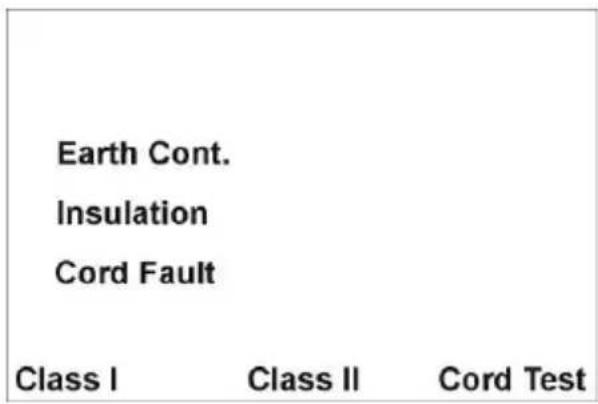
Tests are initiated using the three push buttons:
Power ON/OFF = ② + ③ until a beep is heard
Class I appliance test = ②
Class II appliance test = ③
Cord / extension lead test = ④
Note: The PrimeTest 50 will automatically switch OFF after approximately 3 minutes if no keys are pressed. The auto switch-off is disabled during a power socket test.
A long press on the test key 🔒 or will cause a tone and the 500V warning symbol to illuminate. When released the test will start and insulation resistance carried out at 500v, but the tester will then default back to 250v for the next test. A normal short press will perform the insulation resistance test at the default 250v.
3 Performing Tests
Press keys ②+③ to switch on the PrimeTest 50. When the unit is ready the display will be as shown below.
3.1 Checking a mains power outlet
Connect the IEC power cord to the PrimeTest 50 socket and plug into the mains power outlet to be tested.
If the mains socket wiring is correct the display will show.

If there is a fault with the socket wiring this is indicated by the display below.

In the event of a failure, disconnect the PrimeTest 50 from the supply and rectify the fault.

Do not leave the PrimeTest 50 permanently connected to a mains supply.
The auto switch-off function is disabled when the PrimeTest 50 is connected to a live mains socket. The unit will beep continually after 3 minutes to remind the user to disconnect from the mains socket.
3.2 Testing a Class I Appliance
- Visually inspect the appliance and mains cord for signs of damage.
- If the appliance passes a visual inspection proceed with the electrical tests.
- Plug the earth test lead into the 4mm socket on the PrimeTest 50 end panel.
- Plug the appliance into the PrimeTest 50 front panel mains socket ①
- Connect the earth test probe to an exposed metal part on the appliance.
- If the Appliance under test has an ON/OFF switch, make sure it is in the ON position.
- Press the Class I test key ②
- The PrimeTest 50 will now test the continuity of the protective earth.
- If the measured value is outside acceptable limits a cross is placed next to the Earth Cont enunciator, a FAIL is indicated and the test sequence is halted.

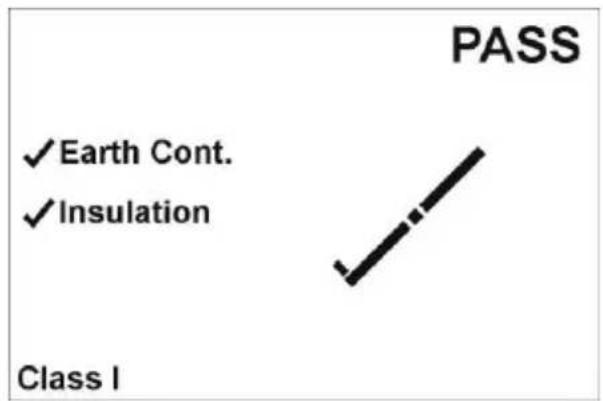
- If the measured value is within acceptable limits a tick is placed next the Earth Cont enunciator.

- The unit will proceed with the Insulation test at 250V.
- If test key ② has had a long press this will cause a tone and the 500V warning symbol to illuminate. When released the test will start and insulation resistance carried out at 500v, but the tester will then default back to 250v for the next test.
Note: The power switch on the appliance under must be in the ON position to perform an insulation test. If no appliance is detected the PrimeTest 50 will display the following.

- Check that the appliance power switch is in the ON position. The test will automatically proceed if the appliance power switch is placed in the ON position.
- If the Check Connections enunciator remains on the display, the load presented by the appliance may be too small for the PrimeTest 50 to detect. In this case, press the test key to continue.
- If the Insulation Resistance is greater than the acceptable limit a tick is placed next to the Insulation enunciator and the PASS enunciator is illuminated.
3.3 Testing a Class II Appliance
- Visually inspect the appliance and mains cord for signs of damage.
- If the appliance passes a visual inspection proceed with the electrical tests.
- Plug the earth test lead into the 4mm socket on the PrimeTest 50 end panel.
- Plug the appliance into the PrimeTest 50 front panel mains socket ①
- Connect the earth test probe to an exposed metal part on the appliance.
- If the Appliance under test has an ON/OFF switch, make sure it is in the ON position.
- Press the Class II test key ③
- The PrimeTest 50 will now test Insulation Resistance at 250V.
- If test key ③ has had a long press this will cause a tone and the 500V warning symbol to illuminate. When released the test will start and insulation resistance carried out at 500v, but the tester will then default back to 250v for the next test.
Note: The power switch on the appliance under must be in the ON position to perform an insulation test. If no appliance is detected the PrimeTest 50 will display the following.

- Check that the appliance power switch is in the ON position. The test will automatically proceed if the appliance power switch is placed in the ON position.
- If the Check Connections enunciator remains on the display, the load presented by the appliance may be too small for the PrimeTest 50 to detect. In this case, press the test key to continue.
- If the Insulation Resistance is greater than the acceptable limit a tick is placed next to the Insulation enunciator and the PASS enunciator is illuminated.

3.4 Testing a mains cord
- Visually inspect the appliance and mains cord for signs of damage.
- If the appliance passes a visual inspection proceed with the electrical tests.
- Plug the mains lead under test into the IEC socket and the front panel mains socket on the PrimeTest 50.
- Press the cords test key ④
- The PrimeTest 50 will now test the continuity of the protective earth.
- If the measured value is outside acceptable limits a cross is placed next to the Earth Cont enunciator, a FAIL is indicated and the test sequence is halted.
- If the measured value is within acceptable limits a tick is placed next the Earth Cont enunciator.
- The unit will proceed with the Insulation test at 250.
PrimeTest 50
Operating Instructions
- If test key ③ has had a long press this will cause a tone and the 500V warning symbol to illuminate. When released the test will start and insulation resistance carried out at 500v, but the tester will then default back to 250v for the next test.
- If the Insulation Resistance is lower than the acceptable limit a cross is placed next to the Insulation enunciator and the test sequence is halted.
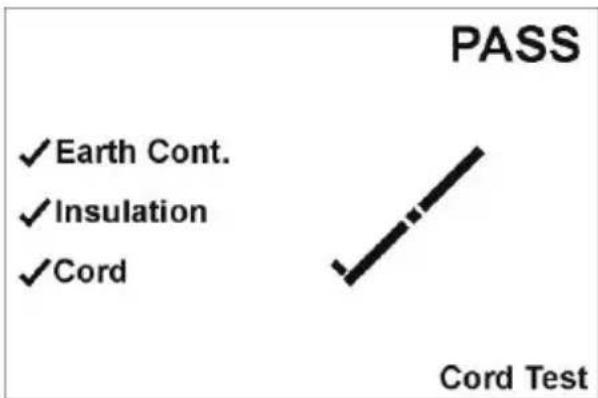
- If the Insulation Resistance is greater than the acceptable limit a tick is placed next to the Insulation enunciator.
- The unit will proceed with the wiring test, checking the live and neutral conductors for short or open circuits or reversed connections.
- If the wiring is correct a tick is placed next to the cord enunciator and a pass is indicated for the sequence.
4 Specification
Earth Continuity Pass Limit 0.2Ω Accuracy* ± 0.03Ω Test current 200mA minimum Test voltage 9V nominal
Insulation resistance Pass Limit 1.0MΩ CLI, 2.0MΩ CL II 2.0MΩ Mains cord Accuracy ± 0.1MΩ Test voltage 250/500V Test current >1mA into 500kΩ Test current <2mA into 2kΩ
Cord Test Earth continuity, insulation resistance as above. Check for Line and Neutral open circuit, short circuit or reversed polarity.
*When used with Seaward test lead, Part Number 347A002
Environmental rating
IP40 Operating temperature range 0^ C to 40^ C, without moisture condensation. Storage temperature range -25^ to 65^ . Batteries should be removed prior to storage. Overvoltage category 300V CAT II
5 Maintenance
Clean only with a dry cloth; do not use solvents. Before use, ensure unit is clean and dry; visually inspect all leads, connectors, and case. Any damage or wear must be rectified to preserve user safety.
Check the battery contacts and compartment are free of electrolytic contamination. Any contamination of the battery contacts or compartment should be cleaned with a dry cloth.
6 Battery Check
The PrimeTest 50 is powered from a 6 AA cells which are checked before a test is performed. When the battery voltage is low the Low Batt enunciator is illuminated. The unit will continue to perform within specification for a limited number of tests, dependent upon the type of the batteries fitted.
When the battery voltage reaches a level where the performance is affected the Low Batt enunciator will flash and all test keys are disabled. The batteries must be replaced.
6.1 Battery Replacement

Before opening the PrimeTest 50 ensure that it is disconnect all test leads.
- Switch off the unit by pressing and holding keys ② and . ③
- Disconnect the black test lead from 4mm test socket ⑥
- Disconnect the IEC mains cable from the IEC socket ⑦
- Disconnect the EUT mains cable from the EUT socket ①
- Place the PrimeTest 50 face down, release the captive screw in the battery compartment cover.
- Remove the battery compartment cover.
- Remove the discharged batteries.
- Insert the replacement batteries into the battery compartment ensuring that the battery polarity matches the marking on the inside of the battery compartment.
- Relocate the battery cover over the battery compartment and fasten in position with the battery cover captive screw.
7 Service and Calibration
To maintain the specified accuracy of the measurement results, the instrument must be recalibrated at regular intervals by either the manufacturer or an authorised Seaward Service
Agent. We recommend a recalibration period of one year.
For help or advise on Service and Calibration contact:
Service Department
Seaward Electronic
Bracken Hill
South West Industrial Estate
Peterlee
Co Durham SR8 2SW
England
Tel: 0191 586 3511
Email: service@seaward.com
Web: www.seaward.com


- PrimeTest 50
- Operating Instructions
- SEAWARD
- Limited Warranty & Limitation of Liability
- Copyright 2020
- Contents
- Important Information
- Introduction
- Numbers shown in circles e.g. refer to figure 1 and figure 2 on page 6.
- User Interface
- Performing Tests
- Checking a mains power outlet
- Testing a Class I Appliance
- Testing a Class II Appliance
- Testing a mains cord
- Specification
- Environmental rating
- Maintenance
- Battery Check
- Battery Replacement
- Before opening the PrimeTest 50 ensure that it is disconnect all test leads.
- Service and Calibration
Brand : Seaward
Model : PrimeTest 50
Category : Measurement