DO4A - Measurement Seaward - Free user manual and instructions
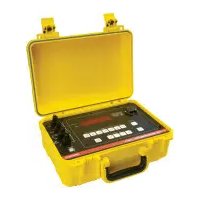
Find the device manual for free DO4A Seaward in PDF.


Pick your language and provide your email: we'll send you a specifically translated version.
| Product Type | Digital Multimeter |
| Brand | Seaward |
| Model | DO4A |
| Category | Measurement |
| Dimensions (approx.) | 180 x 90 x 50 mm |
| Weight (approx.) | 300 g |
| Power Supply | 9V battery (PP3) |
| DC Voltage Range | 200 mV to 1000 V |
| AC Voltage Range | 2 V to 750 V |
| Resistance Range | 200 Ω to 20 MΩ |
| Functions | AC/DC voltage, resistance, continuity, diode test, capacitance, frequency |
| Safety Rating | CAT II 600 V |
| Display | LCD, 3 1/2 digits |
| Continuity Test | Audible beep below 30 Ω |
| Diode Test | Forward voltage drop measurement |
| Data Hold | Yes |
| Auto Power Off | Yes (after 30 minutes) |
| Low Battery Indicator | Yes |
| Overload Protection | Built-in |
| Included Accessories | Test leads, battery, user manual |
| Maintenance | Clean with dry cloth; do not use solvents |
| Spare Parts Availability | Test leads and batteries widely available |
Frequently Asked Questions - DO4A Seaward
How do I measure DC voltage with the Seaward DO4A?
Set the rotary switch to the DCV position. Connect the red lead to the V/Ω jack and the black lead to COM. Touch the probes to the circuit and read the display.
What does the continuity test do?
The continuity test checks if a circuit is complete. Set the dial to the continuity symbol (diode/sound). The meter will beep if resistance is below 30 Ω.
How do I replace the battery in the DO4A?
Turn off the meter and remove the test leads. Unscrew the battery cover on the back. Replace the 9V battery (PP3) and screw the cover back on.
What safety precautions should I take while using the DO4A?
Always observe the CAT II 600V rating. Do not measure voltages above 600V. Use proper probes and keep fingers behind the guards. Disconnect power before measuring resistance.
Can I measure AC voltage with the DO4A?
Yes. Turn the dial to ACV (or V~). Connect the probes as for DC voltage. The meter displays the RMS value.
How do I measure resistance?
Set the switch to the Ω range. Ensure the circuit is de-energized. Connect the probes across the component and read the resistance value.
What does 'OL' mean on the display?
OL stands for Overload. It indicates the measured value exceeds the selected range. Try a higher range or check your connections.
How do I use the data hold function?
Press the HOLD button while measuring. The current reading will freeze on the display. Press again to release.
Can the DO4A measure capacitance?
Yes. Set the dial to the capacitance symbol (often F). Insert the capacitor into the dedicated socket or use leads. Discharge the capacitor before measurement.
How do I clean and maintain the DO4A?
Use a dry cloth to clean the casing. Do not use liquids or solvents. Store in a dry place. Replace the battery if the low battery indicator appears.
User questions about DO4A Seaward
0 question about this device. Answer the ones you know or ask your own.
Ask a new question about this device
No questions yet. Be the first to ask one.
Download the instructions for your Measurement in PDF format for free! Find your manual DO4A - Seaward and take your electronic device back in hand. On this page are published all the documents necessary for the use of your device. DO4A by Seaward.
USER MANUAL DO4A Seaward


Manual assistant
Powered by Anthropic
Waiting for your message
Product information
Brand : Seaward
Model : DO4A
Category : Measurement