
U55E7000M - Television DEXP - Free user manual and instructions
Find the device manual for free U55E7000M DEXP in PDF.


Pick your language and provide your email: we'll send you a specifically translated version.
| Product Type | LED Television |
| Brand | DEXP |
| Model | U55E7000M |
| Screen Size | 55 inches (139.7 cm) |
| Display Resolution | 3840 x 2160 (4K UHD) |
| Refresh Rate | 60 Hz |
| Smart TV | Yes (DEXP Smart platform) |
| Wi-Fi | Built-in 802.11 b/g/n |
| HDMI Ports | 3 x HDMI 2.0 |
| USB Ports | 2 x USB 2.0 |
| Other Connections | Ethernet (RJ45), AV input, Digital Audio Out (Optical), Headphone Jack |
| Power Supply | AC 100-240V, 50/60Hz |
| Power Consumption (Typical) | 120 W |
| Power Consumption (Standby) | < 0.5 W |
| Dimensions with Stand (WxHxD) | 1240 x 780 x 250 mm |
| Dimensions without Stand (WxHxD) | 1240 x 720 x 80 mm |
| Weight with Stand | 15.5 kg |
| Weight without Stand | 15.0 kg |
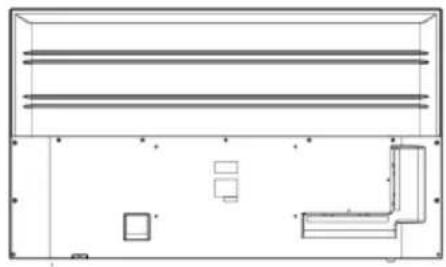
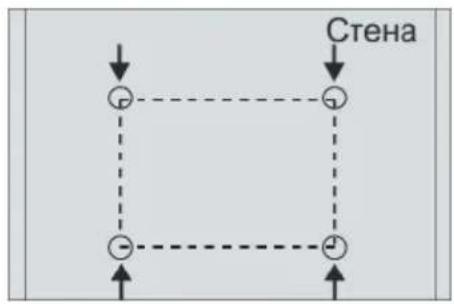
| VESA Mount Pattern | 400 x 200 mm |
| Supported Video Formats | MPEG-4, H.264, H.265, VP9 |
| Supported Audio Formats | MP3, AAC, WMA |
| Cleaning Instructions | Unplug the TV, use a dry soft cloth to wipe the screen. Do not use chemical cleaners. |
| Safety Notes | Do not expose to rain or moisture. Use only the supplied stand or a VESA-approved wall mount. |
| Spare Parts Availability | Remote control, stand base, screws, and power cord available through DEXP service centers. |
Frequently Asked Questions - U55E7000M DEXP
How do I connect my DEXP U55E7000M TV to Wi-Fi?
Go to Settings > Network > Wireless. Select your network, enter the password, and confirm.
How can I perform a factory reset on this TV?
Press Menu on the remote, go to Settings > Device Preferences > Reset. Select Factory data reset and confirm.
What is the correct way to clean the TV screen?
Unplug the TV and wait for it to cool. Use a dry soft microfiber cloth in gentle circular motions. Never spray liquid directly on the screen.
Can the TV be wall-mounted? What is the VESA size?
Yes, the TV supports VESA 400 x 200 mm wall mounts. Use appropriate screws and ensure the wall can support the TV's weight.
How do I update the TV's firmware?
Connect to the internet, then go to Settings > About > System Update. Select Check for Updates and follow on-screen instructions.
Why is there no sound from the TV?
First, check the volume level and ensure mute is off. Verify that external speakers are properly connected. If using HDMI ARC, enable HDMI ARC in sound settings.
How do I connect external devices like a gaming console?
Use an HDMI cable to connect the console to any HDMI port on the TV. Select the correct HDMI input using the Source button on the remote.
The remote control is not working. What should I do?
Replace the batteries with new ones. If still not working, pair the remote again by pressing OK and 0 simultaneously for 3 seconds.
Can I use the TV as a monitor for my computer?
Yes, connect your computer via HDMI. The TV will automatically detect the signal. You may need to adjust the display resolution on your computer to 3840 x 2160 for best results.
How do I enable subtitles on the TV?
Press the Subtitle button on the remote (or go to Menu > Subtitles). Select your preferred language and turn subtitles on.
User questions about U55E7000M DEXP
0 question about this device. Answer the ones you know or ask your own.
Ask a new question about this device
No questions yet. Be the first to ask one.
Download the instructions for your Television in PDF format for free! Find your manual U55E7000M - DEXP and take your electronic device back in hand. On this page are published all the documents necessary for the use of your device. U55E7000M by DEXP.
USER MANUAL U55E7000M DEXP
natural_image
Black triangular warning symbol with a white lightning bolt inside, indicating electrical hazard (no text)ВНИМАНИЕ
natural_image
Black triangular warning symbol with exclamation mark (no text or numbers)natural_image
Architectural line drawing of a multi-level building facade with structural elements (no text or symbols)1
natural_image
Architectural floor plan showing room layouts and structural elements (no text or labels)2
flowchart
graph TD
    A["●"] --> B["●"]
    B --> C["●"]
    C --> D["●"]
    D --> E["●"]
    E --> F["●"]
    style A fill:#fff,stroke:#000
    style B fill:#fff,stroke:#000
    style C fill:#fff,stroke:#000
    style D fill:#fff,stroke:#000
    style E fill:#fff,stroke:#000
    style F fill:#fff,stroke:#000
3

natural_image
Architectural line drawing of a multi-level building facade with structural elements and windows (no text or symbols)

natural_image
Hand pressing a button on a rectangular object with a red arrow indicating left motion (no text or symbols)Основные операции
natural_image
Simple line drawing of a trash bin with crossed lines indicating no waste or restriction (no text or symbols)
Table of contents
Click a title to access it
Manual assistant
Powered by Anthropic
Waiting for your message
Product information
Brand : DEXP
Model : U55E7000M
Category : Television