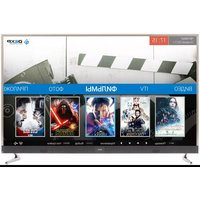
U50E9000K - Television DEXP - Free user manual and instructions
Find the device manual for free U50E9000K DEXP in PDF.


Pick your language and provide your email: we'll send you a specifically translated version.
| Product Type | Television |
| Brand | DEXP |
| Model | U50E9000K |
| Screen Size | 50 inches (127 cm diagonal) |
| Display Resolution | 3840 x 2160 (4K UHD) |
| Refresh Rate | 60 Hz |
| Backlight Type | LED (Direct LED) |
| Operating System | Android TV |
| Connectivity | 2 x HDMI, 1 x USB 2.0, 1 x USB 3.0, 1 x Ethernet, Wi-Fi (802.11ac), Bluetooth 5.0 |
| Tuner | DVB-T2, DVB-S2, DVB-C |
| Audio Output | 2 x 8 W speakers, 1 x Digital Audio Out (optical) |
| Power Consumption (Max) | 90 W |
| Standby Power Consumption | < 0.5 W |
| VESA Mount Pattern | 200 x 200 mm |
| Dimensions (with stand) | 112.7 x 71.1 x 26.2 cm |
| Dimensions (without stand) | 112.7 x 65.0 x 8.0 cm |
| Weight (with stand) | 12.5 kg |
| Weight (without stand) | 11.8 kg |
| Energy Efficiency Class | A+ |
| Remote Control | Infrared + Bluetooth (voice control) |
| Wall Mountable | Yes (VESA 200x200) |
| Cleaning Instructions | Use a soft dry cloth; do not use liquid cleaners |
Frequently Asked Questions - U50E9000K DEXP
How do I connect the TV to Wi-Fi?
Go to Settings > Network & Internet > Wi-Fi, select your network, and enter the password. For Android TV, you can also use a wired Ethernet connection.
How can I perform a factory reset?
Go to Settings > Device Preferences > Reset > Factory data reset. Confirm the action. The TV will restart and erase all personal data.
How do I update the firmware?
Go to Settings > Device Preferences > About > System update. Select Check for update. If available, download and install. Ensure stable internet connection.
How do I mount the TV on a wall?
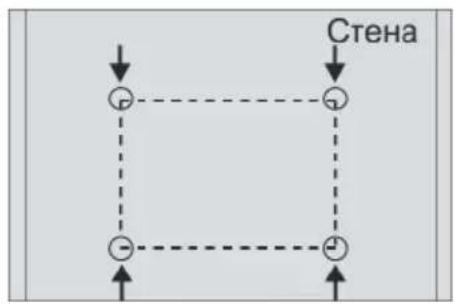
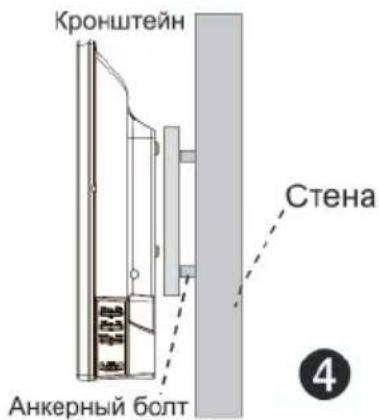
Use a VESA 200x200 compatible wall mount. Remove the stand, attach the mount to the TV using screws (not included), and fix the bracket to the wall. Ensure the wall can support at least 15 kg.
How do I connect external devices like a soundbar?
Use an HDMI cable to connect the soundbar to the TV's HDMI ARC port. Alternatively, use the Digital Audio Out (optical) with a compatible cable. Then select the correct audio output in Settings > Sound.
How can I fix no power issue?
Check the power cable is securely connected. Try a different wall outlet. Press the power button on the TV (not remote). If still no power, contact DEXP support. Do not open the TV.
How do I clean the TV screen?
Turn off and unplug the TV. Use a soft, dry microfiber cloth to gently wipe the screen in circular motions. Do not use water, alcohol, or harsh chemicals.
Where can I find the serial number?
The serial number is on the back of the TV or on the original box. In the TV menu, go to Settings > Device Preferences > About to see it.
How do I use the Smart TV features?
Press the Home button on the remote. Navigate using the directional keys. You can install apps from the Google Play Store, stream content, and use voice search with the remote.
What to do if there is no sound?
Check the volume level and mute status. Ensure the correct audio output is selected in Settings > Sound. Test with external speakers. If using ARC, enable CEC in Settings > HDMI Control.
User questions about U50E9000K DEXP
0 question about this device. Answer the ones you know or ask your own.
Ask a new question about this device
No questions yet. Be the first to ask one.
Download the instructions for your Television in PDF format for free! Find your manual U50E9000K - DEXP and take your electronic device back in hand. On this page are published all the documents necessary for the use of your device. U50E9000K by DEXP.
USER MANUAL U50E9000K DEXP
natural_image
Black triangular warning symbol with a white lightning bolt inside, indicating a hazard or accident (no text)ВНИМАНИЕ
natural_image
Black triangular warning symbol with exclamation mark (no text or numbers)natural_image
Line drawing of a TV set with a central door and side-mounted fans (no text or symbols)1

natural_image
Technical line drawing of a mechanical or electrical enclosure with mounting brackets and structural supports (no text or symbols)2
3
natural_image
Front view of a blank whiteboard with black and white buttons at the bottom (no text or symbols)
flowchart
graph TD
    A["Step 1: Square icon"] --> B["Step 2: Triangle icon"]
    B --> C["Step 3: Square icon"]
    C --> D["Step 4: Square icon"]
    D --> E["Step 5: Square icon"]
natural_image
Technical line drawing of a device rear panel with mounting feet and internal components, showing no text or symbols.natural_image
Hand pressing a button on a rectangular object with a red arrow (no text or symbols)natural_image
Simple line drawing of a trash bin with crossed lines indicating no waste or plastic discharge (no text or symbols)

Table of contents
Click a title to access it
Manual assistant
Powered by Anthropic
Waiting for your message
Product information
Brand : DEXP
Model : U50E9000K
Category : Television