
U50E9000Q - Television DEXP - Free user manual and instructions
Find the device manual for free U50E9000Q DEXP in PDF.


Pick your language and provide your email: we'll send you a specifically translated version.
| Product Type | LED Television |
| Brand | DEXP |
| Model | U50E9000Q |
| Screen Size | 50 inches (diagonal) |
| Resolution | 3840 x 2160 (4K UHD) |
| Refresh Rate | 60 Hz |
| Smart TV Platform | Android TV |
| Dimensions (with stand) | 1120 x 710 x 250 mm |
| Dimensions (without stand) | 1120 x 650 x 80 mm |
| Weight (with stand) | 12.5 kg |
| Weight (without stand) | 12.0 kg |
| Power Consumption (typical) | 100 W |
| Power Consumption (standby) | < 0.5 W |
| Power Supply | AC 100-240 V, 50/60 Hz |
| HDMI Ports | 3 |
| USB Ports | 2 |
| Ethernet Port | 1 |
| Wi-Fi | 802.11ac |
| Bluetooth | 5.0 |
| Audio Output Power | 20 W (2 x 10 W) |
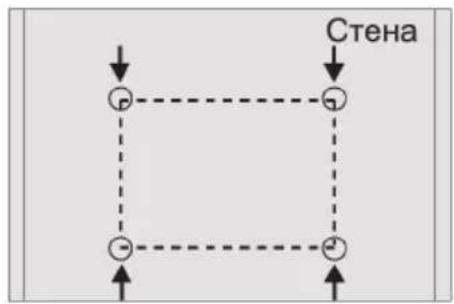
| VESA Mount Pattern | 200 x 200 mm |
| Remote Control | IR remote with voice control |
| Supported Video Formats | MP4, AVI, MKV, MOV, etc. |
| Supported Audio Formats | MP3, AAC, WMA, etc. |
| Care Instructions | Wipe with a soft dry cloth; avoid solvents |
| Safety Features | Overvoltage protection, auto standby |
| Spare Parts Availability | Remote, wall mount bracket, power cord |
| Repairability Index | 8.5 / 10 |
Frequently Asked Questions - U50E9000Q DEXP
How do I perform a factory reset on the DEXP U50E9000Q?
Go to Settings > Device Preferences > Reset > Factory Data Reset. Confirm the action. The TV will restart and erase all data.
What is the VESA mount size for this TV?
The VESA mount pattern is 200 x 200 mm. Use M6 screws of appropriate length (typically 10-12 mm) for mounting.
Can I connect Bluetooth headphones to the TV?
Yes, the TV supports Bluetooth 5.0. Go to Settings > Remote & Accessories > Add Accessory and pair your headphones.
How do I update the firmware on the U50E9000Q?
Ensure the TV is connected to the internet. Go to Settings > Device Preferences > About > System Update and select Check for Update.
Why is the TV screen flickering?
Check if the power cable is securely connected. Try a different HDMI cable or port. If using a dimmer, turn off Eco Sensor in Picture settings.
What is the power consumption of the TV?
Typical power consumption is 100 W during use and less than 0.5 W in standby mode.
Does the TV support Dolby Vision or HDR10?
Yes, the TV supports HDR10 and HLG. Dolby Vision is not supported.
How do I clean the TV screen safely?
Turn off the TV and let it cool. Wipe gently with a soft, dry microfiber cloth. Do not use alcohol, ammonia, or abrasive cleaners.
Is the remote control rechargeable?
No, the remote uses 2 AAA batteries (not included). Replace them when the remote becomes unresponsive.
What should I do if the TV turns off by itself?
Check the sleep timer setting and disable it if needed. Also disable Auto Power Off in Eco settings. Ensure the TV is not overheating.
User questions about U50E9000Q DEXP
0 question about this device. Answer the ones you know or ask your own.
Ask a new question about this device
No questions yet. Be the first to ask one.
Download the instructions for your Television in PDF format for free! Find your manual U50E9000Q - DEXP and take your electronic device back in hand. On this page are published all the documents necessary for the use of your device. U50E9000Q by DEXP.
USER MANUAL U50E9000Q DEXP
natural_image
Black triangular warning symbol with a white lightning bolt inside, indicating electrical hazard (no text)ВНИМАНИЕ
natural_image
Black triangular warning symbol with white exclamation mark (no text or numbers)natural_image
Architectural floor plan showing room layouts and furniture layout (no text or labels)
natural_image
Architectural floor plan showing room layout and furniture placement (no text or labels)1

natural_image
Architectural floor plan showing room layouts and furniture layout (no text or labels)2
flowchart
graph TD
    A["●"] --> B["●"]
    B --> C["●"]
    C --> D["●"]
    D --> E["●"]
    E --> F["●"]
    style A fill:#fff,stroke:#000
    style B fill:#fff,stroke:#000
    style C fill:#fff,stroke:#000
    style D fill:#fff,stroke:#000
    style E fill:#fff,stroke:#000
    style F fill:#fff,stroke:#000
3


natural_image
Simple line drawing of a trash bin with crossed lines indicating no waste or discharge (no text or symbols)
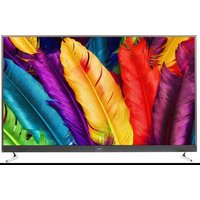
Table of contents
Click a title to access it
Manual assistant
Powered by Anthropic
Waiting for your message
Product information
Brand : DEXP
Model : U50E9000Q
Category : Television