
Serene 2 WRE-085CS - Air Conditioning ActronAir - Free user manual and instructions
Find the device manual for free Serene 2 WRE-085CS ActronAir in PDF.


| Product Type | Split system air conditioner (cooling and heating) |
| Model | Serene 2 WRE-085CS |
| Brand | ActronAir |
| Cooling Capacity | 2.5 kW (approx. 8500 BTU/h) |
| Heating Capacity | 2.8 kW (approx. 9500 BTU/h) |
| Power Supply | 220-240 V ~ 50 Hz |
| Rated Power Input (Cooling) | 0.8 kW |
| Indoor Unit Dimensions (W x H x D) | 850 x 290 x 210 mm |
| Outdoor Unit Dimensions (W x H x D) | 700 x 550 x 250 mm |
| Indoor Unit Weight | 10 kg |
| Outdoor Unit Weight | 30 kg |
| Refrigerant | R32 |
| Noise Level (Indoor) | 25 - 40 dB(A) |
| Noise Level (Outdoor) | 55 dB(A) |
| Energy Efficiency Class | A++ (SEER 6.0, SCOP 4.0) |
| Main Functions | Cooling, heating, dehumidification, fan, timer, sleep mode, auto restart, filter cleaning reminder |
| Air Flow (Indoor) | Up to 8 m³/min |
| Maintenance | Clean filters every two weeks; professional service annually |
| Safety Features | Overload protection, anti-ice, automatic shutdown, child lock (remote) |
| Spare Parts / Repairability | Remote control, filters, indoor fan motor, outdoor fan motor, compressor parts |
| Installation | Requires professional installation; includes mounting bracket and 3m pipe kit |
Frequently Asked Questions - Serene 2 WRE-085CS ActronAir
User questions about Serene 2 WRE-085CS ActronAir
0 question about this device. Answer the ones you know or ask your own.
Ask a new question about this device
Download the instructions for your Air Conditioning in PDF format for free! Find your manual Serene 2 WRE-085CS - ActronAir and take your electronic device back in hand. On this page are published all the documents necessary for the use of your device. Serene 2 WRE-085CS by ActronAir.
USER MANUAL Serene 2 WRE-085CS ActronAir
natural_image
Exterior view of a white AdronAir air conditioner unit (no visible text or symbols beyond branding)Model Numbers:
WRC-026CS/WRE-026CS
WRC-035CS/WRE-035CS
WRC-050CS/WRE-050CS
WRC-072CS/WRE-072CS
WRC-085CS/WRE-085CS
IMPORTANT NOTE:
Please read this manual carefully before operating your air conditioning unit.
That's better. That's Action.
Table of Contents
- General Information ....3
- Safety Instructions ....3
- Unit Specification and Features ....5
03.01. Unit Parts 5
03.02. Achieving Optimal Performance 6
03.03. Features 6
03.04. Setting Vertical Angle of Air Flow 7
03.05. Setting Horizontal Angle of Air Flow 7
03.06. Sleep Operation 8
- Manual Operation 9
- Care and Maintenance 10
- Troubleshooting 14
01. General Information
CONGRATULATIONS on your purchase of an ActronAir air conditioning unit! This unit has been designed and engineered to provide optimum air conditioning and to achieve maximum energy efficiency.
Your air conditioning system has been manufactured from the highest quality materials. Numerous "in house" and "external" inspections and test procedures were conducted to your air conditioning unit to ensure satisfactory operation.
This guide provides operation instructions specific to your split indoor unit. Read this manual thoroughly to ensure safe operation of your air conditioning system.
02. Safety Instructions
- Only licensed HVAC technicians* should service this air conditioning equipment. Improper service or alteration by an unqualified technician could result in significant and major damage to the product or property which may render your warranty null and void. Such unqualified service could also lead to severe physical injury or death. Follow all safety instructions in this literature and all warning labels that are attached to the equipment.
- Prevailing WH&S regulations must be observed and will take precedence to the safety instructions contained on this manual. Safe work practices and environment must be the paramount importance in the performance of all the service procedures.
- This appliance is not intended for use by young children or infirm persons unless they have been adequately supervised by a responsible person to ensure that they can use the appliance safely. Young children should be supervised to ensure that they do not play with the appliance.
*Qualifications required will be appropriate Electrical, Refrigeration and Refrigerant Handling License and Training dependent on local State/Territory regulations.

DANGER
Hazardous Voltage - Risk of Electrocution.
Turn Off the power from main isolator before proceeding with any service and maintenance work of the unit. Observe proper LOCK-OUT/TAG-OUT (LOTO) procedures for electrical appliances in order to prevent accidental switching-on of the power supply. Extreme care and caution must be observed should there be a need to work on live circuit.

WARNING
- If any abnormal situation arises (like burning smell), turn of the power supply and call your HVAC technician for instructions to avoid electric shock, fire or injury.
- DO NOT let the indoor unit or the controller get wet. It may cause electric shock or fire.
- DO NOT insert fingers, rods or other objects into the air inlet or outlet. This may cause injury, since the fan may be rotating at high speeds.
• DO NOT use a flammable spray such as hair spray, lacquer or paint near the unit. This may cause fire or combustion.

CAUTION
• DO NOT inspect the unit by yourself. Ask a qualified HVAC technician to perform the inspection.
- To prevent product deterioration, do not use the air conditioner for preservation purposes (storage of food, plants, animals, works of art, etc.).
- DO NOT operate the air conditioner with wet hands. It may cause electric shock.
• DO NOT touch the evaporator coils inside the indoor unit. The evaporator coils are sharp and may cause injury.
- DO NOT place items that might be affected by moisture damage under the indoor unit. Condensation can occur at a relative humidity of 80%.
- DO NOT expose heat-producing appliances to cold air or place them under the indoor unit. This may cause incomplete combustion or deformation of the unit due to the heat.
• If the air conditioner is used together with other heating devices, thoroughly ventilate the room to avoid oxygen deficiency.
- DO NOT climb onto or place objects on top of the outdoor unit.
- DO NOT operate the air conditioner when using fumigant insecticides. The chemicals may become layered with the unit and endanger those who are hypersensitive to chemicals.
• DO NOT let children play with the air conditioner.
- DO NOT operate the air conditioner in a wet room (e.g. bathroom or laundry room). This can cause electrical shock and cause the product to deteriorate.

WARNING
This air-conditioning unit contains R-32 refrigerant (CLASS A2L) which is mildly flammable. Refer to R-32 Safety Manual, provided with the unit.
NOTE
- Service, maintenance, repairs and decommissioning of this unit must be performed by a licensed HVAC technician; qualified to handle R-32 refrigerant.
• R-32 refrigerant is odourless, if the refrigerant gas comes into contact with fire, it may emit a poisonous gas. - Do not continuously operate open flames and ignition sources in the room.
03. Unit Specification and Features
03.01. Unit Parts

| Display Code | Display Code Explanation |
| 888 | Display window for indicating temperature, operation features and error codes. |
| ON | Displayed for three seconds when:• TIMER ON is set• IONISER, SWING, TURBO, ECO, BREEZE AWAY, INTUITIVE PROXIMITY SENSOR or QUIET feature is turned on |
| OF | Displayed for three seconds when:• TIMER OFF is set• IONISER, SWING, TURBO, ECO, BREEZE AWAY, INTUITIVE PROXIMITY SENSOR or QUIET feature is turned off |
| dF | Displayed when the system is defrosting |
| CL | Displayed when Active Clean feature is turned on |
| FP | Displayed when Freeze Protection mode is turned on |
| ECO | Displayed when ECO+ feature is activated |
| Displayed when Easyconnect is installed | |
| -- | Displayed when Indoor unit is in mode conflict with another operating indoor unit (applicable to multi-split “MRC” installations only) |
NOTE
Refer to remote manual for full features list.
03.02. Achieving Optimal Performance
Optimal performance for the COOL, HEAT, and DRY mode can be achieved in the temperature ranges shown in the table below. If the unit is used outside of these ranges, certain safety protection features will activate and cause the unit to perform at a reduced capacity.
| COOL Mode HEAT Mode DRY Mode | ||
| Indoor Temperature | 17°C - 32°C 0°C | 30°C 10°C - 32°C |
| Outdoor Temperature | -15°C - 60°C 25°C | -30°C 0°C - 60°C |
NOTE
To further optimize the performance of the unit, do the following:
- Keep doors and windows closed.
- Limit energy usage by using TIMER ON and TIMER OFF functions.
- Do not block air inlets or outlets.
• Regularly inspect and clean air filters.
03.03. Features
NOTE
Refer to remote manual for full features list.
Auto-Restart
If the unit loses power, it will automatically restart with the prior settings once power has been restored.
Anti-mildew
When the unit is turned off after COOL, AUTO or DRY mode, the unit will continue to operate a low power to dry up condensed water to prevent mildew growth.
Easyconnect Control (Optional)
Allows you to control the unit using a mobile phone and a wireless connection. Installation is required to be undertaken by a licensed technician. Easyconnect is an accessory that may be purchased separately.
Louvre Angel Memory
When turning on your unit, the louvre will automatically resume its former angle. Aim the louvre higher to avoid direct airflow. This setting is found under the SET menu.
Active Clean Function
It washes away dust, mold and grease when it adheres to the heat exchanger, by automatically freezing and then rapidly thawing frost. Active Clean function is used to produce more condensed water to improve the cleaning effect. After cleaning, the internal blower fan operates with hot air to blow-dry the evaporator and prevent the growth of mold.
When this function is turned on, the indoor unit will display CL. After 20 to 45 minutes, the unit will turn off automatically and Active Clean function will be deactivated.
Breeze Away
This feature stops direct air from blowing onto you.
Refrigerant Leakage Detection
The indoor unit will automatically display ELOC when it detects refrigerant leakage. Switch system off and contact service or installer.
Intuitive Proximity Sensor
This feature detects the occupancy of the people in the room. When in COOL mode, if you are away for 30 minutes, the unit will automatically lower the frequency of the unit to save energy. The unit will automatically resume operation after sensing activity in the room.
LED Display
Press the LED button on the remote control to turn off the indoor unit panel display and cancel the 'beep' noise.
Freeze Protection
When the unit is on HEAT mode and indoor temperature drops below 8 °C - FP will be displayed and system will enter freeze protection mode.
03.04. Setting Vertical Angle of Air Flow
While the unit is on, use the SWING button on the remote control to set the vertical angle airflow direction. Refer to Remote Control manual for more details.
03.05. Setting Horizontal Angle of Air Flow
While the unit is on, press and hold the SWING button on the remote control to set the vertical angle airflow direction. Refer to Remote Control manual for more details.
NOTE
- When using COOL or DRY mode, do not set vertical louvre to the minimum angle for long periods of time. This can cause water to condense on the louvre blade, which may drop on your floor or furnishings.
- When using COOL or HEAT mode, setting the vertical louvre to the minimum angle can reduce the performance of the unit due to restricted air flow.
- Do not move louvre by hand. This will cause the louvre to become out of sync. If this occurs, reset mains power supply isolator to restart the unit. This will reset the louvre.

Do not put your fingers in or near the blower. The high-speed fan inside the unit may cause injury.
The SLEEP function is used to decrease energy usage while you sleep and do not need the same temperature settings to stay comfortable. This function can only be activated via the remote control.
Press the SLEEP button when you are ready to go to sleep. When in COOL mode, the unit will increase the temperature by 1irc C after 1 hour, and will increase an additional 1irc C after another hour. When in HEAT mode, the unit will decrease the temperature by 1irc C after 1 hour, and will decrease an additional 1irc C after another hour.
It will hold the new temperature for 7 hours, then the unit will turn off automatically.
NOTE
The SLEEP function is not available in FAN or DRY mode.

flowchart
graph LR
    A["Set Temperature"] --> B["+/- ±T/Ω F"]
    B --> C["+/- ±T/Ω F"]
    C --> D["7 hours Timer Off"]
    D --> E["Saving Energy During Sleep"]
04. Manual Operation
How to operate your unit without the remote control
In the event that your remote control fails to work, your unit can be operated manually with the MANUAL CONTROL button located on the indoor unit (shown in image below). Note that manual operation is not a long-term solution, and that operating the unit with your remote control is strongly recommended.
To operate your unit manually:
- Locate the MANUAL CONTROL button as shown on the image on the next page.
- Press the MANUAL CONTROL button one time to activate FORCED AUTO mode. The display will show 24.0c.
- Press the MANUAL CONTROL button again to activate FORCED COOLING mode. The display will show fc.
- Press the MANUAL CONTROL button a third time to turn the unit Off.
FORCED AUTO MODE
The unit will go to AUTO mode with 24°C set point.
FORCED COOL MODE
The outdoor unit will run at minimum capacity and indoor fan in low speed. After 30 minutes, the system will go to AUTO mode with 24°C set point.
CAUTION
The manual button is intended for testing purposes and emergency operation only. Please do not use this function unless the remote is lost and it is absolutely necessary. To restore regular operation, use the remote control to activate the unit.

natural_image
Technical line drawing of a printer internal structure (no text or symbols)MANUAL CONTROL BUTTON
05. Care and Maintenance
NOTE
Apart from filter cleaning, all other general maintenance and care of systems should be undertaken by a licensed technician.
Maintenance Procedures
This section describes the procedures that must be performed as a part of normal maintenance program. Regular servicing of equipment by licensed technician is highly recommended. Regular servicing of your unit helps in maintaining its optimum performance and reliability. The checklist and service periods provided on this manual are guides only, as some sites may require more frequent servicing. Always disconnect electrical power to the unit before performing these procedures. It is always a safe practice to observe all safety warnings and cautions when conducting maintenance tasks.

DANGER
Live Electrical Connections!
It may be necessary to work with live electrical components on certain maintenance tasks. Only licensed electricians and qualified technicians are allowed to perform these tasks.
Beware of Rotating Fan Blades!
Always make sure that all power supply, to the Outdoor Fans are turn Off and isolated.
Observe WH&S safety procedures, do not wear loose clothing and any jewellery when working near the fans.
Wear PPE whenever performing any maintenance procedures.
Observe all necessary procedures when working in a confined space.

WARNING
Hazardous Voltage!
Always make sure that all power supply, including remote controls, are disconnected before performing maintenance.
Observe proper LOCK-OUT/TAG-OUT procedures to ensure that power cannot be inadvertently energised. Failure to disconnect power before maintenance procedures can result in serious injury and/or death.
This unit is charged with R-32 mildly flammable refrigerant.
Annual Maintenance Checklists
• Perform general maintenance inspections.
- Perform scheduled start-up checks.
- Leak test refrigerant circuits.
- Inspect contacts of all contactors and relays. Replace all worn contacts as required.
- Inspect, clean and tighten all electrical connections.
- Check fans for balanced operation. Make sure that there are no loose screws / bolts, no fan blades interference and no damage to the fans and guards.
- Inspect the air filters, clean or replace as required.
- Clean and repaint any corroded panel section.
- Ensure no blockage of airflow through variable speed drive.
Cleaning the Condenser Coils
Clean the coils at least once a year or more frequently if unit is located in a dusty and dirty environment, in order to maintain your system's proper operating performance. High discharge pressures are good indication that the coils need cleaning. When using detergent or solvents to clean the coils, follow the manufacturer's instructions to avoid potential damage to the coils and to the unit.
To clean the refrigerant coils, use a soft brush and water spray, such as garden hose or pressure washer with low pressure nozzle.

WARNING
Do Not Use High Alkaline Detergent!
When using detergent for coil cleaning, ensure that the alkaline level is no higher than 8.5, which can cause corrosion damage to the coils.
No Water into the Electrical Compartments!
Ensure consideration is given to the possibility of water entering the electrical compartments during cleaning of the condenser coil.
Coil Cleaning Procedures
- Disconnect power to the unit.
- Remove the louvred panels from the unit to gain access to the air inlet side of the coils.
- Use a soft brush to remove loose dirt and debris from both sides of the coils.
- Straighten bent coil fins with fin comb.
- Prepare the detergent solutions according to the manufacturer's instructions.
- Spray solution at a 90irc angle to the coils, keeping a minimum nozzle spray angle of 15irc , with at least a 1800mm distance from the coils and 600 psi pressure.
- Spray leaving air side of the coils first then the air inlet side. Allow the solution to stand on the coils for five minutes.
- Rinse both sides of the coils with cool clean water.
- Inspect the coils, if they are still dirty, repeat the cleaning procedure.
- Clean and wipe dry the outer and inner sides of the unit, the refrigerating parts and other components.
- Ensure that the condensate drain lines are not blocked.
- Reinstall all unit panels, covers and guards.
- Restore electrical power to the unit after ensuring all electrical components are dry.
Air Filter Cleaning Procedure
A clogged air conditioner can reduce the cooling efficiency of your unit, and can also be bad for your health. Make sure to clean the filter once every two weeks. (Refer to image on next page)
- The air filter is at the top of the indoor unit.
- Grip the tab on the end of the filter, lift it up, then pull it towards yourself.(See image below)
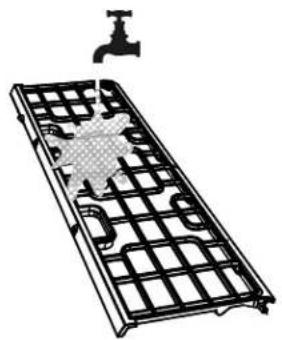
- Clean the air filter with warm, soapy water. Be sure to use a mild detergent.
- Rinse the filter with fresh water, then shake off excess water.
- Dry it in a cool, dry place, and refrain from exposing it to direct sunlight.
- Slide the air filter back into place and clip it into the indoor unit.
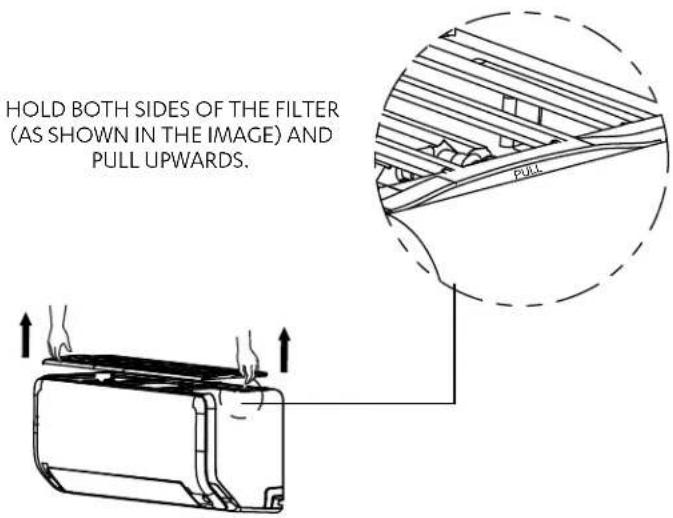
Filter is held in place by mag pull magnets, which helps in easily re-fitting the filter after cleaning.
WASH FILTER THOROUGHLY.
natural_image
Diagram of a metal grid device with a faucet and a water tank, no text or symbols presentMaintenance – Long Periods of Non-Use
If you plan to not use your air conditioner for an extended period of time, do the following:
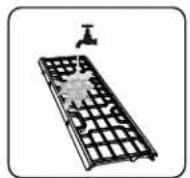
Clean Filter
Turn on FAN function until unit dries out completely

Turn off the unit and isolate the power

Remove batteries from remote control
Maintenance – Pre-Season Inspection
After long periods of non-use, or before periods of frequent use, do the following:

Clean Filter

Replace Batteries

Make sure nothing is blocking all air inlets and outlets
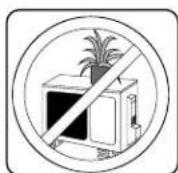

CAUTION
• Any unit repairs, maintenance and cleaning of outdoor unit should be performed by qualified HVAC technician.
- Filter cleaning can and should be regularly performed by product owner as required.
06. Troubleshooting

SAFETY PRECAUTIONS
If ANY of the following conditions occurs, turn off your unit immediately!
- You smell a burning odour
• The unit emits loud or abnormal sounds
• A power fuse blows or the circuit breaker frequently trips
• Water or other objects fall into or out of the unit
DO NOT ATTEMPT TO FIX THESE YOURSELF! CONTACT Authorised SERVICE PROVIDER IMMEDIATELY!
The following problems are not a malfunction and in most situations will not require repairs.
| Fault Possible | Causes |
| Unit does not turn on when pressing ON/OFF button | The Unit has a 3-minute protection feature that prevents the unit from overloading. The unit cannot be restarted within three minutes of being turned off. |
| The unit changes from COOL/HEAT mode to FAN mode | The unit may go into a defrost setting, to prevent frost forming on the unit. During this operation dF will be displayed on the indoor unit Once the temperature increases, the unit will start operating in the previously selected mode again. |
| The set temperature has been reached, at which point the unit turns off the compressor. The unit will continue operating when the temperature fluctuates again. | |
| The indoor unit emits mist | In humid regions, a large temperature difference between the room's air and the conditioned air can cause mist. |
| Both the indoor and outdoor units emit mist | When the unit restarts in HEAT mode after defrosting, mist may be emitted due to moisture generated from the defrosting process. |
| The indoor unit makes noises | A rushing air sound may occur when the louvre resets its position. |
| A squeaking sound may occur when running the unit due to expansion and contraction of the unit's plastic parts. | |
| Both the indoor unit and outdoor unit make noises | Low hissing sound during operation: This is normal and is caused by refrigerant gas flowing through both indoor and outdoor units. |
| Low hissing sound when the system starts, has just stopped running, or is defrosting: This noise is normal and is caused by the refrigerant gas stopping or changing direction. | |
| Squeaking sound: Normal expansion and contraction of plastic and metal parts caused by temperature changes during operation can cause squeaking noises. | |
| The outdoor unit makes noises | The unit will make different sounds based on its current operating mode. |
| Dust is emitted from either the indoor or outdoor unit | The unit may accumulate dust during extended periods of non-use, which will be emitted when the unit is turned on. This can be mitigated by covering the unit during long periods of inactivity. At the end of a cycle, the outdoor fan will run in reverse, expelling dust and debris from coil surface. |
| The unit emits a bad odour | The unit may absorb odours from the environment (such as furniture, cooking, cigarettes, etc.) which will be emitted during operations. |
| The unit's filter have become mouldy and should be cleaned. | |
| The fan of the outdoor unit does not operate | During operation, the fan speed is controlled to optimize product operation. |
NOTE
If your problem persists after performing the checks and diagnostics above, turn off your unit immediately and contact ActronAir on 1800 119 229 for technical support or warranty.
Owner's Manual
Wall Hung Split System
Please check the following points before contacting a qualified service technician.
| Fault Possible | Causes Remedies | |
| Poor Cooling Performance | Temperature setting may be higher than ambient room temperature. | Lower the temperature setting. |
| The heat exchanger on the indoor or outdoor unit is dirty. | Contact a qualified service technician. | |
| The air filter is dirty. | Remove the filter and clean it according to instructions. | |
| The air inlet or outlet of either unit is blocked. | Turn the unit off, remove the obstruction and turn it back on. | |
| Doors and windows are open. | Make sure that all doors and windows are closed while operating the unit. | |
| Excessive heat is generated by sunlight. | Close windows and curtains during periods of high heat or bright sunshine. | |
| Too many sources of heat in the room (people, computers, electronics, etc.). | Reduce amount of heat sources. | |
| Low refrigerant due to leak or long-term use. | Contact a qualified service technician. | |
| QUIET mode is activated. | QUIET mode can lower product performance by reducing operating frequency. Turn off QUIET mode. | |
| The unit is not working | Power failure. Wait for the power to be restored. | |
| The power is turned off. Turn on the power. | ||
| The fuse is burned out. Contact a qualified service technician. | ||
| Remote control batteries are dead. Replace batteries. | ||
| The Unit's 3-minute protection has been activated. | Wait three minutes after restarting the unit. | |
| Timer is activated. Turn timer off. | ||
| The unit starts and stops frequently | There's too much or too little refrigerant in the system. | Contact a qualified service technician. |
| Incompressible gas or moisture has entered the system. | Contact a qualified service technician. | |
| The compressor is broken. Contact a qualified service technician. | ||
| The voltage is too high or too low. Contact a qualified service technician. | ||
| Poor Heating Performance | The outdoor temperature is too low. | Operate system at a lower set temperature, then gradually increase set temp to desired level. |
| Cold air is entering through doors and windows. | Make sure that all doors and windows are closed during use. | |
| Low refrigerant due to leak or long-term use. | Contact a qualified service technician. | |
| Indicator lamps continue flashing | The unit may stop operation or continue to run safely. Some error codes will allow the unit to continue operating. If the indicator lamps continue to flash or error codes appear, wait for about 10 minutes. The problem may resolve itself.If not, disconnect the power, then connect it again. Turn the unit on.If the problem persists, disconnect the power and contact a qualified service technician. | |
| Error code appears in the window display of indoor unit:E(x), P(x), F(x)...EH(xx), EL(xx), EC(xx)...PH(xx), PL(xx), PC(xx)... | ||
NOTE
If your problem persists after performing the checks and diagnostics above, turn off your unit immediately and contact ActronAir on 1800 119 229 for technical support or warranty.

ActronAir
That's better. That's Action.
actronair.com.au
1300 522 722

Quality ISO 900
ARC
Refrigerant Trading Authorization No.: NJ00391
MEPS
CERTIFIED

©Copyright 2020 Actron Engineering Pty Limited ABN 34 002767240. *Registered Trade Marks of Actron Engineering Pty Limited.
ActronAir is constantly seeking ways to improve the design of its products. Therefore, specifications are subject to change without notice.
Document: 9590-4011 Ver. 2 Issue Date: 06/2021
- IMPORTANT NOTE:
- Table of Contents
- General Information
- Safety Instructions
- DANGER
- Hazardous Voltage - Risk of Electrocution.
- WARNING
- CAUTION
- NOTE
- Unit Specification and Features
- Achieving Optimal Performance
- Features
- Auto-Restart
- Anti-mildew
- Easyconnect Control (Optional)
- Louvre Angel Memory
- Active Clean Function
- Breeze Away
- Refrigerant Leakage Detection
- Intuitive Proximity Sensor
- LED Display
- Freeze Protection
- Setting Vertical Angle of Air Flow
- Setting Horizontal Angle of Air Flow
- Manual Operation
- How to operate your unit without the remote control
- FORCED AUTO MODE
- FORCED COOL MODE
- Care and Maintenance
- Maintenance Procedures
- Live Electrical Connections!
- Beware of Rotating Fan Blades!
- Hazardous Voltage!
- Annual Maintenance Checklists
- Cleaning the Condenser Coils
- Do Not Use High Alkaline Detergent!
- No Water into the Electrical Compartments!
- Coil Cleaning Procedures
- Air Filter Cleaning Procedure
- Maintenance – Long Periods of Non-Use
- Maintenance – Pre-Season Inspection
- Troubleshooting
- SAFETY PRECAUTIONS
- Owner's Manual
- Wall Hung Split System
- ActronAir
Brand : ActronAir
Model : Serene 2 WRE-085CS
Category : Air Conditioning