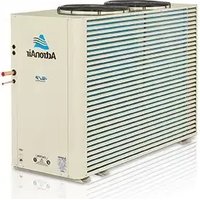
ESP Plus SRA190C - Air Conditioning ActronAir - Free user manual and instructions
Find the device manual for free ESP Plus SRA190C ActronAir in PDF.


| Product Type | Air Conditioning System (Split System) |
| Brand | ActronAir |
| Model | ESP Plus SRA190C |
| System Technology | ESP Ultima VAV (Variable Air Volume) System |
| Master Controller Models | LM7-D, LM24W |
| Zone Controller Model | LM-ZC (Ultima Zone Controller) |
| Control Modes | ESP Auto, Fan Only, Zone Open |
| Display Type | LCD with backlight |
| Temperature Control | Individual zone temperature setting, adjustable within 2°C of master setpoint |
| Damper Position Indicator | Display shows fully open, partially open, or closed damper blade |
| Fan Speeds (Master Controller) | High, Medium, Low |
| Indoor Fan Motor | ECM (Electronically Commutated Motor) |
| Compressor Technology | ESP Digital Compressor |
| Safety Timer | In-built 5-minute delay on startup |
| Zone Capacity | Multiple zones supported (minimal and multiple zone setups) |
| Remote Sensor Compatibility | Zone temperature sensor or remote sensor available |
| Fault Codes | E2, E3, E5 for sensor/communication issues |
| Technical Support Hotline | 1800 119 229 (Australia) |
| Installation Requirement | Professional commissioning and air balancing recommended |
| Manual Contents | 16 pages, English, PDF download available |
Frequently Asked Questions - ESP Plus SRA190C ActronAir
User questions about ESP Plus SRA190C ActronAir
0 question about this device. Answer the ones you know or ask your own.
Ask a new question about this device
Download the instructions for your Air Conditioning in PDF format for free! Find your manual ESP Plus SRA190C - ActronAir and take your electronic device back in hand. On this page are published all the documents necessary for the use of your device. ESP Plus SRA190C by ActronAir.
USER MANUAL ESP Plus SRA190C ActronAir
Operating Instructions
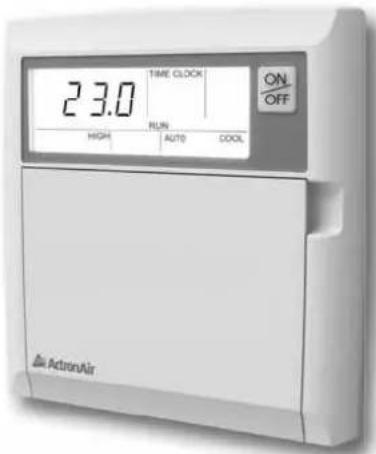
Master Controller LM7-D
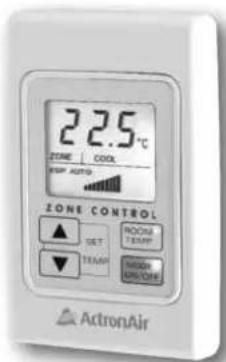
Ultima Zone Controller LM-ZC
Please Read This Manual
Congratulations on your purchase of an ActronAir air conditioning system. This unit has been designed and manufactured with the highest quality standard in mind.
Please read this manual carefully and keep it for future reference.
GENERAL INFORMATION
YOUR ACTRONAIR ESP ULTIMA SYSTEM IS A STATE OF THE ART PRODUCT with advanced Microprocessor Control that automatically controls and regulates conditioned air in each zone to provide year-round climate control and comfort.
INSIDE THIS MANUAL You will find instructions for Zone Controller used with ActronAir ESP Ultima system. Functions of the Master Controller, LM7-D and LM24W in conjunction with ESP Ultima operation, are also explained.
NOTE: Basic and detailed functions of the Master Controller, LM7-D and LM24W, are explained in the operation manual (0500-121) supplied with your A/C unit.
ACTRONAIR ESP ULTIMA SYSTEM is a highly advanced and efficient VAV system that lets you control the temperature of each zone. It is also used in conjunction with ECM (Electronically Commutated Motor) Indoor fan and ActronAir ESP digital compressor technology for maximum energy savings and comfort.
IMPORTANT To ensure efficient and proper operation of your equipment, read and understand all instructions contained in this manual and the Master Controller Manual. Failure to do so may result in damage of equipment and warranty may be void.
CONTENTS
General Information ...... Page 1
Zone Controller Functions ...... Page 2
Turning Zone Controller On Page 3
ESP Auto Mode ...... Page 4
Zone Damper Blade Indicator ...... Page 5
Fan Only Mode ...... Page 6
Zone Temperature Display Page 8
Zone Open Mode ...... Page 10
Trouble Shooting ...... Page 11
Frequently Asked Questions ...... Page 12

Zone Controller
① Mode ON/OFF Button
Turn the zone ON or Off.
② Room Temperature Button
③ Damper Position Indicator
Indicates the position of of zones air damper. (shown fully open damper)
④ COOL Indicator
Illuminates when zone is receiving cooling.
⑤ HEAT Indicator
Illuminates when zone is receiving heating.
⑥ Temperature Set Point Display
⑦ Zone Indicator
⑧ ESP Auto Indicator
Illuminates when zone controller is modulating the airflow.
⑨ OFF Indicator
Illuminates when zone is off and damper is fully closed.
⑩ Set Temperature UP Button
Raises the set point for warmer temperature.
⑪ Set Temperature DOWN Button
Lowers the set point for cooler temperature.
| 1 | Turn the system ON by pressing theON/OFFbutton on Master Controller LM7-D or LM24W. |
| 2 | To turn the zone ON, press theMODEON/OFFbutton on Zone Controller. Alternatively, press the designated zone on the Master Wall Controller.Zone Controller display will show the SET TEMPERATURE, ZONE and ESP AUTO. |
| 3 | Set the desired temperature by pressing either the SET TEMP UP/▲ or DOWN ▼/ arrow key.*For warmer room temperature, press the UP arrow key.•For cooler room temperature, press the DOWN arrow key.• |
Notes
* Zone Controller temperature setting can only be adjusted 2°C below or above the Master Controller set point temperature. This is a factory set limit, which is recommended in order to maintain system accuracy and maximize efficiency. Should this require changing, contact ActronAir Technical support on freecall number :
1800 119 229
Master Controller shown above is LM7-D, same procedure applies with LM24W model.
ESP AUTO MODE
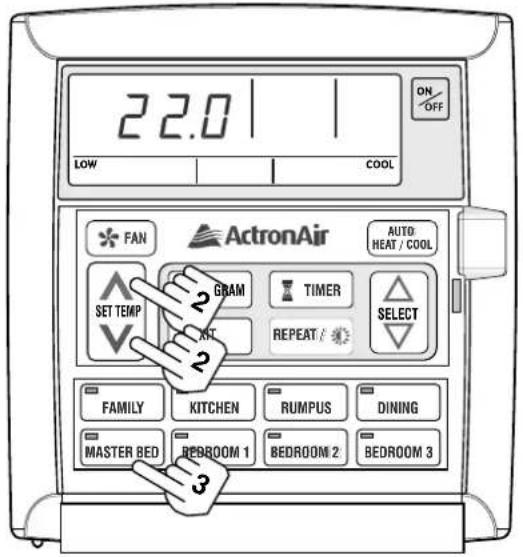
Master Wall Controller
Indications of COOL or HEAT will show zone conditioning. (When zone damper is providing warm or cold air to your zone).

Zone Controller
| 1 | Press the MODEON/OFF button on until ESP AUTO appears on the display. |
| 2 | Set the desired temperature by pressing either the SET TEMP UP ▲ / ▲ or DOWN ▼/ arrow key. *For warmer room temperature, press the UP arrow key.•For cooler room temperature, press the DOWN arrow key. • |
Turning Off
| 3 | Press the MODE° ON/OFF button to turn off the zone. Alternatively, press the designated zone button on the Master Controller.When the designated zone LED in the Master Controller turns off, the zone is off. |
Notes
In Zone Control ESP AUTO mode, the controller will adjust the position of zone • damper automatically in order to meet the desired temperature.
Heating mode will be displayed when the zone starts to heat the room.
Cooling mode will be displayed when the zone starts to heat the room.
ZONE DAMPER BLADE INDICATOR
| DISPLAY | STATUS |
 | FULLY OPEN DAMPER BLADEAllows full airflow through in order to meet your required conditions. |
 | PARTIALLY CLOSED DAMPER BLADERegulating airflow and temperature to meet set conditions. |
 | PARTIALLY OPEN DAMPER BLADERegulating airflow and temperature to meet set conditions. |
| NO DAMPER BLADE INDICATORRoom is satisfied with temperature.•Zone is turned off.•Zone is waiting on HEAT / COOL mode change.• |
Note
When in ESP AUTO, damper blade indicator will automatically adjust itself to regulate the correct amount of airflow (HEAT or COOL) in order to maintain the desired setpoint temperature.

Master Wall Controller
| 1 | Ensure your air conditioner is turned off. |
| 2 | Press the ✦FAN button. The current fan speed setting will appear and the display backlight will turn on (if it is off). |
| 3 | Press the ✦FAN button again to select HIGH, MED, LOW fan speed. |
| 4 | All open zones will circulate air throughout your home. |
| 5 | If you wish to shut any particular zone in this mode, simply turn off zone by pressing the designated zone button. Zone LED will go off. |
Notes
- This mode is commonly used to circulate airflow without Cooling / Heating throughout your home.
Quite often used on mild days to circulate fresh air through the home. Simply open a few windows and let the FAN ONLY MODE circulate fresh air through your home.
FAN ONLY MODE

Zone Controller
FAN MODE
FRn will be displayed on zone control display when the Master Wall Controller is set to circulation operation. During this period, zone damper will be in fully open position for maximum air circulation.
Press the MODE ^® ON/OFF button to turn off the zone damper.
If you do not want the unit to circulate airflow in your room in this mode, simply press the MODE ON/OFF button in your zone controller or turn your zone OFF at the Master Wall Controller
ZONE TEMPERATURE DISPLAY
TO CHECK TEMPERATURE AT MASTER WALL CONTROLLER

Average Room Temperature Display
1
Press any of the

buttons and the average room splayed for 3 seconds.
"INSIDE," "0C" and "." will be flashing. The temperature displayed is the average of all activated zone sensors.
Checking Individual Zone Temperatures
1
Press any of the

buttons.
2
While “INSIDE,” “ ^0 C” and “.” are £1 ashing, press the zone to be checked.
• INSIDE," and C" will turn off. The selected zone LED and "." flashes.
During this time, the selected zone temperature is displayed.
3
To check another zone, simply press the zone button while the previous zone LED and “.” are £1 ashing.
Notes
Room temperature displayed can be the temperature at a zone controller or at a remote sensor or the average of both depending on your installation set up.
ZONE TEMPERATURE DISPLAY
TO CHECK TEMPERATURE AT ZONE CONTROLLER

Zone Controller
1 Press the ROOM° temperature button.
Actual room/zone temperature will be displayed for several seconds then display will return to setpoint temperature.
During this period, the blue LED on the ROOM® button will flash indicating the room temperature is shown on the display.
Notes
To display the room/zone temperature for 45 minutes, press and hold ROOM ^® TEMP button for 5 seconds.
Press any button to exit.
The room/zone temperature display can be the temperature at the zone controller or • at a remote sensor or the average of both depending on your installation set up.
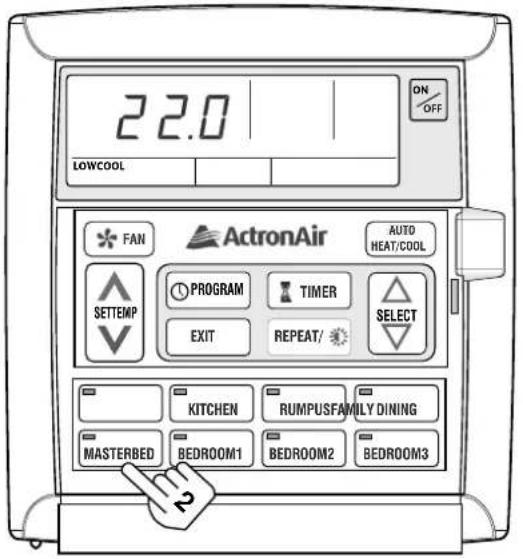
Master Wall Controller

Zone Controller
1 Press the MODE ON/OFF button twice in quick succession until P_n appears on the display.
P_n indicates that the Zone Damper blade is in maximum open position.
Turning Off Zone
2 Press the MODE ON/OFF button to turn off the zone. Alternatively, press the designated zone button in the master wall controller.
Notes
It is not possible to control or adjust the temperature in this mode.
- This zone temperature will now depend on the systems operating mode (HEAT or COOL).
This mode has no control on room temperature, your sensor is ignored in this mode.
A zone in OPn mode is like having a non-temperature controlled ON/OFF zone damper.
Zone 1 cannot be put in OPn mode.
| Condition Causes or Check Points | |
| The system does not start. | Check that 5 minutes has passed from the time you turned• the system on, as the system has in-built safety timers.Check thermostat settings are correct.•Check the thermostat “set-point” is set low enough for • cooling or high enough for heating.Check that the Master Controller is set to correct mode for • COOL / AUTO / HEAT. |
| Air does not £1 ow.(Indoor Unit) | Check if the unit is set in the correct mode• COOL / AUTO / HEAT.Check your Zone Controller is turned on. If using zone sensor, • ensure your zone is turned on at the Master Controller.During defrost cycle of the outdoor unit (in HEAT mode), • the indoor fan will not operate.Defrost cycle is indicated when “HEAT” is flashing on the Master Controller display. |
| OFF is displayed on my zone controller and I cannot turn the zone On. | This means the Master Controller is turned off. • First turn on your air conditioner at the Master Controller.You will now be able to turn on your Zone Controller. |
For any assistance with your ESP Ultima System, do not hesitate to contact our Customer Care Team for technical support on freecall number:
1800 119 229
Q. I cannot adjust my set point on my Zone Controller any more than 2^ higher or lower than the Master Controller.
A. 2^ is the default setting for master temperature offset. ActronAir recommend this 2^ offset to optimise temperature control and maximize energy efficiency. Moving this setting +/- 2^ will result in temperature inaccuracy. Contact ActronAir technical support: Tel. No. 1800 119 229.
Q. Cooling and Heating seems to take a long time to achieve temperature in ESP fan mode. Am I using the correct settings?
A. ESP fan mode really comes into it's own when minimal zones are used. For quicker and more responsive Cooling and Heating, when using more than minimal zones, select HIGH or CONT HIGH fan speed on Master Controller. This will boost heating and cooling and is best optimized when you want to condition more than the minimal zone set up.
Q. Cooling and Heating is not sufficient in my zone.
A. Air balancing is essential part of system commissioning in ESP Ultima system. The duct design may be prohibiting the correct amount of airflow reaching your area. Please contact your installer to ensure air balancing has been carried out.
Q. There is substantial air noise coming from my outlet.
A. If the outlet gets too noisy when the unit or zone is first turned on, the system maybe over supplying airflow to your area. Ensure ESP fan mode is selected when minimal zones are used.
Q. There are dashes across my control display.
A. Make sure you have not had a power interruption. If this is still present on the display after 20 seconds, please contact your installer. Incorrect wiring or a broken circuit could also cause these symptoms.
FAULT CODES:
When E2 is displayed in the Master Controller or Zone Controller, take note of the digits after E and contact your installer.
E3 - System has detected less than 2 sensors (Ultima requires at least 2 sensors in circuit) or, a remote sensor is short circuit.
E5 - No Communication. The system is constantly relaying information back and forth. This indicates the communication is not happening. Contact your installer to check your wiring and cable's integrity.
THIS PAGE INTENTIONALLY LEFT BLANK
THIS PAGE INTENTIONALLY LEFT BLANK

ActronAir
Australian for air conditioning
1800 119 229
actronair.com.au
- Please Read This Manual
- GENERAL INFORMATION
- CONTENTS
- Notes
- ESP AUTO MODE
- Turning Off
- ZONE DAMPER BLADE INDICATOR
- Note
- FAN ONLY MODE
- FAN MODE
- ZONE TEMPERATURE DISPLAY
- Average Room Temperature Display
- 1
- Checking Individual Zone Temperatures
- 2
- 3
- Press the ROOM° temperature button.
- Turning Off Zone
- FAULT CODES:
- THIS PAGE INTENTIONALLY LEFT BLANK
- ActronAir
Brand : ActronAir
Model : ESP Plus SRA190C
Category : Air Conditioning