
S808G - Network switch Totolink - Free user manual and instructions
Find the device manual for free S808G Totolink in PDF.


| Product Type | Unmanaged Gigabit Ethernet Switch |
| Ports | 8 x 10/100/1000 Mbps RJ45 |
| Dimensions (W x D x H) | 140 x 75 x 25 mm |
| Weight | Approx. 200 g |
| Power Supply | DC 5V / 0.6A |
| Switching Capacity | 16 Gbps |
| MAC Address Table | 4K entries |
| Jumbo Frame Support | 9K bytes |
| Auto MDI/MDIX | Yes |
| Flow Control | 802.3x |
| Fanless Design | Yes |
| Mounting | Desktop or wall-mountable |
| LED Indicators | Power, Link/Activity per port |
| Operating Temperature | 0°C to 40°C |
| Storage Temperature | -40°C to 70°C |
| Humidity | 10% to 90% non-condensing |
| Power Consumption | Less than 5W |
| Compliance | IEEE 802.3, 802.3u, 802.3ab, 802.3x |
| Maintenance | Wipe with a dry cloth, keep away from liquids |
| Safety | Use in well-ventilated area, avoid overloading power outlet |
| Spare Parts & Repairability | No user-serviceable parts; contact support for issues |
| General Information | Plug-and-play unmanaged switch for home or small office |
Frequently Asked Questions - S808G Totolink
User questions about S808G Totolink
0 question about this device. Answer the ones you know or ask your own.
Ask a new question about this device
Download the instructions for your Network switch in PDF format for free! Find your manual S808G - Totolink and take your electronic device back in hand. On this page are published all the documents necessary for the use of your device. S808G by Totolink.
USER MANUAL S808G Totolink
Up to 10/100/1000Mbps
8-Port Gigabit Ethernet Switch

Overview
8-Port
Gigabit Desktop Switch
Model No. S808G
S808G is a Gigabit Desktop Switch that
enables you to upgrade your network to gigabit Ethernet.
With full gigabit ports and compact design,
S808G not only increases the speed of your network server,
but also make Gigabit to the desktop a reality.
Generally, S808G is a high performance solution
for your home or office network.


Features
- 8 10/100/1000Mbps auto-negotiated RJ45 ports
- Supports IEEE 802.3x flow control for Full Duplex mode and backpressure for Half Duplex mode
- 4K entry MAC address table and automatic address learning
- Auto-MDI/MDIX eliminates the need for crossover cables
- Store- and-Forward Switching scheme
- Performs non-blocking full wired speed
- Supports Jumbo Frame (9KByte)
- Supports IGMP Snooping
- Supports Giga Lite to improve transfer rate for 4-wire UTP gigabit network
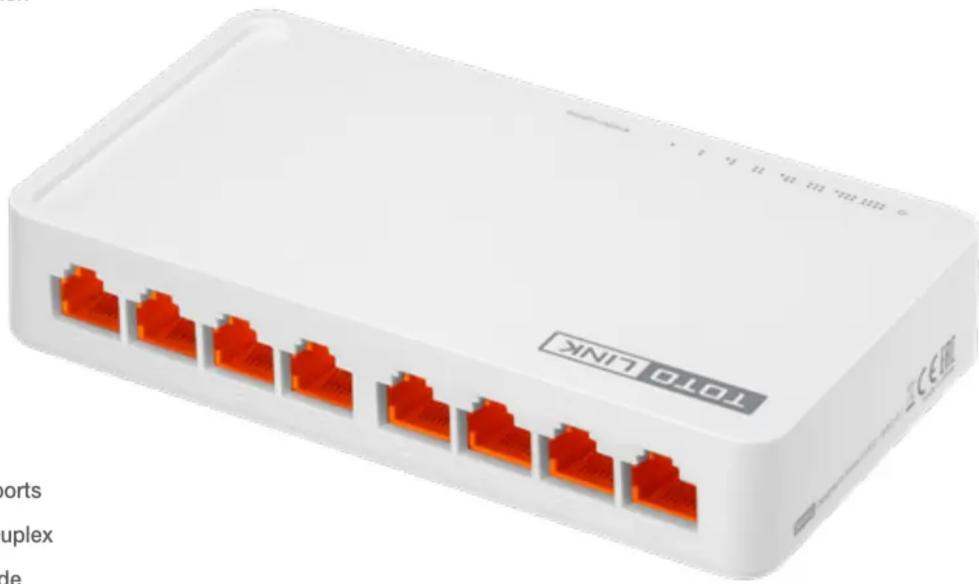
natural_image
White wireless router device with multiple Ethernet ports, no visible text or symbols on the device body
natural_image
3D rendering of a white rectangular electronic device with orange connectors on its top surface (no text or symbols visible)Specification
General
| Standards | - IEEE 802.3, IEEE 802.3u, IEEE 802.3ab, IEEE 802.3x |
| Interface | - 8*10/100/1000Mbps auto-negotiation RJ-45 Ports (Auto MDI/MDIX) |
| Power Supply | - 9V DC/0.5A |
| LED | -1* Power, 8*LANs |
| Dimensions(L x W x H) | - 5.2 x 3.0 x 1.0 in. (132 x 75 x 25mm) |
| MAC Address Learning | - Auto-Learning, Auto-Aging |
| MAC Address Table | - 4K |
| Network Media | - 10BASE-T: UTP Cat 3, 4, 5 cable |
| - 100BASE-TX/1000BASE-T: UTP Cat 5, 5e or above cable | |
| Backup Bandwidth | - 16Gbps |
| Transmission Method | - Store-and-forward |
Others
| Package Contents | - S808G Desktop Switch *1- Power Adapter- Quick Installation Guide *1 |
| Environment | - Operating Temperature: 0 °C~50 °C (32 °F ~122 °F)- Storage Temperature: -40 °C~70 °C (-40 °F ~158 °F)- Operating Humidity: 5%~95% non-condensing- Storage Humidity: 5%~95% non-condensing |
ZIONCOM ( HK ) TECHNOLOGY LIMITED
Copyright©ZIONCOM (HK) TECHNOLOGY CO., LTD. All Rights Reserved.
Headquarter & R&D Center
7/F, Unit D, 4 Building Shenzhen Software Industry Base, Xuefu Road, Nanshan District, Shenzhen, Guangdong, China
Building A1 & A2 Lantian Technology Park, Xinyu Road, Xinqiao Henggang Block, Shajing Street, Baoan District, Shenzhen, Guangdong, China
Brand : Totolink
Model : S808G
Category : Network switch