
A19 Smart LED Bulb - Home Automation RING - Free user manual and instructions
Find the device manual for free A19 Smart LED Bulb RING in PDF.


| Product Type | Smart LED Bulb (A19) |
| Model Number | SAT153 |
| Brand | Ring |
| Wattage | 8.5W |
| Voltage | 120V AC, 60Hz |
| Current | 75mA |
| Color Temperature | Neutral White (~4000K) |
| Lumens (estimated) | ~800 lm |
| Dimmable | Yes (via Ring app, not with standard wall dimmers) |
| Connectivity | Requires Ring Bridge (sold separately) |
| Smart Home Compatibility | Ring app, compatible with other Ring devices |
| Operating Temperature | -4°F to 104°F (-20°C to 40°C) |
| Location Suitability | Damp locations (enclosed fixture), not for direct water exposure |
| Base Type | E26 (standard medium screw base) |
| Dimensions (typical A19) | 4.6 in (height) × 2.4 in (diameter) |
| Weight (estimated) | ~100 g |
| Safety Certifications | FCC Part 15, ISED RSS |
| Warranty | Refer to ring.com/warranty |
| Installation | Screw into socket, ensure power off before installation |
| App Control | Ring app (iOS and Android) |
| Not Compatible With | Standard wall dimmers, photo sensors, motion sensors, timers (unless Ring Smart Lighting) |
| Disposal | Recycle per local electronic waste regulations |
Frequently Asked Questions - A19 Smart LED Bulb RING
User questions about A19 Smart LED Bulb RING
0 question about this device. Answer the ones you know or ask your own.
Ask a new question about this device
Download the instructions for your Home Automation in PDF format for free! Find your manual A19 Smart LED Bulb - RING and take your electronic device back in hand. On this page are published all the documents necessary for the use of your device. A19 Smart LED Bulb by RING.
USER MANUAL A19 Smart LED Bulb RING
natural_image
White LED light bulb with a glowing white top, labeled 'ring' on its side (no additional text or symbols visible)Smart Lightbulb
Dimmable Neutral White A19 LED Bulb
This device is not intended for use with emergency exit fixtures or emergency lights.
Before replacing, turn off power and let the bulb cool to avoid electrical shock or burn.
Dispose of this device in accordance with disposal laws in your area.
This device is not a toy designed to be played with by children.
Do not place the device on hot surfaces.
For safety reasons, do not open devices, which will also void the warranty.

WARNING: Risk of electrical shock. Do not attempt to open or
disassemble the bulb.
Not suitable for use with standard wall dimmers.
Suitable for damp locations. Do not use where directly exposed to water.
Choose a location.
Determine where you would like to install your A19 bulb.
If your desired socket is hard to reach, you can set up your new bulb in an easily accessible socket. Once setup is complete, you can move it to your desired location.
Not compatible with photo sensors, motion sensors or timers unless specifically designed for Ring Smart Lighting.
OPERATING INSTRUCTIONS:
Use the bulb only in a socket rated for this bulb.
Turn off the power.
Before you continue, make sure you turn off power to the light fixture.
Remove the old bulb.
Turn counterclockwise to remove it from the socket.
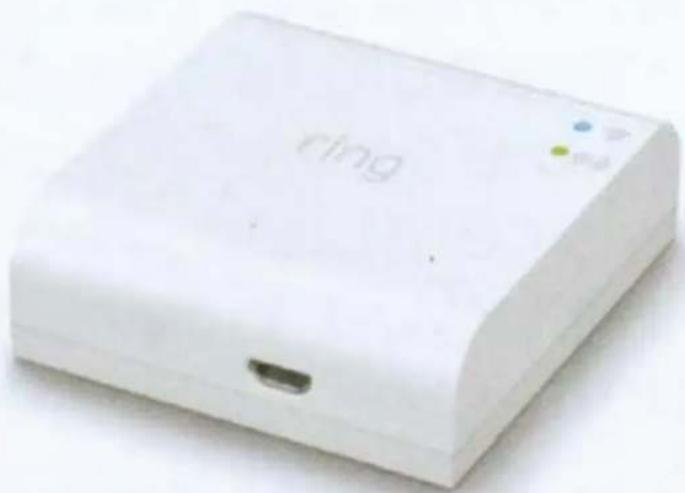
Set up your Ring Bridge.
The Bridge is required to connect your Ring Smart Lights to the Ring app and other compatible Ring devices.
To set up your Bridge, follow the instructions in the Ring app or the Bridge user manual.
natural_image
White electronic device labeled 'ring' with a small port and indicator lights (no readable text beyond branding)Download the Ring app.
The app walks you through setting up and managing your Ring Smart Lightbulb.
Search for "Ring" in one of these app stores, or visit: ring.com/app

Download on the
App Store

GET IT ON
Google play
When prompted, select Smart Lighting and follow the in-app instructions to install your Smartbulb.
You'll need to restore power to the bulb so it can connect to the Bridge during setup.
You will then be able to control your light directly from the Ring app where you can set schedules and link your bulbs to other devices.
Set up your A19 in the Ring app.
In the app, tap Set Up a Device.
You're all set!
Once your bulb is set up, don't forget to keep your light switch ON.
natural_image
Simple line drawing of a light bulb with a flat top and screw base (no text or symbols)For help, visit: ring.com/help Or give us a call...
US 1 800 656 1918
Canada 1 855 300 7289
Worldwide +1 310 929 7085
For all our customer support numbers, visit: ring.com/callus
© 2019 Ring LLC or its affiliates.
Ring and all related logos are trademarks of Ring LLC or its affiliates.

1523 26th St. Santa Monica, CA 90404
Model: Ring Smart Lightbulb (A19)
IMPORTANT PRODUCT INFORMATION
Safety and Compliance Information
Use Responsibly. Read all instructions and safety information before use.
SAFETY INFORMATION

FAILURE TO FOLLOW THESE SAFETY INSTRUCTIONS COULD RESULT IN FIRE, ELECTRIC SHOCK, OR OTHER INJURY OR DAMAGE.
Small parts may pose choking hazards. Keep device and box contents out of reach of children.
Turn off power before inspection, installation, or removal. Ensure that voltage of the bulb is compatible with the mains electricity of your country before connecting to a bulb holder. Do not force bulb base into incompatible bulb holder. Not intended for use in emergency light fixtures or exit signs.
Your bulb can withstand outdoor use in an enclosed fixture. However, your bulb is not intended for underwater use where it will be directly exposed to water. To protect against electric shock, do not intentionally submerge or immerse your bulb in water or expose your bulb to other liquids. Do not spill any food or beverages on your bulb. Do not attempt to clean or polish your bulb with or expose your device to oil, lotion, or other abrasive substances. Do not expose your bulb directly to water, or extremely humid conditions (such as a steam room). Do not attempt to dry your bulb with an external heat source, such as a microwave oven or a hair dryer. If your bulb appears to be damaged, discontinue use immediately.
WARNING: Risk of Electric Shock. Do not attempt to open or disassemble the bulb. Do not use where directly exposed to water.
Not suitable for use with standard wall dimmers. This device is not intended for use with emergency exit fixtures or emergency lights. Switch off the power supply to the socket and allow sufficient time for the bulb to cool before removing the bulb from fitting. Use the bulb only in a socket rated for this bulb. Dispose of this device in accordance with disposal laws in your area. Not compatible with photo sensors, motion sensors or timers unless specifically designed for Ring Smart Lighting.
Product Specifications
Model Number: SAT153
Electrical rating: 120VAC, 75mA, 8.5W, 60Hz
Operating conditions: -4°F to 104°F (-20°C to 40°C)
Recycling Your Device Properly
In some areas, the disposal of certain electronic devices is regulated. Make sure you dispose of, or recycle, your device in accordance with your local laws and regulations. For information about recycling your device, go to www.amazon.com/devicesupport.
For Canadian Customers
Innovation, Science and Economic Development Canada (ISED) Compliance
This device contains license-exempt transmitter(s)/receiver(s) that comply with Innovation, Science and Economic Development Canada's license-exempt RSS(s). Operation is subject to the following two conditions: (1) this device may not cause interference, and (2) this device must accept any interference, including interference that may cause undesired operation of the device.
Caution: Any changes or modifications to this device not explicitly approved by manufacturer could void your authority to operate this equipment.
Information Regarding Exposure to Radio Frequency Energy:
This equipment complies with IC RSS-102 RF exposure limits set forth for an uncontrolled environment.
This equipment should be installed and operated with minimum distance 20 cm between the radiator and your body.
For United States Customers
This device complies with Part 15 of the FCC Rules. Operation is subject to the following two conditions: (1) this device may not cause harmful interference, and (2) this device must accept any interference received, including interference that may cause undesired operation.
The party responsible for FCC compliance is Ring, LLC 1523 26th St Santa Monica, CA 90404 USA
For additional help, visit: ring.com/help
Or give us a call:
US +1 800 656 1918
Canada. +1 855 300 7289
Worldwide +1 310 929 7085
For a list of all our customer support numbers, visit: ring.com/callus
Changes or modifications to this unit not expressly approved by the party responsible for compliance could void the user's authority to operate the equipment. Information on this device is on file with the FCC and can be found by inputting the device's FCC ID into the FCC ID Search form available at https://www.fcc.gov/oet/ea/fccd.
The output power of the radio technology used in the Products is below the radio frequency exposure limits set by the FCC. Nevertheless, it is advised to use the Products in such a manner that minimizes the potential for human contact during normal operation. This device should be installed and operated with at least 20 cm between the radiator and your body.
General
NOTE: This equipment has been tested and found to comply with the limits for a Class B digital device, pursuant to Part 15 of the FCC Rules. These limits are designed to provide reasonable protection against harmful interference in a residential installation. This equipment generates, uses and can radiate radio frequency energy and, if not installed and used in accordance with the instructions, may cause harmful interference to radio communications.
However, there is no guarantee that interference will not occur in a particular installation. If this equipment does cause harmful interference to radio or television reception, which can be determined by turning the equipment off and on, the user is encouraged to try to correct the interference by one or more of the following measures:
Reorient or relocate the receiving antenna.
Increase the separation between the equipment and receiver.
Connect the equipment into an outlet on a circuit different from that to which the receiver is connected.
Consult the dealer or an experienced radio/TV technician for help.
Caution: Any changes or modifications to this device not explicitly approved by manufacturer could void your authority to operate this equipment.
Use of the product is subject to your registration with Ring and your agreement with the Terms of Service found at www.ring.com/terms
To review your warranty coverage, please visit www.ring.com/warranty
© 2019 Ring LLC or its affiliates
Ring, Always Home, and all related logos are trademarks of Ring LLC or its affiliates.
1. Download the Ring app.
Open the app, tap Set Up a Device, then select Smart Lights.
2. Scan this code.
This identifies your Ring to make setup fast and easy.

© 2019 Ring LLC or its affiliates.
Ring and all related logos are trademarks of Ring LLC or its affiliates.
Protected by
ring
Audio/Video Surveillance
800.656.1918
ring.com
At Ring, our mission is to reduce crime in neighborhoods.
Let every visitor know your home is protected by Ring with this sticker.
Connect with us and share pictures of where you stick it at:

facebook.com/ring

twitter.com/ring

instagram.com/ring


- Smart Lightbulb
- Choose a location.
- OPERATING INSTRUCTIONS:
- Turn off the power.
- Remove the old bulb.
- Set up your Ring Bridge.
- Download the Ring app.
- Set up your A19 in the Ring app.
- You're all set!
- 26th St. Santa Monica, CA 90404
- IMPORTANT PRODUCT INFORMATION
- Product Specifications
- Recycling Your Device Properly
- For Canadian Customers
- Innovation, Science and Economic Development Canada (ISED) Compliance
- For United States Customers
- General
- Download the Ring app.
- Scan this code.
- Protected by
- ring
Brand : RING
Model : A19 Smart LED Bulb
Category : Home Automation