
Video Doorbell Pro Wedge Kit - Home Automation RING - Free user manual and instructions
Find the device manual for free Video Doorbell Pro Wedge Kit RING in PDF.


| Product Type | Video Doorbell Pro Wedge Kit |
| Brand | Ring |
| Model | Video Doorbell Pro Wedge Kit |
| Dimensions (Mount) | 4.98 x 1.9 x 1.1 in |
| Weight | Approx. 0.2 lbs |
| Power Supply | Hardwired (8-24 VAC) |
| Video Resolution | 1080p HD |
| Field of View | 160° horizontal, 84° vertical |
| Night Vision | Infrared LEDs |
| Audio | Two-way talk with noise cancellation |
| Connectivity | Wi-Fi 802.11 b/g/n 2.4 GHz |
| Motion Detection | Adjustable motion zones with smart alerts |
| Mobile App | Ring app (iOS/Android) |
| Cloud Recording | Requires Ring Protect Plan (sold separately) |
| Weather Resistance | Rated for outdoor use (-5°F to 120°F) |
| Installation | Simple wired installation with included wedge kit for angle adjustment |
| Maintenance | Clean with a damp, lint-free cloth; avoid abrasive cleaners |
| Security | Encrypted video transmission |
| Spare Parts / Repairability | No user-serviceable parts; contact Ring support for repairs |
| Package Includes | Video Doorbell Pro, Wedge Kit, mounting screws, user manual |
Frequently Asked Questions - Video Doorbell Pro Wedge Kit RING
User questions about Video Doorbell Pro Wedge Kit RING
0 question about this device. Answer the ones you know or ask your own.
Ask a new question about this device
Download the instructions for your Home Automation in PDF format for free! Find your manual Video Doorbell Pro Wedge Kit - RING and take your electronic device back in hand. On this page are published all the documents necessary for the use of your device. Video Doorbell Pro Wedge Kit by RING.
USER MANUAL Video Doorbell Pro Wedge Kit RING
natural_image
Close-up of a silver ring-mounted device mounted on a white wall, no visible text or symbols.ring
Video Doorbell Pro
Wedge Kit Install Guide
Install Tips
Mount your Ring Pro flat against angled siding, or if your door is near a staircase, mount your Ring Pro at an angle for a better view and improved motion detection.
- Comes with 3 stackable wedges
- Ranges from 5irc , 10irc and 15irc angles
- Make sure to trim the feet off the back of the wedge that mounts directly to the wall.
Ring Installation Kits are paintable to match your home.
Check out ring.com/install-kits for more information
For additional help, visit: ring.com/help For immediate assistance, we're available 7 days a week at: help@ring.com
For a list of all our customer support numbers, visit: ring.com/callus
- Use the provided screws to mount one or more Wedge mounts to your wall.

natural_image
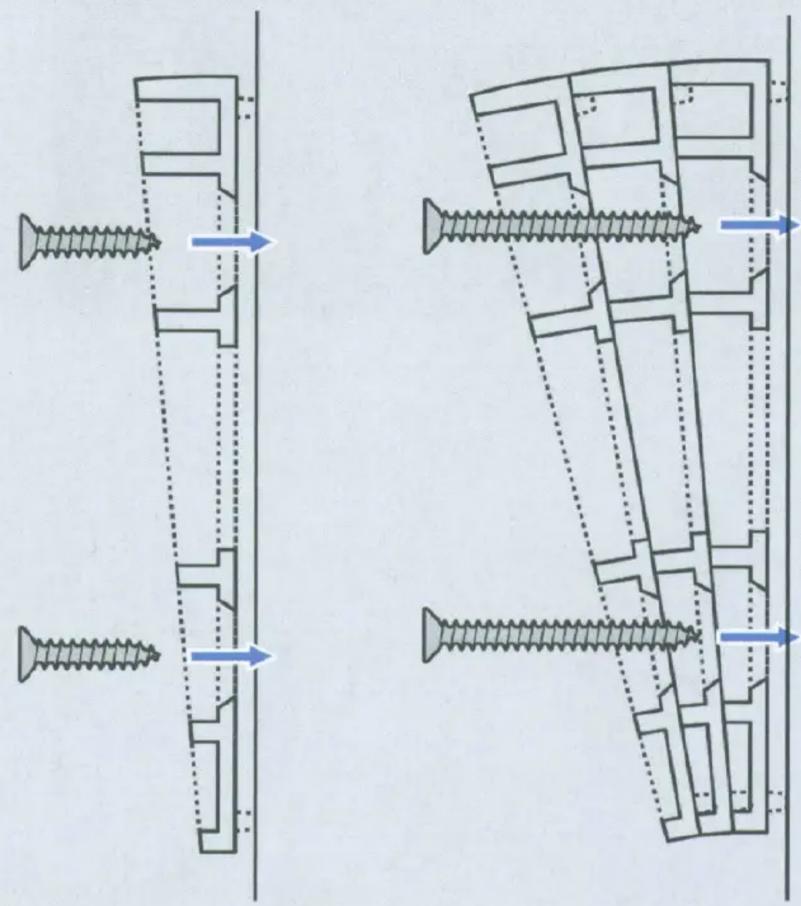
Close-up of hands using a power drill to install or install a white electrical outlet (no visible text or symbols)If installing one Wedge mount, use the shorter (1.25in or 38mm) screw.
If installing more than one Wedge mount, use the longer (2.0in or 51mm) screw.
natural_image
Technical diagram showing two mechanical assembly configurations with screws and fasteners, no text or symbols present.- If necessary, reconnect your Doorbell Pro to your doorbell wiring.

natural_image
Hand holding a black electrical device with wires, mounted on a wall against a textured wall (no visible text or symbols)- Use the shortest screws to mount the doorbell to the Wedge mount(s).

natural_image
Close-up of hands using a screwdriver to adjust or install a black electronic component (no visible text or symbols)- Put the faceplate back on your Doorbell Pro.

natural_image
Exterior view of a modern office building (no signage)


Brand : RING
Model : Video Doorbell Pro Wedge Kit
Category : Home Automation