
SU20 - Microphone Chord - Free user manual and instructions
Find the device manual for free SU20 Chord in PDF.


| Product Type | Dynamic Microphone |
| Brand | Chord |
| Model | SU20 |
| Polar Pattern | Cardioid |
| Frequency Response | 50 Hz - 15 kHz |
| Impedance | 600 Ω |
| Sensitivity | -54 dB ± 3 dB |
| Connector | XLR (3-pin) |
| Cable Length | 5 m (16.4 ft) |
| Dimensions (L x Dia) | 180 mm x 50 mm (7.1 in x 2.0 in) |
| Weight | 250 g (8.8 oz) |
| Power Supply | Passive (no battery required) |
| Material | Zinc alloy die-cast body |
| On/Off Switch | Yes, slide switch |
| Color | Black |
| Included Accessories | Microphone clip, cable, carrying pouch |
| Maintenance | Wipe with a dry cloth; do not use solvents |
| Safety | Avoid moisture and extreme temperatures |
| Spare Parts | Replacement cable (model MC-05) |
| Repairability | Contact authorized service center |
Frequently Asked Questions - SU20 Chord
User questions about SU20 Chord
0 question about this device. Answer the ones you know or ask your own.
Ask a new question about this device
Download the instructions for your Microphone in PDF format for free! Find your manual SU20 - Chord and take your electronic device back in hand. On this page are published all the documents necessary for the use of your device. SU20 by Chord.
USER MANUAL SU20 Chord
Dual UHF Wireless System
Item ref: 171.907UK, 171.908UK, 171.909UK, 171.917UK, 171.918UK
User Manual

natural_image
Collection of wireless earphones and audio devices including a SUI20 network and various headsets (no visible text or labels)Version 1.2

Caution: Please read this manual carefully before operating
Damage caused by misuse is not covered by the warranty
Introduction
Thank you for choosing the Chord SU20 wireless system. This professional wireless set provides a dual high quality UHF radio microphone system for freedom of movement without loss of audio quality. The SU20 uses Chord's NU4 technology to enable 2 sets to operate together on separate frequencies (ensure 2 sets with different carrier frequencies). Please read this manual before using this equipment in order to avoid damage through incorrect operation and to get the best performance from your purchase.
Package Contents
• SU20 UHF wireless receiver
- 19" rack mounting brackets
- 2 x UHF aerial
• 2 x BNC antenna cable (for front panel mounting)
- 2 x transmitter (SU20-H handheld and/or SU20-B bodypack)
- 2 x neckband and 2 x lavalier microphones (SU20-B only)
- 1 x neckband and 1 x lavalier microphone (SU20-C only)
- Mains power adapter
- 6.3mm mono jack lead
- 4 x 1.5V AA battery
If you find any accessory is missing or the product has arrived with any problems, contact your retailer. These products contain no user-serviceable parts inside. Do not attempt to try to fix or modify these items yourself as this will invalidate the warranty. We recommend you keep the original package and proof of purchase for any possible replacement or returned demand.
Warning
To prevent the risk of fire or electric shock, do not expose any of the components to rain or moisture. If liquids are spilled on any component, stop using immediately, allow unit to dry out and have checked by qualified personnel before further use.
Avoid impact or heavy vibration to any of the components, dropping the microphone can cause capsule failure. No user serviceable parts inside transmitter or receiver - refer servicing to qualified service personnel.
Safety
- Ensure that the correct power adaptor is used with adequate current rating (350mA minimum) and that the mains voltage is as stated on the adapter.
- Avoid ingress of water or particles into the transmitters or receiver
• Use alkaline or NiMH batteries in the transmitters and remove if unused for long periods. - Observe the correct polarity when replacing batteries
Placement
- Keep all components out of direct sunlight and away from heat sources.
- Do not place heavy objects on top of the receiver or transmitters
- If rack-mounting, use rack ears provided and do not place heavy equipment above the receiver.
- 2 receivers may be mounted side by side in a single 19" rack space using the supplied jointing plate.
- Keep the transmitters and receiver away from damp or dusty environments.
Cleaning
- Use a soft cloth with a neutral detergent to clean the body of the handheld transmitter and receiver.
• Lightly damp sterile wipes may be used on the microphone grille for hygiene purposes - To avoid damage, do not use solvents to clean the components
Receiver Front Panel

- Power on/off switch
- RF carrier signal indicator - Channel A
- AF audio signal indicator - Channel A
- VOLUME control – Channel A
- RF carrier signal indicator - Channel B
- AF audio signal indicator - Channel B
- VOLUME control – Channel B
Receiver Rear Panel
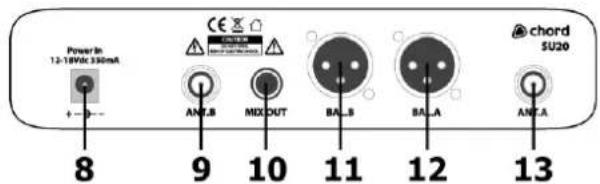
- DC power input jack
- BNC antenna connector - Channel B
- Unbalanced 6.3mm jack output CH. A+B
- Balanced XLRM output - Channel B
- Balanced XLRM output - Channel A
- BNC antenna connector - Channel A
Transmitters


- Antenna
- LED indicator
- On/off switch
- 3.5mm jack socket (beltpack only)
- Gain control (beltpack only)
- Battery compartment
Note: If replacement transmitters are required, these must be genuine Chord branded transmitters which transmit the correct pilot tone to match with the receiver. Transmitters which have the same carrier frequency but not the correct pilot tone will not work with SU-series receivers.
The SU20 system can allow 2 sets to be used together with Red, Green, Blue and Yellow channels working independently without interference with each other.
Setting Up
Insert the supplied AA batteries into the handheld transmitter by carefully unscrewing the base to reveal the battery compartment inside the microphone body, connect the batteries (ensure + and - are the correct way around for each cell) and carefully screw the base back on.
For bodypack transmitters, gently pull downward at the inset on the front of the beltpack and flip forward the front cover to reveal the battery compartment. Insert 2 x AA batteries (ensure + and - are the correct way around for each cell). Connect the 3.5mm jack connector from the neckband or lavalier microphone to the input on top of the bodypack transmitter and rotate to secure the thread.
Position the receiver within the best available line of sight to the transmitter and connect the DC jack of the supplied power adapter to the receiver and the plug-top to the mains outlet.
Connect the 2 UHF antennas to the BNC connector on the rear panel or alternatively, attach each to the supplied rack mounting brackets, connecting via the BNC extension lead supplied.
Turn mic levels for CH. A and CH. B down on the receiver.
A choice of unbalanced 6.3mm jack or balanced XLR output is available on the rear panel of the receiver. Connect the supplied 6.3mm jack lead for a mix of both channels or optionally, connect an XLR lead to each balanced XLR output for 2 independent outputs.
Turn down the volume of any equipment (mixer, amplifier etc.) that the signal will be fed into and then connect the jack lead or XLR leads to the equipment.
Warning! - take care not to point the microphones towards speakers – this can cause damaging feedback (loud whistle or howling noise) – try to aim the microphone away from the speakers.
Operation
Switch on power to the receiver unit.
Move the switch on each handheld transmitter to the fully up position (ON) and gradually increase the microphone level on the receiver (for bodypack transmitters, move the top slide switch to "ON"), then increase the volume on the mixer or amplifier until the sound from each microphone can be heard through the equipment.
Note: if output is low from the neckband or lavalier microphone, it may be necessary to adjust Gain control inside the bodypack unit
After use, slide the transmitter switch to the "OFF" position, which mutes and deactivates the radio signal and powers down the transmitter. Turn down the volume of the mixer or amp and then switch off the receiver.
Please note that the transmitter slide switch has a "MUTE" centre position, which is not used with the SU-series system. Switching the transmitter off automatically mutes the reception channel.
Unplug signal leads from the receiver and mixer or amplifier when moving or packing away.
If the system is not to be used for long periods of time, remove the batteries from the transmitters and unplug the power adapter from the receiver and the mains outlet.
Folding away or removing the antenna can also help avoid damage when the system is not in use.
Specifications
| Model | SU20-H-RG | SU20-H-BY | SU20-C-RG | SU20-B-RG | SU20-B-BY |
| Dimensions: handheld | 250 x 47mm∅ | 250 x 47mm∅ | 250 x 47mm∅ | N/A | N/A |
| Weight: handheld | 231g (no battery) | 231g (no battery) | 231g (no battery) | N/A | N/A |
| Dimensions: beltpack | N/A | N/A | 110 x 676 x 24mm | 110 x 676 x 24mm | 110 x 676 x 24mm |
| Weight: beltpack | N/A | N/A | 74g (no battery) | 74g (no battery) | 74g (no battery) |
| Power supply | 14Vdc 500mA (adaptor supplied) | ||||
| Antenna connection | BNC | ||||
| Batteries | 4 x AA (2 per transmitter) included | ||||
| Carrier frequencies | 863.42MHz (Red), 864.3MHz (Green), 864.8MHz (Blue), 863.1MHz (Yellow) | ||||
| RF power | 10mW | ||||
| Range | 60m | ||||
| Mic. polar pattern | Cardioid (handheld, neckband or lavalier) | ||||
| Output connections | 2 x balanced XLR, 1 x unbalanced 6.3mm jack | ||||
| Output impedance | 2.2k Ohms | ||||
| Output level | 400mV (balanced), 200mV (unbalanced) | ||||
| Frequency response | 50Hz - 18kHz (±3dB) | ||||
| S/N ratio | >80dB | ||||
| THD | <0.5% @ 1kHz | ||||
| Dimensions: receiver | 203 x 187 x 42mm | ||||
| Weight: receiver | 845g | ||||
Troubleshooting
| "POWER" LED does not light on receiver | Ensure power adapter is connected to mains and working properly |
| Ensure receiver is switched on (press front power button until it lights) | |
| "POWER" LED is lit but no "RF" or "AF" LEDs | Ensure each transmitter is switched on |
| Check that each transmitter is not out of reception range | |
| Check that all transmitter batteries are good/charged | |
| "POWER" and "RF" LEDs are lit but no "AF" and no sound | Check that each transmitter switch is switched on |
| Ensure each transmitter has good/charged batteries | |
| Ensure there is no other nearby transmitter with the same frequency | |
| All LEDs lit but no sound from mic | Make sure receiver is properly connected to mixer/amplifier |
| Ensure that receiver and amplifier/mixer channel volumes are turned up | |
| Microphone output is very loud or distorted | Turn down the relevant channel VOLUME on receiver |
| Turn down gain on bodypack transmitters | |
| Reduce gain on mixer/amplifier | |
| Ensure that an XLR output is not fed to a "Hi-Z" line input | |
| Microphone output is very low | Turn up VOLUME on receiver |
| Turn up gain on bodypack transmitter | |
| Increase gain of mixer/amplifier input | |
| Ensure that the jack output is not fed to an XLR input with "Lo-Z" level | |
| Check transmitter batteries |


"Disposal: The "Crossed Wheelie Bin" symbol on the product means that the product is classed as Electrical or Electronic equipment and should not be disposed with other household or commercial waste at the end of its useful life. The goods must be disposed of according to your local council guidelines

Hereby, AVSL Group Ltd. declares that the radio equipment type 171.907UK, 171.908UK, 171.909UK, 171.917UK and 171.918UK are in compliance with
Directive 2014/53/EU
The full text of the EU declaration of conformity for 171.907UK is available at the following internet address: http://www.avsl.com/assets/exportdoc/1/7/171907UK%20CE.pdf
The full text of the EU declaration of conformity for 171.908UK is available at the following internet address: http://www.avsl.com/assets/exportdoc/1/7/171908UK%20CE.pdf
The full text of the EU declaration of conformity for 171.909UK is available at the following internet address: http://www.avsl.com/assets/exportdoc/1/7/171909UK%20CE.pdf
The full text of the EU declaration of conformity for 171.917UK is available at the following internet address: http://www.avsl.com/assets/exportdoc/1/7/171917UK%20CE.pdf
The full text of the EU declaration of conformity for 171.918UK is available at the following internet address: http://www.avsl.com/assets/exportdoc/1/7/171918UK%20CE.pdf
Errors and omissions excepted. Copyright© 2021.
AVSL Group Ltd. Unit 2-4 Bridgewater Park, Taylor Rd. Manchester, M41 7JQ
AVSL (EUROPE) Ltd, Unit 3D North Point House, North Point Business Park, New Mallow Road, Cork, Ireland.
SU20 User Manual


Brand : Chord
Model : SU20
Category : Microphone