CU-POD - Microphone Citronic - Free user manual and instructions
Find the device manual for free CU-POD Citronic in PDF.


| Product Type | Microphone |
| Brand | Citronic |
| Model | CU-POD |
| Microphone Type | Dynamic |
| Polar Pattern | Cardioid |
| Frequency Response | 50 Hz - 15 kHz |
| Impedance | 600 Ω |
| Connector | XLR (3-pin) |
| Power Requirement | Phantom power (48V) or battery |
| Battery Type | AA (1.5V) x 1 |
| Dimensions (L x D) | 180 mm x 50 mm (approx.) |
| Weight | 350 g (approx.) |
| Housing Material | Metal |
| Finish | Matte black |
| On/Off Switch | Yes |
| Operating Range (if wireless) | N/A (wired) |
| Main Functions | Voice amplification, recording, broadcasting |
| Maintenance & Cleaning | Wipe with a dry cloth; avoid moisture |
| Safety | Keep away from liquids; do not disassemble |
| Spare Parts & Repairability | Contact authorized service center |
| General Information | Suitable for live performances and podcasts |
Frequently Asked Questions - CU-POD Citronic
User questions about CU-POD Citronic
0 question about this device. Answer the ones you know or ask your own.
Ask a new question about this device
Download the instructions for your Microphone in PDF format for free! Find your manual CU-POD - Citronic and take your electronic device back in hand. On this page are published all the documents necessary for the use of your device. CU-POD by Citronic.
USER MANUAL CU-POD Citronic
Podcast Microphone Set
User Manual
Setting up
Mount the CU-POD to the supplied angle-adjustable holder by rotating it onto the Mounting Thread at the base of the microphone, surrounding the USB socket.
This holder can be attached to the supplied mini tripod stand for tabletop use or attached to a standard microphone stand or boom arm (an adaptor is provided for stands with 3/8" threads)
A foam pop shield is provided, which may be used if air noise or popping is obtrusive when recording the microphone.
Connect the supplied USB lead to the type B Socket at the base of the microphone housing and the other end to an available USB port on a PC or Mac computer.
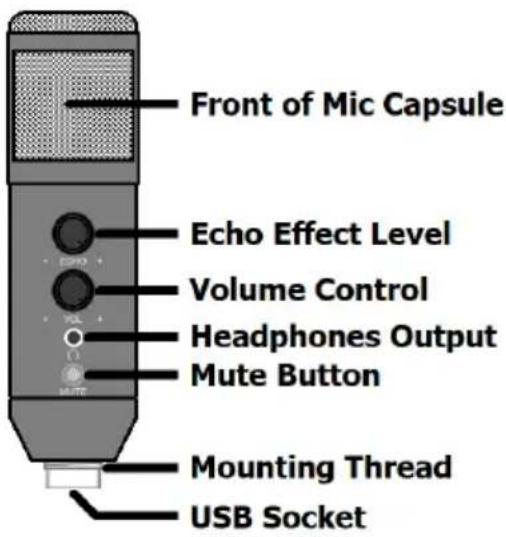
The computer will recognise the CU-POD as a USB Audio Device for both input and output of audio. Connect headphones to the 3.5mm Headphones Output on the front of the CU-POD
Operation
Selecting the CU-POD (usually appearing as "USB Audio Device") as the input and output device within the recording software will set the microphone as the input source and the headphones output for the output for monitoring.
All audio that would normally come from the computer speakers will no w be routed to the headphones output of the CU-POD.
Set the VOL (volume) control to the required level so that the sound is clear and not distorted. Speak into the front of the grille (the front side is with the controls facing you) approximately 5cm away from the grille.
Pressing MUTE will mute the microphone – pressing this again will un-mute the microphone.
If an echo effect is required, this can be introduced by turning up the ECHO control, otherwise, turning this control fully down removes this effect.
The CU-POD can be disconnected and re-connected to USB as a hot-swappable device. Disconnect from USB after use to preserve the computer battery or power supply.
Specifications
| Capsule | 15mm∅ back-electret condenser |
| Polar pattern | Cardioid |
| Connection | USB type B (power & digital audio) |
| Lead length | 1.4m |
| Headphone: connector | 3.5mm s tereo jack |
| Frequency response | 30Hz - 20kHz |
| Controls | Echo, Volume & Mute |
| Max. SPL | 120dB |
| SNR | 10dB |
| Sensitivity | 25mV/Pa (-32dB±2dB) |
| Dimensions | 158 x 45mm∅ |
| Weight | 228g |

Brand : Citronic
Model : CU-POD
Category : Microphone