DS1100 - Baby product Oricom - Free user manual and instructions
Find the device manual for free DS1100 Oricom in PDF.


| Product Type | Baby Monitor |
| Model | DS1100 |
| Brand | Oricom |
| Dimensions (Parent Unit) | Approx. 120 x 80 x 30 mm |
| Dimensions (Baby Unit) | Approx. 100 x 70 x 40 mm |
| Weight (Parent Unit) | Approx. 150 g |
| Weight (Baby Unit) | Approx. 120 g |
| Power Supply | AC adapter (input: 100-240V, output: 5V DC 1A) |
| Battery Type | Rechargeable Li-ion (Parent Unit) |
| Operating Range | Up to 300 meters (open area) |
| Frequency | 2.4 GHz digital |
| Key Features | Two-way talk, night vision, temperature sensor, lullabies |
| Display | 2.8-inch color LCD (Parent Unit) |
| Audio | Full-duplex clear sound |
| Cleaning | Wipe with a dry, soft cloth; avoid liquids |
| Safety | CE, RoHS compliant |
| Spare Parts | Replacement adapters and batteries available |
| Reparability | Contact Oricom support for service |
Frequently Asked Questions - DS1100 Oricom
User questions about DS1100 Oricom
0 question about this device. Answer the ones you know or ask your own.
Ask a new question about this device
Download the instructions for your Baby product in PDF format for free! Find your manual DS1100 - Oricom and take your electronic device back in hand. On this page are published all the documents necessary for the use of your device. DS1100 by Oricom.
USER MANUAL DS1100 Oricom
natural_image
White analog kitchen or dining appliance with a digital display showing 0.00°C, no visible text or symbols on the device itself.Instruction Manual
Keep this user guide for future reference. Always retain your proof of purchase in case of warranty service. www.oricom.com.au
Specification....3
Touch Button 3
Operation....3
Tare Function......4
Caution....4
Express Warranty (Australia) 5
Need Help?
If you need assistance setting up or using your Oricom product now or in the future, call Oricom Support.
Australia (02) 4574 8888
www.oricom.com.au
Mon-Fri 8am – 6pm AEST
New Zealand 0800 67 42 66
www.oricom.co.nz
Mon-Fri 10am – 8pm NZST
WARNING Battery Safety
- Batteries represent a hazard to health and the environment!
• They may contain toxic, ecologically hazardous heavy metals. - Do not dispose of batteries in a fire as they may explode.
- Dispose of batteries according to local regulations, never in your household rubbish.
- Do not dismantle, cut, open, crush, bend, puncture or shred cells or batteries. If a battery leaks, do not let the battery liquid touch skin or eyes. If this happens, immediately flush the affected areas with water, and seek medical assistance.
- Do not modify, remanufacture, attempt to insert foreign objects into the battery, or immerse or expose it to water or other liquids. Batteries may explode if damaged.
- Use only AAA Alkaline batteries. Improper use, or use of unapproved batteries may present a risk of fire, explosion, or other hazard, and may invalidate any approval or warranty.
- If you believe the batteries are damaged, stop using the product. Contact Oricom for assistance. Never use a damaged battery.
Disposal
Always dispose of your products at the end of their life in accordance with your local waste disposal requirements.
Packaging materials all cardboard and paper packaging should be recycled in accordance with your local council waste regulations.
Always remove the batteries from the unit before placing in storage as the battery may leak.
Thank you for choosing the Oricom Digital Baby Scale, please read this manual carefully before using.
Specification
1) Max. 100 ~kg
2) Division: 100g
3) Unit: kg, oz, lb
4) Touch button
5) LCD with blue backlit display
6) Hold function and memory recall for last weight on power up
7) Tare function
8) Overload and low battery indication
9) Auto power off
10) 2x AAA Alkaline batteries
Touch Button


- ON/OFF/TARE: power on, power off and tare function
- HOLD: Holds weight measurement for easy recall
- UNIT: change unit to kg, oz and lb
Operation
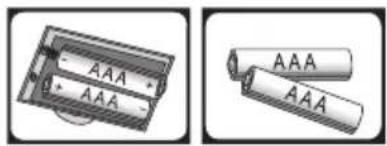
- Remove battery cover from the base of the scales, insert 2 AAA Alkaline batteries and refit the battery cover.
Make sure the batteries are fitted with the correct polarity and the battery cover is also fitted correctly.
natural_image
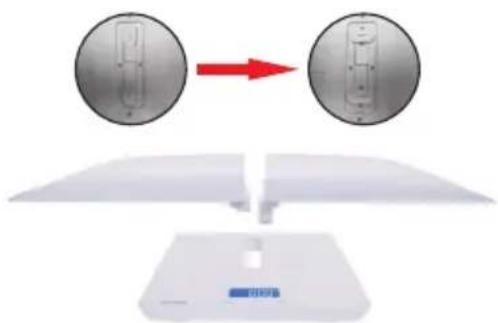
Two battery components shown in side-by-side illustrations, one with a battery and two others with two batteries (no text or symbols visible)- Insert the weighing tray into the middle slot on the scale body and make sure to twist and fix the tray at the back of scale.
natural_image
Diagram showing two circular components with internal structures being rotated by a red arrow, above a white base with blue logo (no text or symbols)Note: Remove weighing tray for use as a stand up scale.
-
Place the scales on a firm stable surface.
-
Press "ON/OFF/TARE" button to switch on the scales. The scales are ready for use when the LCD screen shows "0.00kg" after displaying the last recorded weight for approx. 5 seconds.
You can zero the display at any time by touching the "TARE" button. - Press the "UNIT" button to choose between three units "kg", "oz" and "lb".
- Place baby on the scale tray, weight is displayed on the screen.
- Touch "HOLD" button to lock the weight measurement, you can then remove your baby and retain the weight measurement on the display, this weight measurement will also display on power up for 5 seconds.
- If you want to take another measurement, please press "ON/OFF/TARE" button to zero the display ready for use again.
- To power off touch the "ON/OFF/TARE" button for three seconds.
The scales will switch off automatically when not in use after 60 seconds.
Tare Function
Press “ON/OFF/TARE” button to tare the previous weight, once the display is reset to “0.00kg” the scales are ready for weighing.
Please note: total tare weight can't be over max. capacity 100kg.
Caution
- Always place the scales on a firm stable surface.
- DO NOT LEAVE YOUR BABY/CHILD UNSUPERVISED whilst in the tray.
- Please do not store scales in damp or very cold environment.
- This Oricom DS1100 scale is a high precision measuring device. Handle with care, do not drop, avoid heavy knocks, do not disassemble.
- Please use soft tissue with alcohol or glass cleaner to clean the surface if it is dirty. No soap or other chemicals. Keep it away from water, corrosive liquid, heat and extreme coldness.
- When storing the scale, do not leave any weight on the scale for an extended period of time.
- Do not immerse the scale in water.
- Remove batteries when not in use for extended periods or in storage.
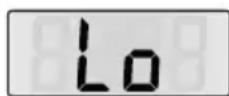
- If "Lo" appears on the LCD screen please change the batteries.
Do not mix batteries, always replace with new batteries of the same type.
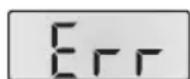
- "Err" on the screen indicates overload, the weight being measured is outside the scales specification.
Express Warranty (Australia)
This Express Warranty is provided by Oricom International Pty Ltd ABN 46 086 116 369, Unit 1, 4 Sovereign Place, South Windsor NSW 2756, herein after referred to as “Oricom”.
Oricom products come with guarantees that cannot be excluded under the Australian Consumer Law. You are entitled to a replacement or refund for a major failure and compensation for any other reasonably foreseeable loss or damage. You are also entitled to have the goods repaired or replaced if the goods fail to be of acceptable quality and the failure does not amount to a major failure.
Oricom warrants that the product is free from defects in materials or workmanship during the Express Warranty Period. This Express Warranty does not extend to any product from which the serial number has been removed or was purchased outside of Australia.
Nothing in this Express Warranty excludes, restricts or modifies any condition, warranty, guarantee, implied term, right or remedy pursuant to the Australian Consumer Law and which may not be so excluded, restricted or modified. For such conditions, terms, guarantees and warranties that cannot be excluded, restricted or modified, Oricom limits the remedies available to extent permitted in the relevant legislation.
Except with respect to rechargeable battery cells and rechargeable battery packs (if supplied), the Express Warranty Period will be 12 months from the date of purchase of the product evidenced by your dated sales receipt. You are required to provide proof of purchase as a condition of receiving Express Warranty services. Rechargeable battery cells and rechargeable battery packs (if supplied) with this product are covered under this warranty for a period of 6 months.
You are entitled to a replacement product or repair of the product at our discretion according to the terms and conditions of this document if your product is found to be faulty within the Express Warranty Period. This Express Warranty extends to the original purchaser only and is not transferable.
Products distributed by Oricom are manufactured using new materials or new and used materials equivalent to new in performance and reliability. Spare parts may be new or equivalent to new. Spare parts are warranted to be free from defects in material or workmanship for thirty (30) days or for the remainder of the Express Warranty Period of the Oricom branded product in which they are installed, whichever is longer. During the Express Warranty Period, Oricom will where possible repair and if not replace the faulty product or part thereof. All component parts removed under this Express Warranty become the property of Oricom. In the unlikely event that your Oricom product has a recurring failure, Oricom may always, subject to the Competition and Consumer Act 2010, at its discretion, elect to provide you with a replacement product of its choosing that is at least equivalent to your product in performance.
No change to the conditions of this Express Warranty is valid unless it is made in writing and signed by an authorised representative of Oricom.
Oricom will not be liable under this Express Warranty, and to the extent permitted by law will not be liable for any defect, loss, damage or injury arising out of or in connection with a:
- Failure by you to adhere to the warnings and follow the instructions set out in this user guide for the proper installation and use of the product;
- Willful misconduct or deliberate misuse by you of the product;
- Any external cause beyond our control, including but not limited to power failure, lightning or over voltage; or
- Modification to the product or services carried out on the product by anyone other than Oricom or Oricom's authorised service provider.
How to make a claim under your Express Warranty in Australia
Oricom has a simple warranty process for you to follow:
- Please call or email our Customer Support Team, (02) 4574 8888 or support@oricom.com.au.
- A Customer Support Team member will verify after troubleshooting with you if your product qualifies under warranty. If so, they will give you a Product Return Authorisation number.
- We will then email or fax a Return Authorisation form and a Repair Notice (if necessary), together with instructions on how to return the goods for warranty service.
Please note that if a Customer Support Team member advises that your product does not qualify for return, this warranty does not apply to your product. Products that are authorised to be returned to Oricom in Australia must include all of the following:
• A completed Return Authorisation form
- A copy of your Proof of Purchase (please keep your original copy)
- The faulty product, including all accessories.
Send the approved returns to:
Oricom International Pty Ltd
Locked Bag 658
South Windsor NSW 2756 Australia
Please note that this Express Warranty excludes expenses incurred by you in returning any faulty product to us. You must arrange and pay any expenses incurred (including postage, delivery, freight, transportation or insurance of the product) to return the faulty product to us, however, we will arrange delivery of the repaired or replaced faulty product to you.
Important Information - Repair Notice
Please be aware that the repair of your goods may result in the loss of any user-generated data (such as stored telephone numbers, text messages and contact information). Please ensure that you have made a copy of any data saved on your goods before sending for repair. Please also be aware that goods presented for repair may be replaced by refurbished goods or parts of the same type rather than being repaired.
ORICOM CUSTOMER SUPPORT
Oricom have a trained and dedicated team of Customer Support Representatives, each with the knowledge and resources to assist in answering your questions quickly and efficiently.
Oricom Support - Australia
For all product enquiries, troubleshooting or to discuss the range of Oricom products, feel free to contact Oricom or visit our website for answers to frequently asked questions.
(02) 4574 8888
Monday - Friday 8am – 6pm AEST
Email: support@oricom.com.au
www.oricom.com.au
Oricom Support - New Zealand
0800 674 266
Monday - Friday 11am - 7pm NZST
Email: support@oricom.co.nz

Brand : Oricom
Model : DS1100
Category : Baby product