
OBHAD200 - Baby product Oricom - Free user manual and instructions
Find the device manual for free OBHAD200 Oricom in PDF.


| Type | Ultrasonic aromatherapy diffuser with humidifier, night light, and Bluetooth speaker |
| Brand | Oricom |
| Model | OBHAD200 |
| Product Name | Nursery Calm |
| Dimensions (H x Diameter) | 11.81 cm x 16 cm |
| Weight (with adaptor) | Approx. 480 g |
| Power Supply Input | AC100-240V 50/60Hz |
| Power Supply Output | 24V 650mA |
| Power Consumption | 15.6 W |
| Suitable Room Area | 10-15 m² |
| Water Tank Capacity | 200 ml (MAX) |
| Timer Settings | 1h / 3h / 6h |
| Night Light Colors | 7 colors (soft glow) |
| Audio Playback | Bluetooth speaker (pair with smart device) |
| Bluetooth Range | Up to 6 meters |
| Materials | ABS, PP, PET |
| Accessories Included | Power adaptor, user manual |
| Auto Shut-off | Yes, when water level is low |
| Cleaning Instructions | Wipe with soft damp cloth; clean ultrasonic plate with water on cloth; dry with soft cloth; empty tank after each use. Do not immerse in water. |
| Safety Warnings | Unplug before cleaning; do not use thinner or cleansers; ensure cover is properly installed; do not immerse unit in water. |
| Express Warranty (Australia) | 12 months from date of purchase |
Frequently Asked Questions - OBHAD200 Oricom
User questions about OBHAD200 Oricom
0 question about this device. Answer the ones you know or ask your own.
Ask a new question about this device
Download the instructions for your Baby product in PDF format for free! Find your manual OBHAD200 - Oricom and take your electronic device back in hand. On this page are published all the documents necessary for the use of your device. OBHAD200 by Oricom.
USER MANUAL OBHAD200 Oricom
1. Overview of Nursery Calm
EN
Model: OBHAD200

- Top Cover
- Power LED
- Timer indicator
- Mood Light button
- Play / Pause button
- Mist button
- Speaker
IMPORTANT:
- Unplug before cleaning.
- All parts may be wiped with a soft damp cloth and then wiped with a dry cloth.
- Clean the ultrasonic plate with water on a soft cloth regularly.
- Dry with a soft cloth to remove leftover condensation.
- Do not clean the product with thinner or cleansers.
• Empty tank after each use. - Do not immerse unit in water.
2. Setting up your Nursery Calm
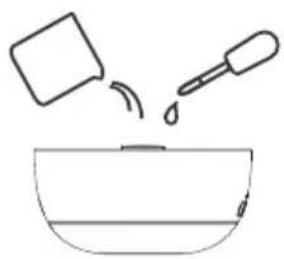
Place the Nursery Calm on a flat, even surface, remove the top cover from diffuser base.
natural_image
Simple line drawing of a bowl with liquid and a dropper above it (no text or symbols)Replace the top cover back onto the diffuser base. Make sure it is installed correctly.
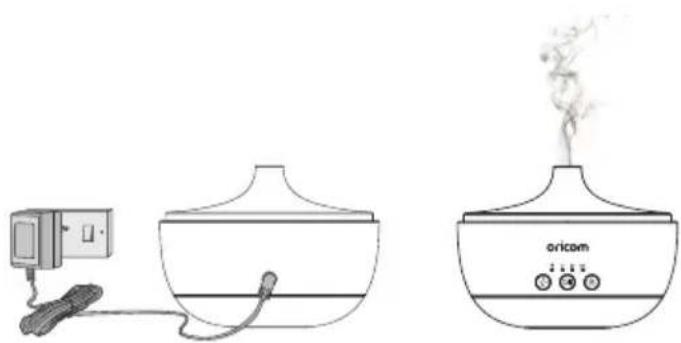
Connect the power adaptor into the power socket on the back of the Nursery Calm and the other end to mains power.

Fill the water tank with clean, cool water up to MAX line. To create an aroma scent, add a few drops of essential oil (not included) to dilute with the water in the tank.
natural_image
Illustration of a simple electric heating setup with a power outlet, a condenser, and an oxicom burner (no text or symbols)3. Using the Product
3.1 Turn On the Nursery Calm
Press \$button to turn on the Nursery Calm.
3.2 Set Timer
You can set a timer to schedule the working hours of the Nursery Calm.
Press 🎨 button to turn on the timer and select 1h / 3h / 6h or switch off both aroma diffuser / humidifier and night light.
3.3 Night Light
The mood light feature gives soft glow light with 7 colours of choice for soothing your baby.
- Press 🎨 button to turn the light on.
- Press - button again to cycle through the colours.
- Press - button during the colour cycle to select a colour.
- Press - button to turn off.
3.4 Audio playback
Switch on Bluetooth and enter discovery mode on your smart device while close to Nursery Calm, searching for available devices and select "AromaSpeaker Diffuser", follow on screen instructions to complete the pairing.
- Press ▷ button to play favourite song through your device.
- While the audio is playing, long press-button to reduce the volume or long press button to increase the volume.
- Press ▷ button to stop Audio playback.
Important for Bluetooth:
- Keep your device within 6 metres of Nursery Calm to get good connection.
4. Troubleshooting
| Problem Possible Cause Solution | ||
| Unit will not turn on | There is not enough water in the Water Tank. The AC adaptor is not connected to a power supply. | Add water to the tank; Carefully disconnect the AC adaptor from the DC Socket and the power supply, check the cables, then reconnect. |
| No mist or abnormal mist; Unit is leaking water | Not enough water or too much water. Residue on the Ultrasonic plate. Cover not installed properly. Dust or restriction to the air-suction port on the underside of the base. | Add a suitable amount of water in the tank. Water must never be filled over 200 ML (MAX) Line. Please refer to Maintenance instructions and remove and re-install correctly so vapours can be released freely. Clean the air suction port of any dust. Restricted airflow will affect mist. |
| Water leakage from product | Cover not installed properly. Has the unit been tipped over? Low temperature or high humidity. | Remove and reinstall correctly, so vapours can be released freely. Under these conditions, the mist may condense quickly into water droplets. |
5. Specifications
| Product Size 11.81cm (height) x | 16cm (diameter) |
| Recommended Water Level 200ml (MAX) | |
| Product Weight Approx. 480g (with adaptor) | |
| Accessories / Materials Adaptor, User Manual / ABS, PP, PET | |
| Power Supply (Input) AC100-240V 50/60Hz / (Output) 24V 650mA | |
| Power / Suitable Area 15.6W / 10-15m ^2 | |
* Automatically turns off when water levels are low.
6. General Information
Express Warranty (Australia)
This Express Warranty is provided by Oricom International Pty Ltd ABN 46 086 116 369, Unit 1, 4 Sovereign Place, South Windsor NSW 2756, herein after referred to as "Oricom".
Oricom warrants that the product is free from defects in materials or workmanship during the Express Warranty Period. This Express Warranty does not extend to any product from which the serial number has been removed or was purchased outside of Australia.
The benefits of this Express Warranty are in addition to other rights and remedies you may have under the Australian Consumer Law. Our goods come with guarantees that cannot be excluded under the Australian Consumer Law. You are entitled to a replacement or refund for a major failure and compensation for any other reasonably foreseeable loss or damage. You are also entitled to have the goods repaired or replaced if the goods fail to be of acceptable quality and the failure does not amount to a major failure. In the event of a minor failure, Oricom reserves the right to choose to repair or replace the product.
The Express Warranty Period will be a period of 12 months beginning on the date of purchase of the product evidenced by your dated sales receipt. You are required to provide proof of purchase as a condition of receiving Express Warranty services.
You are entitled to a replacement product or repair of the product at our discretion according to the terms and conditions of this document if your product is found to be faulty within the Express Warranty Period. This Express Warranty extends to the original purchaser only and is not transferable.
Products distributed by Oricom are manufactured using new materials or new and used materials equivalent to new in performance and reliability. Spare parts may be new or equivalent to new. Spare parts are warranted to be free from defects in material or workmanship for thirty (30) days or for the remainder of the Express Warranty Period of the Oricom branded product in which they are installed,
whichever is longer. During the Express Warranty Period, Oricom will where possible repair and if not replace the faulty product or part thereof. All component parts removed under this Express Warranty become the property of Oricom. In the unlikely event that your Oricom product has a recurring failure, Oricom may always, subject to the Competition and Consumer Act 2010, at its discretion, elect to provide you with a replacement product of its choosing that is at least equivalent to your product in performance.
No change to the conditions of this Express Warranty is valid unless it is made in writing and signed by an authorised representative of Oricom.
Oricom will not be liable under this Express Warranty, and to the extent permitted by law will not be liable for any defect, loss, damage or injury arising out of or in connection with a:
- Failure by you to adhere to the warnings and follow the instructions set out in this user guide for the proper installation and use of the product;
- Willful misconduct or deliberate misuse by you of the product;
- Any external cause beyond our control, including but not limited to power failure, lightning or over voltage; or
- Modification to the product or services carried out on the product by anyone other than Oricom or Oricom's authorised service provider.
How to make a claim under your Express Warranty in Australia
Oricom has a simple warranty process for you to follow:
- Please call or email our Customer Support Team, 02 4574 8888 or support@oricom.com.au.
- A Customer Support Team member will verify after troubleshooting with you if your product qualifies under warranty. If so, they will give you a Product Return Authorisation number.
- We will then email a Return Authorisation form and a Repair Notice (if necessary), together with instructions on how to return the product for warranty service.
Please note that if a Customer Support Team member advises that your product does not qualify for return, this warranty does not apply to your product. Products that are authorised to be returned to Oricom in Australia must include all of the following:
• A completed Return Authorisation form
- A copy of your Proof of Purchase (please keep your original copy)
- The faulty product, including all accessories.
Send the approved returns to:
Oricom International Pty Ltd
Locked Bag 658
South Windsor NSW 2756 Australia
Please note that this Express Warranty excludes expenses incurred by you in returning any faulty product to us. You must arrange and pay any expenses incurred (including postage, delivery, freight, transportation or insurance of the product) to return the faulty product to us, however, we will arrange delivery of the repaired or replaced faulty product to you.
Important Information - Repair Notice
Please be aware that the repair of your products may result in the loss of any user-generated data (such as stored telephone numbers, text messages and contact information). Please ensure that you have made a copy of any data saved on your product before sending for repair. Please also be aware that products presented for repair may be replaced by refurbished products or parts of the same type rather than being repaired.
Oricom Customer Support
Oricom have a trained and dedicated team of Customer Support Representatives, each with the knowledge and resources to assist in answering your questions quickly and efficiently.
Oricom Support - Australia
For all product enquiries, troubleshooting or to discuss the range of Oricom products, feel free to contact Oricom or visit our website for answers to frequently asked questions.
(02) 4574 8888 / Monday - Friday 8am - 6pm AEST
Email: support@oricom.com.au / www.oricom.com.au
Oricom Support - New Zealand
0800 674 266 / Monday - Friday 10am - 8pm NZST
Email: support@oricom.co.nz
oricom.
All rights reserved
Printed in China
Version 5.0Ref:
20221041


- Overview of Nursery Calm
- IMPORTANT:
- Setting up your Nursery Calm
- Using the Product
- Turn On the Nursery Calm
- Set Timer
- Night Light
- Audio playback
- Important for Bluetooth:
- Troubleshooting
- Specifications
- General Information
- Express Warranty (Australia)
- How to make a claim under your Express Warranty in Australia
- Important Information - Repair Notice
- Oricom Customer Support
- Oricom Support - Australia
- Oricom Support - New Zealand
Brand : Oricom
Model : OBHAD200
Category : Baby product