
HNA300 - Baby product Oricom - Free user manual and instructions
Find the device manual for free HNA300 Oricom in PDF.


| Product Type | Digital Ear Thermometer |
| Brand | Oricom |
| Model | HNA300 |
| Measurement Range | 34.0°C – 42.2°C (93.2°F – 108.0°F) |
| Accuracy | ±0.2°C (0.4°F) |
| Display | LCD with backlight |
| Memory | Last 10 readings |
| Measurement Time | 1 second |
| Auto Shut-Off | After 60 seconds of inactivity |
| Power Source | 2 x AAA alkaline batteries (not included) |
| Battery Life | Approximately 3000 measurements |
| Dimensions | 150 x 40 x 30 mm |
| Weight | 80 g (including batteries) |
| Material | ABS plastic, stainless steel probe |
| Cleaning | Wipe probe with alcohol swab after each use; do not submerge |
| Accessories | Replacement probe covers (sold separately) |
| Safety Certifications | FDA cleared, CE marked, RoHS compliant |
| Intended Use | For babies, children, and adults |
| Warranty | 2 years limited manufacturer warranty |
Frequently Asked Questions - HNA300 Oricom
User questions about HNA300 Oricom
0 question about this device. Answer the ones you know or ask your own.
Ask a new question about this device
Download the instructions for your Baby product in PDF format for free! Find your manual HNA300 - Oricom and take your electronic device back in hand. On this page are published all the documents necessary for the use of your device. HNA300 by Oricom.
USER MANUAL HNA300 Oricom
natural_image
Digital thermometer device with digital display showing temperature reading (no visible text or symbols on device body)NFS100

*WARNING – THIS PRODUCT CONTAINS A LITHIUM COIN/BUTTON BATTERY, KEEP BATTERIES OUT OF REACH OF CHILDREN.
Infrared Forehead Thermometer
NFS100 is included as a medical device on the Australian
Register of Therapeutic Goods (ARTG No. 198436).
NFS100 is intended for use as a measuring device for determining the patient's body temperature.
ALWAYS READ THE LABEL AND USER GUIDE, USE ONLY AS DIRECTED.
Keep this user guide for future reference. Always retain your proof of purchase in case of
warranty service
Oricom Customer Support: (02) 4574 8888
Contents
Warnings....3
Principle of Measurement....5
Temperature Ranges 6
Product Descriptions ....7
How to Use NFS100....8
Memory Feature 9
Mode Change (°C ↔ °F)....10
Battery Replacement....10
Probe Replacement....11
Cleaning Storage 12
Indications of Errors 13
Product Specifications....14
Warranty information 15
Need Help?
If you need assistance setting up or using your Oricom product now or in the future, call Oricom Support.
Australia (02) 4574 8888
www.oricom.com.au
Mon-Fri 8am – 6pm AEST
New Zealand 0800 67 42 66
www.oricom.co.nz
Mon-Fri 10am – 8pm NZST
Thank you for purchasing the Oricom NFS100 Infrared Forehead Thermometer The NFS100 is an innovative thermometer using highly developed infrared technology enabling clinical accuracy.
This new type of thermometer enables the user to measure temperature by gently moving the sensor across the forehead.
To use this device correctly please follow the directions in this user guide.
The instructions provide important details on how to achieve accurate measurements.
Warnings
⚠️ Please read this user guide carefully before initial use and follow all instructions.
- Use this product only for its intended purpose as described in this manual and follow all instructions.
• Suitable for use on babies 1 month and older. - The measurement of temperature using this product does not represent a Doctors medical examination.
- Consult with your medical professional if any abnormality is found.
- Do not take a temperature measurement over a scar or open tissue.
- Do not expose the product to temperatures below 20^ C ( 68^ F) or above 50^ C ( 122^ F) or a relative humidity of 95% or greater.
- Do not drop the thermometer as it may cause damage.
- Do not take temperature with this product near heat sources such as in direct sunlight, near a fireplace or stove.
- Do not use this product if it is not working properly, contact Oricom support.
- There are no user serviceable parts the only service required is battery replacement and general cleaning please follow instructions in this user guide.
-
If the product is not going to be used for an extended period of time please remove the battery and store the thermometer in a cool dry place.
-
This product is NOT waterproof. Direct contact with water or other liquids should be avoided.
- Do not leave the thermometer with infants or children at any time.
- The protective glass over the lens is fragile, handle with care.
- Do not touch the glass of the infrared lens with bare fingers.
Warning
Many people may not have an elevated temperature even if they are ill. In the, following cases please consult your medical professional before using this product.
• Under 90-day-old infants
• People on steroids, antibiotics or antipyretics.
• People with compromised immune systems.
WARNING – THIS PRODUCT CONTAINS A LITHIUM COIN/BUTTON BATTERY, KEEP OUT OF REACH OF CHILDREN.
- If you suspect your child has swallowed or inserted a button battery, immediately take them to a hospital emergency room.
- Swallowing may lead to serious injury in as little as 2 hours or death, due to chemical burns and potential perforation of the oesophagus.
- As well as attending hospital or seeing an emergency doctor, contact the 24-hour Poisons Information Centre on 13 11 26 for additional treatment information.
- Examine devices and make sure the battery compartment is correctly secured.
- Dispose of used button batteries immediately and safely. Flat batteries can still be dangerous.
- Tell others about the risk associated with button batteries and how to keep their children safe.
Cautions
- If your child is moving during the measurement it may result in an inaccurate measurement due to the probe losing contact with the skin please calm your child and try again.
- In forehead measurement, slowly move the product from starting point to end for 3 seconds.
- The reliability of the measurement cannot be guaranteed if the temperature is measured from parts of body that are not recommended (anywhere other than the forehead or behind the earlobe).
- Wait 30 seconds between repeat measurements.
- Similar to other thermometer, measurement error may occur within a range of ± 0.2^ ( ± 0.4^ ).
- Measurement should not be taken until completely relaxed at normal room temperature.
- Please note that measurement may be incorrect after exercising, bathing or getting wet in the rain.
- For accurate measurement, make sure forehead is clean and free from makeup.
- Temperature between right and left forehead could be different. Always take the temperature from the same side of the forehead.
- Measurement may be incorrect when low battery( ) signal is indicated. Replace the battery and re-measure.
- When measuring the temperature of a liquid (milk, water) place the probe as close as possible to the liquid but ensure that it is not immersed into the liquid as this may damage your thermometer.
Principle Of Measurement
According to Clinical studies the temperature of the blood in a major artery will reflect an accurate body temperature.
This Infrared Forehead Thermometer is designed to measure the temperature of the skin over the temporal artery, a major artery of the forehead.
The NFS100 is easy and gentle to use it is non-invasive unlike other types of thermometers for measuring rectal ,oral underarm and ear areas.
NFS100 ensures faster and easier measurement with a degree of clinical accuracy and several user-friendly functions.
Temperature Ranges
Body temperature means internal temperature of body. Normal temperature even in a healthy person can vary within a small range. The temperature of a person measured in the evening is normally 0.5^ C higher than early morning and is also affected by the environment, time and activity. Refer to the table below to find out the normal body temperature ranges.
| Normal temperature range at various parts of body |
| Armpit 34.7 ~ 37.3°C (94.5 ~ 99.1°F) |
| Mouth 35.5 ~ 37.5°C (95.9 ~ 99.5°F) |
| Rectum 36.6 ~ 38.0°C (97.9 ~ 100.4°F) |
| Ear 35.8 ~ 38.0°C (96.4 ~ 100.4°F) |
| Normal temperature range by age |
| 0 ~ 2age 36.4 ~ 38.0°C (94.5 ~ 100.4°F) |
| 3 ~ 10age 36.1 ~ 37.8°C (97.0 ~ 100.0°F) |
| 11 ~ 65age 35.9 ~ 37.6°C (96.6 ~ 99.7°F) |
| Above 65age 35.8 ~ 37.5°C (96.4 ~ 99.5°F) |
- Normal body temperature can vary between individuals it is recommended that you record your body temperature when you are healthy as a reference point.
Product Descriptions

- Probe
- LCD Display
- Power/Memory Button
- Scan Button
- Battery Cover
- Carrying Case
- Spare Probe
How to Use NFS100

natural_image
Simple line drawing of a hand pressing a button on a device (no text or symbols)


natural_image
Line drawing of a hand holding a small object (no text or symbols)
natural_image
Line drawing of a person applying makeup to the forehead (no text or symbols)
natural_image
Two hand-drawn diagrams showing 3D object projections with coordinate axes, labeled (○) and (×), no text or symbols present.
-
Press ☉/mem button as illustrated.
-
All symbols are displayed on LCD when started.
-
When ready symbol ( - - . - ) shows on the display, thermometer is ready to use.
-
Gently hold the NFS100 as illustrated. Press and hold the scan button then place the probe flat and firmly on the skin.
-
Slowly slide the probe midline across the forehead to the hairline keeping the instrument flat and in contact with skin. You should scan the forehead slowly, just like wiping the skin, for 3 seconds and then release the scan button. Measurement should start from center of the forehead.
-
The unit beeps one time (1) per second, the final beep only occurs after the scan button is released, the thermometer should remain in contact with the skin once the scan button is released until the final beep is heard.
-
Read the temperature on display.
-
As per cautionary notices on pages 4-5 you should allow 30 seconds between each new measurement.
-
The thermometer will automatically turn off after one minute of no-use.
[NOTE]
![Oricom HNA300 - [NOTE] - 1](/content/2026/06/1210333/images/82d634d1fbcc23fa2bda9ace368f0f7beec5b1e9a1d14a29e1f646aeee284538.jpg)
natural_image
Side profile illustration of a person applying a medical or cosmetic device to their neck (no text or symbols visible)- Follow instructions 1 to 4 and 6 replace only instruction 5 with instruction below.
- Normally, the artery behind the earlobe does not provide a sufficiently accurate reading. However, in this case due to the effect of sweat lowering the temperature, taking the temperature behind the earlobe may give a better result.
- Brush hair aside if covering the ear and wait for 30 seconds for more accurate measurement. Then gently nestle the NFS100 on neck directly behind earlobe and scan through the arrow direction about 1\~2cm (0.4\~0.8inch) as illustrated for 3 seconds.
- You should slide the product until you hear a “beep” sound, which indicates the end of the measurement, and then release it from skin.
Memory Feature
NFS100 stores the last 8 readings
Last measured data is automatically stored in order to review the stored temperature.
Pressing ⬙/mem will show MEM 1

Pressing Ⓞ/mem again will show MEM 2
Pressing ♟/ mem third time will show MEM 3
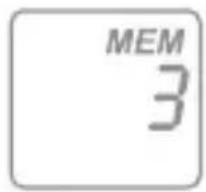
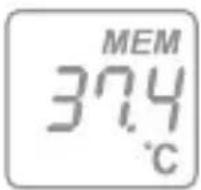
Memory location with no data will not be displayed.

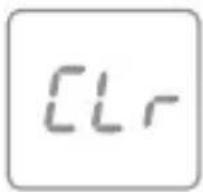
Pressing and holding /mem for 5 seconds deletes the memory.
Mode Change (°C ↔ °F)
To change from °C to °F press and hold the mem/ . and scan button at the same time for 2 seconds.
Battery Replacement
WARNING – THIS PRODUCT CONTAINS A LITHIUM COIN/BUTTON BATTERY, KEEP OUT OF REACH OF CHILDREN.
- If you suspect your child has swallowed or inserted a button battery, immediately take them to a hospital emergency room.
- Swallowing may lead to serious injury in as little as 2 hours or death, due to chemical burns and potential perforation of the oesophagus.
- As well as attending hospital or seeing an emergency doctor, contact the 24-hour Poisons Information Centre on 13 11 26 for additional treatment information.
- Examine devices and make sure the battery compartment is correctly secured.
- Dispose of used button batteries immediately and safely. Flat batteries can still be dangerous.
- Tell others about the risk associated with button batteries and how to keep their children safe.
This product contains one lithium battery. When low battery indication ( ) is displayed on LCD, replace the battery as follows:

natural_image
Close-up of a white plastic object with a small black mark and a pointed tip (no text or symbols visible)To remove the battery cover, firstly remove the screw.

natural_image
Close-up of a white pen tip with a black arrow pointing to the tip area (no text or symbols visible)Press and slide the battery door as indicated by the arrow in the illustration.

natural_image
Close-up of a mechanical device with a knob and internal components (no visible text or symbols)To replace the battery, using a pen or similar probe press latch to release the battery. Place the new battery with the "+" mark facing up.

natural_image
Simple line drawing of a trash can with a cross mark (no text or symbols)Refit the battery cover and replace the screw.
Don't throw used lithium batteries in the bin. Keep them safely out of reach of children before disposing them. Ask your local council for the nearest location to dispose your batteries safely.
WARNINGS:
Make sure there are no loose batteries within any child's reach. If you're changing a button battery, do it on a surface out of reach of children.
Make sure the battery cover is secure so your child can't remove it. Store button batteries like you would any medication – out of reach of children.
If you're suspicious that your child has swallowed a button battery, or has placed one in his/her nose, seek medical attention immediately. Do not give any food or water.
If you find the battery has leaked fluid please do not touch the battery or fluid.
Dispose of the battery properly do not wrap in metal or aluminum foil, wrap in newspaper and dispose of carefully Battery may explode if burnt or exposed to excessive heat. Check your product regularly for damage and exhausted battery.
Probe Replacement
An additional probe is supplied with your product. If the probe is contaminated or probe surface is damaged, please replace the probe. Turn the probe counter-clockwise to remove. As the probe is a consumable item please contact Oricom if you need to purchase additional probes.
WARNING:
Keep probes out of reach of children.
Cleaning and Storage

natural_image
Illustration of a hand using a tool to adjust a circular component (no text or symbols visible)
natural_image
Abstract line drawing of a human hand holding a spiral object (no text or symbols)- The sensor is a very sensitive part and easily damaged. For accurate measurement please keep the sensor clean.
- To clean the sensor please keep it facing down and carefully clean with an alcohol moistened cotton bud, allow to dry for at least one hour before using.
- To clean the outside of the probe use a cloth moistened with alcohol or water.
-
Do not use excessive force on the sensor.
-
Do not immerse the product in water or any other liquid.
- Keep the product away from direct sunlight, dust and any other type of contaminating substance.
- Keep the product at normal room temperature. The operating ambient temperature range for this thermometer is 16°C (60.8°F) to 40°C (104°F)
- Please place the product in normal room temperature for 30 minutes prior to use if it has been stored outside normal room temperature.
Indications Of Errors
 | Q: Outside temperature is below 10°C (50°F) or above 40°C (104°F)A: Place the product where temperature is between 10°C (50 °F) and 40°C (104°F) for 30 minutes. |
 | Q: Measured object is above 42.2°C (108°F)A: Recheckthemeasuredobjectbefore measuring. (Extremely hot object cannot be measured) |
 | Q: Measured object is below 20°C (68°F)A: Recheck the measured object before measuring. (Extremely cold object cannot be measured) |
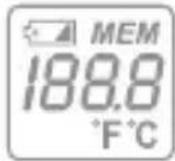 | Q: System ErrorA1: Turn off for 1 minute and turn on againA2: remove and replace the battery turn on againA3: Consult Oricom support |
 | Q: Informing battery replacement timeA: Replace the battery |
 | Q: Informing inactivity due to low batteryA: Replace the battery |
| Inaccurate measurement | Q: After bathing or returning homeA: Need time to relax.Q: Measured value is different.A: Probe and forehead must be at right angles to each other. |
| 3 Short "beep" Sounds | Q: Low battery indication, system error or mal - function.A: remove and replace the battery then turn power on again. |
Product Specifications
Items Descriptions
Measurement Method Infrared measurement
Measuring Time 3 sec for forehead
Temperature 20(68.4) \~ 42.2°C (108.0°F)
Measurement Range
Accuracy ±0.2°C (±0.4°F): 20 \~ 42.2°C
(68.4 \~ 108.0°F)
Display Type LCD (Liquid Crystal Display)
Memory Capacity 8 readings
Power Save Mode Automatic shutdown after 1 minute of
non-use
Battery CR2032 (1ea.) About 6,000 readings
Dimensions 33mm(W) X 42mm(D) X 143mm(H)
Weight 60g(2.1oz) with battery
Ambient Conditions 16\~40°C (60.8\~104°F), Humidity :
below 95%
Atmospheric Pressure(hPa) 700\~1060
Transport -20\~50°C (59\~104°F), Humidity :
below 95%
Storage condition Atmospheric Pressure(hPa) 700\~1060

NFS100 is included as a medical device on the Australian Register of Therapeutic Goods (ARTG No. 198436). NFS100 is intended for use as a measuring device for determining the patient's body temperature. ALWAYS READ THE LABEL AND USER GUIDE, USE ONLY AS DIRECTED.
Type BF Applied Parts
This product is manufactured in Korea under strict quality supervision by:
HuBDIC CO., Ltd, B-301, TaeKwang Industrial Building, 191-1,
Anyang 7-dong Manan-gu, Anyang-si Gyeonggi-do Korea.
IMPORTED & DISTRIBUTED IN AUSTRALIA by the sponsor:- Oricom
International Pty Ltd, Unit 1, 4 Sovereign Place, South Windsor 2756
AUSTRALIA
Express Warranty (Australia)
This Express Warranty is provided by Oricom International Pty Ltd ABN 46 086 116 369, Unit 1, 4 Sovereign Place, South Windsor NSW 2756, herein after referred to as “Oricom”.
Oricom warrants that the product is free from defects in materials or workmanship during the Express Warranty Period. This Express Warranty does not extend to any product from which the serial number has been removed or was purchased outside of Australia.
The benefits of this Express Warranty are in addition to other rights and remedies you may have under the Australian Consumer Law. Our goods come with guarantees that cannot be excluded under the Australian Consumer Law. You are entitled to a replacement or refund for a major failure and compensation for any other reasonably foreseeable loss or damage. You are also entitled to have the goods repaired or replaced if the goods fail to be of acceptable quality and the failure does not amount to a major failure. In the event of a minor failure, Oricom reserves the right to choose to repair or replace the product.
The Express Warranty Period will be a period of 12 months beginning on the date of purchase of the product evidenced by your dated sales receipt. You are required to provide proof of purchase as a condition of receiving Express Warranty services.
You are entitled to a replacement product or repair of the product at our discretion according to the terms and conditions of this document if your product is found to be faulty within the Express Warranty Period. This Express Warranty extends to the original purchaser only and is not transferable.
Products distributed by Oricom are manufactured using new materials or new and used materials equivalent to new in performance and reliability. Spare parts may be new or equivalent to new. Spare parts are warranted to be free from defects in
material or workmanship for thirty (30) days or for the remainder of the Express Warranty Period of the Oricom branded product in which they are installed, whichever is longer. During the Express Warranty Period, Oricom will where possible repair and if not replace the faulty product or part thereof. All component parts removed under this Express Warranty become the property of Oricom. In the unlikely event that your Oricom product has a recurring failure, Oricom may always, subject to the Competition and Consumer Act 2010, at its discretion, elect to provide you with a replacement product of its choosing that is at least equivalent to your product in performance.
No change to the conditions of this Express Warranty is valid unless it is made in writing and signed by an authorised representative of Oricom.
Oricom will not be liable under this Express Warranty, and to the extent permitted by law will not be liable for any defect, loss, damage or injury arising out of or in connection with a:
- Failure by you to adhere to the warnings and follow the instructions set out in this user guide for the proper installation and use of the product;
- Willful misconduct or deliberate misuse by you of the product;
- Any external cause beyond our control, including but not limited to power failure, lightning or over voltage; or
- Modification to the product or services carried out on the product by anyone other than Oricom or Oricom's authorised service provider.
How to make a claim under your Express Warranty in Australia
Oricom has a simple warranty process for you to follow:
- Please call or email our Customer Support Team, 02 4574 8888 or support@oricom.com.au.
- A Customer Support Team member will verify after troubleshooting with you if your product qualifies under warranty. If so, they will give you a Product Return Authorisation number.
- We will then email a Return Authorisation form and a Repair Notice (if necessary), together with instructions on how to return the product for warranty service.
Please note that if a Customer Support Team member advises that your product does not qualify for return, this warranty does not apply to your product. Products that are authorised to be returned to Oricom in Australia must include all of the following:
• A completed Return Authorisation form
- A copy of your Proof of Purchase (please keep your original copy)
- The faulty product, including all accessories.
Send the approved returns to:
Oricom International Pty Ltd
Locked Bag 658
South Windsor NSW 2756 Australia
Please note that this Express Warranty excludes expenses incurred by you in returning any faulty product to us. You must arrange and pay any expenses incurred (including postage, delivery, freight, transportation or insurance of the product) to return the faulty product to us, however, we will arrange delivery of the repaired or replaced faulty product to you.
Important Information Repair Notice
Please be aware that the repair of your products may result in the loss of any user-generated data (such as stored telephone numbers, text messages and contact information). Please ensure that you have made a copy of any data saved on your product before sending for repair. Please also be aware that products presented for repair may be replaced by refurbished products or parts of the same type rather than being repaired.
Oricom.
ORICOM CUSTOMER SUPPORT
Oricom have a trained and dedicated team of Customer Support Representatives, each with the knowledge and resources to assist in answering your questions quickly and efficiently.
Oricom Support - Australia
For all product enquiries, troubleshooting or to discuss the range of Oricom products, feel free to contact Oricom or visit our website for answers to frequently asked questions.
(02) 4574 8888
Monday - Friday 8am – 6pm AEST
Email: support@oricom.com.au
www.oricom.com.au
Oricom Support - New Zealand
0800 674 266
Monday - Friday 11am - 7pm NZST
Email: support@oricom.co.nz


- Infrared Forehead Thermometer
- Contents
- Need Help?
- Warnings
- Warning
- WARNING – THIS PRODUCT CONTAINS A LITHIUM COIN/BUTTON BATTERY, KEEP OUT OF REACH OF CHILDREN.
- Cautions
- Principle Of Measurement
- Temperature Ranges
- How to Use NFS100
- [NOTE]
- Memory Feature
- Mode Change (°C ↔ °F)
- Battery Replacement
- WARNINGS:
- Probe Replacement
- WARNING:
- Cleaning and Storage
- Indications Of Errors
- Product Specifications
- Items Descriptions
- Express Warranty (Australia)
- How to make a claim under your Express Warranty in Australia
- Important Information Repair Notice
- ORICOM CUSTOMER SUPPORT
- Oricom Support - Australia
- 4574 8888
- Oricom Support - New Zealand
- 674 266
Brand : Oricom
Model : HNA300
Category : Baby product