
SC875 - Baby product Oricom - Free user manual and instructions
Find the device manual for free SC875 Oricom in PDF.


| Product Type | Baby Monitor |
| Brand | Oricom |
| Model | SC875 |
| Display | 2.8-inch color LCD |
| Video Resolution | 720p |
| Night Vision | Infrared LEDs, up to 5 meters |
| Audio | Two-way talk, sound activation |
| Range | Up to 300 meters outdoors |
| Temperature Sensor | Yes, alerts for high/low |
| Lullabies | Built-in lullabies |
| Power Supply | AC adapter for both units, rechargeable battery in parent unit |
| Battery Life (Parent Unit) | Up to 10 hours |
| Dimensions (Camera) | 7.5 x 6.2 x 11.8 cm |
| Dimensions (Parent Unit) | 12.5 x 7.8 x 3.5 cm |
| Weight (Camera) | 120 g |
| Weight (Parent Unit) | 180 g |
| Cleaning | Wipe with a dry soft cloth; do not use liquids |
| Safety | Keep away from water; do not place in crib; use only provided accessories |
| Spare Parts & Reparability | Contact Oricom support for replacement parts; battery replaceable |
| Warranty | 1 year limited warranty |
Frequently Asked Questions - SC875 Oricom
User questions about SC875 Oricom
0 question about this device. Answer the ones you know or ask your own.
Ask a new question about this device
Download the instructions for your Baby product in PDF format for free! Find your manual SC875 - Oricom and take your electronic device back in hand. On this page are published all the documents necessary for the use of your device. SC875 by Oricom.
USER MANUAL SC875 Oricom
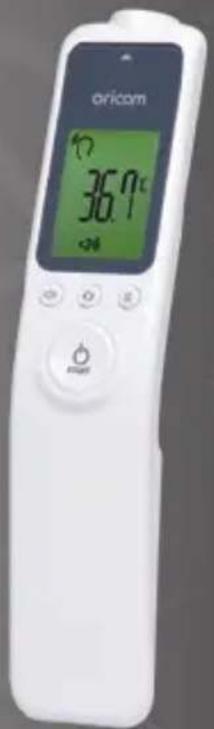
HFS1000 Non-Contact Infrared Thermometer
HFS1000 is included as a medical device on the Australian
Register of Therapeutic Goods (ARTG No. 279076).
HFS1000 is intended for use as a measuring device for determining the patient's body temperature. ALWAYS
READ THE LABEL AND USER GUIDE, USE ONLY AS DIRECTED.
Keep this user guide for future reference. Always retain your proof of purchase in case of warranty service and
register your product on line at AUSTRALIA: www.oricom.com.au

Need Help?
If you need assistance setting up or using your Oricom product now or in the future, call Oricom Support.
Australia 1300 889 785 or 02 4574 8888
www.oricom.com.au
Mon-Fri 8am – 6pm AEST
New Zealand 0800 67 42 66
www.oricom.co.nz
Mon-Fri 10am – 8pm NZST
HFS1000 NON-CONTACT INFRARED THERMOMETER
Table of Contents
| HOW TO TAKE A TEMPERATURE 10 |
| PRODUCT DESCRIPTION 14 |
| BEFORE FIRST USE 16 |
| SWITCHING ON AND SETTING THE THERMOMETER 16 |
| MEASURING BODY TEMPERATURE 17 |
| DISPLAYING STORED MEASUREMENTS 20 |
4 HFS1000 NON-CONTACT INFRARED THERMOMETER
MEASURING OBJECT TEMPERATURE 21
MEASURING ROOM TEMPERATURE 23
ERROR MESSAGES 24
BATTERY REPLACEMENT 26
MAINTENANCE AND STORAGE 27
PRODUCT SPECIFICATIONS 28
CUSTOMER SUPPORT 31
HFS1000 NON-CONTACT INFRARED THERMOMETER
5
IMPORTANT
31
HOW TO MAKE A CLAIM UNDER WARRANTY IN AUSTRALIA 32
IMPORTANT INFORMATION 33
WARRANTY INFORMATION (AUSTRALIA) 33
HFS1000 NON-CONTACT INFRARED THERMOMETER
Thank you for purchasing the Oricom HFS1000 Non-contact Infrared Thermometer.
This product has been developed using the latest in infrared technology. This technology allows the user to measure the temperature without physical contact. To use this device correctly please follow the directions in this user guide. The instructions provide important details on how to achieve accurate measurements.
Warnings

Please read this user guide carefully before initial use.
- Use this product only for its intended purpose as described in this manual and follow all instructions.
- The measurement of temperature using this product does not represent a doctors medical examination.
- Consult with your medical professional if any abnormality is found.
- Do not take a temperature measurement over a scar or open tissue.
- Do not expose the product to temperatures below 20 °C (68 °F) or above 50 °C (122 °F) or above humidity of 95% (≥95%Rh).
- Do not drop the thermometer as it may cause damage.
- Do not take the temperature with this product near heat sources such as in direct sunlight, near a fireplace or stove.
HFS1000 NON-CONTACT INFRARED THERMOMETER
- Do not use this product if it is not working properly, contact Oricom support.
- There are no user serviceable parts the only service required is battery replacement and general cleaning please follow instructions in this user guide.
- If the product is not going to be used for an extended period of time, please remove the batteries and store the thermometer in a cool dry place.
- This product is NOT waterproof. Direct contact with water or other liquids should be avoided.
- Do not leave the thermometer with infants or children at any time.
- The protective glass over the lens is fragile, handle with care. Do not touch the glass of the infrared lens with bare fingers.
• Do not modify or repair the thermometer. - Many people may not have an elevated temperature even if they are ill. In the following cases, please consult your medical professional before using this product.
Under 90-day-old infants.
People on steroids, antibiotics or antipyretics.
People with compromised immune systems.
HFS1000 NON-CONTACT INFRARED THERMOMETER
Cautions
- The reliability of the measurement cannot be guaranteed if the temperature is measured from parts of body that are not recommended.
• Similar to other thermometers, measurement error may occur within a range of ±0.2 ^ ( ±0.4 ^ ).
• Measurement should not be taken until completely relaxed at normal room temperature. - Please note that measurement may be incorrect after exercising, bathing or getting wet in the rain.
• Temperature between right and left temple could be different.
• Measurement may be incorrect when low battery(7) signal is indicated. Replace the battery and re-measure. - When measuring the temperature of a liquid (milk, water), place the probe as close as possible to the liquid but ensure that it is not immersed into the liquid as this may damage your thermometer.
- Check your product regularly for damage and exhausted batteries.
NOTE:
ASTM laboratory accuracy requirements in the display range of 22 to 40 °C (71.6 °F to 104.0 °F) for IR thermometers is ±0.3 °C (±0.5 °F), whereas for mercuryin-glass and electronic thermometers, the requirement per ASTM Standards E 667-86 and E 1112-86 is ±0.1 °C (±0.2 °F).
HFS1000 NON-CONTACT INFRARED THERMOMETER
Simple Operation Principle
The body temperature is reflected on the temporal artery.
- The temporal artery is the artery located closest to the skin and is spread across the forehead. If the blood with body temperature reflection passes the temporal artery on forehead, corresponding amount of infrared rays will be generated. From the infrared rays, the body temperature can be measured.
- This product is a contactless type thermometer and does not make direct contact with forehead.
- The temperature measurement can be taken 2 to 3cm away from the body or object.
• This will decrease discomfort or possible infections caused by touch.
HFS1000 NON-CONTACT INFRARED THERMOMETER
How to take a temperature

IMPORTANT
MEASUREMENT POINT
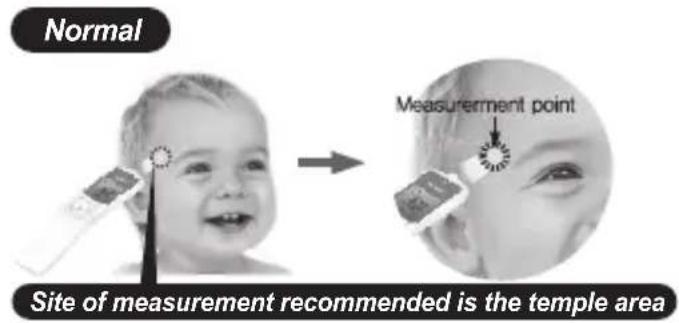
- Recommended measurement is the temple area.
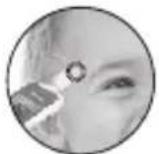
Temple area
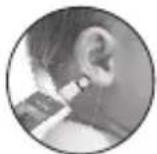
Behind the ear lob

Incorrect measurement
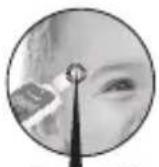
2\~3 cm
▶ 2\~3 cm away from forehead.

Wipe away sweat

Push back hair
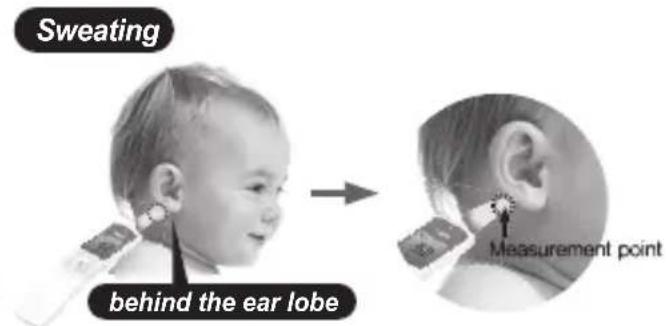
▶ If sweating on the forehead is present we recommend changing the measurement point to behind to earlobe. Wipe away sweat on the forehead and push back any hair from the forehead before use.
HFS1000 NON-CONTACT INFRARED THERMOMETER


Behind the ear lobe
▶ If you have applied an ice or cool pack, you need to wait for at least 30 minutes before taking a temperature measurement.
▶ The measurement should then be taken behind the ear lobe.
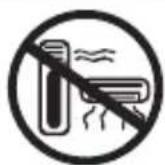

- Do not measure temperature near heat or cooling sources. Do not use outdoors.
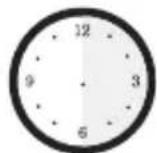
WAIT 30 Minutes
▶ If there is a significant change of surrounding temperature, please, allow the thermometer to adjust to the new temperature for at least 30 minutes before use.
12 HFS1000 NON-CONTACT INFRARED THERMOMETER
• Body Temperature Measurement Ranges
Body temperature means internal temperature of body. Normal temperature even in a healthy person can vary within a small range. The temperature of a person measured in the evening is normally 0.5 °C higher than early morning and is also affected by the environment, time and activity. Refer to the table below to find out the normal body temperature ranges.
Normal ranges by site:
| • Axillary: | 94.5 – 99.1 °F | 34.7 – 37.3 °C | • Rectal: | 97.9 – 100.4 °F | 36.6 – 38.0 °C |
| • Oral: | 95.9 – 99.5 °F | 35.5 – 37.5 °C | • HFS1000: | 96.8 – 100.2 °F | 36.0 – 37.9 °C |

bar
| Event Type | Value | | ---------- | ----------- | | Celsius | 36 | | Normal | 36.5 | | Fever | 37 | | Fahrenheit| 96.897 | | Fahrenheit| 639.5 | | Fahrenheit| 5100.4 | | Fahrenheit| 4101.3 | | Fahrenheit| 1.3 |HFS1000 NON-CONTACT INFRARED THERMOMETER
• Using the Thermometer
- Measuring Body Temperature
Select the HFS1000 to body temperature measuring mode, and check the body temperature on the temple area from 2 to 3 cm distance.
- Measuring Bathing Water Temperature
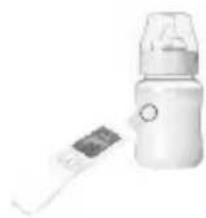
Select the thermometer to daily wide temperature measuring mode, and check the water temperature by holding the thermometer 2 to 3 cm from the water. Be careful not to get water on the thermometer. - Measuring the Nursing Bottle
Select the thermometer to daily wide temperature measuring mode, and check the temperature by holding the thermometer 2 to 3 cm from the nursing bottle.
CAUTION:
ALWAYS CHECK BATH WATER OR NURSING BOTTLE TEMPERATURE MANUALLY IN ADDITION TO USING THIS THERMOMETER.
HFS1000 NON-CONTACT INFRARED THERMOMETER
Product Description
Unit
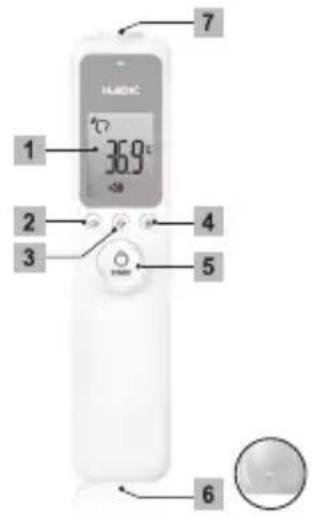
1 LCD display
2 Sound (on/off) button
3 Mode button
4 Memory button
5 Start button (Power & Measurement)
6 Strap position
7 Probe
Buttons Functions

Switching device on. Starting temperature measurement.

Setting the sound (On/Off).

Selecting the measurement method and unit.

Displaying stored measurements (max 32). Entering the measurement method and unit.
HFS1000 NON-CONTACT INFRARED THERMOMETER
Display
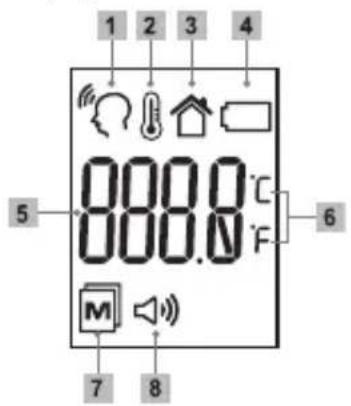
1 Body temperature mode
2 Object temperature mode
3 Room temperature mode
4 Low Battery symbol
5 Temperature display
6 Measurement unit (Celsius/Fahrenheit)
7 Memory
8 Sound on/off
HFS1000 NON-CONTACT INFRARED THERMOMETER
Before first use
• Before first use, insert the batteries supplied.
Battery Replacement [page. 26]
Switching on and setting the thermometer
- Press the Start button or Mode button briefly.
The device switches on. After two seconds, the display shows that the device is ready for use.
The device always starts in body temperature mode.
After 1 minute without use, device automatically turns off.
How to force the device to power off: Press and hold 📋 for 5 seconds.
Setting the measurement unit (°C/°F)
- Present 3 times to select Centigrade and 4 times to select Fahrenheit. If correct measurement unit (°C or °F) is selected, press the MEM button 📂 to save it.
HFS1000 NON-CONTACT INFRARED THERMOMETER
Setting the measurement sound
- Press the Sound button briefly.
Each time the button is pressed, the sound switches on or off.
If the display shows 🏠 after pressing the button, the device emits sound.
If is not displayed after pressing the button, the device does not emit sounds.
The device always starts in "Sound on" mode.
Measuring body temperature
- Press the Start button or Mode button briefly.
The device switches on. After two seconds, the display shows that the device is ready for use.
The device always starts in body temperature mode.
- Hold the thermometer 2 to 3cm from the measuring point.
The ideal measuring point is the temple area.
HFS1000 NON-CONTACT INFRARED THERMOMETER
- Press the Start button briefly.
Keep the distance until you hear the measurement completion beep.
If the thermometer is in silent mode, keep the distance for approximately 2 seconds.
NOTE:
If sweat is present, we recommend changing the measurement point from the temple to behind the ear lobe as this area is less affected by sweating.
HFS1000 NON-CONTACT INFRARED THERMOMETER
- Temperature readings may vary according to location. Therefore we recommend to measure the temperature at more than 2 points. Then please recognize the highest temperature as the right temperature.
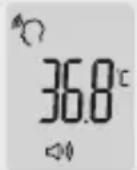
- Check the temperature on the LCD screen. The temperature reading will be automatically stored.
• The LED backlight will illuminate based on the readings.LED will automatically turned off after 2 to 3 seconds.
LED 3 Colours
Green: between 22 °C \~ 37.3 °C
Yellow: between 37.4 °C \~ 37.9 °C
Red: higher than 38 °C
lower than 22 °C
HFS1000 NON-CONTACT INFRARED THERMOMETER
Displaying stored measurements
- Press the Start button, or Mode button briefly to turn on the thermometer.
The device switches on. After two seconds, the display shows that the device is ready for use.
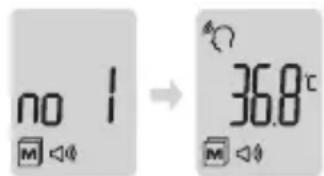
• The device automatically stores the last 32 measurements. - Press the MEM button briefly.
The most recent measurement is displayed.
- Each additional press of the MEM button 📂 calls up the next most recent measurement. The number on the display indicates how many measurements ago this reading was taken.
- Briefly press the Start button or Mode button to exit this feature.
The device switches on. After two seconds, the display shows that the device is ready for use.
- The device only stores measurements when in body temperature mode.
HFS1000 NON-CONTACT INFRARED THERMOMETER
Measuring object temperature
- Press the Start button or Mode button briefly.
The device switches on. After two seconds, the display shows that the device is ready for use.
The device always starts in body temperature mode.
- Press the Mode button briefly.
The device switches to the object temperature measuring mode. If the object temperature measuring mode is selected, press the MEM button to take it.
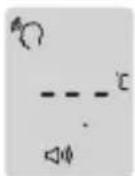
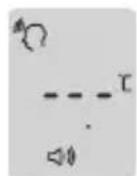
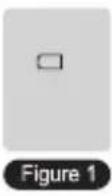
- Check the measurement ready status in [Figure 1].
- Hold the thermometer 2 to 3cm from the desired measuring point.
- Press the Start button briefly.
Keep the distance until you hear the measurement completion beep. If the thermometer is in silent mode, keep the distance for approximately 2 seconds.
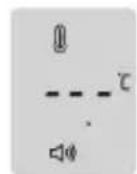
Figure 1
natural_image
Illustration of a baby bottle with a digital display and a small screen (no text or symbols visible)HFS1000 NON-CONTACT INFRARED THERMOMETER
- Read the temperature from the display. [Figure 2]
Measurements in object temperature mode are not stored.
Object temperature
- LED 3 Colours
Green: Measured temperature is between 0 °C \~ 100 °C (32 °F \~ 212 °F)
Red: Measured temperature is higher than 100 °C (212 °F)
Red: Measured temperature is lower than 0 °C (32 °F)
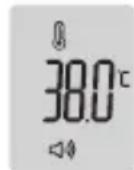
Figure 2
HFS1000 NON-CONTACT INFRARED THERMOMETER
Measuring Room temperature
- If you want to use the thermometer to measure the room temperature, you need to change the mode to room temperature.
- Press the Mode button briefly.
The device switches to the room temperature measuring mode. If the object temperature measuring mode is selected, press the MEM button to save it.
- Check the measurement ready status in [Figure 1].
- Read the temperature from the display [Figure 2].
Measurements in room temperature mode are not stored.
Room temperature
- LED 3 Colours
Green: Measured temperature is between 16 °C \~ 40 °C (60.8 °F \~ 104 °F)
Red: Measured temperature is higher than 40 °C (104 °F)
Red: Measured temperature is lower than 16 °C (60.8 °F)
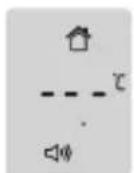
Figure 1
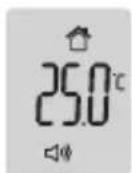
Figure 2
HFS1000 NON-CONTACT INFRARED THERMOMETER
Error messages
| Display Error description | Trouble-shooting | |
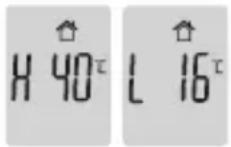 | Ambient temperature is not within the allowed operating temperature.Operating temperature range: 16 °C ~ 40 °C (60.8 °F ~ 104 °F)“H 40” means: Ambient temperature is 43 °C (109.4 °F) which is higher than allowed range.“L 16” means: Ambient temperature is 12 °C (53.6 °F) which is lower than allowed range. | Allow the device to remain for approx 30 minutes in a normal room temperature. |
HFS1000 NON-CONTACT INFRARED THERMOMETER
| Display Error description Trouble-shooting | ||
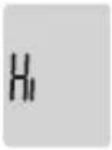 | The temperature of the measuring point is above the measurement range. | Measurement range for body temperature: 22 °C UP 42.5 °C (71.6 °F UP 108.5 °F) Measurement range for object temperature: 0 °C UP 100 °C (32 °F UP 212 °F) |
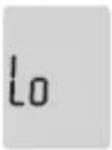 | The temperature of the measuring point is below the measurement range. | Measurement range for body temperature: 22 °C UP 42.5 °C (71.6 °F UP 108.5 °F) Measurement range for object temperature: 0 °C UP 100 °C (32 °F UP 212 °F) |
 | Figure 1. The batteries are weak. | Change batteries. Figure 2. Display appears briefly after changing the batteries. |
HFS1000 NON-CONTACT INFRARED THERMOMETER
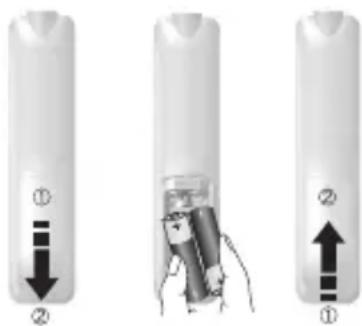
Battery Replacement
• The device requires two AA Alkaline batteries.
Open the battery compartment.
For this purpose, slide down the battery compartment lid on the back.
• Take the used batteries out of the battery compartment. Insert new batteries.
Observe correct polarity.
- Close battery compartment.
Used batteries should not be disposed of in normal household waste.
Dispose of batteries according to local recycling regulations.

Important, if equipment is not likely to be used for some time.
Storage and transfer conditions, temperature: -20 °C to +50 °C
Remove the batteries if the device is not to be used for over three months, the batteries may leak and cause a malfunction.
HFS1000 NON-CONTACT INFRARED THERMOMETER
Maintenance and Storage
- The sensor part of the thermometer is very sensitive and must be kept clean and undamaged.
- Do not put any foreign materials inside the probe.
• To clean the sensor, using a cotton swab with alcohol (ethanol), carefully wipe the surface clean. - Keep the product away from direct sunlight, dust and any other type of contaminating substance.
• The thermometer should be stored in normal room temperature.
- Please place the product in normal room temperature for 30 minutes prior to use if it has been stored out normal room temperature.

Do not subject the thermometer to strong shocks, such as dropping the unit.
Do not submerge the device or any of the components in water or any other solutions.
Store the thermometer and the components in a clean, safe location.
Do not modify this thermometer without authorization of the manufacturer. Do not disassemble or attempt to repair the unit or components.
HFS1000 NON-CONTACT INFRARED THERMOMETER
Product Specifications
| Item Details of description | |
| Measurement method Infrared (IR) measurement, Non-Contact measurement | |
| Basic functions Switches for Multi-measurements (Body, Object and Room temperature)Switches for Celsius/Fahrenheit, Memory function, Sound controls (On,Off) | |
| Operating condition 16 °C to 40 °C (60.8 °F to 104 °F), Humidity: 15% to 93%, non-condensing, Atmospheric Pressure (hPa) 700~1060 | |
| Transport and Storage condition | -20 °C to 50 °C (-4 °F to 122 °F), Humidity: 15% to 93%,non-condensing Atmospheric Pressure (hPa) 700~1060 |
| Measuring distance 2 to 3 cm from the measuring point is the temple area | |
| Measuring range | Body temperature: 22 °C to 42.5 °C (71.6 °F to 108.5 °F), Accuracy: ±0.2 °C/±0.4 °F(36 °C~39 °C/196.8 °F~102.2 °F), Other Accuracy: ±0.3 °C/±0.5 °FObject temperature: 0 °C to 100 °C (32 °F to 212 °F), Accuracy: ±3 °C/±5.4 °FRoom temperature: 16 °C to 40 °C (60.8 °F to 104 °F), Accuracy: ±3 °C/±5.4 °F |
HFS1000 NON-CONTACT INFRARED THERMOMETER
| Item Details of description | |
| Measuring time Less than | 2 seconds, Continuous measurement |
| Resolution 0.1 °C/0.1 °F | |
| Mode selection Body temperature | Perature, Object temperature, Room temperature |
| Memory function Automatic | memory function, Confirm the result by using memory buttonCan store up to 32 results (1 to 32) |
| Sound Button sound, Measuring sound, Result sound,The sound can be turned on and off by using Sound button | |
| Screen type Liquid crystal | display (mono LCD) |
| Display Body temperature | mode, Object temperature mode, Room temperature mode, Memory location, Low Battery, °C/°F degree, Hi / Lo signs for the temperature outside the measurable ranges |
HFS1000 NON-CONTACT INFRARED THERMOMETER
| Item Details of description | |
| Button Start, Sound, Mode, Memory | |
| Backlight Turns On for 3 seconds after measurement. The backlight turns off automatically | |
| Power-saving Turns Off automatically after one minute | |
| Components HFS1000 1 set, Manual, Battery (AA type) 2ea, case | |
| Power | --- AA Alkaline Batteries (x2) |
| Measurable numbers More than 10,000 times | |
HFS1000 NON-CONTACT INFRARED THERMOMETER
Customer Support
If you have any problems setting up or using this product you will find useful tips and information in this user guide as well as “Frequently Asked Questions” on our website www.oricom.com.au.
If you have further questions about using the product after reviewing the resources above or would like to purchase replacement parts or accessories please call our Customer Support Team. Our dedicated local support team are more likely to be able to help you than the retailer where you made your purchase.
Important
Please retain your purchase receipt and attach to the back page of this user guide as you will need to produce this if warranty service is required. Take a few moments to register your product online: www.oricom.com.au
HFS1000 NON-CONTACT INFRARED THERMOMETER
How to make a claim under Warranty in Australia
Oricom has a simple warranty process for you to follow:
- Please call or email our Customer Support Team, contact details follow.
- A Customer Support Team member will verify after troubleshooting with you if your product qualifies warranty. If so, they will give you a Product Return Authorisation number.
- We will then email or fax a Return Authorisation form and a Repair Notice (if necessary), together with instructions on how to return the goods for warranty service.
Please note that if a Customer Support Team member advises that your product does not qualify for return, this warranty does not apply to your product.
Products that are authorised to be returned to Oricom in Australia must include all of the following:
• A completed Return Authorisation form
• A copy of your Proof of Purchase (please keep your original copy)
• The faulty product, including all accessories.
Send the approved returns to:
Oricom International Pty Ltd
Locked Bag 658
South Windsor NSW 2756 Australia
HFS1000 NON-CONTACT INFRARED THERMOMETER
Please note that this warranty excludes expenses incurred by you in returning any faulty product to us. You must arrange and pay any expenses incurred (including postage, delivery, freight, transportation or insurance of the product) to return the faulty product to us, however, we will arrange delivery of the repaired or replaced faulty product to you.
Important Information
Repair Notice
Please be aware that the repair of your goods may result in the loss of any user-generated data (such as stored telephone numbers, text messages and contact information). Please ensure that you have made a copy of any data saved on your goods before sending for repair.
Please also be aware that goods presented for repair may be replaced by refurbished goods or parts of the same type rather than being repaired.
Warranty Information (Australia)
This Warranty is provided by Oricom International Pty Ltd ABN 46 086 116 369, Unit 1, 4 Sovereign Place, South Windsor NSW 2756, herein after referred to as “Oricom”.
HFS1000 NON-CONTACT INFRARED THERMOMETER
Oricom makes no other warranties or conditions, express or implied, including as to acceptable quality and fitness for a particular purpose, except as stated in this Warranty.
Any implied warranties that may be imposed by law are limited in duration to the Warranty Period.
Oricom warrants that the product is free from defects in materials or workmanship during the Warranty Period. This Warranty does not extend to any product from which the serial number has been removed or was purchased outside of Australia.
This warranty in no way affects your statutory warranty rights under the Competition and Consumer Act 2010 or any other similar legislation.
The Warranty Period will be 1 year from the date of purchase of the product evidenced by your dated sales receipt. You are required to provide proof of purchase as a condition of receiving warranty services.
You are entitled to a replacement product or repair of the product according to the terms and conditions of this document if your product is found to be faulty within the Warranty Period. This Warranty extends to the original purchaser only and is not transferable.
Products distributed by Oricom are manufactured using new materials or new and used materials equivalent to new in performance and reliability. Spare parts may be new or equivalent to new. Spare parts are warranted to be free from defects in material or workmanship for thirty (30) days or for the remainder of the Warranty Period of the Oricom branded product in which they are installed, whichever is longer. During the Warranty Period, Oricom will where possible repair and if not replace the faulty product or part thereof. All component parts removed under this
HFS1000 NON-CONTACT INFRARED THERMOMETER
Warranty become the property of Oricom. In the unlikely event that your Oricom product has a recurring failure, Oricom may, subject to the Competition and Consumer Act 2010, at its discretion, elect to provide you with a replacement product of its choosing that is at least equivalent to your product in performance.
Oricom does not warrant that the operation of the product will be uninterrupted or error free.
Oricom is not responsible for damage that occurs as a result of your failure to follow the instructions that came with the product. These terms and conditions together with any specific terms and conditions contained in the user guide to the product purchased constitute the complete and exclusive agreement between you and Oricom regarding the product.
No change to the conditions of this Warranty is valid unless it is made in writing and signed by an authorised representative of Oricom.
Oricom will not be in breach of a warranty expressly set out in this User Guide or under the Competition and Consumer Act 2010 and excludes any liability for damages or any other remedy arising under any other legislation or the common law if the damage occurs as a result of:
- failure by you to adhere to the warnings and follow the instructions set out in this user guide for the proper installation and use of the product;
- negligence on your part or misuse by you of the product;
- an uncontrollable external cause which results in the product not functioning including but not limited to power failure, lightning or over voltage; and
HFS1000 NON-CONTACT INFRARED THERMOMETER
- modification to the product or services carried out on the production by anyone other than Oricom or Oricom's authorised service provider.
Oricom will not be liable for any damages caused by the product or the failure of the product to perform, including any lost profits or savings or special, incidental or consequential damages. Oricom is not liable for any claim made by a third party or made by you on behalf of a third party. This limitation of liability applies whether damages are sought, or a claim made, under this Warranty or as a tort claim (including negligence and strict product liability), a contract claim or any other claim. However, this limitation of liability will not apply to claims for personal injury. Nothing in this Warranty excludes, restricts or modifies any condition, warranty, right or remedy which pursuant to the Competition and Consumer Act 2010 applies to this Warranty and which may not be so excluded, restricted or modified. For warranties that cannot be excluded, restricted or modified, Oricom limits the remedies available to those specified in the relevant legislation.
Oricom products come with guarantees that cannot be excluded under the Australian Consumer Law. You are entitled to a replacement or refund for a major failure and compensation for any other reasonably foreseeable loss or damage. You are also entitled to have the goods repaired or replaced if the goods fail to be of acceptable quality and the failure does not amount to a major failure.
Oricom®
Contact details for Oricom support and warranty claims in Australia
Oricom International Pty Ltd
Locked Bag 658
South Windsor, NSW 2756
Australia
Email: support@oricom.com.au
Phone: 1300 889 785 or (02) 4574 8888
(Monday to Friday 8am to 6pm AEST)
Web: www.oricom.com.au
Fax: (02) 4574 8898
Contact details for Oricom support and warranty claims in New Zealand
Email: support@oricom.co.nz
Phone: 0800 674 266
(Monday to Friday 10am to 8pm NZST)
Web: www.oricom.co.nz

Ref: 21092016
- Need Help?
- HFS1000 NON-CONTACT INFRARED THERMOMETER
- HFS1000 NON-CONTACT INFRARED THERMOMETER
- Warnings
- Cautions
- NOTE:
- Simple Operation Principle
- How to take a temperature
- IMPORTANT
- MEASUREMENT POINT
- HFS1000 NON-CONTACT INFRARED THERMOMETER
- • Body Temperature Measurement Ranges
- CAUTION:
- Product Description
- Buttons Functions
- Before first use
- Switching on and setting the thermometer
- Setting the measurement unit (°C/°F)
- Setting the measurement sound
- Measuring body temperature
- LED 3 Colours
- Displaying stored measurements
- Measuring object temperature
- Object temperature
- - LED 3 Colours
- Measuring Room temperature
- Room temperature
- Battery Replacement
- Maintenance and Storage
- Customer Support
- How to make a claim under Warranty in Australia
- Oricom has a simple warranty process for you to follow:
- Important Information
- Repair Notice
- Warranty Information (Australia)
- Contact details for Oricom support and warranty claims in Australia
- Contact details for Oricom support and warranty claims in New Zealand
Brand : Oricom
Model : SC875
Category : Baby product