
BLT370 - Hi-Fi System CLARION - Free user manual and instructions
Find the device manual for free BLT370 CLARION in PDF.


| Product Type | Bluetooth Audio/Mobile-phone Transceiver (Handsfree Car Kit) |
| Brand | Clarion |
| Model | BLT370 |
| Dimensions | Approx. 44mm (W) x 63mm (H) x 11mm (D) |
| Weight | Approx. 160g |
| Power Supply | 12V DC (car battery), Max 16V DC |
| Current Consumption | 40 - 50mA |
| Cable Length | 2.5m with LC box |
| Bluetooth Version | Bluetooth 1.2 |
| Bluetooth Profiles | A2DP, AVRCP, HFP, HSP |
| Wireless Range | Class 2, up to 10m (line of sight) |
| Audio Bandwidth | 30Hz - 20kHz |
| Signal-to-Noise Ratio | ~84dB |
| Analog Output | Line level (1 Vrms) |
| Microphone | Built-in with AEC; optional external (2.5mm jack) |
| Echo Cancellation | Adaptive acoustic echo cancellation (~48dB) |
| Noise Suppression | Adaptive background noise suppression (~12dB) |
| Volume Levels | 19 levels for both handsfree and music |
| Pairing Capacity | One mobile phone and one Bluetooth audio transmitter simultaneously |
| Installation | Requires 12V car supply, AUX input, TEL-INT pin |
| Compatible Car Stereos | Clarion units from 2007 with AUX and TEL function |
| Fuse Rating | 2A in LC box |
| Operating Temperature | -20°C to 60°C |
| Safety | Do not disassemble; only authorized service partners |
| Disposal | Separate collection for electronic products; do not mix with household waste |
Frequently Asked Questions - BLT370 CLARION
 ] and [] buttons simultaneously for 2 seconds to enter pairing mode. On your phone, search for devices and select 'CLARION_HSF'. Enter PIN 0000 when prompted.
User questions about BLT370 CLARION
0 question about this device. Answer the ones you know or ask your own.
Ask a new question about this device
Download the instructions for your Hi-Fi System in PDF format for free! Find your manual BLT370 - CLARION and take your electronic device back in hand. On this page are published all the documents necessary for the use of your device. BLT370 by CLARION.
USER MANUAL BLT370 CLARION
This equipment has been tested and found to comply with the limits for a Class B digital device, pursuant to Part 15 of the FCC Rules.
These limits are designed to provide reasonable protection against harmful interference in a residential installation.
This equipment generates, uses and can radiate radio frequency energy and, if not installed and used in accordance with the instructions, may cause harmful interference to radio communications. However, there is no guarantee that interference will not occur in a particular installation.
If this equipment does cause harmful interference to radio or television reception, which can be determined by turning the equipment off and on, the user is encouraged to consult the dealer or an experienced radio/TV technician for help.
This device complies with Part 15 of the FCC rules. Operation is subject to the following two conditions:
(1) This device may not cause harmful interference, and
(2) This device must accept any interference received, including interference that may cause undesired operation.
Clarion BLT370
This manual is published by Clarion, without any warranty. Improvements any changes to this manual necessitated by typographical errors, inaccuracies of current information or improvements to programs and/or equipment, may be made by Clarion at any time and without notice. Such changes will, however, be incorporated into new editions of this manual.
iPod is for legal or right holder-authorized copying only. Don't steal music.
iPod is a trademark of Apple Inc., registered in the U.S. and other countries.
The Bluetooth® word mark and logos are owned by the Bluetooth® SIG, Inc. and any use of such marks by Clarion is under license. Other trademarks and trade names are those of their respective owners.

ID: B012658

051 722 877
IC: 419-EA1323B
CLARION PRODUCT REGISTRATION INFORMATION
For USA and Canada only
Dear Customer:
www.clarion.com
Congratulations on your purchase of a Clarion mobile electronic products. We are confident that you'll enjoy your Clarion experience.
There are many benefits to registering your product. We invite you to visit our website at www.clarion.com to register your Clarion product.
We have made product registration simple with our easy to use website. The registration form is short and easy to complete. Once you're registered, we can keep you informed of important product information.
Register at www.clarion.com - it's easy to keep your Clarion product up to date.
CONTENTS
- WHAT IS INCLUDED IN THIS PACKAGE? 4
- PRODUCT FEATURES OVERVIEW 5
Clarion Bluetooth® Audio/Mobile-phone Transceiver (BLT370) 5
- INSTALLATION ...... 7
Installing BLT370 7
- INTRODUCTION TO BLUETOOTH® "PAIRING" 10
Pairing Sequence 11
Automatic Connection 13
- OPERATIONS FOR BLUETOOTH® AUDIO/MOBILE-PHONE TRANSCEIVER UNIT 14
Buttons Terminology 14
Understanding The Transceiver Unit Indicators 16
Basic Operations 17
Music Streaming and Playback Control 19
Using Handsfree with Bluetooth ^® Wireless Technology 21
- COMPATIBLE MODELS 24
- TROUBLESHOOTING 25
- SPECIFICATION 27
- ADDITIONAL INFORMATION ...... 28
1. WHAT IS INCLUDED IN THIS PACKAGE?
A complete BLT370 package consist of the following items:
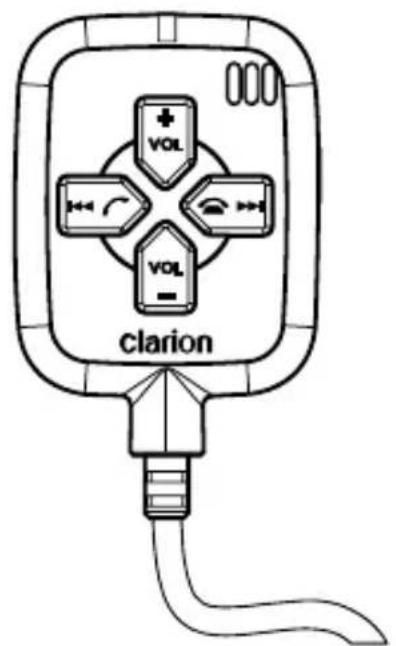
Bluetooth® Audio/Mobile-phone Transceiver unit with 2.5m cable and LC box
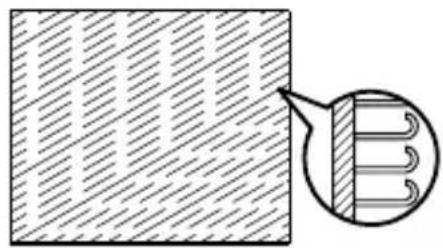
natural_image
Diagram showing a patterned rectangular area with diagonal hatching and an inset circular detail of a coiled spring (no text or symbols)Velcro hook (x2) with double-sided tape attached
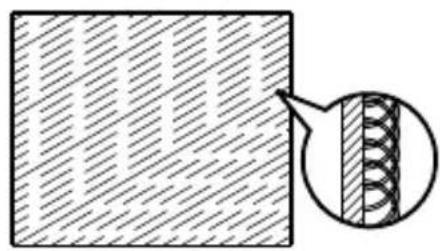
natural_image
Diagram showing a rectangular block with diagonal hatching and a magnified inset of a coiled spring (no text or symbols)Velcro loop (x2) with double-sided tape attached
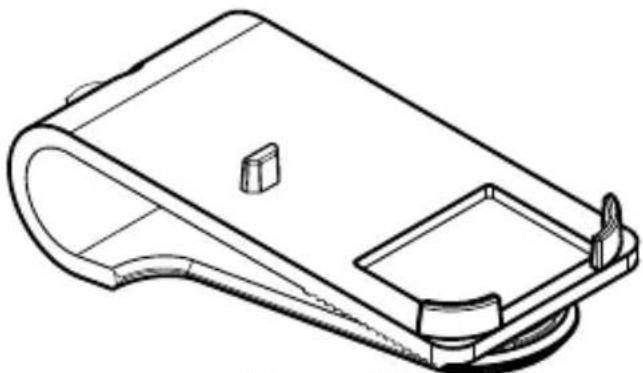
natural_image
Technical line drawing of a mechanical component with a curved base and rectangular opening (no text or symbols)Visor clip

natural_image
Pure electrical connector diagram showing two connectors connected to a terminal block (no text or symbols)RCA to 3.5mm jack cable (1m)
2. PRODUCT FEATURES OVERVIEW
Clarion Bluetooth® Audio/Mobile-phone Transceiver (BLT37)

The BLT370 is a handsfree car kit featuring Bluetooth® wireless technology that allows you to utilize your car's built-in audio system for wireless music streaming and wireless mobile phone handsfree communication.
- Auto features:
• Auto-power up when car is started
- Auto-connect with last paired mobile phone, upon power up (Depends on multiple re-connection mode).
- Auto-switching between music streaming and handsfree mode with Bluetooth® technology
• Music streaming features:
- High quality wireless digital music streaming (dependent on paired device capabilities)
- Remote control for remote device (dependent on paired device capabilities)
• Volume adjustment
- Car kit features:
- Auxiliary output for plugging into car stereo system
- Tel-interrupt pin to switch car stereo to auxiliary-mode for mobile phone communication
• Built-in microphone, with optional external microphone support.
• Acoustic Echo Cancellation (AEC) and noise suppression - Left/Right channel switch (to set speaker output channel)
• One-press pick-up/end/reject call and volume controls - Call transfer
• Volume adjustment
2. PRODUCT FEATURES OVERVIEW
- Telephone interrupt pin
The cable on the Transceiver is equipped with a telephone interrupt pin (TEL-INT). Such mechanism can be used to notify the car stereo unit to switch mode when it detects incoming call and transferring call.
• Automatic Bluetooth® profile switch
If the Transceiver is paired to both a Clarion Bluetooth ^® Audio Transmitter and Cradle for iPod ^®1 and a mobile phone, when there is an incoming call, a stereo ringing tone will be heard and any music streaming will be temporarily muted until call is ended or rejected.
• Acoustic Echo Cancellation
Voice signals from the loudspeaker often appear at the microphone, this causes conversational interference in the form of acoustic echo and howling. With this advanced DSP-based Acoustic Echo Cancellation (AEC) system built-in, it is capable of handling full-duplex communication, echo cancellation and noise suppression on the microphone input to enable smooth handsfree communication and crystal clear speech.
- Separate volume control
There are two set of volume settings, one for handsfree mode and one for music mode. This can ensure that the user can set the desired volume for speech and music separately without having to change the volume when picking up and ending call between music streaming.
Note:
1 Clarion Bluetooth® Audio Transmitter and Cradle for iPod® (DGL370 and BC001N/BC002M/BC003V) are Clarion products (sold separately) that supports music streaming via Bluetooth® wireless technology. Please consult your local authorized Clarion dealer for more information about the product.
Installing BLT370
This Transceiver unit is used to receive audio signals via Bluetooth® wireless technology from otherBluetooth® device and stream it to the car audio system. The attached cable has a pair of auxiliary output, a 12V power connector (with LC box attached) and a TEL-INT (Telephone interrupt) pin.
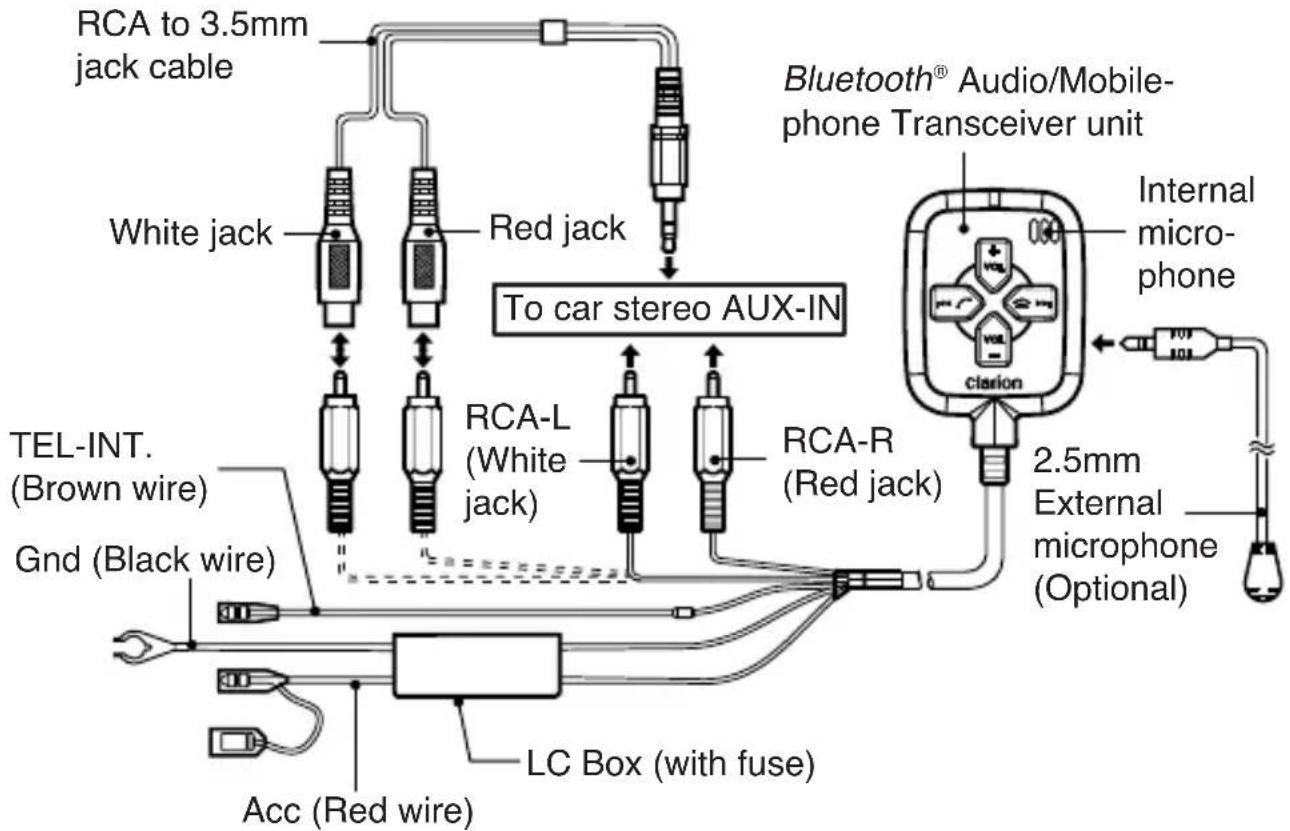
Figure 1: System diagram
Instructions
- Connect the 12V (Acc and Gnd) to car supply.
- Connect the RCA-L and RCA-R to car stereo auxiliary (AUX) input. Alternately, you can use the RCA to 3.5mm jack cable (included) to connect to car stereo that supports 3.5mm AUX input.
- Connect TEL-INT. pin to car stereo telephone mute line (if this feature is supported).
- Make sure that the car stereo system's telephone interrupt is ON.
3. INSTALLATION

- Use Velcro with double-sided tape to hold the visor and Transceiver unit if necessary. (shown in Fig. 2). Detail of using Velcro will be explained as the followings:
Step 1: Attach the Velcro hook to the visor clip with the double-sided tape provided.
Step 2: Attach the Velcro loop to the hook.
Step 3: Attach the Transceiver unit to the Velcro loop with the double-sided tape provided.
- Secure the Transceiver unit to a location that is easily accessed by the driver e.g. sun visor (shown in Fig. 3) and dash board (shown in Fig. 4).
- Set the left/right channel switch according to the position of driver (see "Switching left or right channel output" on page 23 for details).
- Once the car is started, the Transceiver is powered on immediately. It cannot be turned off as long as the ignition key is turned to ON or ACC position.
Notes:
- Check that the location of the Transceiver is adequate to pick-up the car driver voice.
• Alternately, user can use the external microphone (optional) that plug into the 2.5mm audio jack input for a better voice reception.
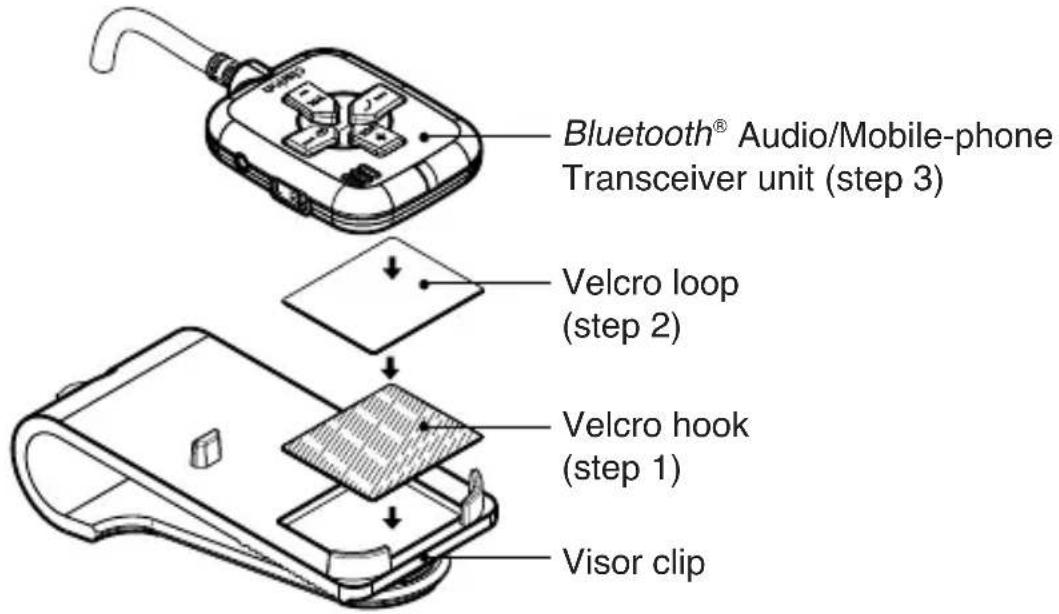
Figure 2: Using Velcro with double-sided tape
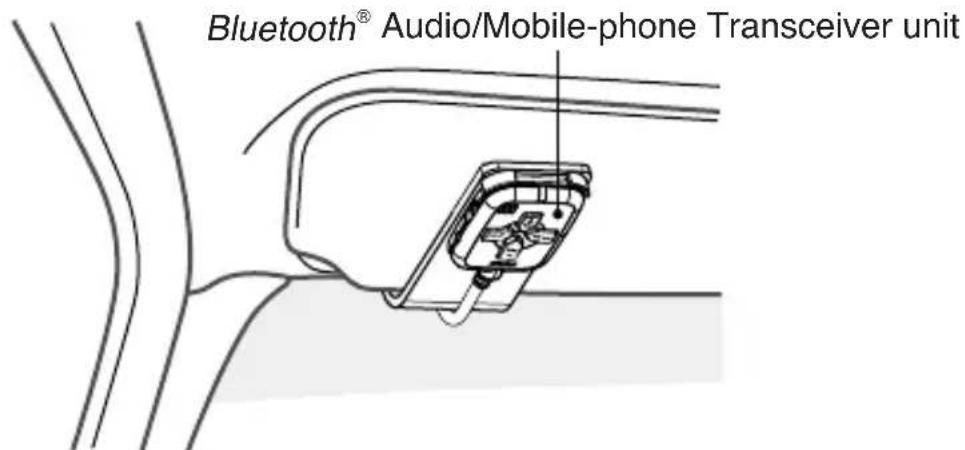
Figure 3: Fix the BLT370 to the car sun visor
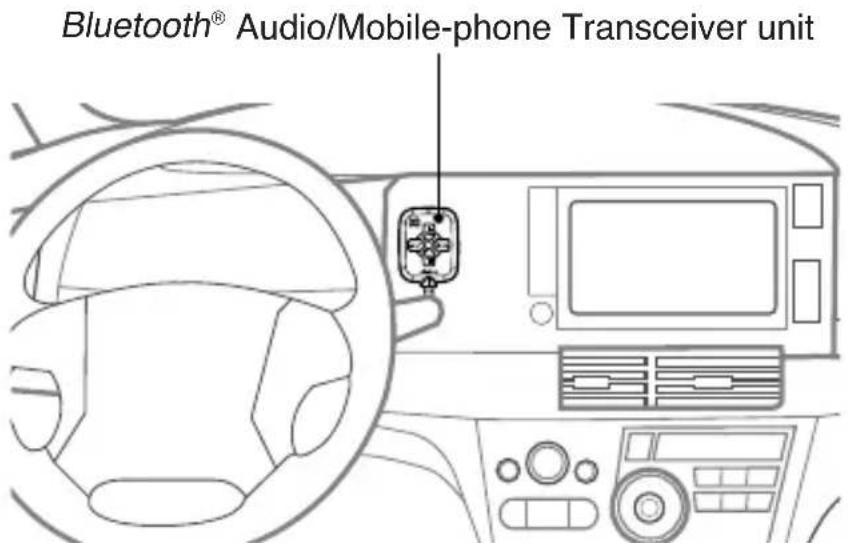
Figure 4: Fix the BLT370 to the dashboard

CAUTION
- Please refer carefully to the system diagram before installing your BLT370. Incorrect wiring method may cause damage to BLT370, your car audio system or even your vehicle.
- We strongly recommend that BLT370 is only installed by those fully familiar with your vehicle's electrical system, please consult with the supply retailer if any doubt.
4. INTRODUCTION TO BLUETOOTH® "PAIRING"
What is Bluetooth ^® wireless technology?
Bluetooth ^® wireless technology is a radio technology that connects devices, such as mobile phones and headsets, without wires or cords over a short distance of approximately 10 meters (approx. 33 feet). Get more information at www.bluetooth.com.
What is Bluetooth ^® wireless profiles?
Bluetooth ^® wireless profiles are the different ways that Bluetooth ^® devices communicate with other devices. Bluetooth ^® phones support either the headset profile (HSP), the hands-free profile (HFP) or both. In order to support a certain of profiles, a phone manufacturer must implement certain mandatory features within the phone's software. The Bluetooth ^® Audio/Mobile-phone Transceiver unit supports both HSP and HFP profiles. In addition, it also supports A2DP and AVRCP in order to allow music streaming and playback control. Please refer chapter “Music Streaming and Playback Control” on page 19 for more description on these profiles.
What is pairing?
With a mobile phone featuring Bluetooth® technology, you must "pair" the Transceiver unit with the phone/Bluetooth® Audio Transmitter before you use it for the first time.
"Pairing" creates a unique wireless link between the phone/Bluetooth® Audio Transmitter with Bluetooth® wireless technology and your Bluetooth® Audio/Mobile-phone Transceiver unit eliminating the need to repeat the pairing process during future use. Bluetooth® devices will not work if the devices have not been paired.
What is passkey?
Passkey or PIN is a code that you enter on your mobile phone to pair it with the Transceiver unit. This makes your phone and the Transceiver unit recognize each other and automatically work together.
4. INTRODUCTION TO BLUETOOTH ^® “PAIRING”
Pairing Sequence
Note:
- Please refer to Clarion Bluetooth® Audio Transmitter and Cradle for iPod owner's manual for the Bluetooth® Audio Transmitter operation below.
Between Bluetooth ^® Audio/Mobile-phone Transceiver and Bluetooth ^® Audio Transmitter
- Make sure the Transmitter is connected to an audio source.
- Make sure the car stereo source mode is switched to 'AUX' mode.
- Set the Transceiver unit in pairing mode. Please refer "Activati® Bluetooth® Transceiver pairing mode" on page 17.
- Set the Transmitter unit in pairing mode.
- Music starts automatically upon successful pairing.
Notes:
- You do not have to enter a dedicated pin code for pairing these two devices, as you do with a mobile phone.
- During pairing mode, the Transceiver unit should show a slower alternate red/blue LED. Make sure that the Transmitter and Transceiver are not paired to any other Transceiver or Transmitter respectively.
- Please refer "Understanding The Transceiver Unit Indicators" on page 16 for further details.
4. INTRODUCTION TO BLUETOOTH ^® “PAIRING”
Between Bluetooth® Audio/Mobile-phone Transceiver and mobile phone
- Activate Bluetooth® on your mobile phone. Please check your mobile phone owner's manual for further details.
- Set the Transceiver in pairing mode. Please refer "Activating Bluetooth® Transceiver pairing mode" on page 17.
- Search for new Bluetooth® device on the mobile phone. The Transceiver unit's name is "CLARION_HSF".
- When attempting to connect to the Transceiver unit, the mobile phone will prompt for a passkey, enter the PIN: "0000".
- Incoming call will be automatically diverted to the Transceiver unit upon successful connection.
Notes:
- Always make sure the Bluetooth® operation mode in the phone is on when using a Bluetooth® car handsfree.
- During music streaming, pairing with mobile phone at the same time may cause choppy sound.

CAUTION
- The Transceiver unit can only pair and connect to ONE mobile phone at a time.
- In order to pair and connect to another mobile phone, user will have to disconnect the current mobile phone first. Please refer your mobile phone owner's manual for disconnecting device.
- The Transceiver unit can pair with the Transmitter unit and mobile phone at the same time as long as both device (Transmitter and mobile phone) do not use the same profiles (A2DP and AVRCP), which are used for music streaming purposes at the same time.
4. INTRODUCTION TO BLUETOOTH® "PAIRING"
Automatic Connection
The Bluetooth ^® wireless function in your phone has to be turned on to establish automatic connection.
-
The Transceiver will establish an automatic connection in the following situations:
-
After a previously successful connection, and the Transceiver is switched on again, it will automatically try to re-connect with the last paired mobile phone (Depends on multiple re-connection mode). Connection may take up to a minute depending on the mobile phone.
-
Some mobile phones will require user confirmation for Bluetooth® connection. In such case, user will need to acknowledge the connection on the mobile phone before the connection is re-established.
-
The Transceiver will not establish an automatic connection or fail to connect in the following situations:
-
If the mobile phone already has connection with other handsfree/headset
- If the paired mobile phone is powered off and on (depends on mobile phone)
- If the paired mobile phone is out of range
- If the paired mobile phone is powered on after the Transceiver is turned on where multiple re-connection mode set to off.
In such cases, the user will need to manually re-connect to the Transceiver through the mobile phone.
Note:
- If the Transceiver is switched off, some mobile phones may take a long time to detect the disconnection.
5. OPERATIONS FOR BLUETOOTH® AUDIO/MOBILE-PHONE TRANSCEIVER UNIT
Buttons Terminology
Please make sure you have read through chapter "Installing BLT370" on page 7 before proceed to the following operations.
![LED Internal microphone [VOL+] [VOL-] [VOL-] [RESET] [LVR] selector 2.5mm mic input [LVR]/[LVR]/[LVR]/[LVR]/[LVR]/[LVR]/[LVR]/[LVR]/[LVR]/[LVR]/[LVR]/[LVR]/[LVR]/[LVR]/[LVR]/[LVR]/[LVR]/[LVR]/[LVR]/[LVR]/[LVR]/[LVR]/[LVR]/[LVR]/[LVR]/[LVR]](/content/2026/05/977589/images/39833aae9b9251a26658f0b09930aaf77bd1f24c858c693a90378939bad77459.jpg)
[◀]/[ √ ] button
- During incoming call, press the button to pick up call.
- During phone conversation, press the button twice to transfer call.
- During music streaming for iPod, press and hold the button for 1 second to restart the current track.
- During music streaming, press and hold the button for 1 second (A2DP device) or 2 seconds (iPod) to move to previous track.
* Restart/Previous track will depend on the duration of playback and A2DP devices.
5. OPERATIONS FOR BLUETOOTH® AUDIO/MOBILE-PHONE TRANSCEIVER UNIT
[▶]/[icon] button
- During incoming call, press the button to reject call.
- During phone conversation, press the button to end call.
- During music streaming for A2DP device or iPod, press and hold the button for 1 second or longer to move to next track.
[VOL+] button
- Press the button to perform volume up.
- During music streaming, press and hold the button for 1 second or longer to play/pause the track.
[VOL -] button
- Press the button to perform volume down.
- During music streaming for A2DP device, press and hold the button for 1 second or longer to stop the track.
[RESET] button
- Use the button to reset the unit.
[L/R] selector
- Switch to left or right channel output for phone conversation.
Internal microphone
• Built-in microphone for phone conversation.
2.5mm mic input
- Connect to external microphone
LED
- Indicator that notifies the Transceiver status
5. OPERATIONS FOR BLUETOOTH® AUDIO/MOBILE-PHONE TRANSCEIVER UNIT
Understanding The Transceiver Unit Indicators
| Event | LEDs | |
| Red Blue | ||
| During power on (may auto connect) | Blink once | Lights up for 1-2 sec |
| During power on (mobile phone pairing info in memory) | Lights up for 2-3 sec | Lights up for 1-2 sec |
| Powered/ready Blink once | every 5 sec | - |
| Bluetooth® Pairing mode | Blink alternately every second | |
| Mobile phone connected (HFP/HSP) | Blink once every 5 sec | Lights up once every 5 secs |
| Incoming call Blink alternately and rapidly | ||
| Transmitter connected/music streaming | Blink once every 5 secs | Blink rapidly |
| Transmitter and mobile phone connected | Blink once every 5 secs | Blink rapidly and lights up once every 5 secs |
| Call in progress | Blink once every 5 secs | Blink normally and lights up once every 5 secs |
| Mutliple re-connection mode is turned ON | - | Blinks rapidly for 1-2 sec |
| Mutliple re-connection mode is turned OFF | Blinks rapidly for 1-2 sec | - |
Notes:
- When both red and blue LEDs are on, LED looks purple.
- Mobile phone with music streaming will be under the same category as “Transmitter and mobile phone connected”.
5. OPERATIONS FOR BLUETOOTH® AUDIO/MOBILE-PHONE TRANSCEIVER UNIT
Basic Operations
- Turning on the power
The unit turns on immediately when power is supplied. It can only be turned off if car engine is off.
- Resetting the Transceiver unit
This function is used to restore to factory default setting and clear all the pairing information.
- Press the [RESET] button once to perform reset function.
Notes:
• Transceiver will remain as power on state.
- The previously-connected device(s) may still hold the Transceiver information. Thus if the device initiate a Bluetooth® connection when the Transceiver is in pairing mode, the connection may be successful.
- Activating Bluetooth® Transceiver pairing mode
- Turn on the Transceiver by powering up the car audio system, note that the Red LED blinks once every 5 seconds to confirm that the power is on.
- Press and hold the [◀◀] and [▶▶▶] buttons simultaneously for 2 seconds or longer to activate Bluetooth® pairing mode.
Note:
- If no device is paired to the Transceiver after 3 minutes, pairing mode will be cancelled.
For more information on Bluetooth ^® pairing, please see chapter “Pairing Sequence” on page 11.
5. OPERATIONS FOR BLUETOOTH® AUDIO/MOBILE-PHONE TRANSCEIVER UNIT
Turning on/off multiple re-connection mode
This function allows user to switch on or off the multiple re-connection mode.
ON: Multiple attempts are made to auto re-connect with the last paired mobile phone (HSP/HFP) when Transceiver is powered up.
OFF: Only 1 attempt is made to auto re-connect with the last paired mobile phone (HSP/HFP) when Transceiver is powered up.
- When the Transceiver is powered on (no device connected), press and hold the [VOL +] and [VOL -] buttons simultaneously for 2 seconds or longer to toggle multiple re-connection mode on or off.
- Auto connection will be observed in the next powered up of the Transceiver based on the multiple re-connection mode setting.
Notes:
• Factory default setting is ON.
- Please refer to chapter "Understanding the Transceiver Unit Indicators" on page 16 for more information about the LED status.
- The multiple re-connection attempts will be terminated if the Transmitter (DGL370) is connected.
- Resetting the Transceiver will not change the multiple re-connection mode to original setting.
5. OPERATIONS FOR BLUETOOTH® AUDIO/MOBILE-PHONE TRANSCEIVER UNIT
Music Streaming and Playback Control
Music streaming is a technique for transferring audio data such that it can be processed as a steady and continuous stream.
Users can stream music from their iPod or other external audio player to their car stereo and listen to the tracks through the car's speakers.
WHAT IS A2DP?
A2DP (Advanced Audio Distribution Profile) is a Bluetooth® profile that allows you to send CD quality stereo music from one device to another without wires. A2DP is able to provide crystal clear music without the hassle of plugging cables. Bluetooth® wireless technology with A2DP makes mobile phones, pda's and computers capable of streaming music.
WHAT IS AVRCP?
AVRCP (Audio Video Remote Control Profile) is anotherBluetooth® profile that enables music from external audio player to be controlled remotely. AVRCP allows some basic playback control functions such as start/play/stop/pause, volume up/down and next/previous track to an external audio player.

CAUTION
- The Transceiver works as one way communication to the Transmitter. Thus, please avoid controlling the iPod and Transceiver at the same time as this might cause some incorrespondence operations between the both devices.
5. OPERATIONS FORBLUETOOTH® AUDIO/MOBILE-PHONE TRANSCEIVER UNIT
- Play/Pause a track
Press and hold the [VOL+] button for 1 second or longer to play or pause the song.
- Stop a track (For A2DP device only)
Press and hold the [VOL -] button for 1 second or longer to stop the song.
- Restart a track (For iPod only)
Press and hold the [◀◀] button for 1 second to restart the current song.
Note:
- Some A2DP devices will also be able to restart the current song when press and hold [ ] button for 1 second depending on the duration of playback.
Press and hold the [▶▶] button for 1 second or longer to select the next song.
- Selecting the next track
- Selecting the previous track
For A2DP device: Press and hold the [◀◀] button for 1 second to select the previous song.
For iPod: Press and hold the select the previous song.
[◀◀] button for 2 second or longer to
Note:
- Some A2DP devices will move back 2 previous tracks when press and hold [◀◀] button for 2 seconds or longer depending on the duration of playback.
- Adjusting the music streaming volume
You can adjust the speaker volume during music streaming. Please leave the car audio system volume at the default volume and use the volume controls on the Transceiver to ensure that the volume do not vary too greatly when using different mode of the car audio system.
- Press the [VOL+] button to increase the volume.
- Press the [VOL-] button to decrease the volume.
Notes:
• There are 19 volume levels with default level setting is 14 upon power up.
- Changing the volume will not affect the internal volume status of the paired device. It will only affect car speakers' volume.
- For A2DP devices, after all 19 levels of volume adjustment have been exhausted, the Transceiver would start reducing/increasing the devices' volume.
5. OPERATIONS FOR BLUETOOTH® AUDIO/MOBILE-PHONE TRANSCEIVER UNIT
Using Handsfree with Bluetooth® Wireless Technology
Note: The Clarion car stereo must activate the telephone interrupt mode to be able to work with the Transceiver. Please refer the car stereo owner's manual of each model for details.
Making a call
- Calling with the phone's keypad
- Using the phone keypad, dial the phone number.
- Press the phone “SEND” key - the phone is now connected to the Transceiver and your car stereo system will be muted. Talk as normal to the Transceiver unit, the voice of the person you’re talking to will be heard through your car speaker.
Incoming call
A ringing tone will be heard. The red and blue LED will alternate blink quickly. Any music streaming will be temporary muted until a call is ended or rejected.
- Answering a call
Whenever your car stereo is operating, the Transceiver unit is in standby mode awaiting the next call, when an incoming call arrives, the car stereo is muted automatically and the ring tone is reproduced through your car's speaker.
- Press the [r] button once to answer the call and speak as normal.
You may also answer the call by using your phone's answer keypad. In this case, you can transfer the call to the Transceiver by following the instruction in the section "Transferring a call" on page 22. However, some phones will require user to activate transfer call via the phone itself in this case.
Note:
- The Clarion car stereo must activate the telephone interrupt mode to be able to work with the Transceiver. Please refer the car stereo owner's manual of each model for details. Make sure that your mobile phone has set the Transceiver as the default headset/handsfree. Please refer your mobile phone owner's manual for the relevant setting.
5. OPERATIONS FOR BLUETOOTH® AUDIO/MOBILE-PHONE TRANSCEIVER UNIT
- To reject a call
User can reject an incoming call with this Transceiver unit.
- When the car handsfree rings, press the [icon] button once.
Note:
• This is dependent on the type of phone.
- Ending a call
Use either one of the following methods to end a call:
- To end a call from the Transceiver unit, press the [💡] button once.
- End a call from the phone's keypad.
Note:
- When making outgoing call from a mobile phone, call cannot be terminated using the Transceiver unit. It can only be ended when the call is connected (conversation). Simply use the phone “END” key in order to terminate an outgoing call.
Transferring a call
• To transfer the call to the phone
During a call, press the [r] button twice.
• To transfer the call to the Transceiver unit
During a call, press the [C] button twice or use the transfer call function in the phone to transfer call back to car stereo.
Note:
- This function is dependent on the type of phone. Some phones are not supported.
5. OPERATIONS FOR BLUETOOTH® AUDIO/MOBILE-PHONE TRANSCEIVER UNIT
Adjusting the telephone interrupt volume
You can adjust the speaker volume in a call via your Transceiver unit.
-
Press the [VOL+] button to increase the volume.
-
Press the [VOL -] button to decrease the volume.
Notes:
- There are 19 volume levels where default level setting is 14 upon power up.
- Use the [VOL +] and [VOL -] controls to adjust the telephone call reception volume and minimize any echo generated.
- Telephone default volume depends on each car stereo model. Please refer your car stereo owner's manual for further details.
Switching left or right channel output
You can switch to left or right channel output for a call.
- Move the [L/R] selector to the right to enable right channel output.
- Move the [L/R] selector to the left to enable left channel output.
Notes:
- If your car stereo supports telephone left/right selection, please make sure that both units (car stereo and Transceiver unit) are set to the same output channel.
- For left-hand drive car, the audio should preferably come out from the right speakers and vice-versa.
Connecting an external microphone (optional)
You can connect an external microphone to the Transceiver unit via the 2.5mm audio jack input for better voice reception. Audio input source will automatically switch from internal microphone to external microphone. Please consult your local authorized Clarion dealer for external microphone recommendation.
Note:
- Please use only 2.5mm jack external microphone.
6. COMPATIBLE MODELS
Supported Clarion car stereo
To enable stereo music streaming, the car stereo must come with AUX function.
To enable handsfree function, the car stereo must have telephone interrupt function.
Compatible with Clarion units from 2007 lineup with TEL and AUX function or consult your nearest Clarion dealer. Please check with your local dealer for compatibility with other car stereo.
Supported phones with Bluetooth ^® wireless technology
Make sure your mobile phone supports the following Bluetooth ^® profile:
- HFP/HSP (handsfree for mobile phone)
Optional profiles for music streaming in mobile phone:
- A2DP (stereo music streaming)
- AVRCP (remote control function)
Please check your phone's specification for supported profiles.
Supported device with Bluetooth® wireless technology
BLT370 is specially designed and work best with Clarion Bluetooth® Audio Transmitter (DGL370) and Cradle for iPod (BC001N/BC002M/BC003V). Please consult your nearest Clarion dealer for the product offer.
7. TROUBLESHOOTING
| Problem | Cause | Description | |
| Transceiver | The power of Transceiver unit does not turn on | Fuse is blown. Replace | with a fuse of the same amperage (2A) in the LC box. If the fuse blows again, consult your store of purchase. |
| Incorrect wiring. Consult | your store of purchase. | ||
| The red or purple LED lights up all the time. | Power-up failure The device may not be start upon power on. | 1. Power off and on the device until the blue LED blinks correctly. 2. Press the reset button | |
| Blue LED lights up all the time. Transceiver is not responding. | The Transceiver has malfunctioned due to some conflicts such as multiple pairing at the same time. | Power off and on the device until the blue LED blinks correctly. | |
| Cannot pair the car handsfree with the phone | The Bluetooth® function in your phone is off or car handsfree is off. | The Bluetooth® function in your phone must be set to Automatic or On. Your phone should be inside the car during the pairing procedure. The ca handsfree must be on. | |
| Unable to auto connect with phone upon power up | Bluetooth® function is is disabled in your phone. | The Bluetooth® function in your phone must be set to Automatic or ON. | |
| Multiple re-connection mode is off. The auto connection may not be successful if there is no Bluetooth® link detection for the first and only one re-connection attempt. | Turn on multiple re-connection mode and restart the Transceiver. | ||
| Manually reconnect via your phone. |
7. TROUBLESHOOTING
| Problem | Cause | Description | |
| Transceiver | Cannot connect to the car handsfree | The car handsfree may be connected to another Bluetooth® device or your phone may be connected to another Bluetooth® device, such as a headset.You may have paired your phone with another handsfree device. | Disconnect the other Bluetooth® device.Some phones can only be paired with one handsfree device at a time. Please check your phone owner's manual. |
| When Transceiver is paired with certain mobile phones (e.g. Nokia 6233), pressing the keypad of the mobile phone causes the audio streaming from the Transmitter to be muted. | This is a feature of the mobile phone:Any audio activities, including keypad tones, are transmitted to the Transceiver unit | Depending on mobile phone software, turning off the keypad tones and alert tones may resolved this issue. | |
| Others | No sound contact between car handsfree and phone | No pairing between car handsfree and phone. | The car handsfree and the phone you are using with it have to be paired to recognize each other, and within range. |
| Car stereo volume is too low. | Increase the volume in the Transceiver unit or car stereo if necessary. | ||
| Telephone call is not interrupted to car stereo | Telephone interrupt is off | Set the telephone interrupt to ON. |
| Compliance | Bluetooth® 1.2 |
| Profiles A2DP (stereo music streaming)AVRCP (remote control function, e.g. play/stop, volume up/down)HFP/HSP (handsfree for mobile phone) | |
| Wireless range Class 2: Up to 10m (line of sight) | |
| Sensitivity - 80dBm | |
| Data rate Forward: 723kbps Reverse: 57kbps | |
| Antenna 2.45 GHz chip type | |
| Compression/decompression algorithm | SBC (sub-band coding) |
| Bit rate Variable (<350kbps typical) | |
| Stereo audio 16kHz - 48kHz, 16bit (for music) | |
| Mono audio 8kHz,16bit (communication) | |
| iPod support MMI support for iPod e.g. play/pause, next/previous track etc | |
| Operating temperature | - 20°C ~ 60°C |
| - 40°C ~ 85°CStorage temperature | |
| Dimensions Approx. 44mm (Width) x 63mm (Height) x 11mm (Depth) | |
| Weight | Approx. 160g |
| Audio bandwidth 30Hz - 20kHz | |
| Signal-to-Noise Ratio ~ 84dB | |
| Mic input | 2.2k ohm |
| Analog output | Line level (1 Vrms) |
| 1 mic with AEC | a) Adaptive acoustic echo cancellation (~ 48dB)b) Adaptive background noise suppression (~ 12dB) |
| Voltage source | Max.16VDC |
| Max current | 40 - 50mA |
| Cable length | 2.5m |
| LC box fuse amperage | 2A |
9. ADDITIONAL INFORMATION
Safe and efficient use
Note:
Read this information before using this product.
Changes or modifications to this product not expressly approved by Clarion may void the user's authority to operate the equipment.
Please check for any exceptions, due to national requirements or limitations, in usage of equipment with Bluetooth ^® wireless technology before using this product.
Product care
- Do not expose your product to liquid or moisture or to humidity.
- Do not expose your product to extreme high or low temperatures.
- Do not expose your product to lit candles, cigarettes, or cigars, or to open flames etc.
- Do not drop, throw or try to bend the product as rough treatment could damage it.
- Do not use any other accessories than Clarion originals intended for use with this product. Use of non-original accessories may result in loss of performance, damage to the product, fire, electric shock or injury. The warranty does not cover product failures which have been caused by use of non-original accessories.
- Do not attempt to disassemble your product. The product does not contain consumer serviceable or replaceable components. Only Clarion service partners should perform service.
- Do not keep the product in an area prone to dust and dirt. Only use a soft damp cloth to clean your product.
- If you will not be using the product for a while, store it in a place that is dry, free from damp, dust and extreme temperatures.
- To reduce risk of electric shock, unplug the unit from any power source before attempting to clean it.
9. ADDITIONAL INFORMATION
Installation
Please note that only authorised personnel should install this product. Please check with your car dealer for recommendations on professional installation engineers. Check with your car manufacturer's representative to be sure that all equipment for this product, including additional accessories, is placed in a safe location. If your car is equipped with an air bag, check that the handsfree equipment does not interfere with its function.
This product equipment is made for use in cars with a 12 volt electrical system. Other supply voltages may cause damage to the equipment.
Radio frequency exposure
This product is a radio transceiver. When in operation, it communicates with a mobile device featuring Bluetooth ^® wireless technology by receiving and transmitting radio frequency (RF) electromagnetic fields (microwaves) in the frequency range 2400 to 2500 MHz. The output power of the radio transmitter is low, 0.001 watt.
This product is designed to operate in compliance with the RF exposure guidelines and limits set by national authorities and international health agencies when used with any compatible mobile phone with Bluetooth ^® wireless technology.
Driving
Check the laws and regulations on the use of mobile phones and handsfree equipment in the areas where you drive.
Always give full attention to driving and pull off the road and park before making or answering a call if driving conditions so require.
RF energy may affect some electronic systems in motor vehicles such as car stereo, safety equipment etc. Check with your vehicle manufacturer's representative to be sure that your mobile phone or this Bluetooth® audio/mobile-phone transceiver will not affect the electronic systems in your vehicle.
9. ADDITIONAL INFORMATION
Electronic equipment
Most modern electronic equipment is shielded from RF energy. However, certain electronic equipment is not, therefore:
Do not use this product near medical equipment without requesting permission. If you are using any personal medical devices, e.g. a pacemaker or a hearing aid, please read in your mobile phone's User's Guide for further information.
Blasting areas
Turn off all your electronic devices when in a blasting area or in areas posted turn off two-way radio to avoid interfering with blasting operations. Construction crews often use remote control RF devices to set off explosives.
Potentially explosive atmospheres
Turn off your electronic device when in any area with a potentially explosive atmosphere. It is rare, but your electronic device could generate sparks. Sparks in such areas could cause an explosion or fire resulting in bodily injury or even death.
Areas with a potentially explosive atmosphere are often, but not always, clearly marked.
Children
Do not allow children to play this product since it contains small parts that could become detached and create a choking hazard.
9. ADDITIONAL INFORMATION
Emergency calls IMPORTANT!
This product and the electronic device connected to the handsfree operate using radio signals, cellular, Bluetooth® wireless technology and landline networks as well as user-programmed functions, which cannot guarantee connection under all conditions. Therefore you should never rely solely upon any electronic device for essential communications (e.g. medical emergencies).
Remember, in order to make or receive calls, Bluetooth® Audio/Mobile-phone Transceiver, Bluetooth® Audio Transmitter and the electronic device connected to the handsfree must be switched on and in a service area with adequate cellular signal strength. Emergency calls may not be possible on all cellular phone networks or when certain network services and/or phone features are in use. Check with your local service provider.

CAUTION!
If you want to dispose this product, do not mix it with general household waste. There is a separate collection system for used electronic products in accordance with legislation that requires proper treatment, recovery and recycling.
Clarion Co., Ltd.
All Rights Reserved. Copyright © 2007: Clarion Co., Ltd. Printed in Malaysia / Imprímé en Malaisie / Impreso en Malasia
EA-1323B 280-8524-01
- Clarion BLT370
- CLARION PRODUCT REGISTRATION INFORMATION
- CONTENTS
- WHAT IS INCLUDED IN THIS PACKAGE?
- PRODUCT FEATURES OVERVIEW
- Clarion Bluetooth® Audio/Mobile-phone Transceiver (BLT37)
- - Auto features:
- • Music streaming features:
- - Car kit features:
- - Telephone interrupt pin
- • Automatic Bluetooth® profile switch
- • Acoustic Echo Cancellation
- - Separate volume control
- Note:
- Installing BLT370
- Instructions
- INSTALLATION
- Notes:
- CAUTION
- INTRODUCTION TO BLUETOOTH® "PAIRING"
- What is Bluetooth ® wireless technology?
- What is Bluetooth ® wireless profiles?
- What is pairing?
- What is passkey?
- INTRODUCTION TO BLUETOOTH ® “PAIRING”
- Pairing Sequence
- Between Bluetooth ® Audio/Mobile-phone Transceiver and Bluetooth ® Audio Transmitter
- Between Bluetooth® Audio/Mobile-phone Transceiver and mobile phone
- Automatic Connection
- OPERATIONS FOR BLUETOOTH® AUDIO/MOBILE-PHONE TRANSCEIVER UNIT
- Buttons Terminology
- [◀]/[ √ ] button
- [▶]/[icon] button
- [VOL+] button
- [VOL -] button
- [RESET] button
- [L/R] selector
- Internal microphone
- 2.5mm mic input
- LED
- Basic Operations
- - Turning on the power
- - Resetting the Transceiver unit
- - Activating Bluetooth® Transceiver pairing mode
- Turning on/off multiple re-connection mode
- Music Streaming and Playback Control
- WHAT IS A2DP?
- WHAT IS AVRCP?
- OPERATIONS FORBLUETOOTH® AUDIO/MOBILE-PHONE TRANSCEIVER UNIT
- - Play/Pause a track
- - Stop a track (For A2DP device only)
- - Restart a track (For iPod only)
- - Selecting the next track
- - Selecting the previous track
- - Adjusting the music streaming volume
- Using Handsfree with Bluetooth® Wireless Technology
- Making a call
- - Calling with the phone's keypad
- Incoming call
- - Answering a call
- - To reject a call
- - Ending a call
- Transferring a call
- • To transfer the call to the phone
- • To transfer the call to the Transceiver unit
- Adjusting the telephone interrupt volume
- Switching left or right channel output
- Connecting an external microphone (optional)
- COMPATIBLE MODELS
- Supported Clarion car stereo
- Supported phones with Bluetooth ® wireless technology
- Supported device with Bluetooth® wireless technology
- TROUBLESHOOTING
- ADDITIONAL INFORMATION
- Safe and efficient use
- Product care
- Installation
- Radio frequency exposure
- Driving
- Electronic equipment
- Blasting areas
- Potentially explosive atmospheres
- Children
- Emergency calls IMPORTANT!
- CAUTION!
- Clarion Co., Ltd.
Brand : CLARION
Model : BLT370
Category : Hi-Fi System