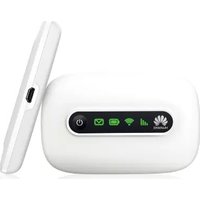
HUAWEI Speed Wi-Fi NEXT W02 - Wi-Fi Access Point

Speed Wi-Fi NEXT W02 - Wi-Fi Access Point HUAWEI - Free user manual and instructions

Find the device manual for free Speed Wi-Fi NEXT W02 HUAWEI in PDF.

📄 2 pages English EN Download 💬 AI Question 10 questions ⚙️ Specs
Notice HUAWEI Speed Wi-Fi NEXT W02 - page 1
Pick your language and provide your email: we'll send you a specifically translated version.
Product Type Wi-Fi Access Point / Mobile Hotspot
Brand Huawei
Model Speed Wi-Fi NEXT W02
Dimensions (approx.) 120 mm x 60 mm x 15 mm
Weight (approx.) 150 g
Power Supply Rechargeable lithium-ion battery, 5V/2A via USB Type-C
Wireless Standards IEEE 802.11a/b/g/n/ac, dual-band 2.4 GHz & 5 GHz
Mobile Network 4G LTE Cat.6, up to 300 Mbps download
Maximum Connected Devices Up to 10 devices
Interface Ports 1x USB Type-C (charging/data), 1x microSD card slot
Security WPA2-PSK, WPA3-Personal, SSID hiding, MAC filter
Battery Capacity 3000 mAh, up to 10 hours of operation
Care and Cleaning Wipe with a soft dry cloth; do not use liquids or abrasive cleaners
Spare Parts & Repairability Battery replaceable by authorised service; other parts not user-serviceable
Operating Temperature 0°C to 40°C

Frequently Asked Questions - Speed Wi-Fi NEXT W02 HUAWEI

How do I turn on the Huawei Speed Wi-Fi NEXT W02?
Press and hold the power button on the side for about 3 seconds until the LED indicator lights up.
How to connect devices to the Wi-Fi?
Turn on the device, then on your phone or laptop, select the Wi-Fi network name (SSID) printed on the device label. Enter the Wi-Fi password (also on the label).
How to reset the device to factory defaults?
Locate the reset hole on the device. Use a paperclip to press the reset button inside for about 10 seconds until the LEDs flash.
What to do if the device is not charging?
Try a different USB cable and charger. Ensure the charging port is clean. If the LED does not turn on, the battery may be deeply discharged; charge for 1 hour then try again.
How many devices can I connect at once?
The Huawei Speed Wi-Fi NEXT W02 supports up to 10 connected devices simultaneously.
How to check the data usage?
Access the web interface at 192.168.1.1 (or default gateway) from a browser. Log in with admin credentials (default: admin/admin). Go to Statistics or Data Usage.
Can I use a microSD card with this device?
Yes, the device has a microSD card slot that can be used to share files over the network. Insert a card, then access it via "File Sharing" in the web interface.
How to update the firmware?
Download the latest firmware from Huawei's support page. Log in to the web interface, go to System Settings > Firmware Update, and select the file.
What do the LED indicators mean?
Solid green: powered on and connected to mobile network. Blinking green: data activity. Red: error or weak signal. Off: device off or in sleep mode.
Is it possible to change the Wi-Fi password?
Yes. Log in to the web interface, go to Wi-Fi Settings and change the Pre-Shared Key. Save the settings and reconnect your devices.

User questions about Speed Wi-Fi NEXT W02 HUAWEI

0 question about this device. Answer the ones you know or ask your own.

Ask a new question about this device

The email remains private: it is only used to notify you if someone responds to your question.

No questions yet. Be the first to ask one.

Download the instructions for your Wi-Fi Access Point in PDF format for free! Find your manual Speed Wi-Fi NEXT W02 - HUAWEI and take your electronic device back in hand. On this page are published all the documents necessary for the use of your device. Speed Wi-Fi NEXT W02 by HUAWEI.

USER MANUAL Speed Wi-Fi NEXT W02 HUAWEI

■ For Those Requiring an English Instruction Manual

英語版の「取扱説明書」が必要な方へ

You can download the English version of "Quick start guide" and "Notes on usage" from the LILIAWEI TECHNOLOGIES CO., LTD. website.

Manual assistant
Powered by Anthropic
Waiting for your message
Product information

Brand : HUAWEI

Model : Speed Wi-Fi NEXT W02

Category : Wi-Fi Access Point