SPEED Wi-Fi NEXT W04 - Wi-Fi Access Point HUAWEI - Free user manual and instructions
Find the device manual for free SPEED Wi-Fi NEXT W04 HUAWEI in PDF.


Pick your language and provide your email: we'll send you a specifically translated version.
| Product Type | Wi-Fi Access Point / Mobile Hotspot |
| Model | SPEED Wi-Fi NEXT W04 |
| Manufacturer | Huawei |
| Dimensions (approx.) | 100 x 65 x 15 mm |
| Weight (approx.) | 100 g |
| Power Supply | Internal rechargeable battery (3000 mAh) or USB-C charging |
| Battery Life | Up to 10 hours of continuous use |
| Wireless Standards | IEEE 802.11a/b/g/n/ac, dual-band 2.4 GHz and 5 GHz |
| Max Wireless Speed | Up to 867 Mbps (5 GHz) and 300 Mbps (2.4 GHz) |
| Mobile Network Support | 4G LTE (Cat.6) up to 300 Mbps download |
| Number of Connected Devices | Up to 32 devices simultaneously |
| Main Functions | Create Wi-Fi hotspot from mobile data, connect devices, WPS support, parental controls |
| Care and Cleaning | Wipe with a soft, dry cloth. Do not use liquids or sprays. |
| Safety Precautions | Do not expose to extreme temperatures or moisture. Use only provided charger. |
| Spare Parts and Repairability | Battery replaceable; contact Huawei support for other parts. |
| General Information | Suitable for home, office, and travel. Supports SIM card (nano). |
Frequently Asked Questions - SPEED Wi-Fi NEXT W04 HUAWEI
How do I reset the Huawei SPEED Wi-Fi NEXT W04 to factory settings?
Press and hold the Reset button (usually located on the back or bottom) for about 10 seconds using a paperclip until the LED indicators flash. The device will reboot to factory defaults.
How can I change the Wi-Fi network name (SSID) and password?
Connect to the device's Wi-Fi, open a browser and go to http://192.168.1.1 (or check the sticker). Log in with the default credentials (often admin/admin). Navigate to Wi-Fi settings to change SSID and password.
What should I do if I cannot access the internet via the device?
Ensure your SIM card is properly inserted and has an active data plan. Check the signal strength indicator. Try toggling Airplane Mode on the device or restarting it. If the issue persists, check the APN settings in the web interface.
How many devices can I connect simultaneously?
The Huawei SPEED Wi-Fi NEXT W04 supports up to 32 devices connected at the same time via Wi-Fi.
What is the battery life of the device?
The built-in 3000 mAh battery provides up to 10 hours of continuous usage under typical conditions. Actual battery life may vary depending on network activity and number of connected devices.
How do I connect the device to my computer via USB?
Use a USB-C cable to connect the device to your computer. The device can be used as a USB modem (tethering) or for charging. Some models may require driver installation. Refer to the user manual for detailed steps.
Can I use the device while it is charging?
Yes, you can use the device while it is plugged in via USB-C. However, charging may be slower if the device is under heavy load.
What are the LED indicators and what do they mean?
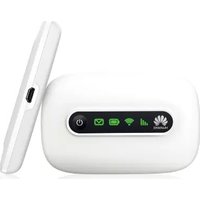
Typically, a green LED indicates good signal and normal operation, a blue LED indicates Wi-Fi is enabled, and a red LED indicates low battery or no signal. Refer to the manual for exact interpretations.
How do I update the firmware of the device?
Log into the web interface at http://192.168.1.1. Go to the System or Maintenance section and look for Firmware Update. You can check for updates online or upload a file manually. Ensure the battery is charged or the device is plugged in during the update.
Is the device unlocked or locked to a specific carrier?
The Huawei SPEED Wi-Fi NEXT W04 is typically sold as an unlocked device, but it may be carrier-locked depending on the purchase source. Check with your provider or the device's IMEI status to confirm.
User questions about SPEED Wi-Fi NEXT W04 HUAWEI
0 question about this device. Answer the ones you know or ask your own.
Ask a new question about this device
No questions yet. Be the first to ask one.
Download the instructions for your Wi-Fi Access Point in PDF format for free! Find your manual SPEED Wi-Fi NEXT W04 - HUAWEI and take your electronic device back in hand. On this page are published all the documents necessary for the use of your device. SPEED Wi-Fi NEXT W04 by HUAWEI.
USER MANUAL SPEED Wi-Fi NEXT W04 HUAWEI



Manual assistant
Powered by Anthropic
Waiting for your message
Product information
Brand : HUAWEI
Model : SPEED Wi-Fi NEXT W04
Category : Wi-Fi Access Point