Explorer - Mobile Phone CROSSCALL - Free user manual and instructions
Find the device manual for free Explorer CROSSCALL in PDF.


| Product Type | Mobile Phone |
| Brand | Crosscall |
| Model | Explorer |
| Dimensions | 152.6 x 75.5 x 13.9 mm (estimated) |
| Weight | Approx. 200 g (estimated) |
| Battery | Li-Ion, 2000 mAh (estimated) |
| Charging | Micro USB, AC adapter included |
| Display | Color LCD, resolution not specified |
| Network | GSM dual SIM |
| Protection | IP54: dust and splash proof |
| SAR Value | 0.259 W/kg (at ear) |
| Main Functions | Call, SMS, FM radio, alarm, calculator, calendar |
| Audio | Headset jack via USB, loudspeaker |
| Memory | Phone and SIM card storage |
| Languages | English, French, Spanish, Portuguese, Italian, Dutch, German, Turkish |
| Compliance | Directive 1999/5/EC, WEEE compliant |
| Battery Warning | Do not expose to high temperatures, replace only with specified type |
| Maintenance | Keep away from magnets, avoid dropping, clean with dry cloth |
| Parts and Repairability | Battery replaceable, other parts not user-serviceable |
Frequently Asked Questions - Explorer CROSSCALL
User questions about Explorer CROSSCALL
0 question about this device. Answer the ones you know or ask your own.
Ask a new question about this device
Download the instructions for your Mobile Phone in PDF format for free! Find your manual Explorer - CROSSCALL and take your electronic device back in hand. On this page are published all the documents necessary for the use of your device. Explorer by CROSSCALL.
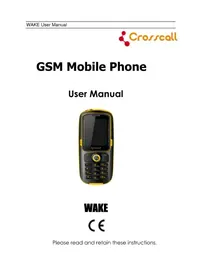
USER MANUAL Explorer CROSSCALL
Pleasereadandretaintheseinstructions.
DearCustomer,
ThankyouforpurchasingthisCrosscallGSMmobilephone.This phoneisdustproofandwaterproofwithanti-shockprotection, makingityouridealcompanionforoutdooractivities.
Please go through the instructions provided in this manual to better enjoy your mobile phone.
Content
ImportantSafetyInformation....4
Gettingstarted....8
Chargingthebattery....11
Phonelayout....12
Keysfunction....13
Icons.... 14
UsingPINcodetounlocktheSIMcard....14
Callfunctions....15
Mainmenu....16
Phonebook....17
Callcenter....19
Userprofiles....20
FMradio....21
Messaging....22
Settings....24
Tools.... 26
Troubleshootings....27
ImportantSafetyInformation
General
Donotbecomedistractedbythedevicewhiledriving,andalwaysbefully awareofalldrivingconditions.
-Alwa ys operatethevehicleinasafemanner.
-Minimizetheamoun t oftimespen t viewing thedevice'sscreenwhiledriving and usevoice prompts when possible.
-Dono t sendtex t messages, placeo r receive phonecalls,input t destinations,chan ge settings,oraccessanyfunctionsrequiringprolongeduseofthedevice'scontrols whiledriving.
-Pullove r inasafean d legalmanne r beforeattempting sucho perations.
-Chec k and followlocalawsre garding deviceusage.
-Switchoffthedevicean dremovethe battery from timetotime for optimum performance.
-Keep your deviceawa y from magnetso r magneticfields.
-Theexternalflexiblecableofthechar ge1 cannot be replaced,Ifthecordis destroyed,theadaptorshouldbedestroyed.
-Theapparatusshallno t beexposedtodrippin g or splashing and that noob jects filledwithliquids,suchasvases,shallbeplacedonapparatus.
-Excessivesound pressure from earphones and headphone can cause hearing loss.
-Themains plug of apparatus should not be obstructed or should beasil y accessed during intended use.
-Thesocke t outlet shall be installed near thee equipment and shall beasil y accessible.
BatteryWarning
Donotleavethedeviceexposedtoaheatsourceorinahighttemperaturelocation, suchasinthesuninanunattendedvehicle.
Li-Ionbatterypackused
-This product contains Li-Ion battery. There is a k offire and burns if the battery pack is handled improperly.
-Warning g: Dan ge r ofex plosionif battery is incorrectly replaced. Toreduceris k of fireorburns, donotattempttoopenorservicebatteryback. Donotdisassemble, crush, puncture, shortexternalcontactsorcircuits, disposeofinfireorwater, or exposeabatterypacktotemperaturehigherthan60°C.

-Re placeonl y specific batteries.Rec ycleanddis poseof used batteriesaccordin g tolocalre gulationo r reference guidesuppliedwithyou 1 product.
-Dono t useashar p object toremovethe battery.
-Kee p the battery away from children.
-Ifusin g anACchar ger or external battery charger,only y usetheaccessor y approved for your product.
-Onl y replacethe battery withthecorrect replacement battery. U s ignanother batterypresentsariskoffireorexplosion.
PacemakersandOtherMedicalDevices
-Studieshaveshowntha ttherema y be a potential interaction betweenmobile phonesandnormalpacemakeroperation.Thepacemakerindustry recommends thatpeoplewithpacemakersfollowtheseguidelinestominimizeanyriskof interferencewithpacemakeroperation:
-Alwa ysmaintainadistanceof15c m (6 inch)ebetweenthe pacemaker and any mobilephonethatisturnedon.
-Storethe phoneontheo ppositesideofthe pacemaker.Dono t carry the phoneina breastpocket.
-Usetheea r furthest from the pacemaker inorde r tominimizean y potentialfor interference.
-If youthink that interference may be occurring, turn off phone immediatel y.
-Fo r other medicaldevices,consul t with your physiciano r themanufacture r to determineifyourmobilephonemayinterferewiththedevice,andtodetermine anyprecautionsthatyoucantaketoavoidinterference.
Emergencycalls
Important: This device operates using radios signals, wireless networks, landline networks, and user-programmed functions. If your devices supports voice call over the internet (internet calls), activate both the internet calls and the cellular phone. The device may attempt to make emergency call over both the cellular networks and through your internet call provider if both are activated. Connections in all conditions cannot be guaranteed. You should never rely solely on any wireless device for essential communications like medical emergencies.
Whenmakinganemergencycall,giveallthenecessaryinformationasaccurately aspossible.Yourwirelessdevicemaybetheonlymeansofcommunicationatthe sceneofanaccident.Donotendthecalluntilgivenpermissiontodoso.
AvoidRepetitiveMotion
-Youma y experienceoccasionaldiscomfort in your hands,arms,shoulders,neck, orotherpartsofyourbodyifyouperformrepetitiveactivities,suchastypingor playinggames,onthedevice.
-Takefrequen t breaks. If youhavediscomfort whileo r after using thedevice, stop usingandseeaphysician.
Certificationinformation(SAR) Thismobiledevicemeetsguidelines for exposuretoradiowaves.
Yourmobiledeviceisaradiotransmitterandreceiver.Itisdesignednottoexceed the limitsforexposuretoradiowavesrecommendedbyinternationalguidelines. Theseguidelinesweredevelopedbytheindependentscientificorganization ICNIRP and includes safety margins designed to assure the protection of all persons, regardless of age and health. The exposure guidelines form mobile devices employ a unit of measurement known as the Specific Absorption Rate or SAR. The SAR limit stated in the ICNIRP guidelines is 2.0 watts/kilogram (W/kg) averaged over 10 gram soft tissue. Tests for SAR are conducted using standard operating positions with the device transmitting at its highest certified power level in all tested frequency bands. The actual SAR level of an operating device can be below the maximum value because the device is designed to use only the power required to reach then network. That amount changes depending on an number of factors such as how close you are to an network base station.
The highest SAR value under the ICNIRP guidelines for use of the device at the ear is 0.259 W/kg.
DeclarationofConformity
Hereby, Admea declares that this GSM Phone is in compliance with the essential requirements and other relevant provisions of Directive 1999/5/EC.
The declaration of conformity is available on website: www.logisav.fr


TheEuropeandirective2002/96/EConWasteElectricalan d ElectronicEquipment (WEEE),requiresthat old householdelectrical appliancesmust not bedisposedinthenormalunsorte d municipal wastestream.Oldappliancesmust becollectedseparatel y inorde r to optimizetherecover y and recycling ofthematerialsthe y containand reducetheimpactonhumanhealthandtheenvironment.
Thecrossedout“wheeledbin”symbolontheproductremindsyouofyourobligation,thatwhenyoudisposeoftheapplianceitmustbeseparatelycollected.
Consumers should contact their local authority or retailer for information concerning the correct disposal of the old appliance.
Gettingstarted
Inserting the SIM card and battery
ASIMcard(SubscriberIdentityModule)isrequiredinordertousethismobile phone.Pleasecontactyourphoneoperatorinordertoobtainone.Thisdeviceis equippedwithtwoSIMcardslots,thuscombiningintoonesinglephonemultiple usages(suchaspersonalandprofessionalusage).
Becarefultohandle,insertorremovetheSIMcardsincetheSIMcardandthe contactsinsidecaneasilybedamagedbyscratchingorbending.
Note: BeforeinstallingtheSIMcard, makesuretha t the phoneisswitched off, disconnectedfromthechargeroranyotherdeviceandthenremovethebattery.
- Remove the back cover: Hold the back cover①and slide the back cover ② and lift it off the phone.

Note: If the battery is inserted, removethe battery by lifting it using the finger grip.
- Inser t aSIMcard:Usethedia gram printed onthedevicetocorrectl y alignthecard. Makesurethatthecontactareaonthecardsisfacingtheconnectorsonthedevice.
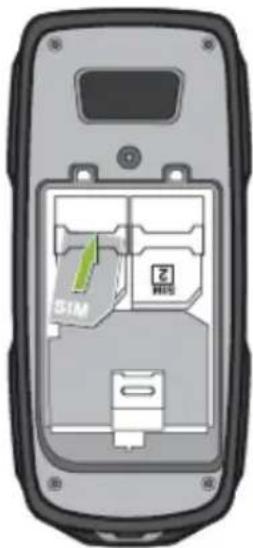
- Insert the battery:lineup thecontactsofthe battery and the battery compartment, and theninsertthebattery.
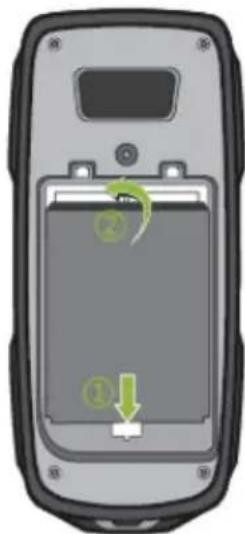
- Replacethe back cover

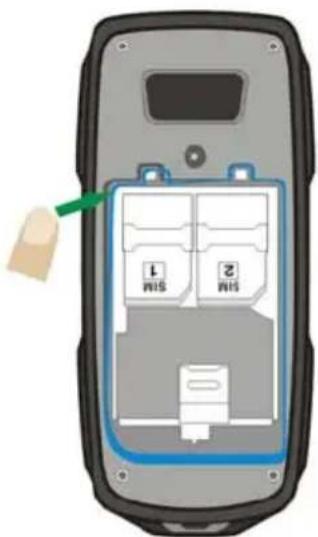
Beforereplacingthecover, makesurethattheplasticjointiscorrectlyplaced (pleaserefertothebelowillustration)
Note:
-The joint pictured abovestren gthen your phone'swater proofan d dustproof capabilities.Itshallnotberemoved.
-This phoneiscertifiedIP54meanin g it canresis t splashing water,suchasrainfall, withoutarmfuleffects,makingityouridealcompanionforoutdooractivities. Plesenotethatthisphoneshallundernocircumstancesbeimmergedintowater. Warranteewouldbevoidinsuchevent.
Chargingthebattery
Toextendthebatterylifeofyourdevice,followtheinstructionsasbelow:
-Usethestandar d charger (provided with this package) to char ge the battery.
-I t is better to charge the battery until the battery indicator on the display stops scrolling.
-Using theUSBcabletochar ge the battery only ifthestandard charger is not available.
-Avoid keeping the device in vibrate mode.
- TaketheUSBcablefrom the device packaging, and attach it to power adapter. Connect the lead from the chargerto USB port of the phone. Then, Connect the chargerto an AC wall outlet. The battery indicator bar start scrolling. When the battery is fully charged, the bar stop scrolling. Disconnect the charger from the phone and the AC outlet.

- Connec t themicroUSBconnector onthecableintoUSB port. The battery indicator barstartsscrolling.
NOTE:
ChargingoverUSBcantakelongertostart, and may not work if you connect through non-powered USBhub. Your device charges more quickly when connected to a wall outlet. When the battery charge is slow, it may take awhile for charging to start. When the battery is fully charged, the battery level indicator on the device screen will stop scrolling horizontally. The bar stop scrolling, disconnect the charger from the phone and the AC outlet.
Phonelayout


Keysfunction
| KeynoteFunctionalDescription | ||
| 1 | Leftsoftkey (LSK) | The function dependent the guidetextss hownon displayaboutthekey,whenthereisword“Menu” abovethekey,pressingthiskeyenterstheMenu functions. |
| 2Callkey | Dialsaphonenumberandansweracall,whenthe displayisclear,showsthemostrecentlydialed number. | |
| 3 | U S B | ForchargingordatatransmissionwithPC.Headphone output o r t |
| 4 | Navigation keys | YoucanpresetthedifferentfunctionfortheNavigation keys, “Setting→Phone setting→dedicated key”, to presetthefunctionfortheNavigationkeys. |
| 5 | * k e | Selectleftsoftkeyandpress*keyquicklyto ylock/unlockthekeypad. Usedforvariouspurposesindifferentfunctions. |
| 6 | Rightsoftkey (RSK) | The function dependent the guidetextss hownon displayaboutthekey,whenthereistheword“Names” allowsaccesstothephonebookfunctions. |
| 7 | Powerkey/ Endkey | Endsorrejectsacall.Alsoexitsfromanyfunctionat anytime.Pressandholdthekeytoswitchthephone On/Off |
| 8 | # k e | Pressandholdtoswitchsilentmode/generalmode. yUsedforvariouspurposesindifferentfunctions. |
Icons
Inthemaindisplay,youmayseeseveraliconsdisplayedonyourstatusbar.Themea ningforeachiconisexplainedbelow:
 | Indicatesthesignalstrengthofthecellularnetworkatyour currentlocation.Thehigherthebar,thestrongerthesignal. |
 | Indicatesnewtextmessage(s). |
 | IndicatesthattheSIMcalldivertisactivated. |
 | Indicatesamissedcall |
 | Indicatesthatthealerttypeofyourphoneissetasring. |
 | Indicatesyourphoneislocked. |
| [350C] | Indicatesthatthealerttypeofyourphoneissetasheadset. |
 | Indicatesthealarmclockisset. |
 | Indicatesthebatterychargelevel. |
Using PIN code to unlock the SIM card
PIN(PersonalIdentificationNumber)isusedtopreventyourSIMcardfrombeing usedillegally.PINisusuallyprovidedwithSIMcardtogether.Ifyouinputwrong PINcodeforcontinuousthreetimes,yourphonewillbelockedforsafetyand unavailable.Shouldthissituationarises,pleasecontactyourphoneoperatorsoasto unlockyourdevice.ThedevicecanbeunlockedbyenteringthePUKcodeprovided byyouroperator.
Callfunctions
Makeacall
Tomakingacall,dothefollowing:
-Ente r the phonenumbe r including theareacodeifnecessary. The c o u y tode shouldbeincluded,ifnecessary.Longpress[0]fortheinternationalprefix (character+)
-Scrollr ght toincreaseo r left todecreasethevolumeoftheear pieceo r headset duringthephonecall.Presscleartodeletethecharactertotheleftofcursor.
-Pressthecallke y tocallthenumber.
Tomakingacallfromthephonebook,dothefollowing:
-Inthestandb y mode, press right soft key (RSK) toenter Phonebook.Scrolltothe desiredcontactnameortypethenameintheinputbox,andthenpresssendkeyto makethecall.
-Youcanalso pressMenuan dchoosePhoneboo k submenu.Usenavi gationke ys to selectSearchoption.Youcandirectlyselectanamefromthephonebooklistorenter thenameinthequicksearchfield.Thenpresssendkeytomakethecall.
Answeringorrejectinganincomingcall
-Toanswe r anincomin g call, pressthecallke y.
-Tore ject the call without answering, presstheen dkey.
Tipsforcalloptions
AcallcanbeconnectedtoanysinglecallerbypassingOptions.Whenyou PressOptionsduringanactivecall,youwouldhavefollowingfunctionsaslistedbelow:
-Holdsin glecall: put acallonhold
-Endsin glecall:en d acall.
-NewCall:makeanewcalldurin g anactivecall.
-Phonebook:shortcu t toPhoneboo k menu.
-Callhistor y:missedcalls,Diale d calls,Receive d callsand Deletecalllogs.
-Messaging:shortcu t toMessa gesmenutowritetex t message.
-Mute:se t On/Offtomutethecalldurin g theconversation.
Mainmenu
ToaccessMenumode, press[Menu] in Idle mode. oSomemenusma y change according to your operator.
Overviewofmenufunctions
| Phone book | Call center | User profiles | Multimedia | Messaging | File manager | Settings | Extra |
| 1.Add new contact | 1.Call history2.Call settings | 1.General2.Silent3.Meeting4.Outdoor5.Mystyle6.Save power | 1.FMradio2.Game | 1.Write message2.Inbox3.Drafts4.Outbox5.Sent messages6.Delete messages7.Broadcast messages8.messages settings | 1.Phone | 1.DualSIM switch2.DualSIM settings3.Phone settings4.Network settings5.Security settings6.Connectivity7.Restore factory settings | 1.Services2.Calculator3.Calendar4.Alarm |
Phonebook
YoucanstorephonenumbersonyourSIMcardandinyourphone'smemory.The SIMcardandphone'smemoryarephysicallyseparate,buttheyareusedasasingle entity called Phonebook. To access this menu, press [Menu] in idle mode and select Phonebookorpressrightsoftkey(RSK)keytoenterPhonebook.
SearchnamesandnumberssavedinthePhonebook.
-Scrolldowninthestandb y mode, an d enter thefirs t letter ofthename. Scrolltothe namethatyouwant.
AddNewContact
- Use this menu to add a new contact to Phonebook following the below steps; Phonebook→Add new contact→then enter contact information.
Or Phonebook →Options →Select →To SIM x or to Phone →then enter contact information.
-For aexistedcontact record in phonebook, pressLSKfor enter the submenu of "Options":
-View:
-Sendtex t message
-Call
-Edi t
-Delete
-Co py
-Move
-AddtoBliacklis t
-Phoneboo k setting
PhonebookSettings
Yourphoneprovidesyouvarioussettingoptionstopersonalizeyourphone, includingPreferredstorage,Speeddial,Mynumber,Extranumbers,Memory status,Copycontacts,Movecontacts,Deleteallcontacts.
Speeddial
Assignthenumbertooneofthespeeddialingkeys(from2to9)savedinthe phonebooklist,Pressandholdthedesiredspeeddialtomakethecall.
Deletecontacts
-PressO ptions → select delete:Todeletesin glecontac t namesand phonenumber.
-PressOptions → Select Phonebooksetting → Deleteallcontacts:todeleteall contactsandnumberfromtwodifferentstoragelocations.
Copycontact
-PressO options→Select Copy:Allows youtoco py singlecontact among two differentstoragelocations.
-PressO ptions→ Select Phonebook setting →copy contacts:Allows youtoco py allcontactsamongtwodifferentstoragelocations.
Move
-PressO ptions→ select Move:Allows youmoveallcontactsinformationtodifferen t storagelocation.
Callcenter
Press Menu in Idle mode, you can check call history, Setting general call settings.
Callhistory
ToviewinformationaboutcallrecordsincludingMissedcalls,Dialedcalls
Receivedcalls, Deletecalllogs.
Missedcalls
InCallRecord menu, chooseMissedCalls, and pressOKtoviewtherecords. Using theoptions providedintheReceive d callsmenuyoucanviewthedateandtimeof eachcallandcall, sendtextmessage, savetophonebook, addtoblacklistanddelete.
Dialedcalls
Thisfunctionallowsyoutoviewalis t of phonenumberstha t youhavemos t recentlydialed.Usingtheoptions provided intheReceivedcallsmenuyoucanview thedateandtimeofeachcallandcall,sen d text message,saveto phone book,ad d toblacklistanddelete.
Receivedcalls
Thisfunctionallowsyoutoviewalistphonenumbersfromwhichyouhavemost recentlyacceptedcalls.UsingtheoptionsprovidedintheReceivedcallsmenuyou canviewthedateandtimeofeachcallandcall,sendtextmessage,savetophone book,addtoblacklistanddelete.
DeleteCallLog
This function allows y outodeletedialedcalls, missedcalls, receivedcallsorall calls.
Callsettings
Thisfunctionallowsyoutose t theSIM1/SIM2callsettingsand generalcall settingsofthephone.
SIM1orSIM2Settings:
- Callwaiting g
- Calldiver t
- Call barring
- Lineswitching
Advancedsettings:
- Black list:Blac k list
Rejectnumberinblacklist: TosetthisfunctionasONorOFF.
Blacklistnumbers: Toaddthenumberswhatyouwanttofilterin thelist. - Whitelist:Whitelis t
Mode: TosetthisfunctionasONorOFF.
Whitelistnumbers: Toaddthenumberswhatyouwanttofilterinthelist. - Autoredial
TosetthisfunctionasONorOFF, Autoredialletsyouredialnumbers automaticallywhencallisfail. - Calltimereminde r
Aftersettingthisfunctionto‘on’, itwillofferawarningtonetowardsthe singleorperiodicsettingasyourownduringthecallprocess,soyouwill beremindedofthecalltimeatperiodicintervalsduringacall. - Reject by SMS
Whenthisfeatureisenabledandyourejectacall,anSMStextmessage willbesendtothecallingparty. - Answer mode:
Including Coveransweranykey(therearetwoanswermodeincludingAny key, Autoanswerwhenheadsetmode).
Userprofiles
TheavailableprofilesareGeneral,Silent,Meeting,Outdoor,MystyleandSave power. Youcanalsosetthetone,volume,alert,ring,andsoforthwithOptions, Customizeoption,sothatwheneveryoureceiveanincomingcalloranewmessage, youcancustomizetheuseofyourphonetodifferenttypesofcallenvironments.
FMradio
ConnecttheheadsetwiththeUSBporttolistentotheFMradio.Thequalityoftheradio broadcast dependsontheradiostation'scoverageintha t particular area.Please noteFMreceptionmay beunavailableo r poor inareaswithlimitedcoverage,while insidebuildings,orwhilemovingathighspeed.
-Whentheradioison, presstheu p/downnavigationkey toad just the volume, and press left/right keytoadjustthefrequency.
-Whentheradioison, pressLSKkey for setting the belowitems:
- Channel list: To save the channel you have found. Press and select edit. Key inthenameofthechannelandfrequencypressOK.Youcansave20radio channelsinthehandset.
- Manualinput: If you know the frequency of other radiochannel you would like to listento (between 88 to 108 MHz), key and press OK.
- AutoSearch: If you want to search radiochannel, press Yes when Prese t list confirm messageshowup. Thesearchstopswhenchannelshas been found and show channelinChannellist.
- Settings:FMradiosettingoptions
-Back ground play:Turnon/offBack ground play function.
-On:allowradiocontinuin g playing whenexi t FMradio
-Off:whenuse r exitsFMradio, radiowillstop.
-Louds peaker:on/off
- On:chooseOKtoconfir m theselection.YoucanlistentotheFMradio withoutinsertingtheearsetintoyourear.
- Off: youneed to put ontheearse t tolistentoFMradio.
Note: BeforeuseFMradio, please insert the headset first.
Messaging
UsetheMessa ging menutosen d and receiveshort messages.Toaccessthismenu, press[Menu]inidlemodeandselec t Messaging.
WriteMessage
TextMessage
Usethismenutocreateandsendamessage, Underwritemessagemenu, pressleft softkeyforoptions:
- Sendto:toente r number or add from Phonebook.
- Inputmethod: Various input methods for options.
- SetZi:Tose t their put method to beintelli gent.Youcanse t it on/off.
- Advanced: i n s e number, inser t name, inser t bookmark
- Savetodrafts
Inbox
EnterInboxtoviewyourreceivedmessages.
Whileviewingthemessagelist,usingtheUp/Downkeytoselectthepreviousor nextmessage.Toreadamessage,pressOKkey.AndyoucanalsoView,Reply,Callsender,Forward,Delete,Deleteall,SavetophonebookifchoosingOptions.
Drafts
Themessa gesun prepared for sending arestoredintheDraft, waiting to bemodified and sent.
Outbox
Select it to view themessa geswaiting to be sent in the device or the SIM card. Whilereading amessa ge, you can press option to select your required period as View, Resend, Edit, Delete, Delete all.
Sentmessages
Thisfolde r storesmessa ges youhavesen t.
Deletemessages
ThisfolderhelpsyoutodeleteallmessagesinselectedfolderasInbox,Draft,Outbox,Sentmessages,Allmessages.
BroadcastMessage
The broadcast messagesrefer tomessa gessen t by theo perator (suchasweathe r information).Pleasenote your phoneo perator may not providesuchfeature.
Note: This servicemay not be available on all networks. For more information about the available sub jects, please contact your network service provider.
MessageSettings
WithintheMessageSettingssub-menu,youcandefinedefaultvaluesoncommon parametersformobile-originatedmessages.
-Textmessage ge:
Accessthesubmenutosetthefollowingitems:
• ProfileSettin gs:
- Voicemailserver: If you can not answer a call, you can as k the other party leave a message to you via this service. Then, access the VoiceMailServer to listentothemessage. Then network operator should support this service. Thus, you need to apply for activation before use.
- CommonSettin gs: Allows youtoactivateor deactivatetheDeliver y Report, ReplyPathandSaveSentmessage.
• Memory Status: Dis playstheoccu piedmemor y of your SIMcar d and phone.
- PreferredStorag: Allows youtodefault a position (SIMo r Phone) to save yourSMS.
Settings
TheSettin gs m e n provides youwithvarioussetting optionstocustomizethe phone to your preferencesand needs.Youcanalsorese t thesettin gs t o th e default values. To access this menu, press [Menu] in Idle mode and select Settings.
-DualSIMswitch: youcanchoosemanually or automatically switch.
-DualSIMsettin gs: youcanhavedualo pen, onl y SIM1o penandonl y SIM2open.
-Phonesettin gs
• Timeanddate: Allow y outoSe t homecity, time/date, set format.
- Schedule poweron/off: Allow youtose t a particular timeonthe phonewhen thephoneshouldpoweron/offitself.
- Language: Allow youtose t thedis play language a s E glish, French, S panish, Portuguese, Italian, Dutch, German, and Turkish.
- Pref.in putmethod: Allow youtotouchthetex t input method.
• Display: You can set Wallpaper, Screensaver, Show date and time.
- Dedicatedkey: This function allows you to re-assign the quick-access-feature default setting in 4-way navigation keys.
- Flightmode: Switchintofli g h t mode, screening off partialfunctionoftelecom.
- Misclivin gs:Youcanse t differentcharacteristicsofLCD backlight.
-Networksettings
• Network selection
TheNetworkSelectionallowyoutomakeNewsearch,selectnetwork,andselect automaticallyormanuallythenetworkusedwhenroamingoutsideofyourhome network.
- Preferences
-Securit y Settings
ThesecuritysettingsprotectyourdeviceorSIMcardfrombeingusedillegally.
- SIMSecurit y Setup
Thisfunctionallowsyoutoactivate password to protect your phoneagains t unauthorizeduse.
- PINLock: This function allows you to lock the phone with a specific SIM card. The feature is designed to prevent the use of your SIM cards by means of another person's phone if your SIM cards lost. You can switch on or off to activate the PINLock function.
- Change PIN: Allow you to change PIN code.
- Phonesecurit y
- Phoneloc k:Youcanswitchono r offtoactivatethe phoneloc k functionto protectyourphone.IfyouswitchPhoneLockon,youneedtoenterthe passwordtosettherequeston.Thedefaultpasswordis“0000”.
- Change password: Allows youtochan ge the phoneloc k password.
- AutoKe ypadLoc k
Thisallowsyoutolockthephone'skeypadtopreventaccidentalkey pressed. Thereare5options:Off,5seconds,30seconds,1minuteor5 minutes.
-Restorefactor y settings
Youcanrestoretheoriginalsettingsincaseyouencounteranyconfiguration problem.Pleasebackupyourdatafirst.Youwillneedtoinputpasswordtorestore factorysettings.Thedefaultpasswordis1234.Inthismenu,inputthepasswordand pressOk.Thenthephonewouldberestortedtofactorysettings.
Tools
Calculator
The phone provides you with a calculator featuring basic functions. Toperform addition, subtraction, multiplication, and division, press corresponding direction key.
Calendar
Inthesubmenu, the screendisplaysthe calendar for the current month, Your phone provides the following selections. JumpToDate, Got today, Got weekly view/Got omonthly view.
Alarm
Thisfunctionallowsyoutosetthealarmtoringatthetimespecified. Thealarm clockworksevenwhenthephoneisswitchedoff. Yourphoneprovidesthe followingselections
- On/Off: power on or offthealar m through left or right navigationke y.
- Edit alarm: set thealar m time.
- Repeat:select therin g mode:Once,Everyday and Custom.
- Snooze:se t continuousalar m time.
- Alert type: selec t thealer t type.
Troubleshootings
Ifproblemsoccurwhenusingthephone,Priortocontactingtheafter-salesservice providers,pleasemakethefollowingsimplecheck.
| ProblemsReasonsandSolutions | |
| Can’tswitchon | Presstheendcallke y for morethan1second.Check ifthe battery isnot insertedwell.Youma y takeout thebatteryfirstandinsertitagainafterseveralseconds.Check ifthe battery isout of power. |
| Can’tconnectto network | Signalistooweak, pleasetry toanothe r placewithstron ger signal.Themobile phonema ybeou t ofthenetwork k coverage.SIMcar d isinvalid; pleasecontact t you r network supplie1. |
| Theaudio qualityofthecall ispoor | Pressnavi gator key toincreasethevolumewhen youarein acall.Check thesi gnalstren gthindicato r onthedis play. |
| Standbytimetoo short | Whenfailin g toconnec t tonetwork,the phonewillkeep searchingbasestationthatconsumesmuchbattery and reducesstandbytime.Movetoanareawithstrongersignal strengthorswitchyourphoneofftemporarily.Replacethe battery. |
| SIMcarderror | Makesuretha t thechipsinSIMcar d areno t damaged;use thecleanclothoscratchit.Makesuretha t SIMcar d isinsertedcorrectl y.SIMcar d invalid.Contac t your service provider. |
| Cannotdialcalls | Makesuretha t thenumber r youdialedisavailableandthe dialkeyhasbeenpressed.Makesuretha t thereisenou ghmoney tomakeacall.Makesuretha t SIMcar d isvalid.Fixed Dialisse t or hascall barring featureturne d on.Deactivatefixeddialfunctionorcallbarring. |
| Cannotreceive calls | Makesuretha t your phonehasconnectedtonetwork k (Checkifthenetworkistooobusyorinvalid).Makesuretha t thereisenou ghmoney toreceivethecall.Makesuretha t SIMcar d isvalid.Check calldiver t settings and incoming call barrin gsettings. |




- DEARCUSTOMER
- CONTENT
- IMPORTANTSAFETYINFORMATION
- GENERAL
- DONOTBECOMEDISTRACTEDBYTHEDEVICEWHILEDRIVING,ANDALWAYSBEFULLY AWAREOFALLDRIVINGCONDITIONS
- BATTERYWARNING
- LI-IONBATTERYPACKUSED
- PACEMAKERSANDOTHERMEDICALDEVICES
- EMERGENCYCALLS
- AVOIDREPETITIVEMOTION
- CERTIFICATIONINFORMATION(SAR) THISMOBILEDEVICEMEETSGUIDELINES FOR EXPOSURETORADIOWAVES
- DECLARATIONOFCONFORMITY
- GETTINGSTARTED
- INSERTING THE SIM CARD AND BATTERY
- NOTE
- CHARGINGTHEBATTERY
- PHONELAYOUT
- ICONS
- USING PIN CODE TO UNLOCK THE SIM CARD
- CALLFUNCTIONS
- MAKEACALL
- TOMAKINGACALL,DOTHEFOLLOWING
- TOMAKINGACALLFROMTHEPHONEBOOK,DOTHEFOLLOWING
- ANSWERINGORREJECTINGANINCOMINGCALL
- TIPSFORCALLOPTIONS
- MAINMENU
- PHONEBOOK
- SEARCHNAMESANDNUMBERSSAVEDINTHEPHONEBOOK
- ADDNEWCONTACT
- PHONEBOOKSETTINGS
- SPEEDDIAL
- DELETECONTACTS
- COPYCONTACT
- MOVE
- CALLCENTER
- CALLHISTORY
- MISSEDCALLS
- DIALEDCALLS
- RECEIVEDCALLS
- DELETECALLLOG
- CALLSETTINGS
- SIM1ORSIM2SETTINGS
- ADVANCEDSETTINGS
- USERPROFILES
- FMRADIO
- MESSAGING
- WRITEMESSAGE
- TEXTMESSAGE
- INBOX
- DRAFTS
- OUTBOX
- SENTMESSAGES
- DELETEMESSAGES
- BROADCASTMESSAGE
- MESSAGESETTINGS
- TEXTMESSAGE GE
- SETTINGS
- PHONESETTIN GS
- NETWORKSETTINGS
- NETWORK SELECTION
- PREFERENCES
- SECURIT Y SETTINGS
- SIMSECURIT Y SETUP
- PHONESECURIT Y
- AUTOKE YPADLOC K
- RESTOREFACTOR Y SETTINGS
- TOOLS
- CALCULATOR
- CALENDAR
- ALARM
- TROUBLESHOOTINGS
Brand : CROSSCALL
Model : Explorer
Category : Mobile Phone