SFP-10A - Network Equipment ComNet - Free user manual and instructions
Find the device manual for free SFP-10A ComNet in PDF.


| Product Type | Small Form-Factor Pluggable (SFP) Transceiver Module |
| Model | SFP-10A (Copper or Optical Fiber) |
| Brand | ComNet |
| Media Support | Copper (RJ45) or Optical Fiber (Multimode/Single mode, LC/SC connectors) |
| Data Rate | Fast Ethernet (100 Mbps) or Gigabit Ethernet (1000 Mbps) depending on variant |
| Maximum Distance | 300 m to 120 km (depending on fiber type and wavelength) |
| Dimensions (approx.) | 13.4 mm x 56.5 mm x 8.5 mm (typical SFP) |
| Weight (approx.) | 10 g (typical SFP) |
| Power Consumption | < 1 W (typical) |
| Operating Temperature | Industrial rated for harsh environments |
| Hot Pluggable | Yes |
| Installation | Insert into SFP cage, secure with bale clasp |
| Removal | Disconnect fiber, open bale clasp, pull out |
| Maintenance | Keep dust plugs inserted when not in use; clean optical surfaces with appropriate materials |
| Safety Precautions | ESD sensitive - use anti-static handling; avoid dust in optical bores |
| Warranty | Lifetime warranty when used with ComNet SFP configurable products |
| Spare Parts / Repairability | No user-serviceable parts; replace module if faulty |
Frequently Asked Questions - SFP-10A ComNet
User questions about SFP-10A ComNet
0 question about this device. Answer the ones you know or ask your own.
Ask a new question about this device
Download the instructions for your Network Equipment in PDF format for free! Find your manual SFP-10A - ComNet and take your electronic device back in hand. On this page are published all the documents necessary for the use of your device. SFP-10A by ComNet.
USER MANUAL SFP-10A ComNet
Communication Networks
natural_image
Five different Ethernet flash drives shown in a row (no visible text or labels)INSTALLATION AND OPERATION MANUAL
SFP-(X)
COPPER AND OPTICAL FIBER ETHERNET CONNECTORS
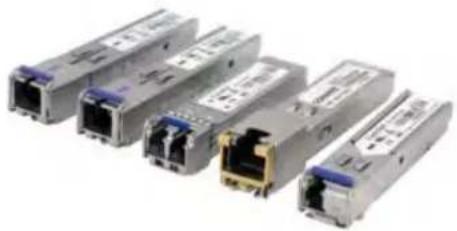
The ComNet™ selection of Small Form-Factor Pluggable modules allow for an optical or copper interface when using a ComNet managed switch, unmanaged switch or media converter.
These interchangeable SFP modules are available for use with copper media, or multimode and single mode optical fiber. The optical fiber SFP modules are available in fast Ethernet one and two fiber versions and Gigabit one and two fiber versions. They also are available with LC or SC optical connectors.
The ComNet SFP modules have different wavelengths and optical power to offer distances from 300 meters to 120 kilometers. These SFP modules are industrially rated to perform in the most difficult operating environments.
The ComNet SFP interface is required for use with all ComNet SFP configurable products to qualify for the ComNet Lifetime Warranty.
See Page 2 for complete installation instructions.
SFP-(X) INSTALLATION/REMOVAL
CAUTION:
- The Fiber Optic sub-module is static sensitive. Use static handling precautions when installing or removing the sub-module.
- Protect your SFP sub-modules by inserting clean dust plugs into the SFP sub-modules after the optical fiber is extracted from them. Be sure to clean the optic surfaces of the optical fiber before you plug them back into the optical bores of another SFP sub-module. Avoid getting dust and other contaminants into the optical bores of your SFP sub-modules. The optics will not work correctly when obstructed by dust.
SFP Module:
- The SFP sub-module installs in the connector cage located on the unit corresponding to the port assignment to be used.
- The SFP sub-module is keyed and can only be installed in one orientation.
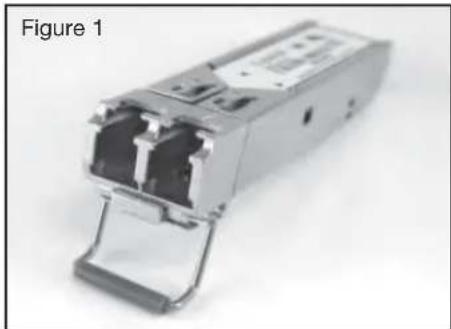
- The SFP sub-module (see Figure 1) has a bale clasp that you use to secure the SFP sub-module in a connector cage.
The photos used in the following sequence are intended to aid in the installation and removal of the SFP sub-module and may not match your particular model.
natural_image
Close-up of a metallic broadband flash drive (no visible text or symbols)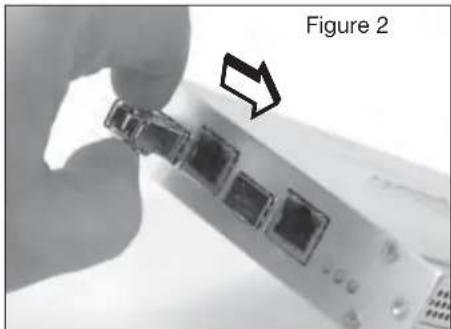
natural_image
Close-up of a hand holding a small electronic device with four ports, labeled as Figure 2 (no text or symbols on the device itself)Installation:
Step 1 - Flip the bale clasp up before inserting the SFP module.
Step 2 - Line up the SFP sub-module with the port and slide it into the port. (see Figure 2)
Step 3 - When you are ready to attach the optical fiber, remove the rubber plugs from the sub-module and save for future use.
Note: When installed properly the SFP sub-module will lock in place.
natural_image
Close-up of a device's internal components with a hand pointing to a button (no text or symbols visible)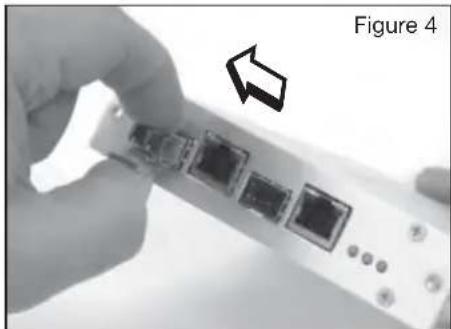
natural_image
Close-up of a hand holding a device with four ports, showing a right-pointing arrow (no text or symbols on the device itself)Removal:
Step 1 - Disconnect the optical fiber from the SFP sub-module.
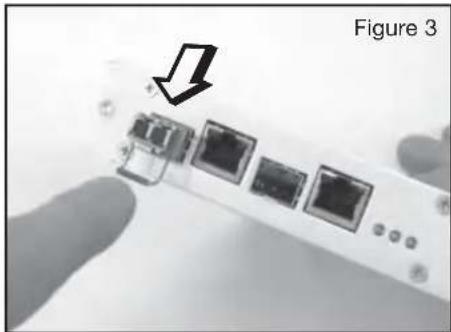
Step 2 - Open the bale clasp on the SFP sub-module by pressing it down with your index finger as shown in Figure 3.
Step 3 - Grasp the SFP sub-module between your thumb and index finger and carefully remove it from the connector cage as shown in Figure 4.
Step 4 - Install the rubber plugs back into the SFP sub-module optical bores, and place the SFP sub-module in anti-static protective packaging.
comnet Communication Networks
3 CORPORATE DRIVE | DANBURY, CT 06810 | USA
T: 203.796.5300 | F: 203.796.5303 | TECH SUPPORT: 1.888.678.9427 | INFO@COMNET.NET
8 TURNBERRY PARK ROAD | GILDERSOME | MORLEY | LEEDS, UK LS27 7LE
T: +44 (0)113 307 6400 | F: +44 (0)113 253 7462 | INFO-EUROPE@COMNET.NET
INS SFP-(X) REV-
04/05/10
PAGE 2
Brand : ComNet
Model : SFP-10A
Category : Network Equipment