KJM-7808 - Karaoke Vocopro - Free user manual and instructions
Find the device manual for free KJM-7808 Vocopro in PDF.


| Product Type | Karaoke Player with CD+G Support |
| Dimensions | 17.5 x 12.2 x 8.3 inches (44.5 x 31 x 21 cm) |
| Weight | 13.2 lbs (6 kg) |
| Power Supply | AC 120V, 60Hz |
| Power Consumption | 45W |
| Built-in Speakers | 2 x 6.5 inch full-range speakers |
| Microphone Inputs | 2 x 1/4 inch (6.35 mm) jacks |
| Audio Output | Composite Audio (RCA) and S-Video |
| Supported Media | CD, CD-R/RW, CD+G, MP3-encoded discs |
| Key Control | Yes, ±5 semitones |
| Echo Control | Yes, adjustable echo level |
| Bluetooth | No (not specified) |
| Display | LED song number display |
| Remote Control | Included (infrared) |
| Cleaning Instructions | Wipe exterior with dry cloth; lens cleaner for CD player |
| Safety Precautions | Keep away from moisture and heat; disconnect when not in use |
| Spare Parts Availability | Microphones, remote control, AC adapter (if lost) |
| Repairability | Modular design; contact Vocopro for service |
| Warranty | 1 year limited warranty |
| Included Accessories | 2 microphones, audio/video cables, remote control, user manual |
Frequently Asked Questions - KJM-7808 Vocopro
User questions about KJM-7808 Vocopro
0 question about this device. Answer the ones you know or ask your own.
Ask a new question about this device
Download the instructions for your Karaoke in PDF format for free! Find your manual KJM-7808 - Vocopro and take your electronic device back in hand. On this page are published all the documents necessary for the use of your device. KJM-7808 by Vocopro.
USER MANUAL KJM-7808 Vocopro
Professional Karaoke Mixer with DSP Key Control and Crossfader Video Toggle
OWNER'S MANUAL
And Thank you for purchasing the KJ-7808RV from VocoPro, your ultimate choice in Karaoke entertainment! With years of experience in the music entertainment business, VocoPro is a leading manufacturer of Karaoke equipment, and has been providing patrons of bars, churches, schools, clubs and individual consumers the opportunity to sound like a star with full-scale club models, in-home systems and mobile units. All our products offer solid performance and sound reliability, and to further strengthen our commitment to customer satisfaction, we have customer service and technical support professionals ready to assist you with your needs. We have provided some contact information for you below.
VocoPro
1728 Curtiss Court
La Verne, CA 91750
Toll Free: 800-678-5348
TEL: 909-593-8893
FAX: 909-593-8890
VocoPro Company Email Directory
Customer Service & General Information
info@vocopro.com
Tech Support
techsupport@vocopro.com
Remember Our Website
Be sure to visit the VocoPro website www.vocopro.com for the latest information on new products, packages and promos. And while you re there don t forget to check out our Club VocoPro for Karaoke news and events, chat rooms, club directories and even a Service directory!
We look forward to hearing you sound like a PRO, with VocoPro, your ultimate choice in Karaoke entertainment.
FOR YOUR RECORDS
Please record the model number and serial number below, for easy reference, in case of loss or theft. These numbers are located on the rear panel of the unit. Space is also provided for other relevant information
Model Number
Serial Number
Date of Purchase
Place of Purchase
Table of Contents
Before Getting Started
FCC Information 2
Listening For A Lifetime 3
Safety Instructions 4
Getting Started
KJ-7808RV Features 5
Mounting....5
Getting Connected 6
Front Panel Descriptions and Functions
Microphone Panel 8
Middle Panel 9
Master Panel 12
Rear Panel Description and Functions
Rear Panel 14
Operations.... 16
Troubleshooting.... 23
Specifications....25
-
IMPORTANT NOTICE: DO NOT MODIFY THIS UNIT!: This product, when installed as indicated in the instructions contained in this manual, meets FCC requirements. Modifications not expressly approved by Vocopro may void your authority, granted by the FCC, to use this product.
-
IMPORTANT: When connecting this product to accessories and/or another product use only high quality shielded cables. Cable(s) supplied with this product MUST be used. Follow all installation instructions. Failure to follow instructions could void your FCC authorization to use this product in the U.S.A.
-
NOTE: This product has been tested and found to comply with the requirements listed in FCC Regulations, Part 15 for Class "B" digital devices. Compliance with these requirements provides a reasonable level of assurances that your use of this product in a residential environment will not result in harmful interference with other electronic devices. This equipment generates/uses radio frequencies and, if not installed and used according to the instructions found in the owner's manual, may cause interference harmful to the operation of other electronic devices. Compliance with FCC regulations does not guarantee that interference will not occur in all installations. If this product is found to be the source of interference, which can be determined by turning the unit "Off" and "On", please try to eliminate the problem by using one of the following measures:
Relocate either this product or the device that is being affected by the interference.
Use power outlets that are on different branch (circuit breaker or fuse) circuits or install AC line filter(s).
In the case of radio or TV interference, relocate/reorient the antenna. If the antenna lead-in is 300-ohm ribbon lead, change the lead-in to coaxial type cable.
If these corrective measures do not produce satisfactory results, please contact your local retailer authorized to distribute Vocopro products. If you can not locate the appropriate retailer, please contact Vocopro, 1728 Curtiss Court, La Verne, CA 91750.
CAUTION
The apparatus is not disconnected from the AC power source so long as it is connected to the wall outlet, even if the apparatus itself is turned off. To fully insure that the apparatus is indeed fully void if residual power, leave unit disconnected from the AC outlet for at least fifteen seconds.
CAUTION:
READ THIS BEFORE OPERATING YOUR UNIT
-
To ensure the finest performance, please read this manual carefully. Keep it in a safe place for future reference.
-
Install your unit in a cool, dry, clean place · away from windows, heat sources, and too much vibration, dust, moisture or cold. Avoid sources of hum (transformers, v motors). To prevent fire or electrical shock, do not expose to rain and water.
-
Do not operate the unit upside-down.
-
Never open the cabinet. If a foreign object drops into the set, contact your dealer.
-
Place the unit in a location with adequate air circulation. Do not interfere with its proper ventilation; this will cause the internal temperature to rise and may result in a failure.
-
Do not use force on switches, knobs or cords. When moving the unit, first turn the unit off. Then gently disconnect the power plug and the cords connecting to other equipment. Never pull the cord itself.
-
Do not attempt to clean the unit with chemical solvents: this might damage the finish. Use a clean, dry cloth.
-
Be sure to read the "Troubleshooting" section on common operating errors before concluding that your unit is faulty.
-
This unit consumes a fair amount of power even when the power switch is turned off. We recommend that you unplug the power cord from the wall outlet if the unit is not going to be used for a long time. This will save electricity and help prevent fire hazards. To disconnect the cord, pull it out by grasping the plug. Never pull the cord itself.
-
To prevent lightning damage, pull out the power cord and remove the antenna cable during an electrical storm.
-
The general digital signals may interfere with other equipment such as tuners or receivers. Move the system farther away from such equipment if interference is observed.
NOTE:
Please check the copyright laws in your country before recording from records, compact discs, radio, etc. Recording of copyrighted material may infringe copyright laws.
Selecting fine audio equipment such as the unit you've just purchased is only the start of your musical enjoyment. Now it's time to consider how you can maximize the fun and excitement your equipment offers. VocoPro and the Electronic Industries Association's Consumer Electronics Group want you to get the most out of your equipment by playing it at a safe level. One that lets the sound come through loud and clear without annoying blaring or distortion and, most importantly, without affecting your sensitive hearing.
Sound can be deceiving. Over time your hearing “comfort level” adapts to a higher volume of sound. So what sounds “normal” can actually be loud and harmful to your hearing. Guard against this by setting your equipment at a safe level BEFORE your hearing adapts.
To establish a safe level:
- Start your volume control at a low setting.
- Slowly increase the sound until you can hear it comfortably and clearly, and without distortion.
Once you have established a comfortable sound level:
- Set the dial and leave it there.
- Pay attention to the different levels in various recordings.
Taking a minute to do this now will help to prevent hearing damage or loss in the future. After all, we want you listening for a lifetime.
Used wisely, your new sound equipment will provide a lifetime of fun and enjoyment. Since hearing damage from loud noise is often undetectable until it is too late, this manufacturer and the Electronic Industries Association's Consumer Electronics Group recommend you avoid prolonged exposure to excessive noise. This list of sound levels is included for your protection.
Some common decibel ranges:
| Level | Example |
| 30 | Quiet library, Soft whispers |
| 40 | Living room, Refrigerator, Bedroom away from traffic |
| 50 | Light traffic, Normal Conversation |
| 60 | Air Conditioner at 20 ft., Sewing machine |
| 70 | Vacuum cleaner, Hair dryer, Noisy Restaurant |
| 80 | Average city traffic, Garbage disposals, Alarm clock at 2 ft. |
The following noises can be dangerous under constant exposure:
| Level | Example |
| 90 | Subway, Motorcycle, Truck traffic, Lawn Mower |
| 100 | Garbage truck, Chainsaw, Pneumatics drill |
| 120 | Rock band concert in front of speakers |
| 140 | Gunshot blast, Jet plane |
| 180 | Rocket launching pad |
-Information courtesy of the Deafness Research Foundation
Safety Instructions
CAUTION RISK OF SHOCK

CAUTION: To reduce the risk of electric shock, do not remove cover (or back). No user-serviceable parts inside. Only refer servicing to qualified service personnel.
Explanation of Graphical Symbols
The lightning flash & arrowhead symbol, within an equilateral triangle, is intended to alert you to the presence of danger.

The exclamation point within an equilateral triangle is intended to alert you to the presence of important operating and servicing instructions.
WARNING
To reduce the risk of fire or electric shock, do not expose this unit to rain or moisture.
- Read Instructions— All the safety and operating instructions should be read before the appliance is operated.
- Retain Instructions—The safety and operating instructions should be retained for future reference.
- Heed Warnings— All warnings on the appliance and in the operating instructions should be adhered to.
- Follow Instructions— All operating and use instructions should be followed.
- Attachments—Do not use attachments not recommended by the product manufacturer as they may cause hazards.
- Water and Moisture—Do not use this unit near water. For example, near a bathtub or in a wet basement and the like.
- Carts and Stands—The appliance should be used only with a cart or stand that is recommended by the manufacturer.
7A. An appliance and cart combination should be moved with care. Quick stops, excessive force, and uneven surfaces may cause an overturn.

- Ventilation— The appliance should be situated so its location does not interfere with its proper
ventilation. For example, the appliance should not be situated on a bed, sofa, rug, or similar surface that may block the ventilation slots.
- Heat- The appliance should be situated away from heat sources such as radiators, heat registers, stoves, or other appliances (including amplifiers) that produce heat.
- Power Sources—The appliance should be connected to a power supply only of the type described in the operating instructions or as marked on the appliance.
- Grounding or Polarization—Precautions should be taken so that the grounding or polarization means of an appliance is not defeated.
- Power-Cord Protection—Power-supply cords should be routed so that they are not likely to be walked on or pinched by items placed upon or against them, paying particular attention to cords at plugs, convenience receptacles, and the point where they exit from the appliance.
- Cleaning- Unplug this unit from the wall outlet before cleaning. Do not use liquid cleaners or aerosol cleaners. Use a damp cloth for cleaning.
- Power lines— An outdoor antenna should be located away from power lines.
- Nonuse Periods- The power cord of the appliance should be unplugged from the outlet when left unused for a long period of time.
- Object and Liquid Entry— Care should be taken so that objects do not fall and liquids are not spilled into the enclosure through openings.
- Damage Requiring Service—The appliance should be serviced by qualified service personnel when:
A. The power supply cord or plug has been damaged; or
B. Objects have fallen into the appliance; or
C. The appliance has been exposed to rain; or
D. The appliance does not appear to operate normally or exhibits a marked change in performance; or
E. The appliance has been dropped, or the enclosure damaged.
- Servicing- The user should not attempt to service the appliance beyond that described in the operating instructions. All other servicing should be referred to qualified service personnel.
Note:
To CATV system installer's (U.S.A.): This reminder is provided to call the CATV system installer's attention to Article 820-40 of the NEC that provides guidelines for proper grounding and, in particular, specifies that the cable ground shall be connected as close to the point of cable entry as practical.
KJ-7808RV Features
• Professional grade KJ, DJ and VJ mixer with Video Select Toggle/Crossfader
- DSP Vocal Reverb with Level control
- Two Main video outputs plus one more for use with a monitor (RCA)
- DSP Vocal Echo with Level, Repeat and Delay controls
• Crossfader and video toggle in-one automatically switches video when fading between audio channels
- 4 microphone channels, each with Master volume sliders and Gain, Bass, Treble and DSP Level controls
- 5-Band Graphic Equalizer for best fidelity and precision tuning
- 3 A/V channels each with gain control, volume slider and illuminating signal meter
- Assignable vocal effects Send/Return channel with Send and Return level controls
- Assignable 11-step Digital Key Controller
• Vocal Cancel and Vocal Partner for use with Multiplex CDs
• Vocal Eliminator reduces or removes vocals from standard CDs
• LED Output Level Display meter
• Talkover function with automatic mode
• Headphone jack with level control
• 12V DJ lamp jack for professional production
- 19" rack mountable, requiring only 6 spaces
Mounting
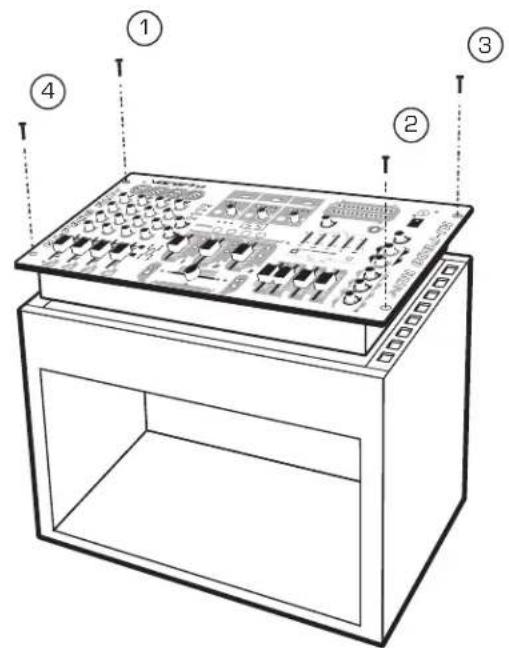
To mount, carefully place the KJ-7808RV in the rack space of your case. The KJ-7808RV takes 4 screws to mount. Make sure holes are aligned evenly. Use an alternating "X" rotation when screwing to ensure even tension and alignment.
[See diagram below]
You will need:
- 19" Rack Case
- 4 Mount Screws
• Phillips-head Screwdriver
Note:
When top mounting, make sure you have at least 2 rack-spaces available.
Getting Connected
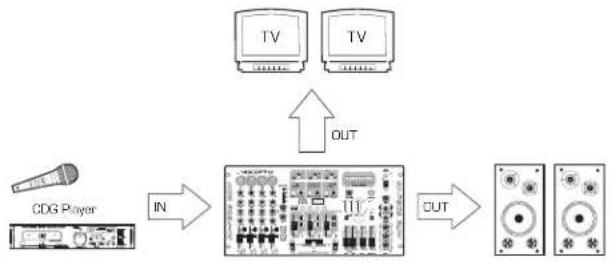
Below we provide some general information to help understand how a professional Karaoke system works and how it is connected.
Signal Path
When connecting your professional Karaoke system, the key is keeping in mind the signal path from the source music into your KJ-7808RV and out to your monitor, amp and speakers. Understanding the signal path before installation will make the process easier and most likely save you lots of time! Below is a diagram illustrating a basic signal path.
flowchart
graph TD
    A["TV"] -->|OUT| B["CDG Player"]
    C["TV"] -->|OUT| B
    D["CDG Player"] -->|IN| E["Block with 117+"]
    E -->|OUT| F["Output Device"]
Since the KJ-7808RV has numerous connectivity options, and there exist many variations in user needs, we illustrate a system where all possible connections are used. Note: This is a reference model only. Reference what you need from the diagram. Some connections may not apply for your system.
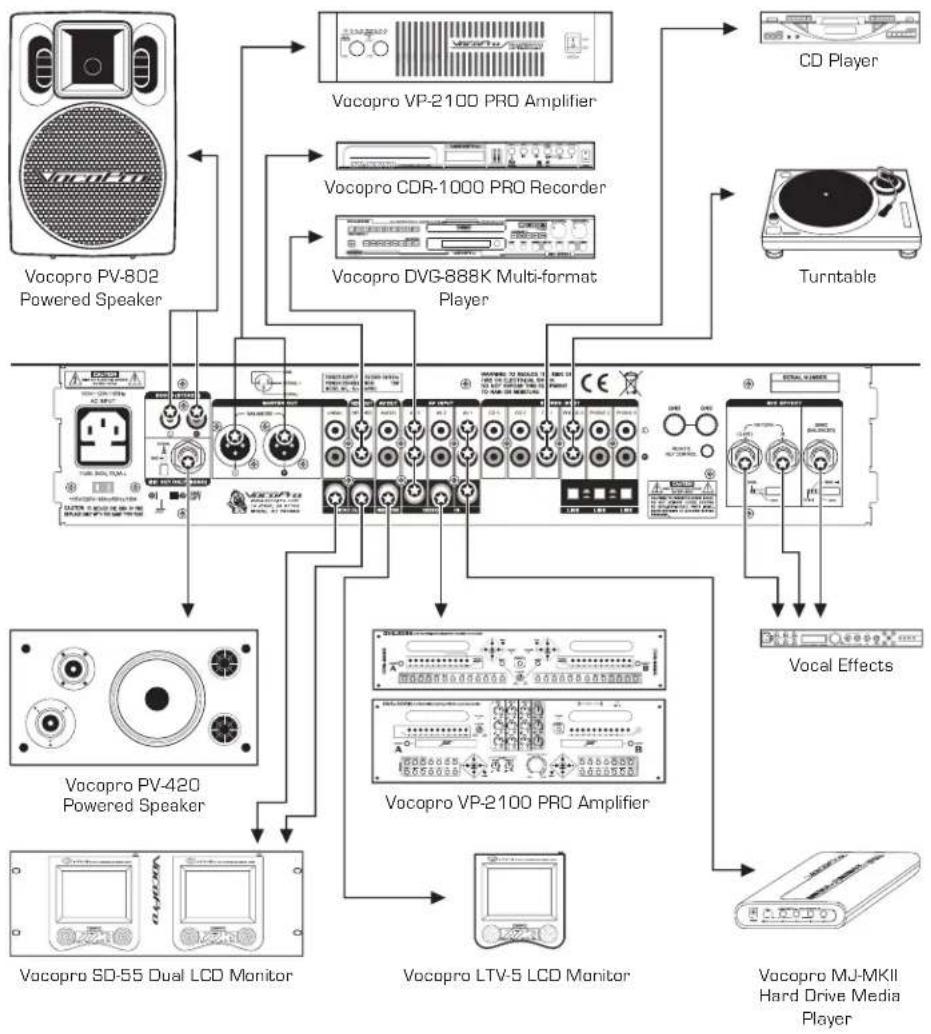
flowchart
graph TD
    A["Vocopro PV-802 Powered Speaker"] --> B["Vocopro VP-2100 PRO Amplifier"]
    A --> C["Vocopro CDR-1000 PRO Recorder"]
    A --> D["Vocopro DVG-888K Multi-format Player"]
    B --> E["CD Player"]
    C --> F["Turntable"]
    D --> E
    D --> F
    G["Vocopro PV-420 Powered Speaker"] --> H["Vocopro SD-55 Dual LCD Monitor"]
    I["Vocopro LP-2100 PRO Amplifier"] --> J["Vocopro SD-55 Dual LCD Monitor"]
    K["Vocopro LTV-5 LCD Monitor"] --> L["Vocopro SD-55 Dual LCD Monitor"]
    M["Vocopro MJ-MKII Hard Drive Media Player"] --> N["Vocopro LJ-MKII Hard Drive Media Player"]
Getting Connected
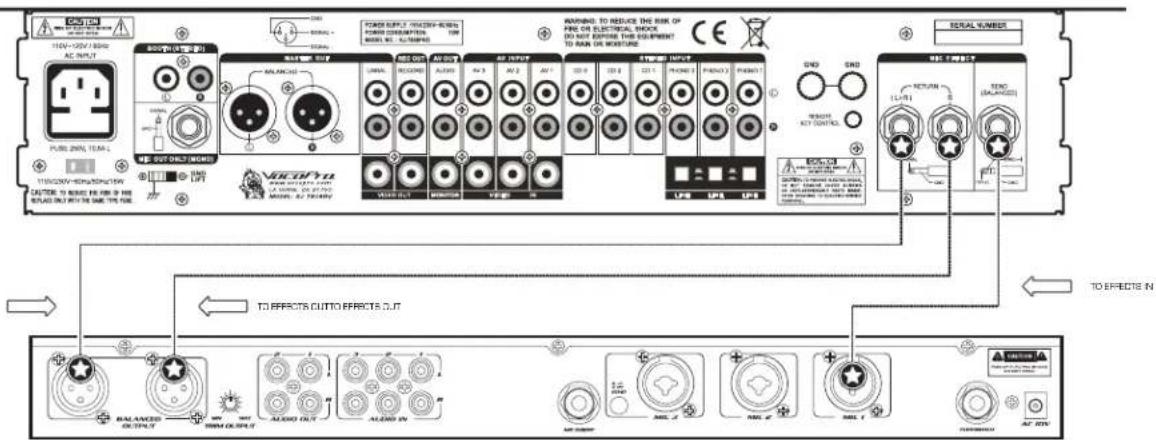
Connecting an External Vocal Effects Unit
The EFFECTS SEND and RETURN on the rear panel is designed to allow you connect a vocal effects unit without sacrificing the original or "clean" microphone vocal signal.
-
Using a Balanced 14 " cable, connect one end to the SEND jack and the other end to the input on the external effects unit.
-
Using two Unbalanced 14 " cables, connect one end of each to the L and R RETURN jacks on the KJ-7808RV and connect the other ends to the L and R outputs on the external effects unit.
NOTE: Depending on the effects unit, it may be necessary to use an adapter ("1/4" to RCA", "1/4" to XLR", etc.) if there are no 1/4" inputs or outputs. Refer to the effects unit's user's manual for additional setup instructions. (Adapters not included)
Front Panel Descriptions and Functions
- XLR or 1/4" MICROPHONE/LINE INPUTS - This combination input can be used to connect either a low impedance (XLR) high impedance [1/4"] microphone or line-level device. The 1/4" INPUT jack is located in the center of the jack housing. The XLR INPUT jack is located within the outer perimeter of the jack housing. Align the 3 pins of your XLR mic cable with the appropriate positioning in the jack.
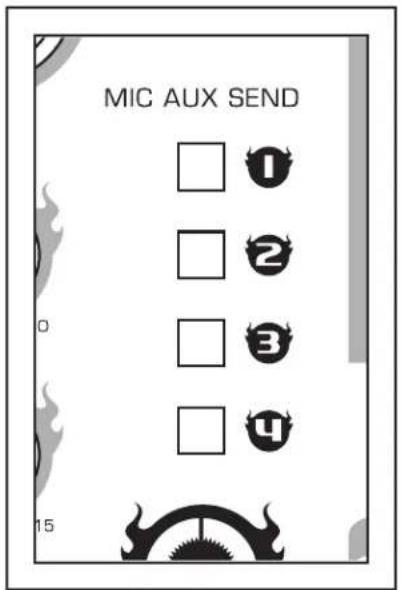
- MIC AUX SEND - Allows you to assign or bypass the effects loop for each mic channel. Press down to assign and up to bypass.
- SEND level control (Mic aux) - Controls the mic level that is output to the effects loop.
- RETURN level control (Mic aux) - Controls the level of the return effects loop signal.
- GAIN - This controls the input level from any device that is connected to the mic/line input jack. To increase GAIN level, turn clockwise. To decrease, turn counter-clockwise.
- TREBLE - This controls the level for high frequency EQ. Use this control to boost or reduce the TREBLE in the audio signal. To increase TREBLE, turn clockwise. To decrease, turn counter-clockwise.
- BASS - This controls the level for low frequency EQ. Use this control to boost or reduce the BASS frequencies in the audio signal.
- MIC DSP control - Controls the amount of DSP effect (Reverb and echo) that is applied to each microphone channel.
- CUE - This monitors the input signal from the mixer board to the headphones. Press CUE on any channel to hear only that channel through the headphones. Note: If you cue more than one channel, each selected channel will be audible as well.
- CHANNEL FADER - The CHANNEL FADER raises or lowers the Mic or line volume of the channel as it is moved up or down.
- KEY - This assigns DIGITAL KEY CONTROL to each applicable channel. If the button is pressed, the DIGITAL KEY CONTROL setting will be applied.
- TALKOVER - The TALKOVER feature allows the KJ/DJ/VJ to make announcements by instantly lowering the music volume when there is mic activity. To use, select "ON." Select "OFF" to disable. When set to "AUTO," it will automatically lower the music volume when mic activity is present, and return music when no mic activity is present. Note: This feature only works with the Mic 1, as that channel is designed to be used by KJs, DJs and VJs. Other channels are not affected by the Talk Over function.
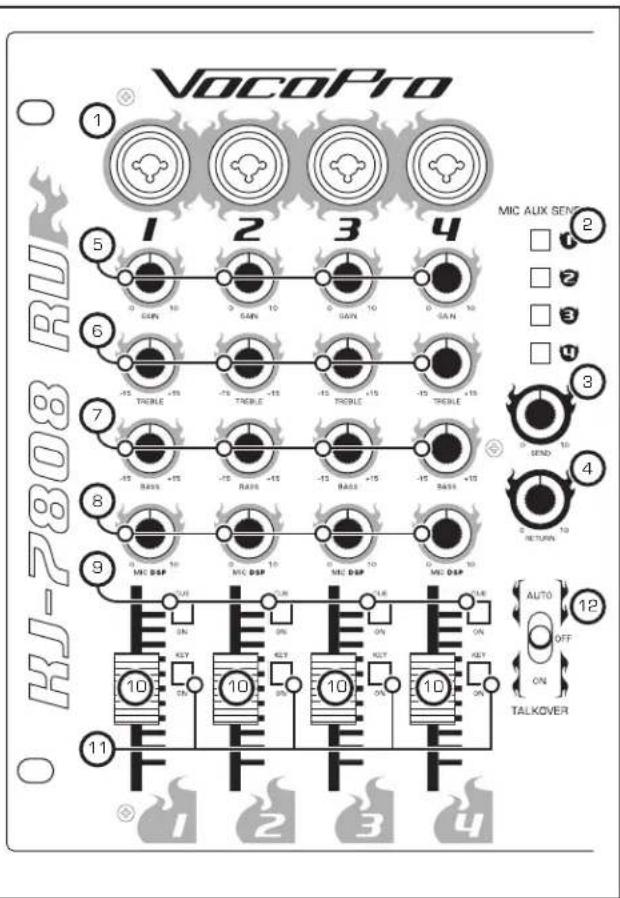
Microphone Panel of the KJ-7808RV
Front Panel Descriptions and Functions
- STEREO CHANNEL SOURCE toggle - This switch will toggle between AV, PHONO/LINE and CD sources connected to that channel. As stated above, if you have both a CD+G player and a turntable connected to the same channel, only that device to which this SOURCE TOGGLE is selected would be audible. Applicable graphics/video signals are output accordingly.
- VIDEO TOGGLE button - Toggles between Crossfader video select mode and manual video select mode.
When in CROSSFADER mode, the X-FADER LED will be lit. This indicates that video output signal is recieved from the two assigned sources in the crossfader ASSIGN selections. You can alternate between any two of the three source inputs by pushing the crossfader either to the far left or far right. As you shift the crossfader in either direction, you will see the respective VIDEO 1, 2, or 3 LEDs above the SOURCE toggles illuminate.
In MANUAL mode, the X-FADER LED is not illuminated, indicating that you can manually shift between the VIDEO LEDs by simply pushing the VIDEO SELECT toggle in the MANUAL postion repeatedly to cycle through VIDEO 1 (red LED), 2 (green LED) and 3 (yellow LED).
- VIDEO-MAIN selector - Selects which channel will be output from the MAIN video output. The LEDs indicate which channel is currently set.
- AV MONITOR selector - Selects which channel will be output from the MONITOR video output. The LEDs indicate which channel is currently set.
- SIGNAL light - This light illuminates blue when a signal is recieved to STEREO CHANNEL 1, 2 or 3.
- GAIN - This knob controls the input level from that channel's selected source. To increase the GAIN, turn clockwise. Note: Adjusting this knob is not synonymous to adjusting the channel fader. The gain knob adjusts the input level from the source, while the channel fader adjusts the output level from the source. For best audio results, adjust GAIN until just before distortion is noticeable.
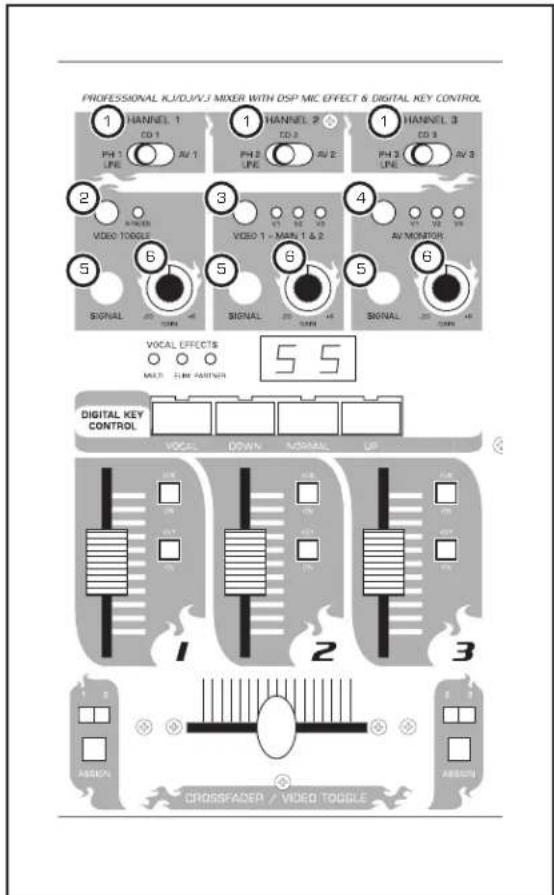
Middle Panel of the KJ-7808RV
Front Panel Descriptions and Functions
7. VOCAL PARTNER/MULTIPLEX FUNCTION &
VOCAL ELMINATOR: VOCAL PARTNER/MULTIPLEX - This feature can alternately remove and activate "guide" or "lead" vocals with compatible Multiplex media. On this type of media, music and lead vocals are panned hard left and right. With the first press of this button, the red MULTIPLEX LED is lit, indicating that lead vocals have been removed, a feature also known as VOCAL CANCEL. The channel with music only is duplicated so it is heard in both left and right channels. Some backing vocals will remain if there is overlap in the way they are recorded. Pressed two more times, this button will illuminate the yellow LED to indicate VOCAL PARTNER and guide vocals will be activated.
VOCAL ELIMINATOR - Press the button until the center, green LED illuminates. With standard recordings, you will be able to partially remove lead vocals to turn any recording into a Karaoke performance or for remixing possibilities. To return to regular disc playback, press this button until all three LEDs are unlit.
- DIGITAL KEY CONTROL - Key Control allows you to modify the original key of a track without changing its tempo to match the natural range of your voice. You can raise or lower your source music a total of 11 steps, or half note increments from its "natural" key. To step DOWN or "flat [b]" the key, press the left button. To step UP or "sharp [#]" the key, press the right button. To revert back to the original/natural key press the middle NORMAL button. Note: Key changes are only cueable when Master cueing.
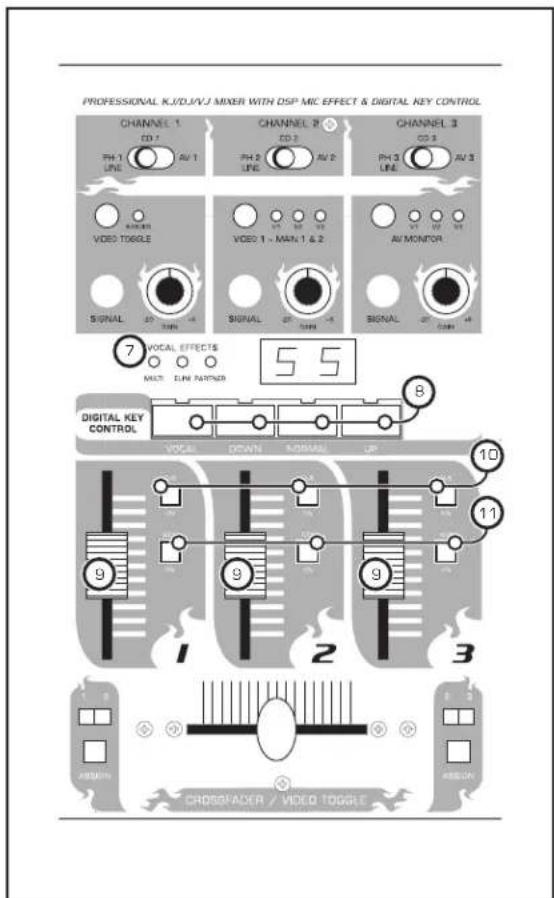
Middle Panel of the KJ-7808RV
- CHANNEL FADER - Each fader raises and lowers the volume of the corresponding STEREO 1, 2 or 3 channel as it is moved up or down.
- CUE - This monitors the input signal from the mix board to the headphones. Press CUE to hear that channel through the headphones. Note: If you cue more than one channel, those channels will be audible as well.
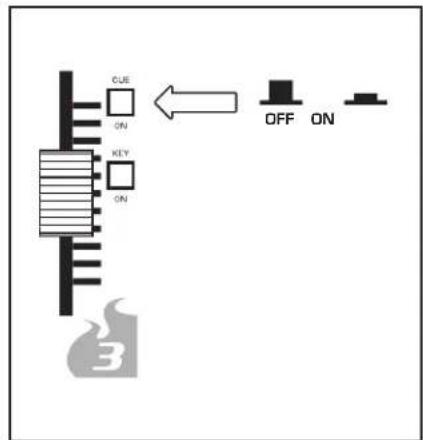
- KEY - This assigns DIGITAL KEY CONTROL to the channel. If the button is pressed, DIGITAL KEY CONTROL will be applied to that channel.
Front Panel Descriptions and Functions
- CROSSFADER/VIDEO TOGGLE - The CROSSFADER allows the user to fade the music out from one source and in to another source, while simultaneously switching the VIDEO TOGGLE between the two associated video inputs. For example, a clean fade from one CDG to another is possible, automatically cueing the lyrics for each disc on your video monitor.
The KJ-7808RV eliminates manual video cueing from the music source switching process. However, you have the choice of cueing manually if you prefer or the situation calls for it. Select either MANUAL or CROSSFADER from the VIDEO SELECT toggle [pg 10,#1]. Note: The crossfader will only fade in/out from the two sources that have been assigned to it.
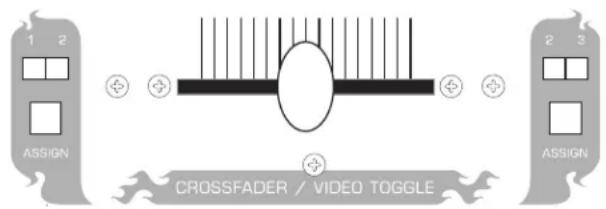
- ASSIGN - These buttons work in conjunction with the CROSSFADER. Assigning channels determines which inputs will be included in the crossfade. For example, to fade between a track from STEREO CHANNEL 1 to a track cued on STEREO CHANNEL 2, the ASSIGN button on the left should be pressed to illuminate the 1 LED, and the right pressed to illuminate the 2 LED. You will hear that one input source "fades" out while the other fades in when the CROSSFADER is moved from left to right.
Note: Make sure your STEREO CHANNEL SOURCE toggle is set properly to the input type you are using (see BACK PANEL for connections).
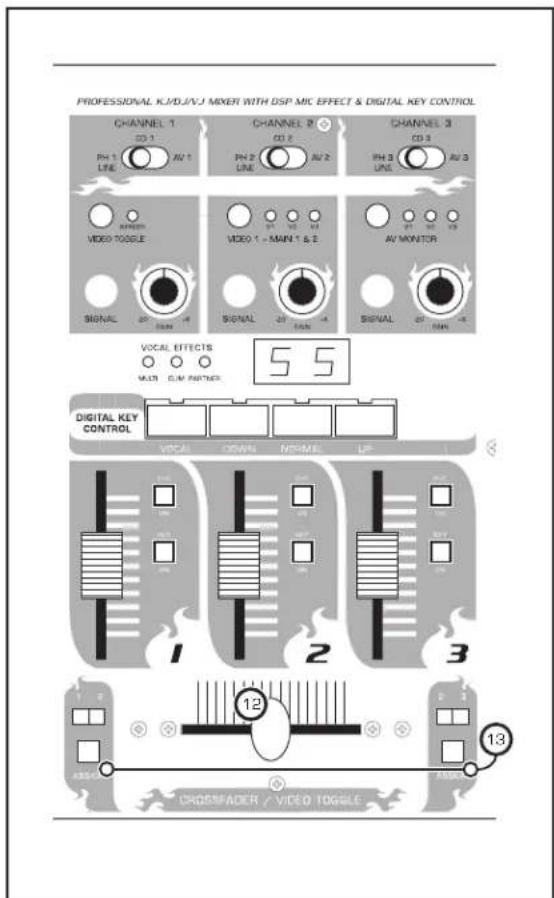
Middle Panel of the KJ-7808RV
Front Panel Descriptions and Functions
-
LED METERS - These meters display system OUTPUT LEVELS. For maximum performance with a clean, undistorted signal, increase source output, as well as the KJ-7808RV's GAIN, CHANNEL FADER and L/R MASTER FADERS until meter peaks in the yellow LED range (-2 to +4). Input should rarely cause meters to peak in the range of the red LEDs for best sound.
-
12V LIGHT JACK (BNC) - This BNC style jack is for connecting a 12V DJ LIGHT, ideal for mixing in dark environments.
-
POWER - This button turns the KJ-7000 Pro ON in the upper position, OFF in lower.
-
AV OUT LEVEL - This level control only affects the RCA jacks from AV OUT on the back panel. MASTER and CHANNEL faders will not effect output levels from these jacks.
-
HEADPHONES jack - This 1/4" jack is for connecting HEADPHONES.
-
MASTER EQUALIZER - This 5-band, Graphic EQ gives you additional control over your tone in the 60 Hz, 250 Hz, 1KHz, 4Khz and 12KHz frequencies with a +/- 12 boost or cut for precise room tuning. Adjust these controls to suit your sound quality preferences.
-
MASTER EQUALIZER ON/OFF - This button must be pressed in to activate the Graphic EQ.
-
CUE/MASTER - This button toggles between CHANNEL Cueing and MASTER Cueing. When CHANNEL cueing, you will only hear channels that have been selected for Cueing. When MASTER Cueing, you will hear MASTER OUTPUT, regardless of which channels have been selected for Cueing. Note: Digital Key Control changes are only audible when MASTER Cueing.
-
MASTER L/R FADERS - These slide controls raise and lower the Left and Right MASTER OUTPUT levels for all stereo channels as they are moved up and down, providing an overall volume level for each channel mixed together. Balance each channel's individual fader control for the best mix.
-
BOOTH FADER - This slide control raises or lowers the output level for the BOOTH OUT located on the back panel.
Note: This slide control is only functional when monitors or a control booth is connected from the corresponding outputs.
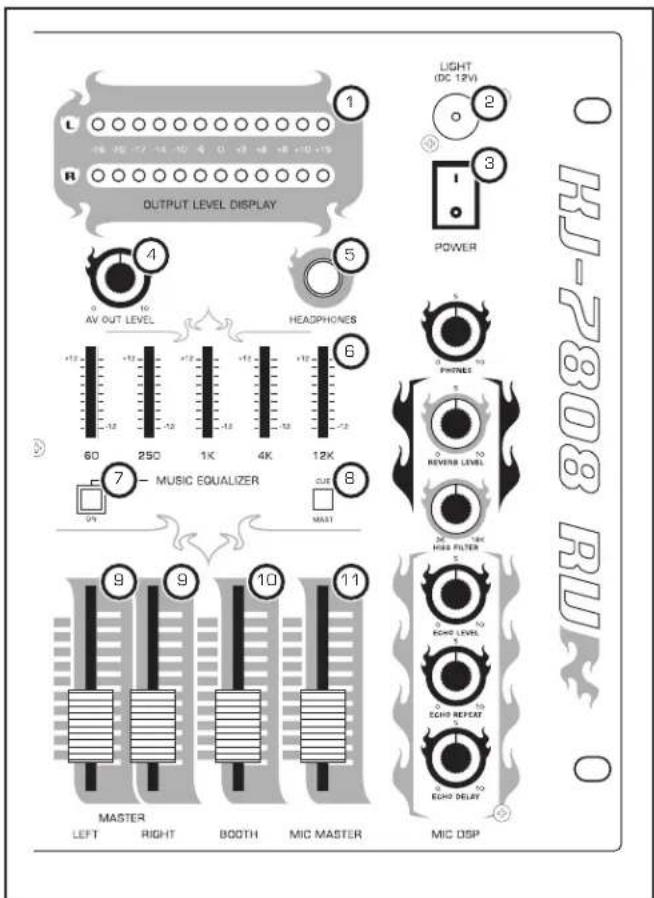
Master Panel of the KJ-7808RV
Front Panel Descriptions and Functions
- MIC MASTER Fader - Controls the overall microphone level of all four microphone channels through the MIC OUT ONLY output (#12, page 15).
- HEADPHONES Level Control - This control adjusts the headphones volume level when cueing. Turn clockwise for more volume and counterclockwise for less volume.
Note: Volume output may be much louder when CHANNEL cueing than MASTER cueing. It is recommended that you adjust this level prior to toggling between cue options. - REVERB LEVEL Control - Controls the overall amount of reverb that is applied to the microphone channels.
NOTE: Make sure the MIC DSP control for each mic channel is turned up enough to hear the reverb on that channel. - HISS FILTER - Cuts the amount of hiss or sibilance [the 's" sound from vocals] that is in the mix. Turn clockwise to increase the filter strength and counter-clockwise to decrease it.
NOTE: The higher the filter strength, the less hiss there will be. - ECHO LEVEL - This control serves as a master LEVEL for the ECHO settings. If ECHO is assigned to a MIC channel, this knob will control how much ECHO is applied before individual adjustments. Each channel-specific echo control and should be used in unison with this master level control.
- ECHO REPEAT Control - This control adjusts the number of ECHO repetitions before the effect "decays." In other words, as more REPEAT is applied, more echo intervals will be heard before the ECHO fades out.
- ECHO DELAY Control - This control adjusts length of each time between ECHO intervals. As more DELAY is applied, there will be the illusion of more "space" between the starting and ending point of each echo.
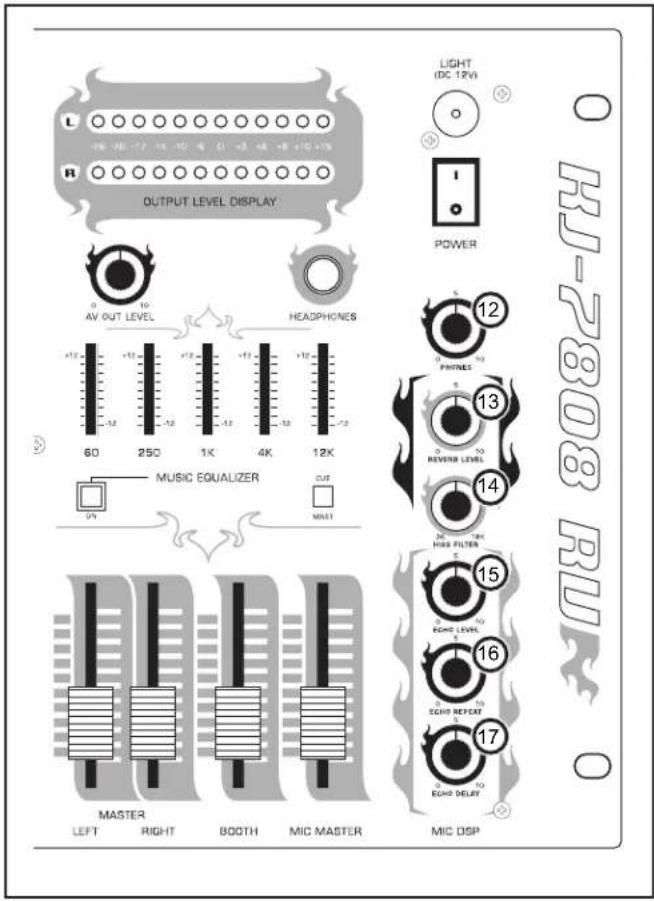
Master Panel of the KJ-7808RV
Rear Panel Descriptions and Functions
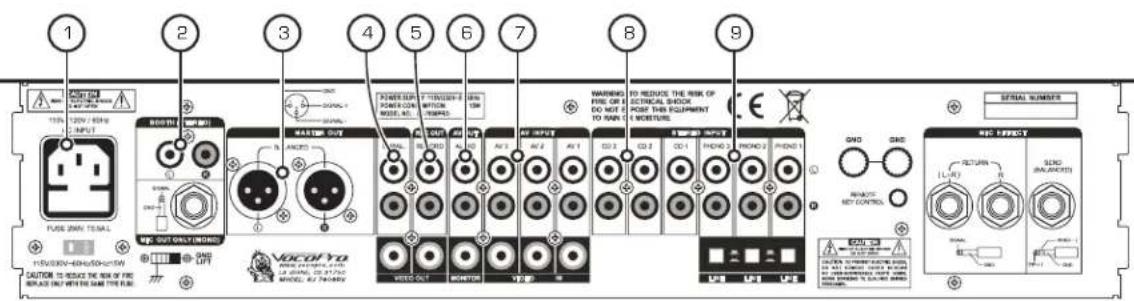
- AC INPUT - This is the terminal for the AC power cable. Carefully insert the AC power cable here. The AC power cable should fit firm into housing.
- BOOTH OUT - These RCA jacks are for sending audio to BOOTH/MONITOR speakers. The output level to the BOOTH/MONITOR speakers is controlled via the BOOTH fader. Connect an appropriate cable from these jacks to your BOOTH/MONITOR speakers. Note: If your Booth/Monitor speakers do not have a built-in amplifier, you will need to connect them to a dedicated amplifier to power them.
- BALANCED (XLR) MASTER OUT - These BALANCED MASTER OUT jacks are for balanced XLR cables. These jacks provide connection to a power amplifier. Note: If your amplifier has 1/4" input jacks, you will need 1/4" to XLR cables or adaptors. Some amplifiers offer multiple connection options, including RCA "unbalanced" input. See number 4.
- UNBALANCED (RCA) MASTER OUT - These UNBALANCED MASTER OUT jacks are for standard RCA cables. These jacks provide connection to a power amplifier as well. Note: If your amplifier has 1/4" input jacks, you will need 1/4" to RCA cables or adaptors.
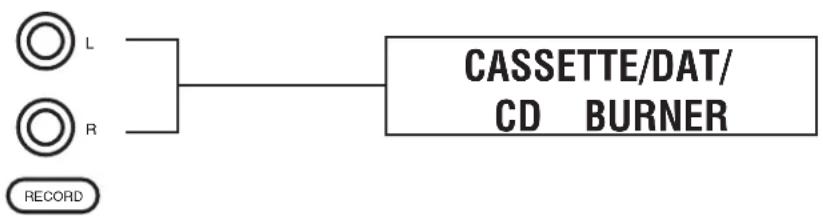
- RECORD OUT - These L/R RCA jacks jacks bypass the MASTER OUTS for connection to any CD burner, cassette, or DAT recorder to record your mix. Ideal for the mobile DJ/KJ that wants to offer their customer a recording at the end of their performance.
- AV OUT - In addition to the MASTER and BOOTH outs, this mixed RCA L/R output gives you an additional option for connection of your mix to external components. Use in conjunction with the AV OUT LEVEL on the Master Panel to control the signal level.
- AV INPUT 1, 2, 3 (audio) - These STEREO INPUT jacks are for connecting external components to the KJ-7808RV. You can connect any L/R RCA cables to these inputs, but there are dedicated inputs for CD or PHONO/LINE to provide optimal sound quality. Adjust the STEREO CHANNEL SOURCE toggle on the middle panel of the KJ-7808RV accordingly.
- CD INPUT 1, 2, 3 - Use these dedicated inputs for CD players as source music with RCA L/R cables. Adjust the STEREO CHANNEL SOURCE toggle on the middle panel of the KJ-7808RV accordingly.
- PHONO 1, 2, 3/LINE INPUT - Use these STEREO INPUT jacks to connect turntables using L/R RCA. With PHONO 1 and 2, you also have the option of selecting line input, using #9 in conjunction with these jacks. Adjust the STEREO CHANNEL SOURCE toggle on the middle panel of the KJ-7808RV accordingly.
Rear Panel Descriptions and Functions
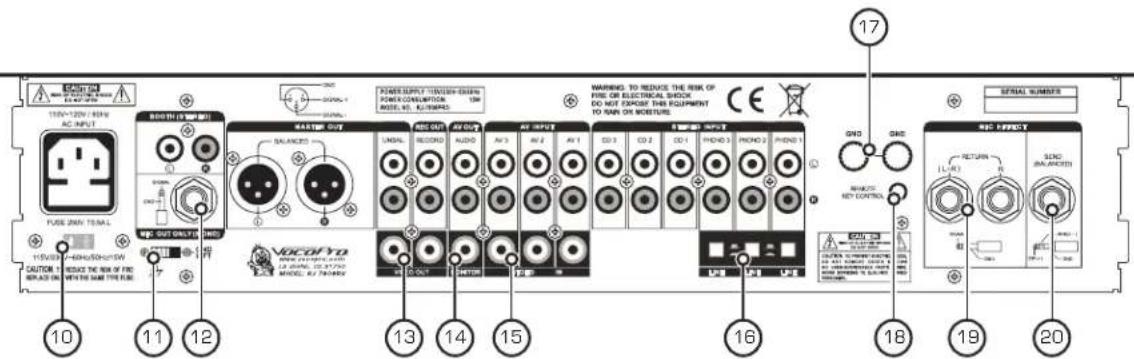
- VOLTAGE SELECTOR - This switch can change the voltage from 115V to 230V. Before your KJ-7808RV is shipped from the factory, the switch is set to 115V. If you live in an area that has different voltage requirements (230-240V), you MUST set it to 230V.
- GROUND LIFT Switch - A "ground loop" is a phenomenon where an unintended connection to ground is made through an interfering electrical conductor, causing what is known as "60Hz hum." A GROUND LIFT switch adds a resistor between the ground and cable shield when switched on, effectively ridding the system of hum.
- MIC OUT ONLY (MONO) Jack - This output channel is dedicated to microphone vocals only. Connect to a monitor using a balanced 14 " cable.
- VIDEO OUT (main) - These jacks send graphics from input source player video output to video display device(s) such as TVs, TFTs and Monitors. Connect video cables from these VIDEO OUT jacks to the VIDEO IN jacks on your video display device(s).
- VIDEO OUT (monitor) - This jack sends a separate video signal for use with a monitor so the KJ, DJ, or VJ can cue up songs on the other AV inputs while one is playing.
- VIDEO IN 1, 2, 3 - These jacks allow the video component of CD+G, DVD, VCD and LD players to be connected to the KJ-7808RV. Connect video cables from the VIDEO OUT jacks on your player[s] to these VIDEO IN jacks.
- PHONO/LINE Switches - When inputting turntables to the PHONO/LINE 1 or 2 STEREO INPUT jacks, use the accompanying switch. Select the out position to toggle to PHONO and the in position to toggle to LINE input type.
- GROUND TERMINALS - These TERMINALS are for connecting ground wires. If you are experiencing line noise, attach wire from here to your other devices or similar suitable surface.
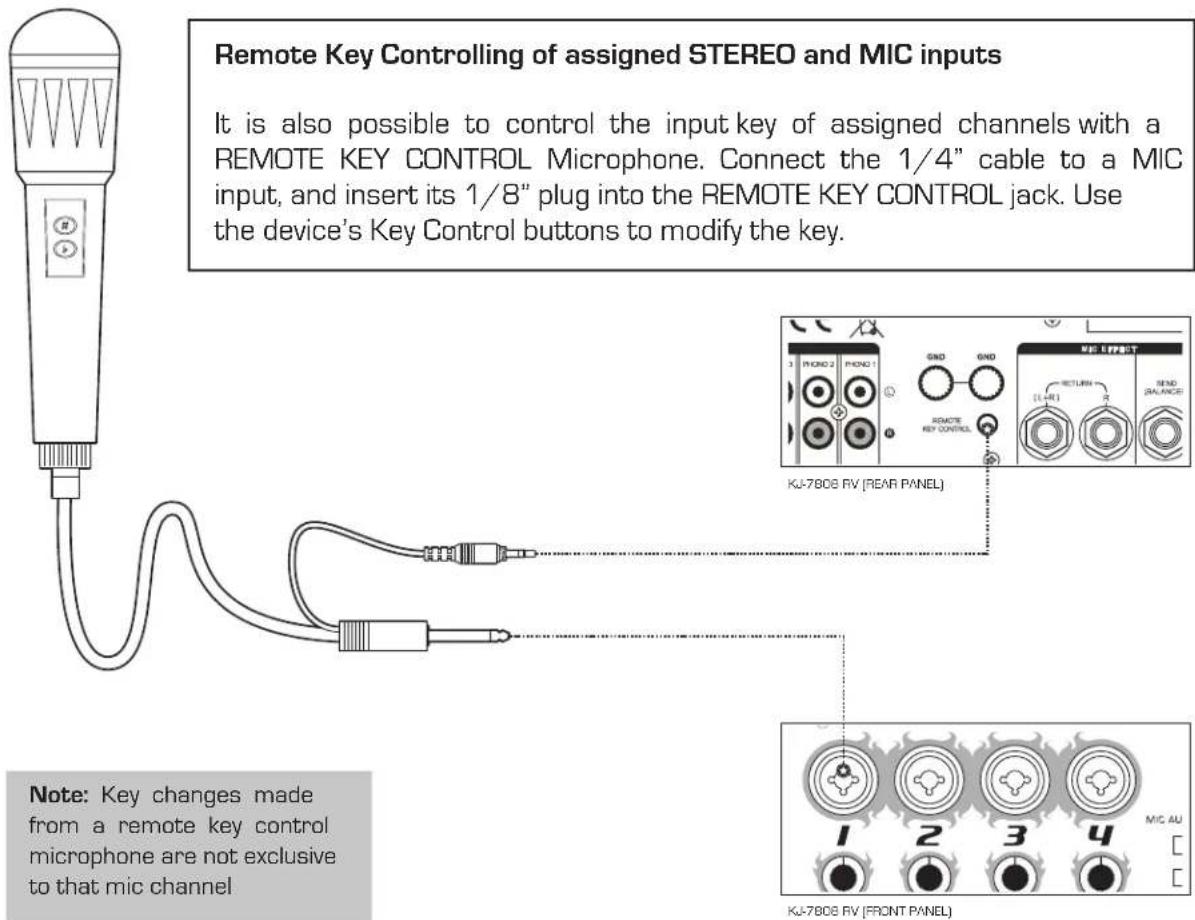
- REMOTE KEY CONTROL - This 1/8" jack is for connecting a REMOTE KEY CONTROL cable. Remote Key Control allows you to make key changes at a distance from the Digital Key Controller on the KJ-7808RV.
- MIC EFFECT RETURN (effect loop) - Connect to the L/R output channels [14] on a mic effects unit using unbalanced 14 " cables.
- MIC EFFECT SEND (effect loop) - Connect the 14 " input on a mic effects unit using a balanced 14 " cable. NOTE: You must use a BALANCED 14 " cable when connecting to the MIC EFFECT SEND jack.
Operations
Setting the Main Video Output Channel
The KJ-7808RV allows up to three A/V devices to be connected at one time. There are two ways to select which A/V channel will be output to the main video outputs: manually or automatically using the crossfader.
Automatically
To set the KJ-7808RV to automatically switch video when using the crossfader, press the VIDEO TOGGLE button so that the X-FADER LED lights up.
Manually
- When selecting video manually, make sure that he X-FADER LED is not lit. If it is lit, press the VIDEO TOGGLE button.
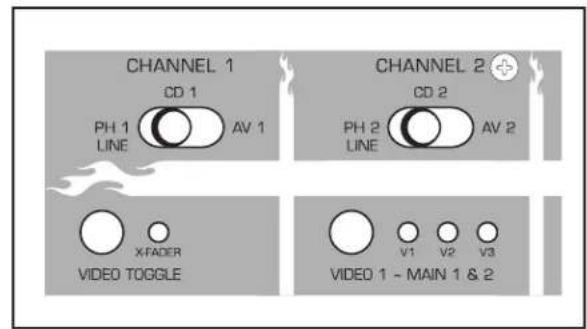
- Press the VIDEO 1 button until the correct AV channel LED is lit.
Setting the AV Monitor Output Channel
The KJ-7808RV has a second video output (MONITOR) that allows you to view the video from another AV input and cue up songs while a different AV input is set to the main video output.
- Press the AV MONITOR button until the correct AV channel LED is lit.
![ECTS ○ ARTNER 55 b DOWN NORMAL UP flat [1/2 step down] natural [Reset to "Normal" key] sharp [1/2 step up]](/content/2026/05/972760/images/5036b2c434e8fe0f4bddda4cb925c8b51bef609179c96902cff9852b7ba104b0.jpg)
Using Digital Key Control
Use the Digital Key Controller to obtain the musical key that matches the natural range of your voice. You can increase or decrease the original or "NORMAL" note by 6 steps to cover the total musical range of 12 different keys. The Digital Key Controller indicator displays either 0 for NORMAL key or ± 6 on the DOWN and UP sides. To step UP or "# [sharp]", press the right button. To step DOWN, or "b [flat]", press the left button. To revert back to the original key, press the NORMAL button.
Operations
Assigning Digital Key Control to MIC and STEREO Channels
You can assign the Key Control to any channel you desire. To ASSIGN, you simply press the KEY button located to the right of the fader on each channel you want the key changes to be applied to (both MIC and STEREO inputs) and the key changes will take immediate effect. To REMOVE a key change from a channel, simply depress the KEY button from that channel, and it is removed.
Operations
Customizing Digital Echo settings [See Figure 1] When using Digital Echo, you can customize the effect by adjusting the ECHO, REPEAT and DELAY controls. First set the ECHO level control to 5. Then customize the effect with the REPEAT and DELAY level controls. REPEAT adjusts the interval repetition of the echo effect. As more REPEAT is applied, more echo intervals will be heard when using it and vice versa. DELAY adjusts length of each interval. As more DELAY is applied, there will be more "space" between the starting and ending point of each echo. When the Digital Echo effect is customized, adjust the ECHO level control as you would a master level control.
Setting the Digital Reverb (Figure 2)
The KJ-7808RV allows you to set the amount of reverb that is present in the microphone signal. Turn the REVERB LEVEL control clockwise to increase the amount of reverb and counter-clockwise to decrease it.
Setting the Overall DSP Effect Level (Figure 3)
Each mic channel has a DSP EFFECT control which allows you to adjust how much of the DSP effects (echo and reverb) is present in each channel. Turn the DSP EFFECT control clockwise to increase the effect and counter-clockwise to decrease it.
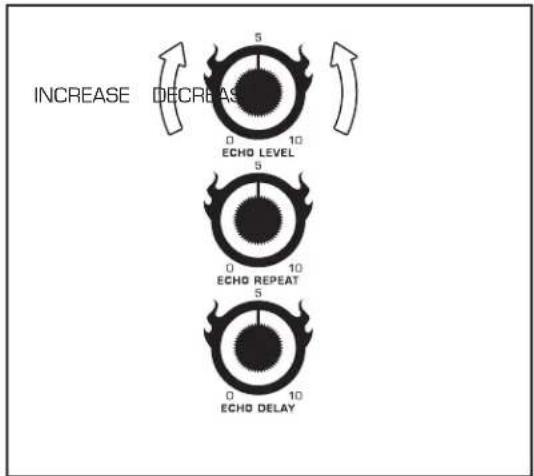
(Figure 1)
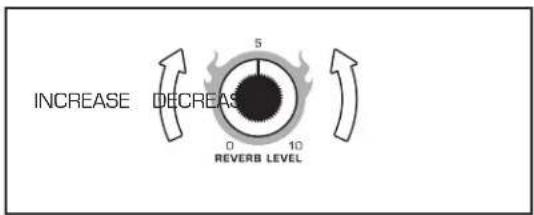
(Figure 2)
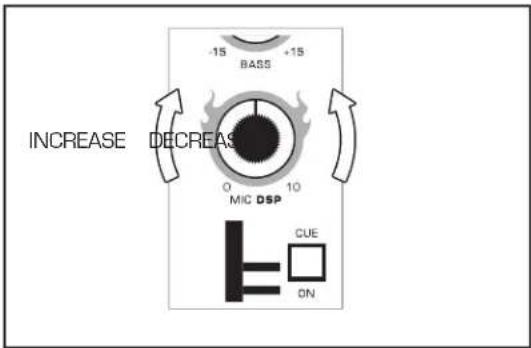
(Figure 3)
Operations
Vocal Partner/Vocal Eliminator/Multiplex features
The VOCAL button can switch between three modes:
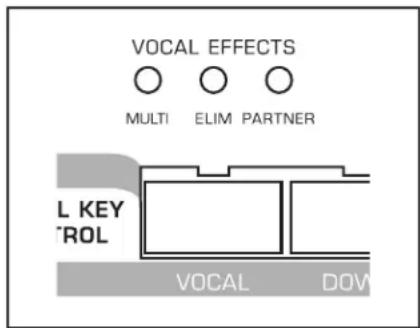
- MULTIPLEX - With Multiplex media, music and lead vocals are panned hard left and right. With the first press of this button, the red MULTIPLEX LED is lit, indicating that lead vocals have been removed. This feature is also known as VOCAL CANCEL. The channel with music only is duplicated so it is heard in both left and right channels. Some backing vocals will remain if there is overlap in the way they are recorded.
- VOCAL PARTNER - Pressed two more times, the VOCAL button will illuminate the yellow LED to indicate VOCAL
PARTNER and “guide” or “lead” vocals will be activated. In this mode, the vocal layer will be cancelled only as long there is Mic activity present. When there is no Mic/Line activity present, the vocal layer appears for continuity. In other words, while you are singing, the vocal layer is cancelled, and when you are not singing, the vocal layer is output. This mode is commonly used when a solo singer wants to simulate a duet, with the KJ-7808RV as the “partner.”
- VOCAL ELIMINATOR - Press the VOCAL button until the center, green LED illuminates. With standard recordings, you will be able to partially remove lead vocals to turn any recording into a Karaoke performance or for remixing possibilities. It is not possible for such an effect to entirely remove vocals from a recording because it operates by selecting certain frequencies that best represent the vocal range in the center of a mix. Naturally, this removes other tones in these frequencies with it. To return to regular disc playback, press this button until all three LEDs are unlit.
Talk Over
Making an announcement during playback
To make an announcement during music playback, you most likely will want the music at a low enough volume so that you can be heard over the music clearly. To do this, you use the TALK OVER function[pg 9, #9] when the toggle is set to ON, the music volume is lowered considerably to allow for the announcement. When done with the announcement, you switch the toggle back to OFF to return the music back to the level it was originally. If you make several announcements, and want to avoid Talk Over On/Off switching, use the AUTO mode. When in AUTO mode, the music volume level will automatically lower whenever there is mic activity during an announcement and return when the announcement is over.
Note: Talk Over only works with Mic 1. If you try to use it when speaking into Mic 2, 3 or 4, it will not work. Mic 1 is reserved as the KJ/DJ Mic.
Operations
Graphic Equalizer
Fine tuning music for precise room tuning
To fine tune the sound of your musical output, we included the 5-Band Graphic EQ. This EQ makes adjusting the warmth or sharpness of your music a breeze. Frequency range settings are: 60, 250, 1k, 4k and 12k. The lows are 60 and 250, the mid is 1k and the highs are 4k and 12k. Below we have provided some common general settings.
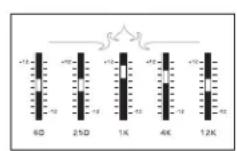
Clean Vocals
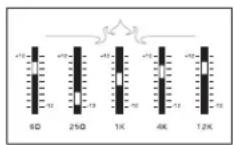
Correction
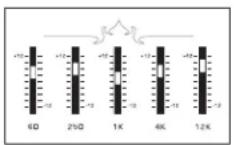
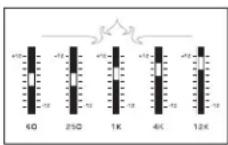
(Recording) (Playing)
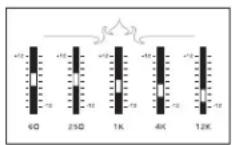
Reducing Tape HissSlight Power Boc
Channel Cueing
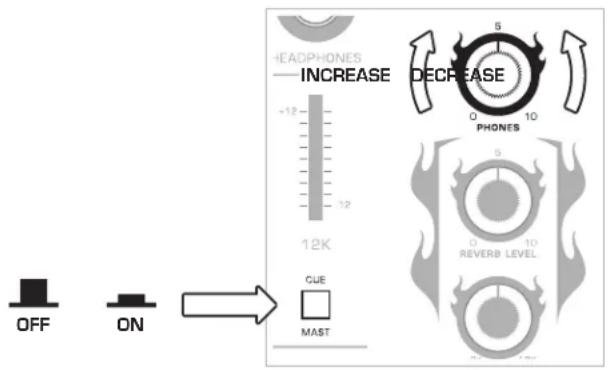
Channel cueing monitors the input signal(s) from the mix board to the headphones. When channel cueing, you can select as many channels as you like to cue to headphones. To CHANNEL CUE, first make sure the MASTER/CUE SELECTOR button is set to CUE. Then press the CUE button on each channel that you want cued to the headphones. To REMOVE a channel from being cued, simply depress that channels CUE button. To INCREASE or DECREASE the volume level to headphones, use the CUE LEVEL control located next to the Cue/Master button. Note: It is recommended to only cue necessary channels, as too many cued channels can be difficult to discern from one another. Also when channel cueing, any Digital Key changes in effect will not be audible to the headphones.
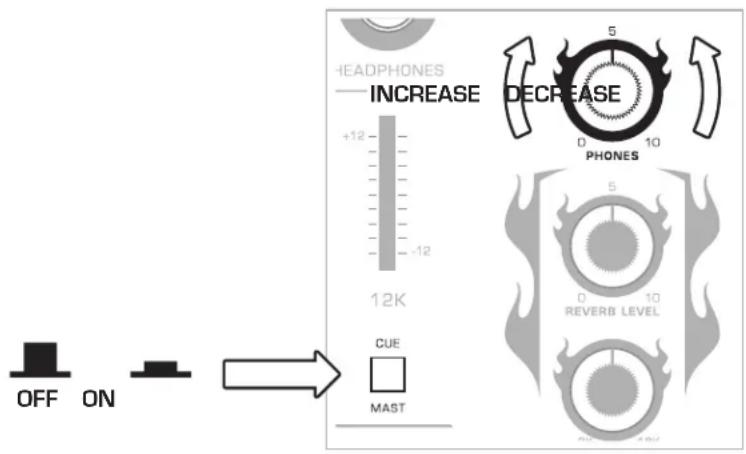
Operations
Setting the Mic Aux Send for Each Mic Channel
When running a vocal effects unit through the effects loop, you can select which mic channels will be assigned to the effects unit and which ones will bypass it using the MIC AUX SEND button. Each MIC AUX SEND button has a number next to it that corresponds with the mic channel that it will Assign/Bypass.
- To assign a channel to the effects loop, press the MIC AUX SEND button for that channel down
- To bypass the effects loop, depress the MIC AUX SEND button for that channel.
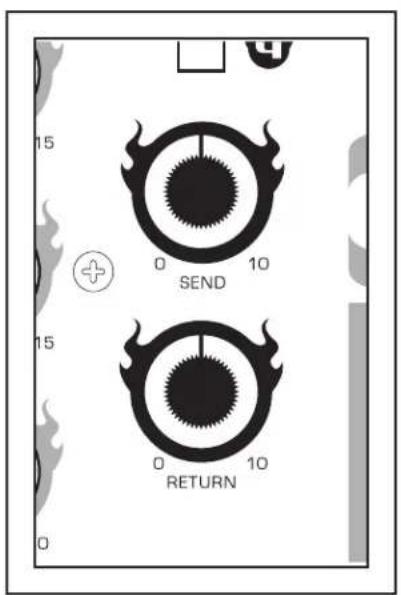
Adjusting the Effects Loop Send and Return Levels
The KJ-7808RV allows you to adjust the Send and Return levels of the effects loop.
SEND - is the clean microphone signal that goes into the effects unit.
RETURN - Is the microphone signal with effects applied to it.
- Turn each control clockwise to increase and counter-clockwise to decrease
Operations
Master Cueing
Master Cueing will cue the MASTER OUTPUT to the headphones. This is commonly used to isolate the audio signal to the headphones. Master cueing makes it possible to practice when "audible" music is not permitted i.e. late night practicing at home. To MASTER CUE, make sure the CUE/MASTER button is set to MASTER and adjust the CUE LEVEL control to a desired volume level. Note: When master cueing, pressing any channels individual Cue button will not affect output to the headphones as those buttons only work when channel cueing.
Crossfading between sources
The crossfader allows you to "mix" or crossfade between two channels while toggling between corresponding video outputs. To do this, you need to first ASSIGN the two channels to your CROSSFADER. On each side of the CROSSFADER, there is an ASSIGN button. The LEFT ASSIGN button can assign either CHANNEL 1 or 2, while the RIGHT ASSIGN button can assign either CHANNEL 2 or 3. Once you have your desired channels assigned, move their respective CHANNEL FADERS to an audible level, and slide the CROSSFADER back and forth to crossfade.
flowchart
graph TD
    A["1 2"] --> B["Switch"]
    C["2 3"] --> D["Switch"]
    B --> E["Switch"]
    D --> F["Switch"]
    E --> G["Crossfader / Video Toggle"]
    F --> G
    style G fill:#f9f,stroke:#333,stroke-width:2px
Note: If you assign channel 2 on both sides, the crossfader will not crossfade.
Recording a Performance or Mix
To RECORD a mix or performance, connect a line-level patch cable from the RECORD OUT to the AUDIO IN of a recording device.
flowchart
graph LR
    A["L"] --> C["CASSETTE/DAT/<br>CD BURNER"]
    B["R"] --> C
    D["RECORD"] --> C
Troubleshooting
PROBLEM POSSIBLE CAUSES(S) SOLUTION(S)
| No Sound Coming From Selected Music Source | Source toggle switch is set incorrectly. | Change source toggle to the correct setting. |
| Gain or master levels are turned down. | Raise gain and master levels to an appropriate level. | |
| External device(s) are either not connected or not working properly. | Check external device(s) connection and viability. | |
| No Video Output From Display Device | Player source is not properly connected to the KJ-7808RV video in, or the KJ-7808RV out to the display monitor. | Check all video connections in from the player and to the video monitor out from the KJ-7808RV. |
| Video cable(s) are not properly connected. | Reconnect cables firmly to correct video jacks. | |
| Disk medium is not formatted for video. | Play a video formatted disk (ie. CD+G, VCD, LD or DVD). | |
| Video Cancel/partner Features Are Not Working | Disk is not multiplexed. | Insert multiplexed disk. |
| Talk-over Feature Lowers Microphone Volume With Music Volume | Microphone being used is not plugged into mic channel 1. | Connect microphone to mic channel 1. |
| Crossfader Isn't Fading Between Channels | Active source(s) are not assigned to the crossfader. | Assign active sources to the crossfader. |
Troubleshooting
PROBLEM POSSIBLE CAUSES(S) SOLUTION(S)
| No Channels Or Volume Being Cued To Headphones | Cue buttons for channel(s) are not selected. | Press cue button on channel(s) that you want cued. |
| Cue level is turned down too low. | Increase cue volume level. | |
| Cue/master button is set to “master”, preventing selectable channel cueing. | Press cue/master button in for “cue” setting. | |
| No Audio Going Routed Through Insert Channels | Cable(s) connected are not designed for “insert” use. | Replace cables with proper insert cables. |
| No Echo Applied To Audio | Echo master level control is turned down. | Turn echo master level control up. |
| Echo on/off button is set to off. | Set echo on/off button to on. | |
| Channel specific echo level control is turned down. | Turn channel specific echo level control up. | |
| High-pitched Squealing Occurs When Using The Microphone | Microphone is pointed at, or too close to, the speakers. | Move microphone away from speakers. |
| Treble level(s) are too high on microphone channel(s). | Decrease treble level(s) on microphone level(s). |
Specifications
Inputs Sensitivity:
Mic 1, 2, 3, 4 Balanced XLR Jack 1.5mV/1K ohms
CD/Line RCA Jack 150mV/10K ohms
Phono RCA Jack 3.0mV/47K ohms
Outputs:
Master Output ....XLR Jack/Balance 1.5V/600 ohms ....RCA Jack/Unbalance 1.5V/600 ohms
Booth Output 1/4" Jack/Unbalance 1.5V/600 ohms
Record Output ...... RCA Jack/Unbalance 1.5V/600 ohms
Headphones 400mV/32
Maximum Output +20dBV 8.5V RMS, 0dBV=1V
Tone Controls:
Treble +/-15dB (10KHz)
Bass +/-15dB (100Hz)
Signal to noise Ratio:
Mic ....>78dB (Below Max.)
CD/Line >85dB (Below Max.)
Phono ....>75dB (Below Max.)
Graphic Equalizer +/-12dB @ 60, 250, 1K, 4K, 12KHz
Total Harmonic Distortion ....<0.05%
Frequency Response 20Hz\~20KHz +/-1dB
Key 6 steps up & down
Net Weight 10.5 lbs.
Power Consumption 15W
DSP Reverb
Sample rate 40 KHz
DSP Data Length 24 Bits
THD -85 dBu
S/N Ratio 89dB (90dB A-Weighting)
Echo Delay 40mS \~ 242mS
Hiss filter 3KHz \~ 18KHz

natural_image
Stylized illustration of a lion wearing a crown and holding a fruit (no text or symbols)KJ-7808RV MANUAL ©2006 VOCOPRO
WWW.VOCOPRO.COM
- OWNER'S MANUAL
- VocoPro
- Tech Support
- FOR YOUR RECORDS
- Table of Contents
- Before Getting Started
- Getting Started
- Front Panel Descriptions and Functions
- Rear Panel Description and Functions
- CAUTION
- CAUTION:
- READ THIS BEFORE OPERATING YOUR UNIT
- NOTE:
- Safety Instructions
- CAUTION RISK OF SHOCK
- Explanation of Graphical Symbols
- WARNING
- KJ-7808RV Features
- Mounting
- Getting Connected
- Signal Path
- Connecting an External Vocal Effects Unit
- VOCAL PARTNER/MULTIPLEX FUNCTION &
- Rear Panel Descriptions and Functions
- Operations
- Setting the Main Video Output Channel
- Automatically
- Manually
- Setting the AV Monitor Output Channel
- Using Digital Key Control
- Assigning Digital Key Control to MIC and STEREO Channels
- Setting the Digital Reverb (Figure 2)
- Setting the Overall DSP Effect Level (Figure 3)
- Vocal Partner/Vocal Eliminator/Multiplex features
- Talk Over
- Graphic Equalizer
- Channel Cueing
- Setting the Mic Aux Send for Each Mic Channel
- Adjusting the Effects Loop Send and Return Levels
- Master Cueing
- Crossfading between sources
- Recording a Performance or Mix
- Troubleshooting
- Specifications
- Inputs Sensitivity:
- Outputs:
- Tone Controls:
- Signal to noise Ratio:
- DSP Reverb
Brand : Vocopro
Model : KJM-7808
Category : Karaoke