DAX-9900RV - Karaoke Vocopro - Free user manual and instructions
Find the device manual for free DAX-9900RV Vocopro in PDF.


User questions about DAX-9900RV Vocopro
0 question about this device. Answer the ones you know or ask your own.
Ask a new question about this device
Download the instructions for your Karaoke in PDF format for free! Find your manual DAX-9900RV - Vocopro and take your electronic device back in hand. On this page are published all the documents necessary for the use of your device. DAX-9900RV by Vocopro.
USER MANUAL DAX-9900RV Vocopro
text_image
VocoPro Effect Studio Grade DSP Key Controller BODW Professional Studio Grade Key Control Mixing Amplifier with Soul Enhancer and DSP Reverb Mic Music — Mic Effects Vol. — Echo Reverb Master Vol. Master Vol. Power Base Gain PD-Freq Tender — Mic Freq. Cut Balance Mic Vol. Mic Input 1 2 3DAX-9900RV
owner's manual
Table of Contents
Welcome. 3
Listening for a Lifetime 4
Safety Information. 5
FCC Information 6
Getting connected. 7
Operations. 14
Descriptions 17
Setup 22
Specifications 24
Commonly Asked Questions 25
Welcome
Welcome
And thank you for purchasing the DAX-9900RV from VocoPro, your ultimate choice in Karaoke entertainment! With years of experience in the music entertainment business, VocoPro is a leading manufacturer of Karaoke equipment, and has been providing patrons of bars, churches, schools, clubs and individual consumers the opportunity to sound like a star with full-scale club models, in-home systems and mobile units. All our products offer solid performance and sound reliability, and to reinforce our commitment to customer satisfaction, we have customer service and technical support professionals ready to assist you with your needs. We have provided some contact information for you below.
VocoPro
1728 Curtiss Court
La Verne, CA 91750
Toll Free: 800-678-5348
TEL: 909-593-8893
FAX: 909-593-8890
VocoPro Company Email Directory
Customer Service & General Information
info@vocopro.com
Tech Support
techsupport@vocopro.com
Remember Our Website
Be sure to visit the VocoPro website www.vocopro.com for the latest information on new products, packages and promos. And while you're there don't forget to check out our Club VocoPro for Karaoke news and events, chat rooms, club directories and even a KJ Service directory!
We look forward to hearing you sound like a PRO, with VocoPro, the singer's ultimate choice.
FOR YOUR RECORDS
Please record the model number and serial number below, for easy reference, in case of loss or theft. These numbers are located on the rear panel of the unit. Space is also provided for other relevant information
Model Number
Serial Number
Date of Purchase
Place of Purchase
Listening for a Lifetime
Selecting fine audio equipment such as the unit you've just purchased is only the start of your musical enjoyment. Now it's time to consider how you can maximize the fun and excitement your equipment offers. VocoPro and the Electronic Industries Association's Consumer Electronics Group want you to get the most out of your equipment by playing it at a safe level. One that lets the sound come through loud and clear without annoying blaring or distortion and, most importantly, without affecting your sensitive hearing.
Sound can be deceiving. Over time your hearing “comfort level” adapts to a higher volum sound. So what sounds “normal” can actually be loud and harmful to your hearing. Guard against this by setting your equipment at a safe level BEFORE your hearing adapts.
To establish a safe level:
- Start your volume control at a low setting.
- Slowly increase the sound until you can hear it comfortably and clearly, and without distortion.
Once you have established a comfortable sound level:
- Set the dial and leave it there.
- Pay attention to the different levels in various recordings.
Taking a minute to do this now will help to prevent hearing damage or loss in the future. After all, we want you listening for a lifetime.
Used wisely, your new sound equipment will provide a lifetime of fun and enjoyment. Since hearing damage from loud noise is often undetectable until it is too late, this manufacturer and the Electronic Industries Association's Consumer Electronics Group recommend you avoid prolonged exposure to excessive noise. This list of sound levels is included for your protection.
Some common decibel ranges:
| Level | Example |
| 30 | Quiet library, Soft whispers |
| 40 | Living room, Refrigerator, Bedroom away from traffic |
| 50 | Light traffic, Normal Conversation |
| 60 | Air Conditioner at 20 ft., Sewing machine |
| 70 | Vacuum cleaner, Hair dryer, Noisy Restaurant |
| 80 | Average city traffic, Garbage disposals, Alarm clock at 2 ft. |
The following noises can be dangerous under constant exposure:
| Level | Example |
| 90 | Subway, Motorcycle, Truck traffic, Lawn Mower |
| 100 | Garbage truck, Chainsaw, Pneumatics drill |
| 120 | Rock band concert in front of speakers |
| 140 | Gunshot blast, Jet plane |
| 180 | Rocket launching pad |
-Information courtesy of the Deafness Research Foundation
Safety Information

CAUTION
RISK OF SHOCK

CAUTION: To reduce the risk of electric shock, do not remove cover (or back). No user-serviceable parts inside. Only refer servicing to qualified service personnel.
Explanation of Graphical Symbols

The lightning flash & arrowhead symbol, within an equilateral triangle, is intended to alert you to the presence of danger.

The exclamation point within an equilateral triangle is intended to alert you to the presence of important operating and servicing instructions.
WARNING
To reduce the risk of fire or electric shock, do not expose this unit to rain or moisture.
- Read Instructions - All the safety and operating instructions should be read before the appliance is operated.
- Retain Instructions - The safety and operating instructions should be retained for future reference.
- Heed Warnings - All warnings on the appliance and in the operating instructions should be adhered to.
- Follow Instructions - All operating and use instructions should be followed.
- Attachments - Do not use attachments not recommended by the product manufacturer as they may cause hazards.
- Water and Moisture - Do not use this unit near water. For example, near a bathtub or in a wet basement and the like.
- Carts and Stands - The appliance should be used only with a cart or stand that is recommended by the manufacturer.
7 A. An appliance and cart combination should be moved with care. Quick stops, excessive force, and uneven surfaces may cause an overturn.

-
Ventilation - The appliance should be situated so its location does not interfere with its proper ventilation. For example, the appliance should not be situated on a bed, sofa, rug, or similar surface that may block the ventilation slots.
-
Heat - The appliance should be situated away from heat sources such as radiators, heat registers, stoves, or other appliances (including amplifiers) that produce heat.
-
Power Sources - The appliance should be connected to a power supply only of the type described in the operating instructions or as marked on the appliance.
-
Grounding or Polarization - Precautions should be taken so that the grounding or polarization means of an appliance is not defeated.
-
Power-Cord Protection - Power-supply cords should be routed so that they are not likely to be walked on or pinched by items placed upon or against them, paying particular attention to cords at plugs, convenience receptacles, and the point where they exit from the appliance.
-
Cleaning - Unplug this unit from the wall outlet before cleaning. Do not use liquid cleaners or aerosol cleaners. Use a damp cloth for cleaning.
-
Power lines - An outdoor antenna should be located away from power lines.
-
Nonuse Periods - The power cord of the appliance should be unplugged from the outlet when left unused for a long period of time.
-
Object and Liquid Entry - Care should be taken so that objects do not fall and liquids are not spilled into the enclosure through openings.
-
Damage Requiring Service - The appliance should be serviced by qualified service personnel when:
A. The power supply cord or plug has been damaged; or
B. Objects have fallen into the appliance; or
C. The appliance has been exposed to rain; or
D. The appliance does not appear to operate normally or exhibits a marked change in performance; or
E. The appliance has been dropped, or the enclosure damaged.
- Servicing - The user should not attempt to service the appliance beyond that described in the operating instructions. All other servicing should be referred to qualified service personnel.
Note:
To CATV system installer's (U.S.A.): This reminder is provided to call the CATV system installer's attention to Article 820-40 of the NEC that provides guidelines for proper grounding and, in particular, specifies that the cable ground shall be connected as close to the point of cable entry as practical.
FCC Information
1. IMPORTANT NOTICE: DO NOT MODIFY THIS
UNIT!: This product, when installed as indicated in the instructions contained in this manual, meets FCC requirements. Modifications not expressly approved by Vocopro may void your authority, granted by the FCC, to use this product.
-
IMPORTANT: When connecting this product to accessories and/or another product use only high quality shielded cables. Cable(s) supplied with this product MUST be used. Follow all installation instructions. Failure to follow instructions could void your FCC authorization to use this product in the U.S.A.
-
NOTE: This product has been tested and found to comply with the requirements listed in FCC Regulations, Part 15 for Class "B" digital devices. Compliance with these requirements provides a reasonable level of assurances that your use of this product in a residential environment will not result in harmful interference with other electronic devices. This equipment generates/uses radio frequencies and, if not installed and used according to the instructions found in the owner's manual, may cause interference harmful to the operation of other electronic devices. Compliance with FCC regulations does not guarantee that interference will not occur in all installations. If this product is found to be the source of interference, which can be determined by turning the unit "Off" and "On", please try to eliminate the problem by using one of the following measures:
Relocate either this product or the device that is being affected by the interference.
Use power outlets that are on different branch (circuit breaker or fuse) circuits or install AC line filter(s).
In the case of radio or TV interference, relocate/reorient the antenna. If the antenna lead-in is 300-ohm ribbon lead, change the lead-in to coaxial type cable.
If these corrective measures do not produce satisfactory results, please contact your local retailer authorized to distribute Vocopro products. If you can not locate the appropriate retailer, please contact Vocopro, 1728 Curtiss Court, La Verne, CA 91750.
CAUTION
The apparatus is not disconnected from the AC power source so long as it is connected to the wall outlet, even if the apparatus itself is turned off. To fully ensure that the apparatus is indeed fully void of residual power, leave unit disconnected from the AC outlet for at least fifteen seconds.
CALIFORNIA PROP 65 WARNING
WARNING: This product contains chemicals known to the state of California to cause cancer and birth defects or other reproductive harm.
(California law requires this warning to be given to customers in the State of California.)
For more information: www.vocopro.com/prop65
CAUTION:
READ THIS BEFORE OPERATING YOUR UNIT
- To ensure the finest performance, please read this manual carefully. Keep it in a safe place for future reference.
- Install your unit in a cool, dry, clean place - away from windows, heat sources, and too much vibration, dust, moisture or cold. Avoid sources of hum (transformers, v motors). To prevent fire or electrical shock, do not expose to rain and water.
- Do not operate the unit upside-down.
- Never open the cabinet. If a foreign object drops into the set, contact your dealer.
- Place the unit in a location with adequate air circulation. Do not interfere with its proper ventilation; this will cause the internal temperature to rise and may result in a failure.
- Do not use force on switches, knobs or cords. When moving the unit, first turn the unit off. Then gently disconnect the power plug and the cords connecting to other equipment. Never pull the cord itself.
- Do not attempt to clean the unit with chemical solvents: this might damage the finish. Use a clean, dry cloth.
- Be sure to read the "Troubleshooting" section on common operating errors before concluding that your unit is faulty.
- This unit consumes a fair amount of power even when the power switch is turned off. We recommend that you unplug the power cord from the wall outlet if the unit is not going to be used for a long time. This will save electricity and help prevent fire hazards. To disconnect the cord, pull it out by grasping the plug. Never pull the cord itself.
- To prevent lightning damage, pull out the power cord and remove the antenna cable during an electrical storm.
- The general digital signals may interfere with other equipment such as tuners or receivers. Move the system farther away from such equipment if interference is observed.
NOTE:
Please check the copyright laws in your country before recording from records, compact discs, radio, etc. Recording of copyrighted material may infringe copyright laws.
Voltage Selector (General Model Only)
Be sure to position the voltage selector to match the voltage of your local power lines before installing the unit.

Getting Connected
The DAX-9900RV is capable of supporting connections to many types of devices to accomplish any sort of audio set up. Below are a few common connections:
CONNECTING:
A/V Source - The DAX-9900RV can support up to 4 AV sources when using these jacks: VOD, DVD, AUX, BGM. Most devices that use RCA output jacks would be compatible.
Music Source - There are two music only inputs: TAPE and MP3/AUX.

text_image
Rear Panel VocoPro PROFESSIONAL VOCIAL SYSTEMS MPC/ALX Input Level MP3/ALX VDD OUT REMOTE IN RS-232 Sub Out (GND) System 1 - Minimum 4 Ohms System 2 - Minimum 4 Ohms System 1 & System 2 - Minimum 8 Ohms VODO DVD AUX BSV I e VODO DVD AUX TAPE REC BEM IN OUT IN PBE AMP AUDIO Speaker Systems A B Audio Serial No. CAUTION: 50Hz MODELED, DO NOT REMOVE ACCESS ATTENTION: INBILE OF 60% ELECTRONE, #TRE BEATHER LET INL. 116-120V-60Hz 220-240V-50Hz MAX POWER CONSUMPTION 550W www.vocogro.com La Vienne, CA U.S.A. Made in Taiwan AC ~ CD Player Karaoke PlayerDVD Disc Player
Note:
- Simultaneous use of the 1/8" MP3/AUX jack and the RCA AUX will result in overlapping audio.
- All connections not required, but up to 3 possible sources can be used.
- Products shown as illustration only.
Getting Connected
CONNECTING:
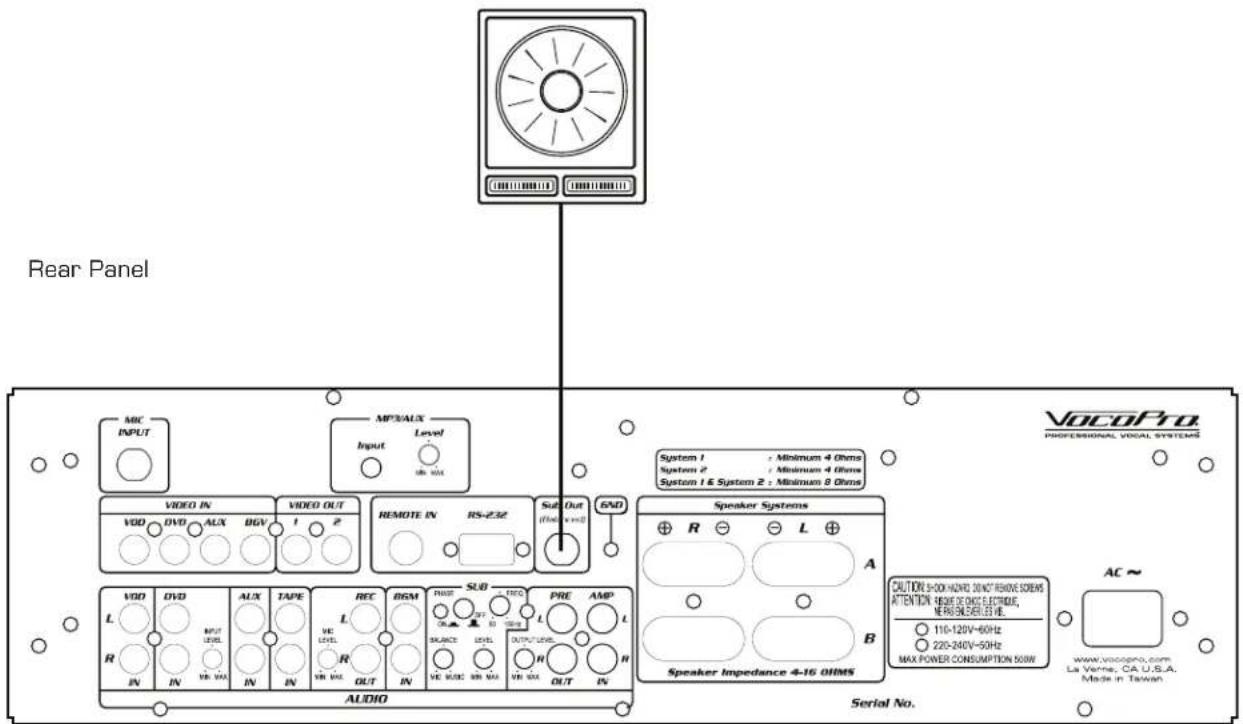
Subwoofer - A Self-powered subwoofer can be used when it is connected to the Sub Out jack. Use the controls labeled SUB on the back panel to alter the audible characteristics of the Bass:
- The crossover frequency knob will dictate how "low" the bass will sound. The closer it is to 50Hz, the bass will be "rumbly" and will be felt more than it will be heard. When set closer to 150Hz, the bass has more of a "punchy" sound to it.
- The Phase switch will correct the audio of the sub to better match the speakers. If the speakers and sub were out of Phase, the audio will sound muted compared to when the are in Phase.
-The Balance knob will change the ratio of Music of Mic signals being routed to the Sub. - The Level will determine the volume of the connected subwoofer.
text_image
Rear Panel MIC INPUT MP3/AUX Input Level VDD IN DVD AUX BGV VIDEO OUT 1 2 REMOTE IN RS-232 Sub Out (Rear vint) END System 1 : Minimum 4 Ohms System 2 : Minimum 4 Ohms System 1 & System 2 : Minimum 8 Ohms Speaker Systems R L A L A R B Speaker Impedance 4-16 OHMS CAUTION SHOCK H set. SELECT REMOVE SCREENS ATTENTION: RESET OF ONCE ELECTRIDE, ME PROJ5/50Hz I.E. 116-120V=60Hz 220-240V=50Hz MAX POWER CONSUMPTION 50W AC ~ www.vocopro.com La Verne, CA U.S.A. Made in Taiwan AUDIO Serial No.Getting Connected
CONNECTING:
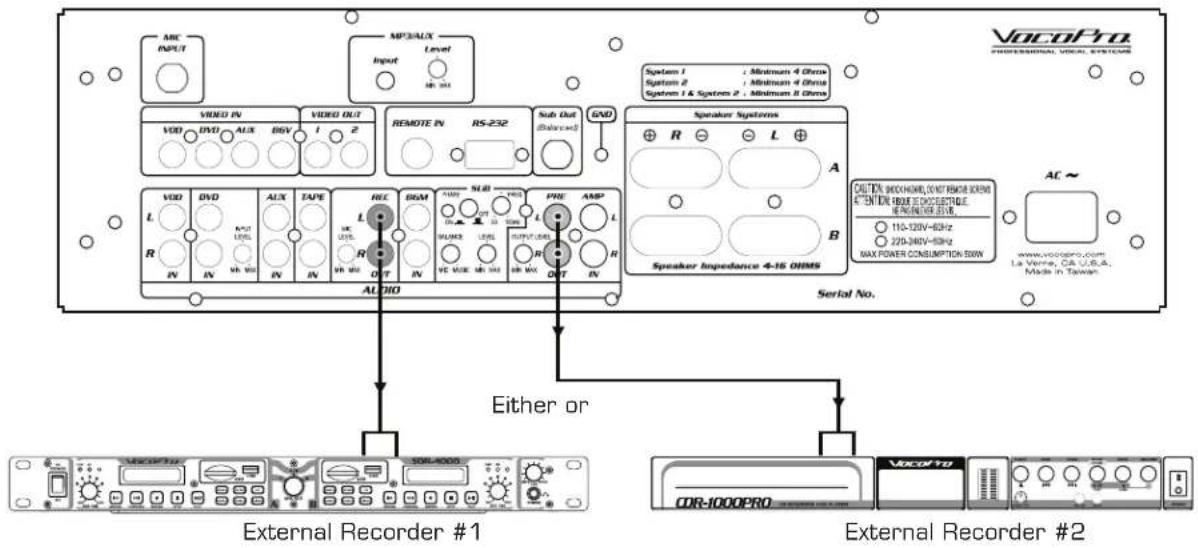
Recording Devices - Most recording devices that use RCA input jacks can be connected to either the REC Out or Pre Out.
- The REC Out has a constant music output volume; it is not affected by the Music Master Volume. The microphone audio can be selectively applied to the REC Out signal with the Mic Level located near the REC Out jacks.
- The Pre Out is directly affected by the Music Master Volume. The higher the Music Master Volume, the louder the signal from the Pre Out jacks. The Output Level control located near the Pre Out is used to adjust the output level without adjusting the Music Master Volume, especially if the main speakers need to be at full volume but the recording does not.
Rear Panel
text_image
VocoPro PROFESSIONAL VOCAL SYSTEMS VOCOFTO VOCOFTO External Recorder #1 External Recorder #2 Audio Speaker Systems System 1 : Minimum 4 GHz System 2 : Minimum 4 GHz System 1 & System 2 : Minimum 3 GHz R L A B XC OUT R OUT R OUT XC OUT R OUT XC OUT XC MAX XC MAX XC MAX XC MAX XC MAX XC MAX XC MAX XC MAX XC MAX XC MAX XC MAX XC MAX XC MAX XC MAX XC MAX XC MAX XC MAX XC MAX XC MAX XC MAX XC MAX XC MAX XC MAX XC MAX XC MAX XC MAX XC MAX XC MAX XC MAX XC MAX XC MAX XC MAX XC MAX XC MAX XC MAXNote:
- The Power Amp In setting, in the System Set Up Menu, must be set to Internal.
• External Recorders not included - Products shown as illustration only.
Getting Connected
CONNECTING AN EFFECTS PROCESSOR:
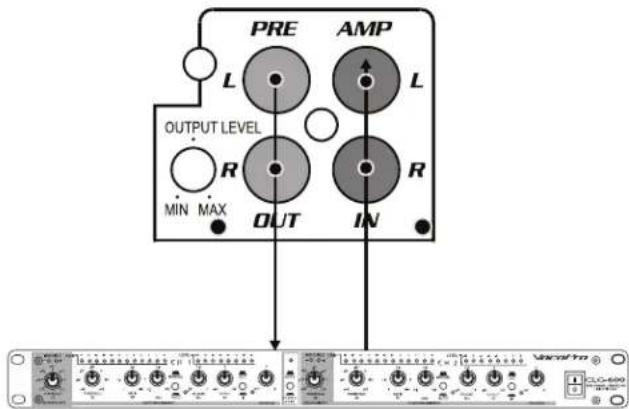
An effects processor can be used with the Pre Out and Amp In jacks.
In order to use an External Effects Processor, the Power Amp In setting in the System Set Up Menu must be set to External. Refer to System Set Up menu for details.

text_image
Rear Panel VocoPro PROFESSIONAL VOCOL SYSTEMS MAC INPUT MPS/AUX Input Level VIN/IN VIDEO IN VIDEO OUT 1 2 REMOTE IN RS-232 Sub-Dot (Dissolved) GND VDD DVD ALX BOS A SOD VDD DVD ALX TAPE REC BSM SLB PRE AMP R L Speaker Systems R L A OUT EN SWITCHER 0.4K MODE 0.0000 ATTEN ON 1682.5.2017 ELECTRICAL WELCOME 0.0000/1682.5.2017 ELECTRICAL 11A-130V-60Hz 220-240V-60Hz MAX POWER CONSUMPTION SEED AC~ www.vocopro.com. La Verne, CA, U.S.A. Made in TaiwanWhen Set
EXT:
The on-board microphone effects are disabled. Microphone audio is routed out through the Pre-Out into the external effects processor to be altered. Once altered, it is sent back into the DAX-9900RV through the Amp In jacks.
- Amp In jack will function like an Effect Loop In.
- Pre-Out jack will function like an Effect Loop Out.
- All microphone audio will be looped through an external effects processor and back in through the Amp In jacks.
text_image
PRE AMP L L OUTPUT LEVEL R R MIN MAX OUT IN Vacc# ProExternal Effects Processor (not included)
When Set
NT:
The Amp In jacks are disabled. The Pre-Out jacks send an unamplified line level signal to be used with an additional amplifier or recorder.
-
Amp In jack will be disabled.
-
Pre-Out jack will function like a standard RCA audi output jack.
- All microphone audio will be routed through the internal effects processor.

text_image
PRE AMP L L OUTPUT LEVEL R R MIN MAX OUT IN
Disabled

not included
Powered Speaker
Getting Connected
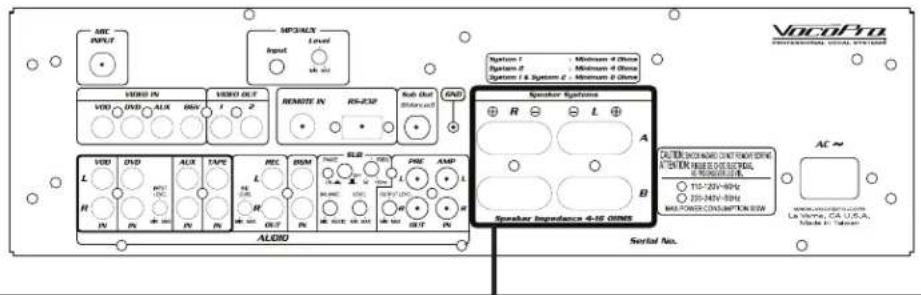
The Speaker Terminals are located on the rear panel. There are two sets of speaker outputs, A & B. If using a single speaker output, either A or B, the lowest rated speakers permitted is 4Ω. If using both speaker outputs, A and B, the lowest rated speakers permitted is 8Ω. Be sure to connect the polarities (+,-) to the appropriate terminal.
Caution
- Before connecting the speakers, make sure that the DAX-9900RV is disconnected from the power source.
- Do not let the bare speaker wires touch each other or another metal part of this unit. This could damage the DAX-9900RV and/or the speakers.
Rear Panel
text_image
VocoPro PROFESSIONAL SIGNAL SYSTEMS MIC INPUT MP30/UX Input Level Output VDD IN VDD OUT REMOTE IN RS-232 Sub-Out (Select out) GND System 1 System 2 System 1 & System 2 Minimum 4 GHz Minimum 4 GHz Minimum 2 GHz Speaker Systems R L A B Speaker Impedance 4-SE OS/MS AC~ AUDIO Serial No. La Vina, CA U.S.A. Made in Taiwan
text_image
SPEAKER 4Ω A Right SPEAKER 4Ω A Left + - + - A OR B Speaker Systeme Symbol 1 : Minimum 0 Ohms System 2 : Minimum 0 Ohms System 3 & System 4 : Minimum 0 Ohms Speaker Impedance 8-16 OHMS AMP R L A B MAX PS Serial No. SPEAKER 80 B Right SPEAKER 80 B Left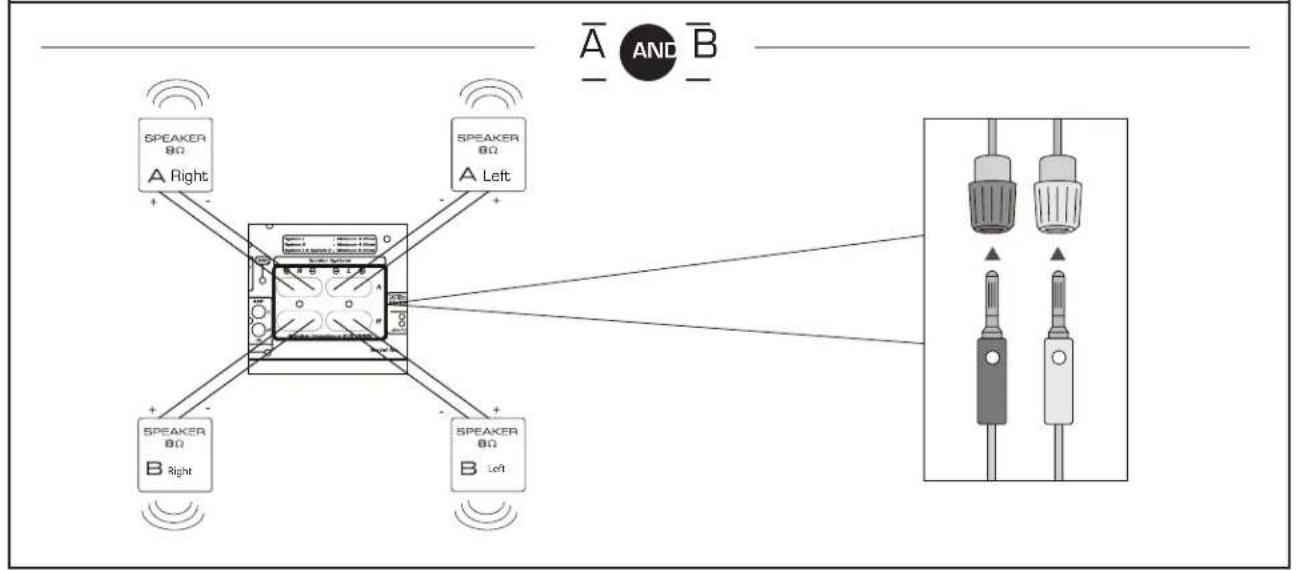
flowchart
graph TD
    A["Speaker 80"] -->|A Right| B["Central Device"]
    C["Speaker 80"] -->|A Left| B
    D["Speaker 80"] -->|B Right| B
    E["Speaker 80"] -->|B Left| B
    B --> F["Output Display"]
    style A fill:#f9f,stroke:#333
    style C fill:#f9f,stroke:#333
    style D fill:#f9f,stroke:#333
    style E fill:#f9f,stroke:#333
    style F fill:#ccf,stroke:#333
Getting Connected
PREPARING THE SPEAKER CABLE
You can either used an exposed speaker wire or Banana Plug speaker cable.
EXPOSED SPEAKER WIRE
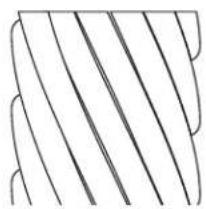
- Remove approximately 3/8" (10mm) of insulation

- Twist the exposed strands together to prevent short circuits
natural_image
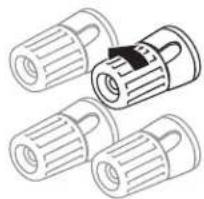
Abstract geometric pattern with diagonal lines and curved ends (no text or symbols)- Loosen the knob on the speaker terminal
natural_image
Illustration of three cylindrical mechanical components with a central knob (no text or symbols)- Insert the bare wire

natural_image
Diagram of a screwdriver inserted into a cylindrical component (no text or symbols)- Tighten the knob until the wire is secure.

natural_image
Illustration of a multi-pin electrical connector with no visible text or symbolsBANANA CONNECTOR
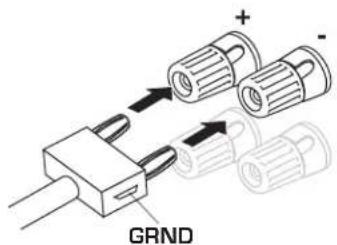
Insert banana plug into speaker terminal.
text_image
GRNDGetting Connected
POWERED SPEAKERS: A set of powered speakers can be connected to either the Pre-Out or the REC out jacks. The volume control will change depending on which output being used.
- The REC Out has a constant music output volume; it is not affected by the Music Master Volume. The microphone audio can be selectively applied to the REC Out signal with the Mic Level located near the REC Out jacks. This can be useful when using the powered speakers as music monitors or for additional speaker coverage for a large room.
- The Pre Out is directly affected by the Music Master Volume. The higher the Music Master Volume, the louder the signal from the Pre Out jacks. Use these for situations where Music Master must have absolute control over the audio playback. The Output Level control located near the Pre Out is used to adjust the output level without adjusting the Music Master Volume, especially if the main speakers need to be at full volume but powered speakers do not.

text_image
VOLUME RANS THESLE MODEL: PV-802 Stereo Powered 6" Audio Speakers PRE AMP L L OUTPUT LEVEL R R MIN MAX OUT INOperations
USING THE MICROPHONE EFFECT PRESETS:
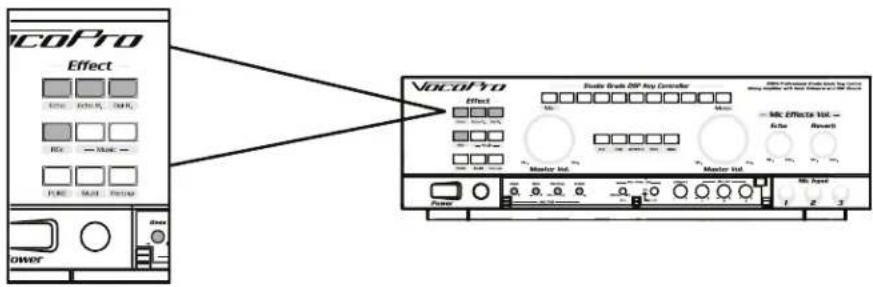
The microphone effect presets are available to add an extra layer to your performance and are accessed from the front of the DAX-9900RV. The four microphone presets levels can be adjusted in the Microphone Effect Set Up menu.
On the remote control and in the Microphone Effect Set Up menu, the four presets are numbered:
- 1 - Echo
- 2 - Reverb
• 3 - Echo + Reverb - 4 - Delay + Reverb
text_image
VocoPro Effect Elec 1000, 1000, 1000 Rsc — Music — FURE MAUR FUTUAR VocoPro Effect Double Stroke DSP key controller Master Inv Master Inv MC Effecta Vol. — Echo Research Power 1 2 3USING THE MUSIC EFFECT PRESETS:
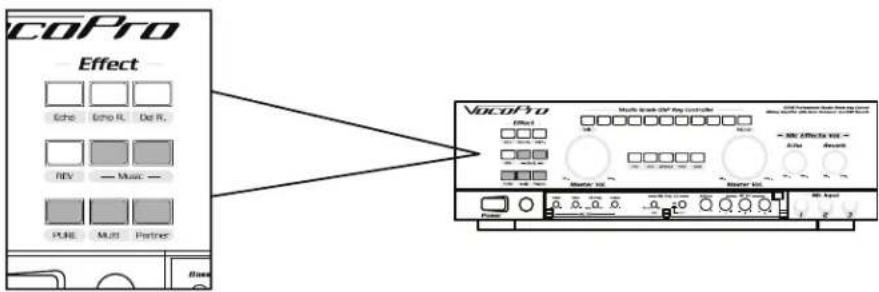
The DAX-9900RV has music effect presets to better perform the songs you choose. The Music Effect Presets can altered in the Music Set Up Menu. The presets are:
text_image
CoPro Effect Echo Echo R. Del R. RV Music - PLRE MULTI Partner VoCoPro Multi-peak HV Pro control Effect 100 200 300 400 500 600 700 800 900 1000 1100 1200 1300 1400 1500 1600 1700 1800 1900 2000 2100 2200 2300 2400 2500 2600 2700 2800 2900 3000 3100 3200 3300 3400 3500 3600 3700 3800 3900 4000 4100 4200 4300 4400 4500 4600 4700 4800 4900 5000 5100 5200 5300 5400 5500 5600 5700 5800 5900 6000 6100 6200 6300 6400 6500 6600 6700 6800 6900 7000 7100 7200 7300 7400 7500 7600 7700 7800 7900 8000 8100 8200 8300 8400 8500 8600 8700 8800 8900 9000 9100 9200 9300 9400 9500 9600 9700 9800 9900 1 2 3- Pure Direct – This mode is for high fidelity music audio with no sound enhancements. When selected, the music audio will bypass any settings that may be on. Access to the Set Up Menu will be disabled as well. Use this mode for listening to music or to perform a track as it was originally released.
- Multi – The main vocal track will be removed. This mode will only work on Multiplex (MPX) format karaoke discs.
- Partner - This mode will dip the volume of the main vocal track when the mic is in use. The main vocal track will automatically rise back to audible levels once the mic is no longer being used.
- Sonic Enhancer – This mode applies a music EQ designed to produce clear highs and tight, punchy lows. Simulates a live music sensation.
- Surround 3D 1, Surround 3D 2, Surround Sim – These modes simulate surround sound using stereo speakers. Each mode is using a different method to approximate surround sound using only 2 speakers, which may work better for some room configurations.
Operations
text_image
Studio Grade DSP Key Controller Mnbi VOCOPDThe key control will help adjust the music to better match the current singers' vocal range. If a song is too low or too high, use the key control buttons on the face of the DAX-9900RV, or the buttons on the remote control, to alter the key to better match the singer.
The key control can key the music audio down 5 half steps or up 5 half steps. The current key level will be displayed on the front of the DAX-9900RV and on the On Screen.
USING THE INPUT SELECTOR:
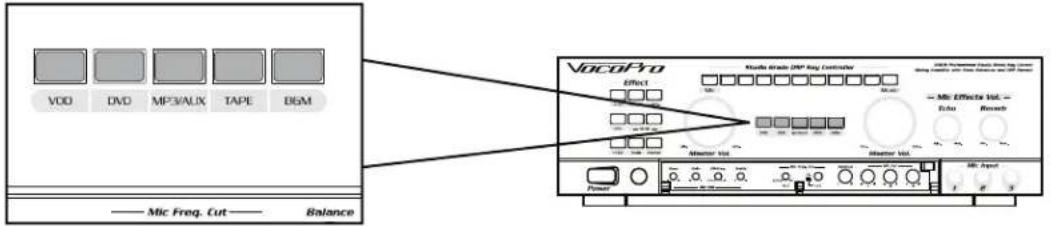
The DAX-9900RV can support up to 5 separate audio source inputs. The input selector will dictate which audio source is heard at a time.
text_image
VDD DVD MP3/AUX TAPE D&M —— Mic Freq. Cut —— Balance VocoPro Effect Studio Grade DNP Key Controller Micro Effect Vol. — Data Record Master Vol. Master Vol. Power 1 2 3 4 5 6 7 8 9 10 11 12 13 14 15 16 17 18 19 20 21 22 23 24 25 26 27 28 29 30 31 32 33 34 35 36 37 38 39 40 41 42 43 44 45 46 47 48 49 50 51 52 53 54 55 56 57 58 59 60 61 62 63 64 65 66 67 68 69 70 AudioUse the Input Select buttons located on the front of the unit or on the remote control to shift the selected Input.
If the Auto Input Select is activated in the System Set Up menu, the DAX-9900RV will automatically select the input it detects a signal. If no input signal is detected, it will revert to BGM (Background Music) by default.
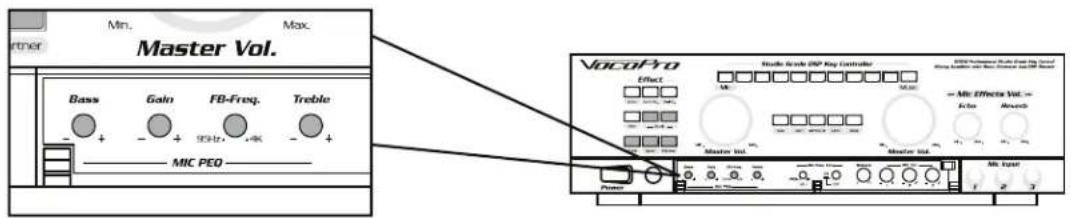
USING THE MICROPHONE PARAMETRIC E.Q. (P.E.Q):
text_image
Min. Max. Master Vol. Bass Gain FB-Freq. Treble - + - + 93Hz +K - + MIC PEO VocoPro Radio Scale DSP Key Controller Effect M M - Mic Effecta Vol.~ Echo Ampo Master Int. Master Int. 1 2 3 PowerThe P.E.Q. adjusts the tone of the microphone audio. Each of the options can be only be altered from the front of the machine.
- Bass – This alters the low-end frequency response of the microphone audio.
- Gain – This alters the level of the microphone input level. Increasing too far to the right may cause distorted audio.
- Feedback (FB) Freq – This changes the frequency at which feedback occurs.
- Treble – This alters the high-end frequency response of the microphone audio.
Operations
USING THE MIC FREQUENCY CUT:

text_image
Mic Freq. Cut 20Hz 1K ADJ ON CUT VocoPro Studio Grade DSP Key Controller Effect Micro Micro Micro Micro Effectors Vol. Echo Reverb Master Vol. Master Vol. Power 1 e 3 2000 Professional Static Key Control Ming Supplied with 5000 MHz and 450 MHzThe Mic frequency cut is intended to change the Bass cutoff frequency for the microphone audio. Any audio below the set frequency value will not be heard. This feature is useful for microphones with poor Bass response.
Description
FRONT PANEL

text_image
①②③④⑤ VocoPro Effect Studio Grade DSP Key Controller 800k Professional Studio Grade Key Control Mixing Amplifier with Sock Enhancer and DSP Reverb — Mic Effects Vol. — Echo Reverb Master Vol. Master Vol. Power Base Roll MF-Prog. Stable MK Freq. Ctrl — Balance — MK Vol. C250 10 AU L R 1 2 3 1 2 3 Mic Input 1 2 3- Pure Direct – This mode is for high fidelity music audio, with no sound enhancements. When selected, the music audio will bypass any settings that may be on. Access to the Set Up Meny will be disabled as well. Use this mode for listening to music or to perform a track as it was originally released.
- Multi [Multiplex] – When this mode is activated, the main vocal track will be removed. This mode will only work on Multiplex (MPX) format karaoke discs. Press the Multi button to toggle this mode off/on.
- Music Effect - There are four types of mic effects available. The intensity of the effects can be altered in the Microphone Effect Setup.
a. Sonic Enhancer
b. Surround 3D1
c. Surround 3D2
d. Surround Sim
- Vocal Partner - This mode will dip the volume of the main vocal track when the mic is in use. The main vocal track will automatically rise back to audible levels once the mic is no longer being used. This mode will only work on Multiplex (MPX) format karaoke discs. Press the Vocal Partner button to toggle this mode off/on.
- Master Microphone Control – This controls the overall Microphone volume. When altered, all microphoneaudio will be altered simultaneously. The upper and initial volume limits can be set in the System Set Up menu.
- Key Control Selector - These buttons will transpose the Music audio by a 12 step per level. Use to match the key of the music to the vocal range of the singer.
- Input Selector – These allow the DA-9900RV to change audio/video input. The input selections correspond to the input jacks available on the back of the system.
a. VOD
b. DVD
c. MP3/AUX
d. TAPE
e. BGM
- Master Music Control – This controls the overall Music volume. The upper and initial volume limits can be set in the System Setup menu.
- Echo - This knob adjusts the amount of Echo Effect that is applied to the microphone channels. The maximum Echo level can be adjusted in the Microphone Effect Setup.
- Reverb - This adjusts the amount of Reverb Effect that is applied to the microphone channels. The maximum Reverb level can be adjusted in the Microphone Effect Setup.
Descriptions
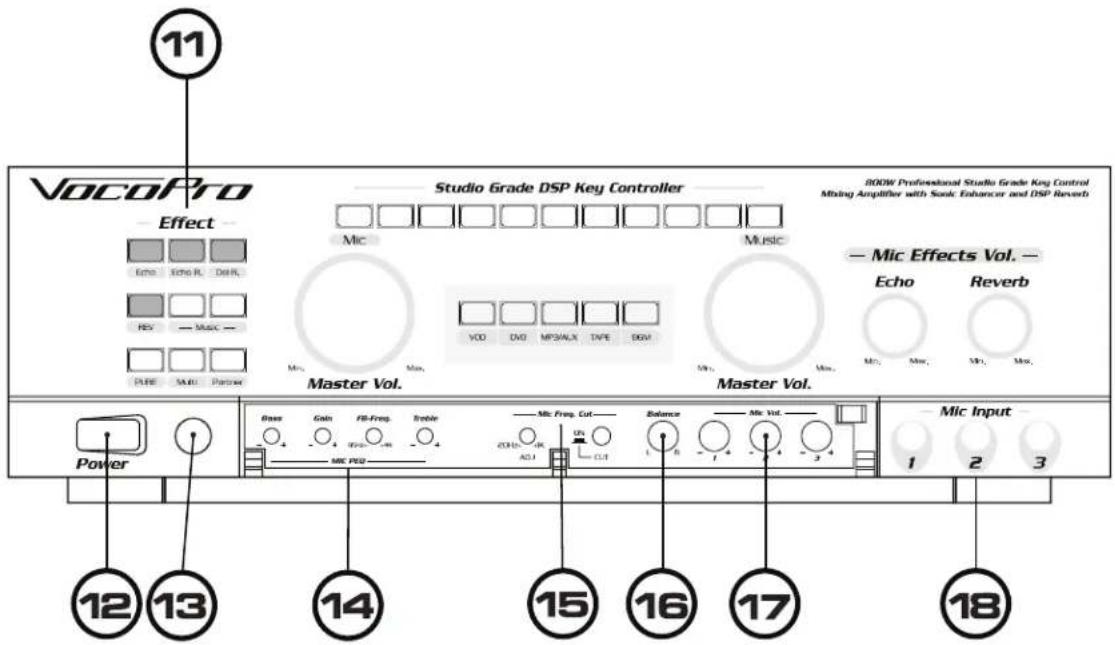
FRONT PANEL
text_image
VocoPro Effect Studio Grade DSP Key Controller 800W Professional Studio Grade Key Control Mixing Amplifier with Sonic Enhancer and DSP Reverb — Mic Effects Vol. — Echo Reverb Master Vol. Master Vol. Power Base Gain FB-Freq Treble Mic Freq Cut Balance Mic Vol. 12 13 14 15 16 17 18 MIC PQQ ACI CUT 1 2 3- Microphone Effects - There are four types of mic effects available. The intensity of the effects can be altered in the Microphone Effect Setup.
a. Echo
b. Echo + Reverb
c. Delay + Reverb
d. Reverb
- Power - This controls power to the DA-9900RV.
- IR Sensor - This sensor detects commands from the remote control. Do not block.
- MIC Parametric EQ – These adjustments control the Microphone audio. Use them to achieve the desired microphone sound.
a. Bass - This alters the low-end frequency response of the microphones. Increase to get a booming-like sound, decrease to a tiny-like sound. Preset value is the center position.
b. Gain - This raises or lowers the strength of the music signal. Use to correct quiet-sounding mics. Beware: increasing the gain also increases the potential for distortion. Preset value is the center position.
c. Feedback Freq (F.B. Freq) – Use this adjustment to alter the frequency at which feedback will occur. Preset value is 1 KHz.
d. Treble - This alters the mid-level frequency response of the microphones. Increase to get a "bright" sound, decrease to get a "hollow" sound. Preset value is the center position.
- MIC Frequency Cut - This alters the Bass cutoff frequency for the microphones. Audio lower than the set frequency will not be heard which is useful for microphones with poor bass response.
a. On/Off - This toggles the MIC Frequency Cut feature.
- Balance Control - Use this to set the audio proportions between the Left and Right channel. Preset value is the center position.
- Microphone Volume Control – These knobs adjust the volume for their respective microphone channel.
- Microphone Input Jacks - Connect a microphone here.
Descriptions
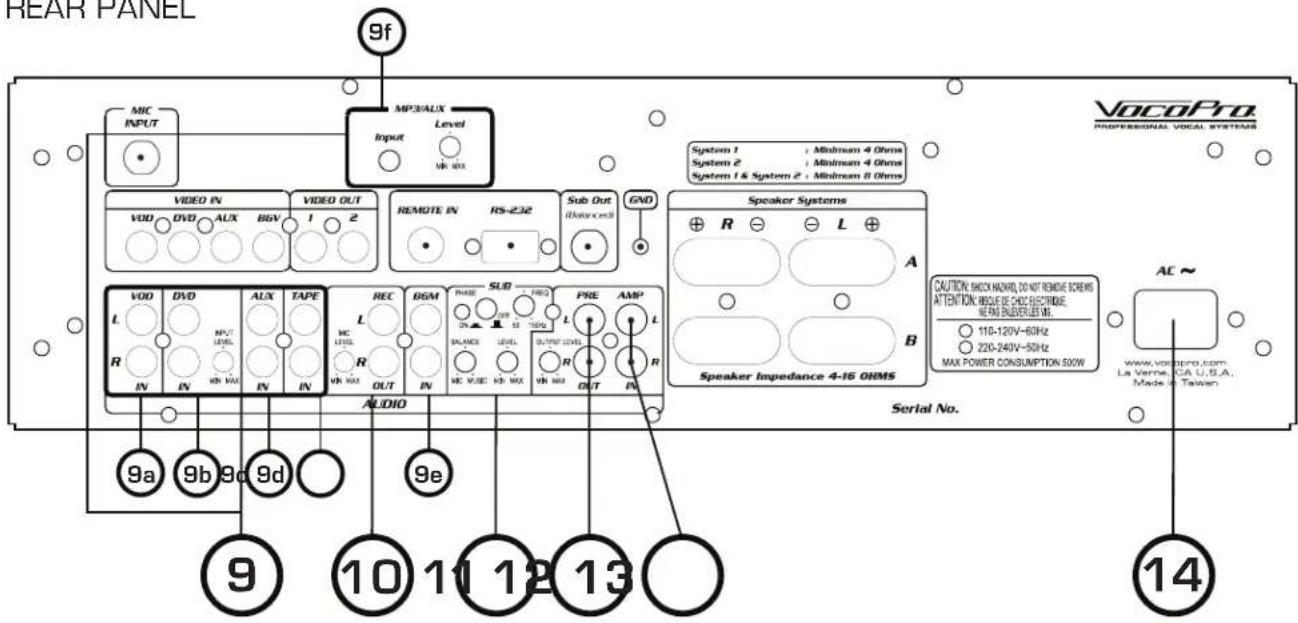
REAR PANEL

text_image
①②③④⑤⑥⑦⑧ VocoPro PROFESSIONAL VOCAL SYSTEMS MIC INPUT MP30UX Input Level UH MAX VIDEO IN VIDEO OUT REMOTE IN HV/SP Sub-Out (AUD) IMinimum 4.0Hz
System 2 System 2 & Systems P - Minimum 4.0Hz Speaker Systems R L A A B CUTURE CHECKING JOINT REMESSION ATTENTION WORKS EFFECTIVE, REMARKET LEVEL 115-120V-40Hz 228-240V-50Hz MAX POWER CONSUMPTION 950V Speaker Impedance B-IS OHMS AC ~ www.vocopro.com Le Verne, CA U/B/A, Made in Taiwan AUDIO Serial No.- Microphone Input - This jack accepts microphone audio via 14 " mono cable.
-
Video Inputs:
-
VOD – This jack accepts video signal from a source such a DVD or CD+G player.
- DVD – This jack accepts video signal from a source such as a DVD or CD+G player.
- AUX – This jack accepts video signal from a source such as a DVD or CD+G player.
-
BGV – This jacks accept video from a source that supplies Back Ground Video.
-
Video Outputs – These jacks send the video signal out to a TV/Display.
- Remote In - This jack is used for KTV control schemes. When used with an appropriate controller, the systems features and functions can be accessed remotely.
- RS-232 Jack - This jack is intended for service & repair.
- Sub Out - This jack outputs the Subwoofer signal via a balanced 14 cable. The output from this jack is unamplified.
- Ground - This is where the grounding wire is attached to prevent damage to the unit due to static or electric shock.
- Speaker Jack Connectors – These jacks can support up to 4 speakers. Please be sure to use speakers rated from 4-16 Ohms. (Please reference pg 11 for connection diagram and impedance specifications)
Descriptions
REAR PANEL
text_image
REAR PANEL 9f MIC INPUT MPC/ALX Input Level Input MV MAX VIDEO IN VIDEO OUT REMOTE IN RS-232 Sub Out iWave cell GND System 1 / Minimum 4 Ohms System 2 / Minimum 4 Ohms System 1 & System 2 / Minimum 8 Ohms VOCOPRO PROFESSIONAL VOCAL SYSTEMS Speaker Systems R L A L IN IN IN IN IN IN IN IN IN IN IN IN IN IN IN IN IN IN IN IN IN IN IN IN IN IN IN IN IN IN IN IN IN IN IN IN IN IN IN IN IN IN IN IN IN IN IN IN IN IN IN IN IN IN IN IN IN IN In In In In In In In In In In In In In In In In In In In In In In In In In In In In In In In In In In In In In In In In In In In In In In In In In In In In In In In In In In In In In In In In In In In In In In In In In In In In In In In In In In In In In In In In In In In In In In In In In In In In I VOD DVD AUX BGV 1 2 VOD DVD AUX TAPE REC BGM PHASE SUD FREQ PRE AMP L MC USS R DANCE LEVEL OUT PHEE AMP R OUT N C VISC IR MAX DVPRE OUT R OUT R AUDIO Serial No. 9a 9b 9c 9d 9e ⑨ ⑩ ⑪ ⑫ ⑬ ⑭ ⑮ CAUTION: SHOCK HAIRD, DO NOT REMOVE SCREENS ATTENTION: MASCUE DE CHAS ELECTRIDE. REPA UNLESSIBLE W. 110-120V-60Hz 220-240V-50Hz MAX POWER CONSUMPTION 500W www.vocopro.com La Verne, CA U.S.A., Mode X Taiwan AC~ 14- Audio Inputs:
9a. VOD - These jacks accept the audio signal from a source such a DVD or CD+G player.
9b. DVD - These jacks accept the audio signal from a source such a DVD or CD+G player.
- DVD Input Level – This knob adjusts the DVD input volume.
9c. AUX - These jacks accept the audio signal from a source such a DVD or CD+G player.
9d. TAPE – These jacks accept the audio signal from a source such a Tape or Record player.
9e. BGM – These jacks accept audio from a source that supplies Back Ground Music.
9f. MP3/AUX - This jack accepts audio from a source with a 1/8th inch stereo output.
- MP3/AUX Level – This adjust the input volume of the MP3/AUX jack.
- REC Out – These jacks send the microphone and music audio signal out to an external recording device.
- Mic Level – This knob adjusts the microphone volume level present in the REC Out signal.
-
Sub Control - These dictate the audio balance and overall sound of the Sub Out jack.
-
Phase – This changes the Phase of the audio supplied to the subwoofer by 180 degrees. The Subwoofer and Speakers must be in the correct Phase for the best audio quality.
- Crossover Freq – This changes the frequency at which the subwoofer activates. Audio under this frequency gets routed to the Subwoofer, audio over this frequency gets routed through the stereo speakers.
• Balance – This changes the balance of Mic and Music audio being supplied to the Subwoofer. -
Level – This changes the overall output volume from the Subwoofer.
-
Pre-Out – These jacks output the microphone and music audio to be used with an external amplifier or powered speakers. These jacks also act as Effect Loop Out jacks, refer to the System Set Up Menu for details.
- Output Level – This adjust the output volume to the external amplifier/device.
- Amp In - These jacks function as Effect Loops In jacks, refer to the System Set Up Menu for details.
- Power Connector - This is where the power cable is connected.
Descriptions
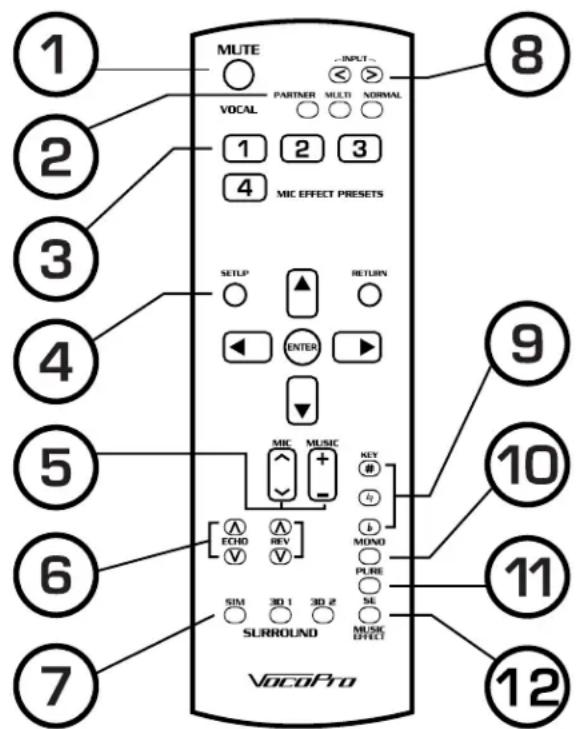
REMOTE CONTROL
text_image
① ② ③ ④ ⑤ ⑥ ⑦ ⑧ ⑨ ⑩ ⑪ ⑫ ⑬ ⑭ ⑮ ⑯ VocoPro MUTE PARTNER MULTI NORMAL VOCAL 1 2 3 4 MIC EFFECT PRESETS SETLP RETURN ENTER MIC MUSIC + - ECHO REV V SIN 30 1 30 2 SURROUND MUSIC EFFECT #Y #Z MOMO PLRE SE- Mute - This button silences all audio output from the DAX-9900RV
- Vocal Effects
a. Partner - This mode will lower the volume of the main vocal track when the mic is in use. The main vocal track will automatically rise back to audible levels once the mic is no longer being used.
b. Multi - When this mode is activated, the main vocal track will be removed. This mode will only work on Multiplex (MPX) format karaoke discs. Press the Vocal Partner button to toggle this mode on/off.
c. Normal – This exits any Vocal Cancel/Partner modes.
- Mic Effect Presets – These are preset effect and effect levels that can be customized in the Set Up Menu. Refer to the Set Up Menu for details.
a. 1 - Echo
b. 2 - Reverb
c. 3 - Echo + Reverb
d. 4 - Delay + Reverb
-
Set Up – This accesses the Set Up Menu for System, Music, and Effects Setup. See the Set Up Menu page for more details.
-
Mic Vol Control - Adjusts microphone master volume.
Music Vol Control - Adjusts music master volume.
- Echo and Reverb - Adjusts the overall echo and reverb level applied to all mic channels.
- Music Effect - These alter the music audio to emulate surround sound.
- Input Selector - These cycle through the available inputs.
- Key Control - Use to adjust key of music up or down in half step increments.
- Mono - This turns the signal to the Subwoofer on/off.
- Pure - This mode is for high fidelity music audio with no sound adjustments. When selected, any audio settings currently set will be disabled, as will access to the Setup Menu.
- Sonic Enhancer - This mode applies a music EQ designed to produce clear highs and rich lows.
Setup Menu
The Set Up Menu has options to alter the operation of the unit such as the System, Music, and Effect settings. The function settings being edited are rendered inoperable while the Set Up Menu is open.

flowchart
graph LR
    A["Use buttons to select an item, press button to enter a selection, and press RETURN button to exit."] --> B["DEMO"]
    B --> C["Input Level adj. AGC level : 600mV Bass Treble"]
    C --> D["SET SET 0 ±1"]
    D --> E["Operate with button when this sign shows up."]
    D --> F["Operate with and buttons when this sign shows up."]

flowchart
graph TD
    A["SETUP"] --> B["ENTER"]
    B --> C["RETURN"]
    C --> D["DECREASE"]
    B --> E["UP"]
    B --> F["ENTER"]
    C --> G["BACK TO PREVIOUS PAGE"]
    C --> H["DOWN"]
    C --> I["ENTER SETUP FUNCTION"]
- System Setup – These options change the way the DAX-9900RV looks and operates.
a. Auto Input Select – This option dictates which input will be automatically selected when signal is detected. If a constant stream of music is desired, turn this feature on.
i. OFF – Disables the automatic detection of audio signals present in the inputs. Input Selection is entirely user controlled.
ii. ON - Detects which input has an audio signal present and automatically selects that input. If no audio signal is detected on any input, BGM is selected by default.
b. IR Key Control – This enables or disables the key control buttons on the DAX-9900RV remote control. This is used to keep the key from being changed on accident.
i. OFF – Disables the key control buttons on remote.
ii. ON – Enables key control buttons on remote.
c. Background color – This selects the background color of the menus and the default video color when there is no video connection made.
i. Blue v. Red
ii. Skyblue vi. Olive
iii. Green vii. Teal
iv. Brown viii. Purple
d. Power Amp In - This selects the function of the Amp In and Pre-Out jacks located on the back panel
i. When set to EXT:
- Amp In jack will function like an Effect Loop In
- Pre-Out jack will function like an Effect Loop Out
- All microphone audio will be routed out through the Pre-Out jack and would need to be looped through an external effects processor and back in through the Amp In jacks.
ii. When set to INT:
- Amp In jack will be disabled.
- Pre-Out jack will function like a standard RCA audio output jack
- All microphone audio will be routed through the internal effects processor.
e. Volume Limit Set – This sets the volume the DAX-9900RV will be set to when the machine is powered on and the maximum volume limit for both Microphone and Music.
i. Of f/On
- When set to Off, the music and mic volumes would be user set every time the machine is powered on.
- When set to On, the settings for the initial and maximum volume can be set.
a. Music:
i. Initial – This sets the music volume level when the machine is powered on.
1. Default setting is 0/60
ii. Max - This sets the highest level the music volume can be set to.
1. Default setting is 60/60
b. Mic:
i. Initial - This sets the mic volume level when the machine is powered on.
Setup Menu
- Default setting is 0/60
ii. Max - This sets the highest level the mic volume can be set to.
-
Default setting is 60/60
-
Music Setup – These options change the way the DAX-9900RV handles audio signals.
a. Input Level Adj - This alters the volume of the inputs respectively. Each input can have an adjustment of -6 to +6 dB independently. Preset value is 0 dB
i. VOD
ii. DVD
iii. AUX
iv. TAPE
v. BGM
b. AGC Level (mVrms) – These options alter the gain of the input signals connected to each input respectively. Each input channel can have a custom value of: 150, 300, 400, 540 mV. Preset value is 0mV.
i. VOD
ii. DVD
iii. AUX
iv. TAPE
v. BGM
c. Mic Effect Memory – This designates the default Microphone Effect when the unit is powered on. See
i. Last
ii. Effect 1
iii. Effect 2
iv. Effect 3
v. Effect 4
d. Bass - This adjusts the Bass response of the music audio. The Bass can be altered from -12dB to +12dB. The preset value is OdB.
e. Treble - This adjusts the Treble response of the music audio. The Treble can be altered from -12dB to +12dB. The preset value is 0dB.
f. Balance L/R - This adjusts the proportion of music between the Left and Right audio channels. Left and Right audio Channels. Left and Right channel can have their audio altered from -30 to OdB. Stereo will is OdB/OdB.
g. Sonic Enhancer - This dictates if the S.E is on/off and if on. If on, adjustments to the high and low frequency bands can be made.
i. High-Freq: 0 - 12dB
ii. Low-Freq: 0 - 12db
- Microphone Effect Setup – These options alter the way the Microphone effects sound and operate.
a. Echo
i. Delay Time - This alters the length of time between Echo repeats.
- 1.0 - 30ms
ii. Repeat - This alters the number of time the Echo is heard.
- 1.0 - 70
iii. Depth - This alters the initial strength of the Echo effect.
- -50% - +50%
b. Reverb
i. Time - This alters the duration of the Reverb effect.
- 0.3 - 10 sec.
ii. Pre-Delay - This alters the delay length before the Reverb effect is heard.
- 1.0 - 250ms
iii. Low Pass Filter (L.P.F) – This alters the tone of the Reverb effect.
- 1.4Hz - 13KHz
iv. Type - This changes the which Reverb is used.
- Stage, Plate, Hall, Room
c. Initial Data – This reverts all of the options back to factory settings.
Specifications
AMPLIFIER
• Audio Output Power: 150W+150W(8Ω)
• Total Harmonic Distortion: (1KHz, -3dB, 8Ω) 0.05%
• Audio Input (Sensitivity / Impedance):
MIC 3.5 mV/3.3KΩ
MUSIC 350 mV/33KΩ
- Audio Output (Level / Impedance): PRE - OUT: 2.8V/1KΩ Overload Output Voltage: 9.6/1KΩ SUB OUT (Balance): 5.2V/1KΩ Recording Output: 340 mV/1KΩ
PRE OUT L/R: 2.8V / 1KΩ
- Frequency response MIC: 20Hz\~15KHz, -0.2 \~ -1dB MIC LOW CUT: 20Hz \~ 1KHz MUSIC: 20Hz \~ 20KHz, -1 \~ -0.5dB SUB: 20Hz \~ 200 Hz
- Tone control response MIC BASS: +9 \~ -11dB(100Hz) GAIN: +11.5 \~ -13.5dB(1KHz) FREQ: 95 \~ 4KHz TREBLE: +6.5 \~ -8.5dB(10KHz) LOW CUT: 20\~1KHz(-18dB) MUSIC BASS: ±8.5dB(100Hz) TREBLE: ±9.5dB(10KHz) SE: - LOW +8(100Hz) SE: - HIGH +9(10KHz)
POWER SUPPLY
• Power supply: 110/120 VAC 50\~60Hz
• Power Consumption: 500W
OTHER
- Dimensions (W x H x D): 16.9 x 5.35 x 16.3 in.
- Weight: 13Kg
- Speaker Impedance (A/B): 8Ω \~16Ω
• Music Key Control Range: 14Step ±7 Pitch
• Video Input (Sensitivity / Input Impedance): 1Vp-p/75Ω
• Video Output (Output Level / Output Impedance) 1Vpp/75Ω - Echo Delay Time (MAX): 300ms
- Echo Repeat time (MAX): 5Sec
- Reverb delay time (MAX): 10Sec
Commonly Asked Questions
Q: Why is there no music audio?
A: Check that the:
- Cables from the music source and the DAX-9900RV are properly secured.
- Cables from the speaker terminals and speakers are properly connected.
- Input select is set to an input with audio playback.
- Master music volume is turned up.
- Mute function is not activated.
• Power Amp In setting is set to INT.
Q: Why are the Key Control buttons on the remote control not working?
A: In the Set Up menu, the IR Key Control setting must be turned ON in order for the remote Key control buttons to work.
Q: Are banana jacks required in order to connect the speakers?
A: No, you are able to use bare speaker wire with the speaker terminals. Refer to Getting Connected: Preparing the Speaker Cable.
A: Be sure to match polarities from the speaker terminals to the speaker
Q: Do the banana jacks snap into place?
A: No, the banana jacks will simply slide into place and are held in place by the tension of contact between the metal terminals.
Q: I'm sending the microphone audio to an external effects processor, why do I have no audio?
A: The audio has to be looped back in from the output of the external effects processor through the Amp In jacks on the back of the DAX-9900RV.
A: The Power Amp In option in the Set Up menu must be set to EXT in order for the Pre-Out and Amp In jacks to function as an Effects Loops.
Q: What cables do I need to use an external effects processor?
A: It would depend on the processor being used; it would likely require an RCA to 14 cables. Whether it is a TS (tip-sleeve) or TRS (tip-ring-sleeve) 14 cable would be dictated by the available inputs located on the effects processor.
Q: Why can't I change the Parametric E.Q settings on the front of the system?
A: It would require a small flathead screwdriver to adjust the knobs. There is a small horizontal indent on each knob.
Q: Why can't I read the set up menu on the display?
A: The Set Up Menu options are overlaid the video from whichever input source being used at the time. Either stop playback on the video source or switch the input selector to an input that does not have a video signal.
Q: Why are none of the effects working?
A: The Pure function is turned on. When activated, all mic effects and set up menus are disabled.